{"cells":[{"metadata":{"_cell_guid":"b1076dfc-b9ad-4769-8c92-a6c4dae69d19","_uuid":"8f2839f25d086af736a60e9eeb907d3b93b6e0e5"},"cell_type":"markdown","source":""},{"metadata":{},"cell_type":"markdown","source":"# ** 3. An Image Classification Application with CNN** \n[Return Contents](#0)\n
"},{"metadata":{},"cell_type":"markdown","source":"## **Import Modules** "},{"metadata":{"trusted":true},"cell_type":"code","source":"import numpy as np # linear algebra\nimport pandas as pd # data processing, CSV file I/O (e.g. pd.read_csv)\nimport matplotlib.pyplot as plt # data visualization\nimport seaborn as sns # data visualization\n\nfrom sklearn.model_selection import train_test_split\nfrom keras.utils.np_utils import to_categorical\n\nimport tensorflow as tf\nfrom tensorflow.keras import Sequential\nfrom tensorflow.keras.layers import Conv2D, Dropout, Dense, Flatten, BatchNormalization, MaxPooling2D,LeakyReLU\nfrom tensorflow.keras.optimizers import RMSprop,Nadam,Adadelta\nfrom tensorflow.keras.preprocessing.image import ImageDataGenerator\nfrom tensorflow.keras.callbacks import ReduceLROnPlateau, EarlyStopping\nfrom tensorflow.keras.utils import to_categorical\nfrom tensorflow.keras.regularizers import l2\n\nimport warnings\nwarnings.filterwarnings('ignore')\n\nimport os\nfor dirname, _, filenames in os.walk('/kaggle/input'):\n for filename in filenames:\n print(os.path.join(dirname, filename))","execution_count":null,"outputs":[]},{"metadata":{},"cell_type":"markdown","source":"* With this code below you can check if the kernel use GPU or not."},{"metadata":{"trusted":true},"cell_type":"code","source":"tf.test.gpu_device_name()","execution_count":null,"outputs":[]},{"metadata":{},"cell_type":"markdown","source":"## **Understanding the Data** \n[Return Contents](#0)"},{"metadata":{},"cell_type":"markdown","source":"* We have training and test set CSV files,\n* In order to evaluate the generalization skill of the model we will split our training set into training and validation sets.\n* After training the data, Kaggle will evaluate the final performance of our data with test set predictions."},{"metadata":{},"cell_type":"markdown","source":"* Let's read csv files"},{"metadata":{"_cell_guid":"79c7e3d0-c299-4dcb-8224-4455121ee9b0","_uuid":"d629ff2d2480ee46fbb7e2d37f6b5fab8052498a","trusted":true},"cell_type":"code","source":"raw_train = pd.read_csv('../input/Kannada-MNIST/train.csv')\nraw_test = pd.read_csv('../input/Kannada-MNIST/test.csv')","execution_count":null,"outputs":[]},{"metadata":{},"cell_type":"markdown","source":"* We have $28$x$28$ dimension handwritten pics.\n* Dataset has been already flattened and has 784-pixel values for each pic.\n* Totaly we have $60000$ pics in training set."},{"metadata":{"scrolled":true,"trusted":true},"cell_type":"code","source":"raw_train.iloc[[0,-1],[1,-1]] # First and last values of dataset","execution_count":null,"outputs":[]},{"metadata":{},"cell_type":"markdown","source":"* It is important to know the distribution of data according to the labels they have.\n* This data set is __homogeneously__ distributed as you see below."},{"metadata":{"trusted":true},"cell_type":"code","source":"num = raw_train.label.value_counts()\nsns.barplot(num.index,num)\nnumbers = num.index.values","execution_count":null,"outputs":[]},{"metadata":{},"cell_type":"markdown","source":"* __If the data wasn't homogeneously__ distributed what would we do?\n 1. Then we could use data augmentation techniques to generate new data for low quantity labels,\n 2. Or if we have enough data we can discard some high quantity labels"},{"metadata":{},"cell_type":"markdown","source":"#### **Image of Handwritten Character** \n[Return Contents](#0)\n
\n \n * An overview of a picture\n * You can change the $num$ variable to see other numbers."},{"metadata":{"trusted":true},"cell_type":"code","source":"num=6\nnumber = raw_train.iloc[num,1:].values.reshape(28,28)\nprint(\"Picture of \"+ str(num) + \"in Kannada style\")\nplt.imshow(number, cmap=plt.get_cmap('gray'))\nplt.show()\n","execution_count":null,"outputs":[]},{"metadata":{},"cell_type":"markdown","source":"## **Data Preprocessing** \n### **Normalizing Data** \n[Return Contents](#0)\n
\n* What is normalizing? Normalization means that adjusting values measured on different scales to a notionally common scale.\n* Why should you normalize the data? With a normalized data weight values reach optimum value faster.\n* On image processing applications generally we normalize data to 0-1 scale with dividing data to 255.\n* Because each pixel in every sample of training set has integer values from 0 to 255.\n* In order to normalize training set data, we need to convert x to float type."},{"metadata":{"trusted":true},"cell_type":"code","source":"x = raw_train.iloc[:, 1:].values.astype('float32') / 255\ny = raw_train.iloc[:, 0] # labels","execution_count":null,"outputs":[]},{"metadata":{},"cell_type":"markdown","source":"### **Cross Validation - Training- Validation Set Split** \n[Return Contents](#0)\n \n* In order to measure the generalization ability of the model, we train the data with the training set and make the model arrangement according to the error value in the validation set. In addition, we determine the final performance of the model with the test set. \n* The reason for using the test set on the final evaluation is the model would have a bias on the validation set because we developed the model according to the validation set performance. So a kind of overfitting on the validation set is formed.\n* This Kernel is prepared on a Kaggle competition dataset. They give us a training set for training the model and a test set without labels for prediction. As we don't have the labels we don't know the final performance of the test set until we submit our predictions.\n* To evaluate the model we need to split our training set into training and validation set.\n \n* For I prefer to split\n * Training set - $\\%80$\n * Validation set - $\\%20$\n"},{"metadata":{"trusted":true},"cell_type":"code","source":"x_train, x_val, y_train, y_val = train_test_split(x, y, test_size = 0.2, random_state=42) ","execution_count":null,"outputs":[]},{"metadata":{},"cell_type":"markdown","source":"### **Reshape Data to Fit Model** \n[Return Contents](#0)"},{"metadata":{},"cell_type":"markdown","source":"> * In order to feed the CNN model we need to reshape our $54000$x$784$ flatten image data to $54000$x$28$x$28$x$1$ dimensions.;"},{"metadata":{"trusted":true},"cell_type":"code","source":"x_train.shape","execution_count":null,"outputs":[]},{"metadata":{"trusted":true},"cell_type":"code","source":"x_train = x_train.reshape(-1, 28, 28,1)\nx_val = x_val.reshape(-1, 28, 28,1)\ny_train = to_categorical(y_train)\ny_val = to_categorical(y_val)","execution_count":null,"outputs":[]},{"metadata":{},"cell_type":"markdown","source":"* You can leave one unknown dimension as -1.\n* Whenever numpy has -1 value on reshape method it will calculate the dimension which denoted with -1 automatically."},{"metadata":{},"cell_type":"markdown","source":"## **Building and Training a CNN Model** \n[Return Contents](#0)\n
\n* On Keras Sequential Networks there is three-stage for training building, compiling and fitting the model.\n \n#### **Model - Build** \n\n \n* On building stage you specify the architecture of the model mainly.\n* You can decide the [Filter](#110) size and [Padding](#150) type you will use on [Convolution](#110) operations and add [Pooling](#150), Batch Normalization, Dropout, activation function layers with build section."},{"metadata":{"trusted":true},"cell_type":"code","source":"model = tf.keras.models.Sequential([\n tf.keras.layers.Conv2D(64, (3,3), padding='same', input_shape=(28, 28, 1)),\n tf.keras.layers.BatchNormalization(momentum=0.9, epsilon=1e-5, gamma_initializer=\"uniform\"),\n tf.keras.layers.LeakyReLU(alpha=0.1),\n tf.keras.layers.Conv2D(64, (3,3), padding='same'),\n tf.keras.layers.BatchNormalization(momentum=0.9, epsilon=1e-5, gamma_initializer=\"uniform\"),\n tf.keras.layers.LeakyReLU(alpha=0.1),\n tf.keras.layers.Conv2D(64, (3,3), padding='same'),\n tf.keras.layers.BatchNormalization(momentum=0.9, epsilon=1e-5, gamma_initializer=\"uniform\"),\n tf.keras.layers.LeakyReLU(alpha=0.1),\n\n tf.keras.layers.MaxPooling2D(2, 2),\n tf.keras.layers.Dropout(0.2),\n \n tf.keras.layers.Conv2D(128, (3,3), padding='same'),\n tf.keras.layers.BatchNormalization(momentum=0.9, epsilon=1e-5, gamma_initializer=\"uniform\"),\n tf.keras.layers.LeakyReLU(alpha=0.1),\n tf.keras.layers.Conv2D(128, (3,3), padding='same'),\n tf.keras.layers.BatchNormalization(momentum=0.9, epsilon=1e-5, gamma_initializer=\"uniform\"),\n tf.keras.layers.LeakyReLU(alpha=0.1),\n tf.keras.layers.Conv2D(128, (3,3), padding='same'),\n tf.keras.layers.BatchNormalization(momentum=0.9, epsilon=1e-5, gamma_initializer=\"uniform\"),\n tf.keras.layers.LeakyReLU(alpha=0.1),\n \n tf.keras.layers.MaxPooling2D(2,2),\n tf.keras.layers.Dropout(0.2), \n \n tf.keras.layers.Conv2D(256, (3,3), padding='same'),\n tf.keras.layers.BatchNormalization(momentum=0.9, epsilon=1e-5, gamma_initializer=\"uniform\"),\n tf.keras.layers.LeakyReLU(alpha=0.1),\n tf.keras.layers.Conv2D(256, (3,3), padding='same'),\n tf.keras.layers.BatchNormalization(momentum=0.9, epsilon=1e-5, gamma_initializer=\"uniform\"),##\n tf.keras.layers.LeakyReLU(alpha=0.1),\n\n tf.keras.layers.MaxPooling2D(2,2),\n tf.keras.layers.Dropout(0.2),\n \n \n tf.keras.layers.Flatten(),\n tf.keras.layers.Dense(256),\n tf.keras.layers.LeakyReLU(alpha=0.1),\n \n tf.keras.layers.BatchNormalization(),\n tf.keras.layers.Dense(10, activation='softmax')\n])","execution_count":null,"outputs":[]},{"metadata":{},"cell_type":"markdown","source":"### **Model - Compile** \n[Return Contents](#0)\n \n* On Compile Section we specify the loss function, optimizer algorithm and metric to use for evaluating the model."},{"metadata":{"trusted":true},"cell_type":"code","source":"optimizer = RMSprop(learning_rate=0.002,###########\n rho=0.9,\n momentum=0.1,\n epsilon=1e-07,\n centered=True,\n name='RMSprop')\nmodel.compile(loss='categorical_crossentropy',\n optimizer=optimizer,\n metrics=['accuracy'])","execution_count":null,"outputs":[]},{"metadata":{},"cell_type":"markdown","source":"#### **Compile ->Loss Function ->Categorical Crossentropy** \n[Return Contents](#0)\n \n* The Categorical Crossentropy Loss Function computes between network predictions and target values for multiclass classification problems.\n\n* The loss is calculated using the following formula;\n\\begin{equation}\nLoss = -\\frac{1}{m}\\sum_{i=1}^{m}\\sum_{k=1}^{K} Y^i_klog(\\hat{Y^i_k})(1-Y^i_k)log(1-\\hat{Y^i_k}) \\\\\n\\end{equation}\n\nwhere $k$ demonstrates class, $i$ demonstrates sample number, $\\hat{Y_c}$ is the predicted value, $Y_c$ is the ground truth value, $m$ is the sample number in a batch and $K$ is the total number of classes.\n\n* Why do we use log? Because cross-entropy function penalize bigger difference more and smaller difference less as mentioned below.\n\n[](https://postimg.cc/687WdN22)"},{"metadata":{},"cell_type":"markdown","source":"#### **Compile -> Optimizer** \n[Return Contents](#0)\n* To optimize the weight values of the network we should choose an optimizer algorithm. \n* In the first lessons of artificial learning, the gradient descent algorithm is taught as the optimization algorithm used in backpropagation. \n* Over time, the gradient descent algorithm was developed and the algorithms that achieved faster and more accurate results were obtained. \n* Some of them are ADAGRAD, ADAM, ADAMAX, NADAM and RMSPROP. \n* These algorithms use techniques such as adaptive learning rate and momentum to achieve the global minimum.\n* If you want to take a more detailed look at Gradient Descent algorithms, [here](https://ruder.io/optimizing-gradient-descent/) is a very nice overview article written by [Sebastian Ruder](https://ruder.io/optimizing-gradient-descent/).\n\n* __As you see below__ while Stochastic Gradient Descent (SGD) which is a basic gradient descent algorithm cannot escape the saddle point, more advanced algorithms escape the saddle point __at different speeds.__\n"},{"metadata":{},"cell_type":"markdown","source":"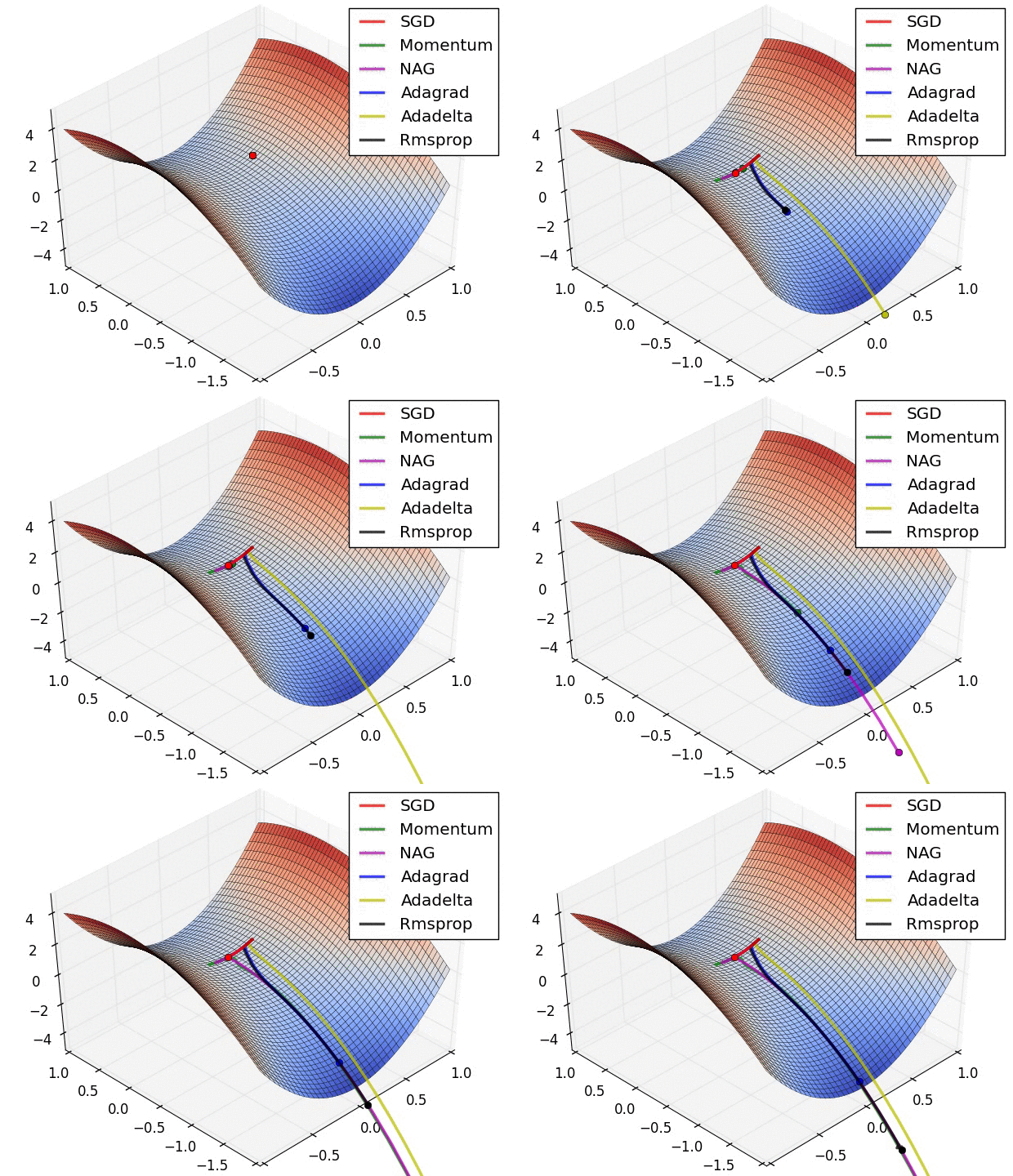\n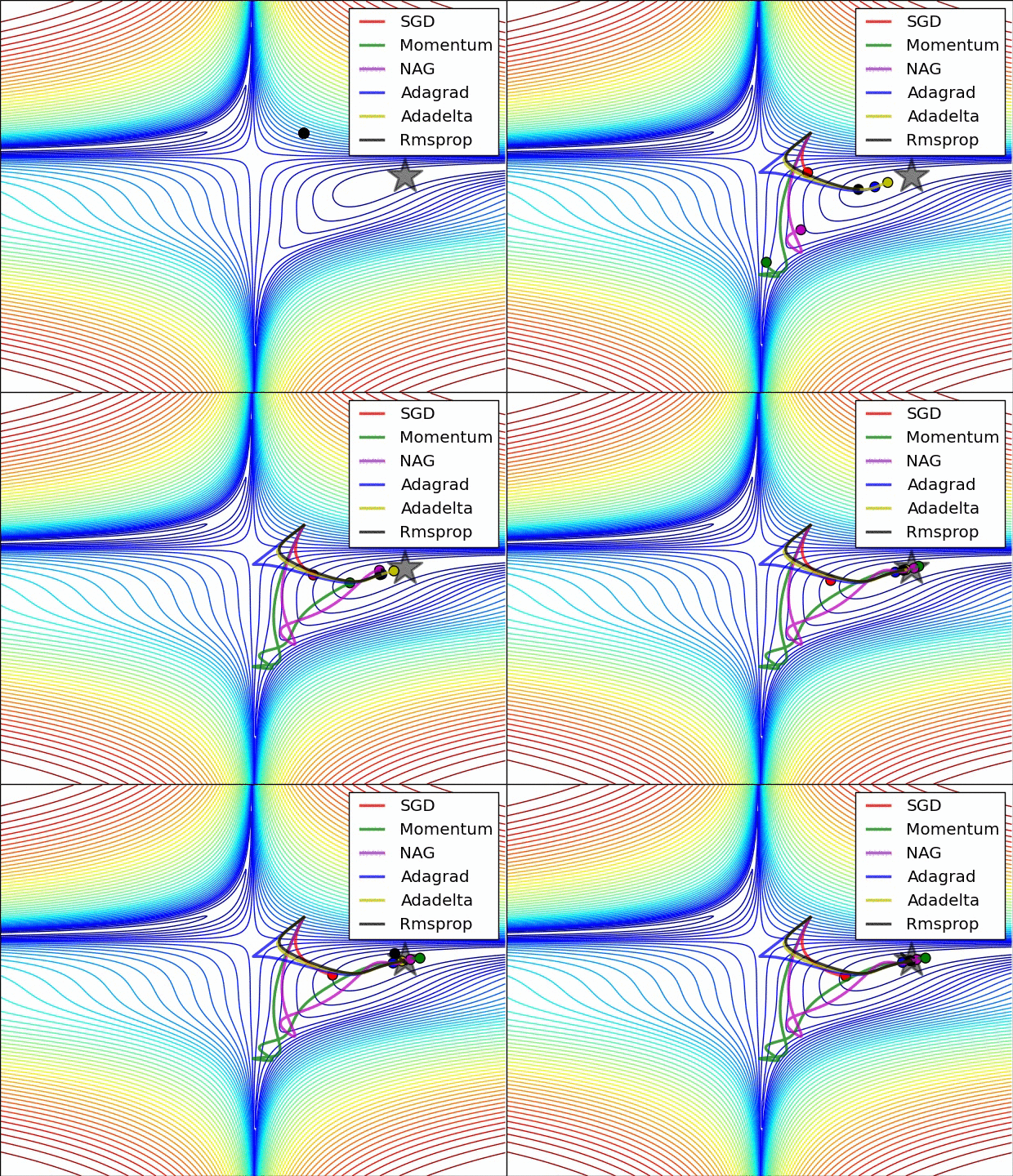"},{"metadata":{"trusted":true},"cell_type":"code","source":"batch_size = 1024\nnum_classes = 10\nepochs = 58\n","execution_count":null,"outputs":[]},{"metadata":{},"cell_type":"markdown","source":"#### **On-the-Fly Data Augmentation** \n[Return Contents](#0)\n* On classification tasks on image datasets data augmentation is a common way to increase the generalization of the model. \n\n[](https://postimg.cc/3dXPqXWZ)\n\n* With the ImageDataGenerator on Keras, we can handle this objective easily.\n* [Here](https://www.pyimagesearch.com/2019/07/08/keras-imagedatagenerator-and-data-augmentation/) is a comprehensive and inspiring article about data augmentation and ImageDataGenerator written by [Adrian Rosebrock](https://www.pyimagesearch.com/2019/07/08/keras-imagedatagenerator-and-data-augmentation/) who is the author of PyImageSearch a very instructive web-site about computer vision.\n* __By changing__ some of the properties of the image from the code below, __you can observe what changes are happening in the dataset__. \n* With this observation, you can roughly specify the range you should choose."},{"metadata":{"trusted":true},"cell_type":"code","source":"# An observation code for our dataset\ndatagen_try = ImageDataGenerator(rotation_range=15,\n width_shift_range = 0.25,\n height_shift_range = 0.25,\n shear_range = 25,\n zoom_range = 0.4,)\n# fit parameters from data\ndatagen_try.fit(x_train)\n# configure batch size and retrieve one batch of images\nfor x_batch, y_batch in datagen_try.flow(x_train, y_train, batch_size=9):\n\t# create a grid of 3x3 images\n\tfor i in range(0, 9):\n\t\tplt.subplot(330 + 1 + i)\n\t\tplt.imshow(x_batch[i].reshape(28, 28), cmap=plt.get_cmap('gray'))\n\t# show the plot\n\tplt.show()\n\tbreak","execution_count":null,"outputs":[]},{"metadata":{"trusted":true},"cell_type":"code","source":"datagen_train = ImageDataGenerator(rotation_range = 10,\n width_shift_range = 0.25,\n height_shift_range = 0.25,\n shear_range = 10,\n zoom_range = 0.1,\n horizontal_flip = False)\n\ndatagen_val = ImageDataGenerator() \n\n\nstep_train = x_train.shape[0] // batch_size\nstep_val = x_val.shape[0] // batch_size\n\nlearning_rate_reduction = tf.keras.callbacks.ReduceLROnPlateau( \n monitor='loss', # Quantity to be monitored.\n factor=0.25, # Factor by which the learning rate will be reduced. new_lr = lr * factor\n patience=2, # The number of epochs with no improvement after which learning rate will be reduced.\n verbose=1, # 0: quiet - 1: update messages.\n mode=\"auto\", # {auto, min, max}. In min mode, lr will be reduced when the quantity monitored has stopped decreasing; \n # in the max mode it will be reduced when the quantity monitored has stopped increasing; \n # in auto mode, the direction is automatically inferred from the name of the monitored quantity.\n min_delta=0.0001, # threshold for measuring the new optimum, to only focus on significant changes.\n cooldown=0, # number of epochs to wait before resuming normal operation after learning rate (lr) has been reduced.\n min_lr=0.00001 # lower bound on the learning rate.\n )\n\nes = EarlyStopping(monitor='val_loss', mode='min', verbose=1, patience=300, restore_best_weights=True)\n","execution_count":null,"outputs":[]},{"metadata":{},"cell_type":"markdown","source":"### **Model - Fit** \n[Return Contents](#0)"},{"metadata":{"trusted":true},"cell_type":"code","source":"history = model.fit_generator(datagen_train.flow(x_train, y_train, batch_size=batch_size),\n steps_per_epoch=len(x_train)//batch_size,\n epochs=epochs,\n validation_data=(x_val, y_val),\n validation_steps=50,\n callbacks=[learning_rate_reduction, es],\n verbose=2)","execution_count":null,"outputs":[]},{"metadata":{},"cell_type":"markdown","source":"## **Evaluation of the Model** \n### **Accuracy and Loss Curves** \n[Return Contents](#0)"},{"metadata":{},"cell_type":"markdown","source":"* On classification, accuracy metric is calculated as below;\n\n\\begin{equation}\nclassification~accuracy = \\frac{correct~predictions}{total~predictions} * 100 \\\\\n\\end{equation}"},{"metadata":{"trusted":true},"cell_type":"code","source":"tf.keras.utils.plot_model(model, to_file=\"model.png\", show_shapes=True)","execution_count":null,"outputs":[]},{"metadata":{"trusted":true},"cell_type":"code","source":"plt.plot(history.history['accuracy'])\nplt.plot(history.history['val_accuracy'])\nplt.title('Model accuracy')\nplt.ylabel('Accuracy')\nplt.xlabel('Epoch')\nplt.legend(['Train', 'Validation'], loc='upper left')\nplt.show()\n\n# Plot training & validation loss values\nplt.plot(history.history['loss'])\nplt.plot(history.history['val_loss'])\nplt.title('Model loss')\nplt.ylabel('Loss')\nplt.xlabel('Epoch')\nplt.legend(['Train', 'Validation'], loc='upper left')\nplt.show()","execution_count":null,"outputs":[]},{"metadata":{},"cell_type":"markdown","source":"### **Test Set Accuracy Score** \n[Return Contents](#0)"},{"metadata":{"trusted":true},"cell_type":"code","source":"model.evaluate(x_val, y_val, verbose=2);","execution_count":null,"outputs":[]},{"metadata":{},"cell_type":"markdown","source":"### **Confusion Matrix** \n[Return Contents](#0)"},{"metadata":{"trusted":true},"cell_type":"code","source":"y_predicted = model.predict(x_val)\ny_grand_truth = y_val\ny_predicted = np.argmax(y_predicted,axis=1)\ny_grand_truth = np.argmax(y_grand_truth,axis=1)\nfrom sklearn.metrics import confusion_matrix\ncm = confusion_matrix(y_grand_truth, y_predicted)","execution_count":null,"outputs":[]},{"metadata":{},"cell_type":"markdown","source":"* If 90% of the data set is cat image and 10% is dog image, your accuracy will be 90% even if you estimate the entire test set as a cat.\n* But in another aspect, the model's success in predicting dogs is 0%.\n* In this context, accuracy may not always give us realistic information about the actual performance of the model.\n* The confusion matrix shows how confused your classification model is for which classes by detailing the relationship between actual class and predicted class.\n* If there is an anomaly something like above mentioned, you can specify the problem with confusion matrix and improve accuracy by various methods like adding more data for a specific class, etc."},{"metadata":{"trusted":true},"cell_type":"code","source":"f, ax = plt.subplots(figsize=(10,10))\nsns.heatmap(cm,fmt=\".0f\", annot=True,linewidths=0.1, linecolor=\"purple\", ax=ax)\nplt.xlabel(\"Predicted\")\nplt.ylabel(\"Grand Truth\")\nplt.show()","execution_count":null,"outputs":[]},{"metadata":{},"cell_type":"markdown","source":"### **F1 Score Calculation** \n[Return Contents](#0)"},{"metadata":{},"cell_type":"markdown","source":"* As mentioned above, [accuracy](#271) gives a general idea about the performance of the model but does not provide any information about the model's trends.\n* In classification algorithms, it is important to analyze the false predictions of the model.\n* There are 2 kinds of false predictions; \n * __Predicted as \"1\" but Ground Truth is \"0\" (False Positive)__\n * __Predicted as \"0\" but Ground Truth is \"1\" (False Negative)__\n\n[](https://postimg.cc/Hczhd4f6)\n* The F1 score creates a success performance metric, taking into account both of these incorrect prediction performances as well as the true positive predictions\n* Since our problem has more than 2 classes, we calculated the F1 score for each class on a one-to-all basis.\n* [Here](https://towardsdatascience.com/multi-class-metrics-made-simple-part-ii-the-f1-score-ebe8b2c2ca1) is a nice article on how to calculate the F1 score in multiple classes, supported by examples."},{"metadata":{"trusted":true},"cell_type":"code","source":"scores = np.zeros((10,3))\ndef calc_F1(num):\n TP = cm[num,num]\n FN = np.sum(cm[num,:])-cm[num,num]\n FP = np.sum(cm[:,num])-cm[num,num]\n precision = TP/(TP+FP)\n recall = TP/(TP+FN)\n F1_score = 2*(recall * precision) / (recall + precision)\n return precision, recall, F1_score\nfor i in range(10):\n precision, recall, F1_score = calc_F1(i)\n scores[i,:] = precision, recall, F1_score\nscores_frame = pd.DataFrame(scores,columns=[\"Precision\", \"Recall\", \"F1 Score\"], index=[list(range(0, 10))])","execution_count":null,"outputs":[]},{"metadata":{"trusted":true},"cell_type":"code","source":"f, ax = plt.subplots(figsize = (4,6))\nax.set_title('Number Scores')\nsns.heatmap(scores_frame, annot=True, fmt=\".3f\", linewidths=0.5, cmap=\"PuBu\", cbar=True, ax=ax)\nbottom, top = ax.get_ylim()\nplt.ylabel(\"\")\nax.set_ylim(bottom + 0.5, top - 0.5)\nplt.show()","execution_count":null,"outputs":[]},{"metadata":{},"cell_type":"markdown","source":"### **Evaluate with Another Dataset** \n[Return Contents](#0)"},{"metadata":{"trusted":true},"cell_type":"code","source":"raw_dig = pd.read_csv(\"../input/Kannada-MNIST/Dig-MNIST.csv\")\nraw_dig.head()\nx_dig = raw_dig.iloc[:, 1:].values.astype('float32') / 255\ny_dig = raw_dig.iloc[:, 0].values\n\nx_dig = x_dig.reshape(-1,28,28,1)\ny_dig = to_categorical(y_dig)\nmodel.evaluate(x_dig, y_dig, verbose=2)","execution_count":null,"outputs":[]},{"metadata":{},"cell_type":"markdown","source":"### **Submit for Competition** \n[Return Contents](#0)"},{"metadata":{"trusted":true},"cell_type":"code","source":"sample_sub=pd.read_csv('../input/Kannada-MNIST/sample_submission.csv')\nraw_test_id=raw_test.id\nraw_test=raw_test.drop(\"id\",axis=\"columns\")\nraw_test=raw_test / 255\ntest=raw_test.values.reshape(-1,28,28,1)\ntest.shape","execution_count":null,"outputs":[]},{"metadata":{"trusted":true},"cell_type":"code","source":"sub=model.predict(test) ##making prediction\nsub=np.argmax(sub,axis=1) ##changing the prediction intro labels\n\nsample_sub['label']=sub\nsample_sub.to_csv('submission.csv',index=False)","execution_count":null,"outputs":[]},{"metadata":{},"cell_type":"markdown","source":"# **Conclusion** \n[Return Contents](#0)\n\n* Please do not hesitate to comment and ask questions.\n* If you found it useful, I would appreciate it if you upvote \n \n [](https://postimg.cc/fS0HtTf7)\n"}],"metadata":{"kernelspec":{"display_name":"Python 3","language":"python","name":"python3"},"language_info":{"codemirror_mode":{"name":"ipython","version":3},"file_extension":".py","mimetype":"text/x-python","name":"python","nbconvert_exporter":"python","pygments_lexer":"ipython3","version":"3.6.5"}},"nbformat":4,"nbformat_minor":1}