
For this competition, I chose to use a pipeline of multiple models instead of an end-to-end model (such as Donut, Deplot, or Matcha). I made this choice because the baseline end-to-end model model I tested with Kaggle data only did not perform well, and I thought it may require a powerful machine to train and cost time to generate data.
\nextracted data into a 50% training set and a 50% validation set.generated data for training setBest CV - LB (with train data only): 0.871 - 0.86
\nPrivate LB: 0.67
\nBest public - private LB: 0.86 - 0.69
\nStep 0: Chart type classification
\nI used a v2s backbone model to classify the charts, with a CV accuracy of 99.2%.
\n
Step 1: Detect and read x/y labels:
\nStep 2: Use an object detection model to detect x/y ticks.
\nStep 3: Map x/y labels and x/y ticks.
\n
Step 4: Detect the point on top of each bar using an object detection model. I will call these points \"value boxes\" because I predicted boxes instead of points.
\nStep 5: Map x ticks and value boxes.
\nStep 6: Get the final value of each bar.
\nvalue_box_value = y1_value - abs((y2_value - y1_value) / (y2_pixel - y1_pixel) * (value_y_pixel - y1_pixel))How to check if a vertical bar is a histogram:
\n
I process a horizontal bar chart follow these steps:
\n
\n
\nStep 4: Use a segmentation model to predict the lines in the chart. For dashed lines, connect them to make them continuous.
Step 5: Project the line onto the Ox axis and keep only the x labels and ticks that can be projected onto the line in the Ox dimension. Then, get the corresponding value boxes for the remaining x labels.
\nStep 6: Obtain the final value for each value box:
\n
Step 4: Detect scatter points using object detection models. I find the box size of scatter points by getting the largest rectangle connected component that contains the scatter point, then average all the box size in the chart to get the final box size for all scatter points. These predicted points will be referred to as \"value boxes\" in the following steps, in order to maintain consistency with other chart types.
\nStep 5: Map the x/y ticks and value boxes.
\nStep 6: Obtain the final value of each value box.
\nSimilar to vertical bar chart, except if the x labels are numerical, we use scatter postprocessing methods instead.
\nMore detail in the notebook. The inference notebook is public here: https://www.kaggle.com/code/thanhhau097a/bmga-submission-0-86
\nCheer
", "messages": [ { "id": "2311266", "postDate": "06/21/2023 04:11:43", "content": "For this competition, I chose to use a pipeline of multiple models instead of an end-to-end model (such as Donut, Deplot, or Matcha). I made this choice because the baseline end-to-end model model I tested with Kaggle data only did not perform well, and I thought it may require a powerful machine to train and cost time to generate data.
\nextracted data into a 50% training set and a 50% validation set.generated data for training setBest CV - LB (with train data only): 0.871 - 0.86
\nPrivate LB: 0.67
\nBest public - private LB: 0.86 - 0.69
\nStep 0: Chart type classification
\nI used a v2s backbone model to classify the charts, with a CV accuracy of 99.2%.
\n
Step 1: Detect and read x/y labels:
\nStep 2: Use an object detection model to detect x/y ticks.
\nStep 3: Map x/y labels and x/y ticks.
\n
Step 4: Detect the point on top of each bar using an object detection model. I will call these points \"value boxes\" because I predicted boxes instead of points.
\nStep 5: Map x ticks and value boxes.
\nStep 6: Get the final value of each bar.
\nvalue_box_value = y1_value - abs((y2_value - y1_value) / (y2_pixel - y1_pixel) * (value_y_pixel - y1_pixel))How to check if a vertical bar is a histogram:
\n
I process a horizontal bar chart follow these steps:
\n
\n
\nStep 4: Use a segmentation model to predict the lines in the chart. For dashed lines, connect them to make them continuous.
Step 5: Project the line onto the Ox axis and keep only the x labels and ticks that can be projected onto the line in the Ox dimension. Then, get the corresponding value boxes for the remaining x labels.
\nStep 6: Obtain the final value for each value box:
\n
Step 4: Detect scatter points using object detection models. I find the box size of scatter points by getting the largest rectangle connected component that contains the scatter point, then average all the box size in the chart to get the final box size for all scatter points. These predicted points will be referred to as \"value boxes\" in the following steps, in order to maintain consistency with other chart types.
\nStep 5: Map the x/y ticks and value boxes.
\nStep 6: Obtain the final value of each value box.
\nSimilar to vertical bar chart, except if the x labels are numerical, we use scatter postprocessing methods instead.
\nMore detail in the notebook. The inference notebook is public here: https://www.kaggle.com/code/thanhhau097a/bmga-submission-0-86
\nCheer
", "rawMarkdown": "For this competition, I chose to use a pipeline of multiple models instead of an end-to-end model (such as Donut, Deplot, or Matcha). I made this choice because the baseline end-to-end model model I tested with Kaggle data only did not perform well, and I thought it may require a powerful machine to train and cost time to generate data.\n\n# Models\n\n- Image classification: used to classify chart types.\n- Text detection: used to detect x/y labels.\n- Text recognition: used to read the crops (pretrained model only, no fine-tuning).\n- Object Detection: used to detect x/y ticks, scatter points, and vertical and horizontal bars.\n- Object Segmentation: used to segment lines on line charts and segment vertical bars (to classify if the vertical bar is a histogram or not).\n- Pretrained Deplot Model: used for cases where the pipeline cannot predict anything (applied only in one case out of 559 CV files).\n\n# Data\n\n- Use only Kaggle data.\n- Split the `extracted` data into a 50% training set and a 50% validation set.\n- Use all `generated` data for training set\n- Finally, use all the data to train the final weights for each type of model.\n\n# Result:\n\nBest CV - LB (with train data only): 0.871 - 0.86\n\nPrivate LB: 0.67\n\nBest public - private LB: 0.86 - 0.69\n\n# Pipeline Details\n\n**Step 0: Chart type classification**\n\nI used a v2s backbone model to classify the charts, with a CV accuracy of 99.2%.\n\n## General components/steps applied for all chart types:\n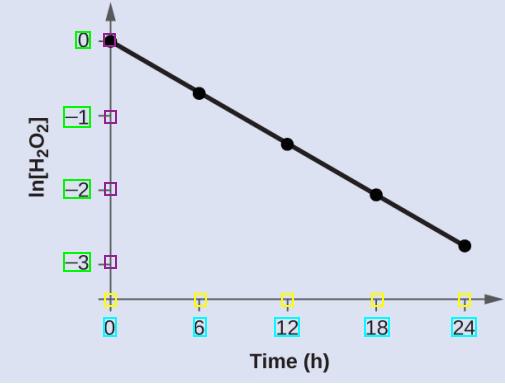\n\n**Step 1**: Detect and read x/y labels:\n\n- First, use a text detection model to detect the polygons of x/y labels.\n- Then, use a text recognition model to read the text inside the polygons.\n- Post-processing:\n - For x labels, draw a horizontal line from top to bottom of the image and select the line that intersects the largest number of x labels polygons. This is because the text detection model is not always accurate.\n - Repeat the process for y labels.\n\n**Step 2**: Use an object detection model to detect x/y ticks.\n\n- Post-processing: Similar to x/y labels, I draw a horizontal line to filter x ticks and a vertical line to filter y ticks.\n\n**Step 3**: Map x/y labels and x/y ticks.\n\n- Based on the relative position between labels and ticks, I create a 1-1 mapping for these label-tick pairs based on IOU in Ox direction and ignore all other labels/ticks that can't be paired.\n- Because there are cases where the x labels are not straight, to make the mapping more accurate:\n - Get the rectangles of x_label from polygons.\n - Draw a rhombus with vertices at the center of the rectangle edges.\n - Draw a new rectangle with the center at the highest vertex of the rhombus.\n - Then create a 1-1 mapping with x_boxes similar to mapping x labels and x ticks.\n\n## For a vertical bar chart\n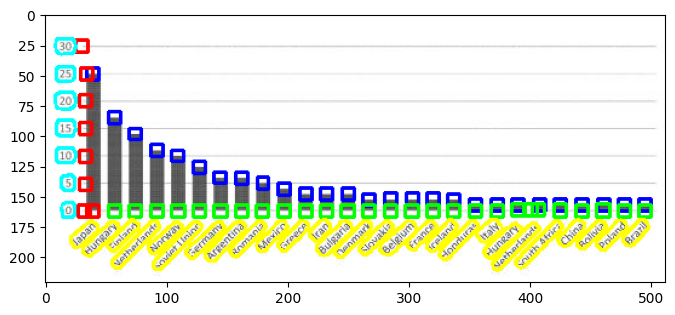\n\n**Step 4:** Detect the point on top of each bar using an object detection model. I will call these points \"value boxes\" because I predicted boxes instead of points.\n\n**Step 5:** Map x ticks and value boxes.\n\n- This step is similar to mapping x labels and x ticks.\n\n**Step 6:** Get the final value of each bar.\n\n- Project the center of each value box to Oy, then get the final value by comparing it to the two nearest y ticks' values.\n - `value_box_value = y1_value - abs((y2_value - y1_value) / (y2_pixel - y1_pixel) * (value_y_pixel - y1_pixel))`\n\n**How to check if a vertical bar is a histogram:**\n\n- Because all columns of a histogram always sit next to each other without space, I use a bar segmentation model to detect the bar region.\n- Calculate the percentage in the Ox direction. If the segmented region (in the Ox direction) is greater than 95% of the distance between the last bar and the first bar, then it is a histogram.\n\n## Horizontal Bar Chart\n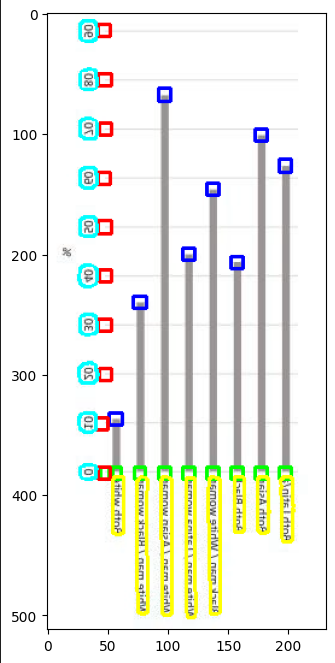\n\nI process a horizontal bar chart follow these steps:\n\n- Rotate the chart 90 degrees and then flip it horizontally to make it similar to a vertical bar chart.\n- Use the same steps as for a vertical bar chart to process the horizontal bar chart.\n\n## Line Chart\n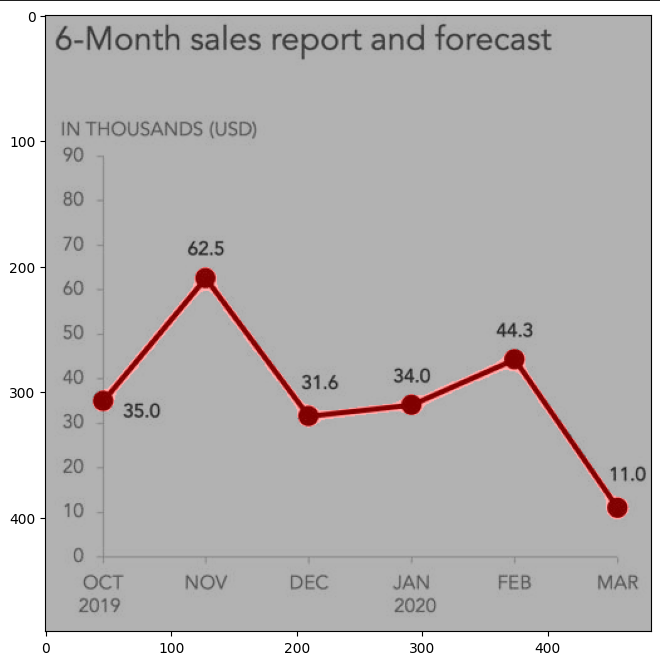\n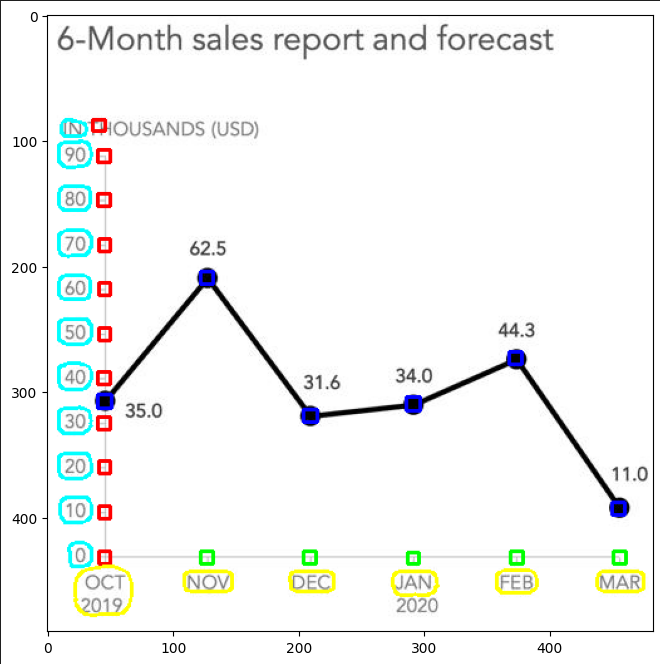\n**Step 4**: Use a segmentation model to predict the lines in the chart. For dashed lines, connect them to make them continuous.\n\n**Step 5**: Project the line onto the Ox axis and keep only the x labels and ticks that can be projected onto the line in the Ox dimension. Then, get the corresponding value boxes for the remaining x labels.\n\n**Step 6**: Obtain the final value for each value box:\n\n- Project the center of each value box onto the Oy axis.\n- Compare the projected value with the values of the two nearest y ticks to get the final value.\n\n## For scatter chart\n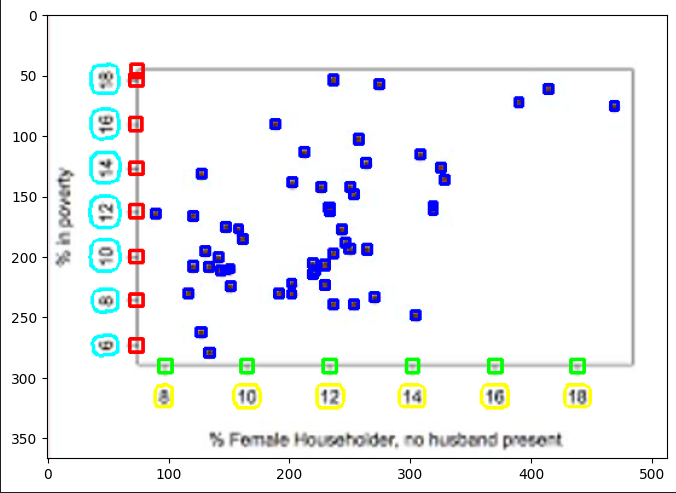\n\n**Step 4**: Detect scatter points using object detection models. I find the box size of scatter points by getting the largest rectangle connected component that contains the scatter point, then average all the box size in the chart to get the final box size for all scatter points. These predicted points will be referred to as \"value boxes\" in the following steps, in order to maintain consistency with other chart types.\n\n**Step 5**: Map the x/y ticks and value boxes.\n\n- Similar to mapping the x ticks and value boxes in a vertical bar chart, we do the same for the y ticks in the Oy dimension.\n\n**Step 6**: Obtain the final value of each value box.\n\n- Project the center of the value boxes to Ox/Oy, then obtain the final value by comparing them to the values of the two closest x/y ticks.\n\n## For dot chart\n\nSimilar to vertical bar chart, except if the x labels are numerical, we use scatter postprocessing methods instead.\n\n### And another post-processing functions using computer vision based algorithms, some highlights:\n\n- To avoid errors in text recognition and detection, keep the y-label values as the longest increasing sequence.\n- Splitting words inside polygons since the pretrained text recognition model doesn't include spaces,, I use another word detection model. Then sort the words based on their geometric location can help with accuracy.\n\nMore detail in the notebook. The inference notebook is public here: [https://www.kaggle.com/code/thanhhau097a/bmga-submission-0-86](https://www.kaggle.com/code/thanhhau097a/bmga-submission-0-86)\n\nCheer", "votes": null }, { "id": "2311332", "postDate": "06/21/2023 05:42:04", "content": "Congratulations Hau! The way you jumped so quickly on the lb made it really clear you were doing something different and brilliant
", "rawMarkdown": "Congratulations Hau! The way you jumped so quickly on the lb made it really clear you were doing something different and brilliant", "votes": null }, { "id": "2311371", "postDate": "06/21/2023 06:15:57", "content": "Impressive. This work definitely required a lot of effort. Congratulation on your Gold Medal!
", "rawMarkdown": "Impressive. This work definitely required a lot of effort. Congratulation on your Gold Medal!", "votes": null }, { "id": "2311426", "postDate": "06/21/2023 06:57:02", "content": "Hey Hau! Thank you for the great work and congratulations! I would like to see you on top but maybe for the next competition! Will be a follower of your work.
", "rawMarkdown": "Hey Hau! Thank you for the great work and congratulations! I would like to see you on top but maybe for the next competition! Will be a follower of your work.", "votes": null }, { "id": "2311534", "postDate": "06/21/2023 08:10:12", "content": "Congrats on solo gold! Great score and a very diverse solution, great work!
", "rawMarkdown": "Congrats on solo gold! Great score and a very diverse solution, great work!", "votes": null }, { "id": "2311579", "postDate": "06/21/2023 08:51:40", "content": "Congratz for the nice finish, really cool to see a full detection-based model work.
\nOur pipeline for scatter is really similar, main difference is we used a linear regression fit on all ticks instead of simple linear interpolation. One thing I found useful is to post-process axis labels to ensure the correlation between ticks and their coordinates is > 0.999 (i.e. the scale is linear), this helps a lot for robustness against OCR & detection errors.
", "rawMarkdown": "Congratz for the nice finish, really cool to see a full detection-based model work.\n\nOur pipeline for scatter is really similar, main difference is we used a linear regression fit on all ticks instead of simple linear interpolation. One thing I found useful is to post-process axis labels to ensure the correlation between ticks and their coordinates is > 0.999 (i.e. the scale is linear), this helps a lot for robustness against OCR & detection errors.", "votes": null }, { "id": "2311625", "postDate": "06/21/2023 09:40:44", "content": "@thanhhau097a can you state which model is used in each step: text detection, segmentation, value box detection? What is the validation score of each chart type ? Thank you !
", "rawMarkdown": "thanhhau097a can you state which model is used in each step: text detection, segmentation, value box detection? What is the validation score of each chart type ? Thank you !", "votes": null }, { "id": "2311875", "postDate": "06/21/2023 14:04:43", "content": "Thank you!
\nUsing linear regression is a great idea! To handle the problem of potentially incorrect x/y label texts, I use a heuristic method to ensure that the x-labels sequence from left to right is a longest increasing sequence. Then, I only keep ticks/labels that are in that sequence. I'm surprised to see your linear regression solution – it's a really clever approach!
", "rawMarkdown": "Thank you! \n\nUsing linear regression is a great idea! To handle the problem of potentially incorrect x/y label texts, I use a heuristic method to ensure that the x-labels sequence from left to right is a longest increasing sequence. Then, I only keep ticks/labels that are in that sequence. I'm surprised to see your linear regression solution – it's a really clever approach!", "votes": null }, { "id": "2311879", "postDate": "06/21/2023 14:05:40", "content": "Might be a silly question, but what is a v2s backbone model?
", "rawMarkdown": "Might be a silly question, but what is a v2s backbone model?", "votes": null }, { "id": "2311881", "postDate": "06/21/2023 14:06:34", "content": "Thank you, my old boss! Congrats on your Competition Master title! :D
", "rawMarkdown": "Thank you, my old boss! Congrats on your Competition Master title! :D", "votes": null }, { "id": "2311886", "postDate": "06/21/2023 14:08:27", "content": "Sorry, the correct name is EfficientNetV2-S, V2S is just a short name I usually use :D
\nhttps://arxiv.org/abs/2104.00298
Hi Nam,
\nText detection: DBNet
\nSegmentation: EfficientNetV2-S backbone
\nValue box detection: YoloX
This is my CV score with model trained with training split only:
\n# = \n# chart_ = line score = 0.8549755488485793\n# chart_ = vertical_bar score = 0.9413445015654374\n# chart_ = scatter score = 0.6703900987052557\n# chart_ = horizontal_bar score = 0.9510436031780835\nAh thank you, but I don't really deserve it - Eduardo is also brilliant lol
", "rawMarkdown": "Ah thank you, but I don't really deserve it - Eduardo is also brilliant lol", "votes": null }, { "id": "2311926", "postDate": "06/21/2023 14:38:57", "content": "Congratulations @thanhhau097a. Two questions:
\nThank you!
\nHope that answers your questions!
", "rawMarkdown": "Thank you!\n\n1. Agree, the mapping relies heavily on label and tick predictions. To avoid missing mapping pairs, I lowered the threshold to predict more labels and ticks. The predictions are quite accurate, so mistakes rarely happen.\n2. Initially, I created the pre-annotation by finding the largest connected component in the chart region. Then, I used a labeling tool to correct any incorrect annotations. Then finetune the model on corrected data.\n\nHope that answers your questions!", "votes": null }, { "id": "2312018", "postDate": "06/21/2023 15:54:12", "content": "The 7th place solution demonstrates a well-structured pipeline approach using multiple models for different tasks. The use of image classification, text detection, text recognition, object detection, and object segmentation models showcases a comprehensive approach to address various components of the problem. The step-by-step explanation of each stage in the pipeline provides clarity and insight into the methodology used. Overall, it's an impressive solution that leverages Kaggle data effectively. Great work!
", "rawMarkdown": "The 7th place solution demonstrates a well-structured pipeline approach using multiple models for different tasks. The use of image classification, text detection, text recognition, object detection, and object segmentation models showcases a comprehensive approach to address various components of the problem. The step-by-step explanation of each stage in the pipeline provides clarity and insight into the methodology used. Overall, it's an impressive solution that leverages Kaggle data effectively. Great work!", "votes": null }, { "id": "2312034", "postDate": "06/21/2023 16:15:51", "content": "Good and experience
", "rawMarkdown": "Good and experience", "votes": null }, { "id": "2312132", "postDate": "06/21/2023 17:27:21", "content": "Thanks! I thought too about mapping bounding boxes but I was afraid that my ODs accuracy would be insufficient and the exact match accuracy would be lower than my previous model. Nice to see you made it work
", "rawMarkdown": "Thanks! I thought too about mapping bounding boxes but I was afraid that my ODs accuracy would be insufficient and the exact match accuracy would be lower than my previous model. Nice to see you made it work", "votes": null }, { "id": "2312245", "postDate": "06/21/2023 19:04:47", "content": "Congrats on your solo gold, and thanks for sharing your awesome solution!
\nI wondered what magic you had done since I joined the competition.
\nI tried Faster RCNN, but it didn't perform well, especially on scatter plots.
May I ask what OCR model did you use? I tried similar way for scatter plots but my OCR accuracy was not good. I got only 0.05 for scatter plot in LB.
", "rawMarkdown": "May I ask what OCR model did you use? I tried similar way for scatter plots but my OCR accuracy was not good. I got only 0.05 for scatter plot in LB.", "votes": null }, { "id": "2312947", "postDate": "06/22/2023 09:45:06", "content": "Congratulation @thanhhau097a . I am so impressive that how you put so much effort to this competition.
\nLet me ask a question.
How did you deal with space in Text detection.
\nFor example :
\nOne x label is \"World Bank High Income\".
\nDid you receive results of \"World\", \"Bank\", \"High\", \"Income\" 4 words separately ? And how did you merge that in to one label.
Thank you very much
", "rawMarkdown": "Congratulation @thanhhau097a . I am so impressive that how you put so much effort to this competition. \nLet me ask a question.\n\nHow did you deal with space in Text detection.\nFor example : \nOne x label is \"World Bank High Income\". \nDid you receive results of \"World\", \"Bank\", \"High\", \"Income\" 4 words separately ? And how did you merge that in to one label.\n\nThank you very much", "votes": null }, { "id": "2313474", "postDate": "06/22/2023 17:51:39", "content": "I am also interested to know that, let's wait for the answer
", "rawMarkdown": "I am also interested to know that, let's wait for the answer", "votes": null }, { "id": "2313542", "postDate": "06/22/2023 18:31:26", "content": "Perfect💯💯💯
", "rawMarkdown": "Perfect💯💯💯", "votes": null }, { "id": "2313975", "postDate": "06/23/2023 05:06:18", "content": "Your solution is so beautiful!
", "rawMarkdown": "Your solution is so beautiful!", "votes": null }, { "id": "2314302", "postDate": "06/23/2023 10:32:55", "content": "How could you get the score per chart-type?
", "rawMarkdown": "How could you get the score per chart-type?", "votes": null }, { "id": "2314875", "postDate": "06/23/2023 16:46:57", "content": "Thanks for sharing!
", "rawMarkdown": "Thanks for sharing!", "votes": null }, { "id": "2319405", "postDate": "06/27/2023 05:33:07", "content": "@thanhhau097a congrats! Very detailed topic!
", "rawMarkdown": "thanhhau097a congrats! Very detailed topic!", "votes": null }, { "id": "2543557", "postDate": "11/30/2023 07:07:37", "content": "Congrats ! .Great work
", "rawMarkdown": "Congrats ! .Great work", "votes": null } ], "comments": [ { "id": 2311332, "author_name": "hamishdickson", "author_url": "", "post_date": "06/21/2023 05:42:04", "content": "Congratulations Hau! The way you jumped so quickly on the lb made it really clear you were doing something different and brilliant
", "votes": null, "replies": [ { "id": 2311881, "author_name": "thanhhau097a", "author_url": "", "post_date": "06/21/2023 14:06:34", "content": "Thank you, my old boss! Congrats on your Competition Master title! :D
", "votes": null, "replies": [ { "id": 2311916, "author_name": "hamishdickson", "author_url": "", "post_date": "06/21/2023 14:26:59", "content": "Ah thank you, but I don't really deserve it - Eduardo is also brilliant lol
", "votes": null, "replies": [] } ] } ] }, { "id": 2311371, "author_name": "namgalielei", "author_url": "", "post_date": "06/21/2023 06:15:57", "content": "Impressive. This work definitely required a lot of effort. Congratulation on your Gold Medal!
", "votes": null, "replies": [] }, { "id": 2311426, "author_name": "emirhanbilgic", "author_url": "", "post_date": "06/21/2023 06:57:02", "content": "Hey Hau! Thank you for the great work and congratulations! I would like to see you on top but maybe for the next competition! Will be a follower of your work.
", "votes": null, "replies": [] }, { "id": 2311534, "author_name": "thedrcat", "author_url": "", "post_date": "06/21/2023 08:10:12", "content": "Congrats on solo gold! Great score and a very diverse solution, great work!
", "votes": null, "replies": [] }, { "id": 2311579, "author_name": "theoviel", "author_url": "", "post_date": "06/21/2023 08:51:40", "content": "Congratz for the nice finish, really cool to see a full detection-based model work.
\nOur pipeline for scatter is really similar, main difference is we used a linear regression fit on all ticks instead of simple linear interpolation. One thing I found useful is to post-process axis labels to ensure the correlation between ticks and their coordinates is > 0.999 (i.e. the scale is linear), this helps a lot for robustness against OCR & detection errors.
", "votes": null, "replies": [ { "id": 2311875, "author_name": "thanhhau097a", "author_url": "", "post_date": "06/21/2023 14:04:43", "content": "Thank you!
\nUsing linear regression is a great idea! To handle the problem of potentially incorrect x/y label texts, I use a heuristic method to ensure that the x-labels sequence from left to right is a longest increasing sequence. Then, I only keep ticks/labels that are in that sequence. I'm surprised to see your linear regression solution – it's a really clever approach!
", "votes": null, "replies": [] } ] }, { "id": 2311625, "author_name": "namgalielei", "author_url": "", "post_date": "06/21/2023 09:40:44", "content": "@thanhhau097a can you state which model is used in each step: text detection, segmentation, value box detection? What is the validation score of each chart type ? Thank you !
", "votes": null, "replies": [ { "id": 2311892, "author_name": "thanhhau097a", "author_url": "", "post_date": "06/21/2023 14:11:46", "content": "Hi Nam,
\nText detection: DBNet
\nSegmentation: EfficientNetV2-S backbone
\nValue box detection: YoloX
This is my CV score with model trained with training split only:
\n# = \n# chart_ = line score = 0.8549755488485793\n# chart_ = vertical_bar score = 0.9413445015654374\n# chart_ = scatter score = 0.6703900987052557\n# chart_ = horizontal_bar score = 0.9510436031780835\nHow could you get the score per chart-type?
", "votes": null, "replies": [] } ] } ] }, { "id": 2311879, "author_name": "brendanartley", "author_url": "", "post_date": "06/21/2023 14:05:40", "content": "Might be a silly question, but what is a v2s backbone model?
", "votes": null, "replies": [ { "id": 2311886, "author_name": "thanhhau097a", "author_url": "", "post_date": "06/21/2023 14:08:27", "content": "Sorry, the correct name is EfficientNetV2-S, V2S is just a short name I usually use :D
\nhttps://arxiv.org/abs/2104.00298
Congratulations @thanhhau097a. Two questions:
\nThank you!
\nHope that answers your questions!
", "votes": null, "replies": [ { "id": 2312132, "author_name": "alejopaullier", "author_url": "", "post_date": "06/21/2023 17:27:21", "content": "Thanks! I thought too about mapping bounding boxes but I was afraid that my ODs accuracy would be insufficient and the exact match accuracy would be lower than my previous model. Nice to see you made it work
", "votes": null, "replies": [] } ] } ] }, { "id": 2312018, "author_name": "poojach7611", "author_url": "", "post_date": "06/21/2023 15:54:12", "content": "The 7th place solution demonstrates a well-structured pipeline approach using multiple models for different tasks. The use of image classification, text detection, text recognition, object detection, and object segmentation models showcases a comprehensive approach to address various components of the problem. The step-by-step explanation of each stage in the pipeline provides clarity and insight into the methodology used. Overall, it's an impressive solution that leverages Kaggle data effectively. Great work!
", "votes": null, "replies": [] }, { "id": 2312034, "author_name": "prayoganurdiansyah", "author_url": "", "post_date": "06/21/2023 16:15:51", "content": "Good and experience
", "votes": null, "replies": [] }, { "id": 2312245, "author_name": "zhugds", "author_url": "", "post_date": "06/21/2023 19:04:47", "content": "Congrats on your solo gold, and thanks for sharing your awesome solution!
\nI wondered what magic you had done since I joined the competition.
\nI tried Faster RCNN, but it didn't perform well, especially on scatter plots.
May I ask what OCR model did you use? I tried similar way for scatter plots but my OCR accuracy was not good. I got only 0.05 for scatter plot in LB.
", "votes": null, "replies": [ { "id": 2313474, "author_name": "hamzahabduljalil", "author_url": "", "post_date": "06/22/2023 17:51:39", "content": "I am also interested to know that, let's wait for the answer
", "votes": null, "replies": [] } ] }, { "id": 2312947, "author_name": "hwhuynguyen", "author_url": "", "post_date": "06/22/2023 09:45:06", "content": "Congratulation @thanhhau097a . I am so impressive that how you put so much effort to this competition.
\nLet me ask a question.
How did you deal with space in Text detection.
\nFor example :
\nOne x label is \"World Bank High Income\".
\nDid you receive results of \"World\", \"Bank\", \"High\", \"Income\" 4 words separately ? And how did you merge that in to one label.
Thank you very much
", "votes": null, "replies": [] }, { "id": 2313542, "author_name": "hunterzwer", "author_url": "", "post_date": "06/22/2023 18:31:26", "content": "Perfect💯💯💯
", "votes": null, "replies": [] }, { "id": 2313975, "author_name": "decalogue", "author_url": "", "post_date": "06/23/2023 05:06:18", "content": "Your solution is so beautiful!
", "votes": null, "replies": [] }, { "id": 2314875, "author_name": "", "author_url": "", "post_date": "06/23/2023 16:46:57", "content": "Thanks for sharing!
", "votes": null, "replies": [] }, { "id": 2319405, "author_name": "serangu", "author_url": "", "post_date": "06/27/2023 05:33:07", "content": "@thanhhau097a congrats! Very detailed topic!
", "votes": null, "replies": [] }, { "id": 2543557, "author_name": "jemsonjacob", "author_url": "", "post_date": "11/30/2023 07:07:37", "content": "Congrats ! .Great work
", "votes": null, "replies": [] } ], "raw_markdown_by_id": { "2311266": "For this competition, I chose to use a pipeline of multiple models instead of an end-to-end model (such as Donut, Deplot, or Matcha). I made this choice because the baseline end-to-end model model I tested with Kaggle data only did not perform well, and I thought it may require a powerful machine to train and cost time to generate data.\n\n# Models\n\n- Image classification: used to classify chart types.\n- Text detection: used to detect x/y labels.\n- Text recognition: used to read the crops (pretrained model only, no fine-tuning).\n- Object Detection: used to detect x/y ticks, scatter points, and vertical and horizontal bars.\n- Object Segmentation: used to segment lines on line charts and segment vertical bars (to classify if the vertical bar is a histogram or not).\n- Pretrained Deplot Model: used for cases where the pipeline cannot predict anything (applied only in one case out of 559 CV files).\n\n# Data\n\n- Use only Kaggle data.\n- Split the `extracted` data into a 50% training set and a 50% validation set.\n- Use all `generated` data for training set\n- Finally, use all the data to train the final weights for each type of model.\n\n# Result:\n\nBest CV - LB (with train data only): 0.871 - 0.86\n\nPrivate LB: 0.67\n\nBest public - private LB: 0.86 - 0.69\n\n# Pipeline Details\n\n**Step 0: Chart type classification**\n\nI used a v2s backbone model to classify the charts, with a CV accuracy of 99.2%.\n\n## General components/steps applied for all chart types:\n\n\n**Step 1**: Detect and read x/y labels:\n\n- First, use a text detection model to detect the polygons of x/y labels.\n- Then, use a text recognition model to read the text inside the polygons.\n- Post-processing:\n - For x labels, draw a horizontal line from top to bottom of the image and select the line that intersects the largest number of x labels polygons. This is because the text detection model is not always accurate.\n - Repeat the process for y labels.\n\n**Step 2**: Use an object detection model to detect x/y ticks.\n\n- Post-processing: Similar to x/y labels, I draw a horizontal line to filter x ticks and a vertical line to filter y ticks.\n\n**Step 3**: Map x/y labels and x/y ticks.\n\n- Based on the relative position between labels and ticks, I create a 1-1 mapping for these label-tick pairs based on IOU in Ox direction and ignore all other labels/ticks that can't be paired.\n- Because there are cases where the x labels are not straight, to make the mapping more accurate:\n - Get the rectangles of x_label from polygons.\n - Draw a rhombus with vertices at the center of the rectangle edges.\n - Draw a new rectangle with the center at the highest vertex of the rhombus.\n - Then create a 1-1 mapping with x_boxes similar to mapping x labels and x ticks.\n\n## For a vertical bar chart\n\n\n**Step 4:** Detect the point on top of each bar using an object detection model. I will call these points \"value boxes\" because I predicted boxes instead of points.\n\n**Step 5:** Map x ticks and value boxes.\n\n- This step is similar to mapping x labels and x ticks.\n\n**Step 6:** Get the final value of each bar.\n\n- Project the center of each value box to Oy, then get the final value by comparing it to the two nearest y ticks' values.\n - `value_box_value = y1_value - abs((y2_value - y1_value) / (y2_pixel - y1_pixel) * (value_y_pixel - y1_pixel))`\n\n**How to check if a vertical bar is a histogram:**\n\n- Because all columns of a histogram always sit next to each other without space, I use a bar segmentation model to detect the bar region.\n- Calculate the percentage in the Ox direction. If the segmented region (in the Ox direction) is greater than 95% of the distance between the last bar and the first bar, then it is a histogram.\n\n## Horizontal Bar Chart\n\n\nI process a horizontal bar chart follow these steps:\n\n- Rotate the chart 90 degrees and then flip it horizontally to make it similar to a vertical bar chart.\n- Use the same steps as for a vertical bar chart to process the horizontal bar chart.\n\n## Line Chart\n\n\n**Step 4**: Use a segmentation model to predict the lines in the chart. For dashed lines, connect them to make them continuous.\n\n**Step 5**: Project the line onto the Ox axis and keep only the x labels and ticks that can be projected onto the line in the Ox dimension. Then, get the corresponding value boxes for the remaining x labels.\n\n**Step 6**: Obtain the final value for each value box:\n\n- Project the center of each value box onto the Oy axis.\n- Compare the projected value with the values of the two nearest y ticks to get the final value.\n\n## For scatter chart\n\n\n**Step 4**: Detect scatter points using object detection models. I find the box size of scatter points by getting the largest rectangle connected component that contains the scatter point, then average all the box size in the chart to get the final box size for all scatter points. These predicted points will be referred to as \"value boxes\" in the following steps, in order to maintain consistency with other chart types.\n\n**Step 5**: Map the x/y ticks and value boxes.\n\n- Similar to mapping the x ticks and value boxes in a vertical bar chart, we do the same for the y ticks in the Oy dimension.\n\n**Step 6**: Obtain the final value of each value box.\n\n- Project the center of the value boxes to Ox/Oy, then obtain the final value by comparing them to the values of the two closest x/y ticks.\n\n## For dot chart\n\nSimilar to vertical bar chart, except if the x labels are numerical, we use scatter postprocessing methods instead.\n\n### And another post-processing functions using computer vision based algorithms, some highlights:\n\n- To avoid errors in text recognition and detection, keep the y-label values as the longest increasing sequence.\n- Splitting words inside polygons since the pretrained text recognition model doesn't include spaces,, I use another word detection model. Then sort the words based on their geometric location can help with accuracy.\n\nMore detail in the notebook. The inference notebook is public here: [https://www.kaggle.com/code/thanhhau097a/bmga-submission-0-86](https://www.kaggle.com/code/thanhhau097a/bmga-submission-0-86)\n\nCheer", "2311332": "Congratulations Hau! The way you jumped so quickly on the lb made it really clear you were doing something different and brilliant", "2311371": "Impressive. This work definitely required a lot of effort. Congratulation on your Gold Medal!", "2311426": "Hey Hau! Thank you for the great work and congratulations! I would like to see you on top but maybe for the next competition! Will be a follower of your work.", "2311534": "Congrats on solo gold! Great score and a very diverse solution, great work!", "2311579": "Congratz for the nice finish, really cool to see a full detection-based model work.\n\nOur pipeline for scatter is really similar, main difference is we used a linear regression fit on all ticks instead of simple linear interpolation. One thing I found useful is to post-process axis labels to ensure the correlation between ticks and their coordinates is > 0.999 (i.e. the scale is linear), this helps a lot for robustness against OCR & detection errors.", "2311625": "thanhhau097a can you state which model is used in each step: text detection, segmentation, value box detection? What is the validation score of each chart type ? Thank you !", "2311875": "Thank you! \n\nUsing linear regression is a great idea! To handle the problem of potentially incorrect x/y label texts, I use a heuristic method to ensure that the x-labels sequence from left to right is a longest increasing sequence. Then, I only keep ticks/labels that are in that sequence. I'm surprised to see your linear regression solution – it's a really clever approach!", "2311879": "Might be a silly question, but what is a v2s backbone model?", "2311881": "Thank you, my old boss! Congrats on your Competition Master title! :D", "2311886": "Sorry, the correct name is EfficientNetV2-S, V2S is just a short name I usually use :D\nhttps://arxiv.org/abs/2104.00298", "2311892": "Hi Nam,\n\nText detection: DBNet\nSegmentation: EfficientNetV2-S backbone\nValue box detection: YoloX\n\nThis is my CV score with model trained with training split only:\n\n```\n# AVERAGE Score = 0.8717596081541045\n# chart_type = line score = 0.8549755488485793\n# chart_type = vertical_bar score = 0.9413445015654374\n# chart_type = scatter score = 0.6703900987052557\n# chart_type = horizontal_bar score = 0.9510436031780835\n```", "2311916": "Ah thank you, but I don't really deserve it - Eduardo is also brilliant lol", "2311926": "Congratulations @thanhhau097a. Two questions:\n1. Doesn't the bounding box mapping heavily relies on the accuracy of your Object Detector? For example, if you don't predict all x-ticks and x-labels some may be left unpaired and in consequence the series length is predicted wrong.\n2. Did you use any segmentation tool to labeling the Line Charts?", "2311953": "Thank you!\n\n1. Agree, the mapping relies heavily on label and tick predictions. To avoid missing mapping pairs, I lowered the threshold to predict more labels and ticks. The predictions are quite accurate, so mistakes rarely happen.\n2. Initially, I created the pre-annotation by finding the largest connected component in the chart region. Then, I used a labeling tool to correct any incorrect annotations. Then finetune the model on corrected data.\n\nHope that answers your questions!", "2312018": "The 7th place solution demonstrates a well-structured pipeline approach using multiple models for different tasks. The use of image classification, text detection, text recognition, object detection, and object segmentation models showcases a comprehensive approach to address various components of the problem. The step-by-step explanation of each stage in the pipeline provides clarity and insight into the methodology used. Overall, it's an impressive solution that leverages Kaggle data effectively. Great work!", "2312034": "Good and experience", "2312132": "Thanks! I thought too about mapping bounding boxes but I was afraid that my ODs accuracy would be insufficient and the exact match accuracy would be lower than my previous model. Nice to see you made it work", "2312245": "Congrats on your solo gold, and thanks for sharing your awesome solution!\nI wondered what magic you had done since I joined the competition.\nI tried Faster RCNN, but it didn't perform well, especially on scatter plots.", "2312731": "May I ask what OCR model did you use? I tried similar way for scatter plots but my OCR accuracy was not good. I got only 0.05 for scatter plot in LB.", "2312947": "Congratulation @thanhhau097a . I am so impressive that how you put so much effort to this competition. \nLet me ask a question.\n\nHow did you deal with space in Text detection.\nFor example : \nOne x label is \"World Bank High Income\". \nDid you receive results of \"World\", \"Bank\", \"High\", \"Income\" 4 words separately ? And how did you merge that in to one label.\n\nThank you very much", "2313474": "I am also interested to know that, let's wait for the answer", "2313542": "Perfect💯💯💯", "2313975": "Your solution is so beautiful!", "2314302": "How could you get the score per chart-type?", "2314875": "Thanks for sharing!", "2319405": "thanhhau097a congrats! Very detailed topic!", "2543557": "Congrats ! .Great work" }, "source": "meta" }