{"cells":[{"metadata":{"_uuid":"d629ff2d2480ee46fbb7e2d37f6b5fab8052498a","collapsed":true,"_cell_guid":"79c7e3d0-c299-4dcb-8224-4455121ee9b0","trusted":false},"cell_type":"markdown","source":"## Tips for making the Informative Visualization\n\nI've done a lot of visualizations at Kaggle, and I've gained a lot of insight into visualizations in the process.\n\nShare some visualization tips in data analysis, hoping you won't make the same mistake as me.\n\n\n\n> Small data visualization community in Korea."},{"metadata":{},"cell_type":"markdown","source":"## Data visualization is \"Data\" and \"Visualization\"\n\nLiterally. Data visualization is a task that requires both data and visualization to be understood at the same time.\n\nFirst, you have to understand the type of the variable. \n\n- **Numerical**\n - **Discrete**: Discrete data such as number of people and dice scale.\n - 0, 1, 2\n - **Continuous**: Data such as age, score, temperature, etc.\n - 10.2, 20.3\n- **Categorical**\n - **Ordered**: Categorical data, such as high school, university, and graduate school.\n - **Nominal**: There is no order, such as country, blood type, race, but different categorical data.\n\nThen, examples of preattentive(visual) attributes are as follows:\n\n- Location\n- Form\n- Size\n- Color\n- ETC\n\n \n\nYou need to understand the proportional elements of data and visualization elements."},{"metadata":{},"cell_type":"markdown","source":"## Let's proceed with visualizations that fit the purpose.\n\nVisualization is a targeted act.\n\nInformation visualization is a process to find 4 main things.\n\n- **Composition**: What does the data consist of?\n- **Distribution**: What distribution does the data have?\n- **Comparison**: What distribution are features in?\n- **Relationship**: What about the relationship between two or more features?\n\n
 \n\nAnd let's think about this.\n\n- What content can we use after this?\n- What process will it take to do Feature Engineering after EDA?\n- Did they create visualizations that are more understandable than text?\n\nVisualization does not necessarily have to be aesthetically pleasing if it serves its purpose and appropriately helps to understand.\n\nHowever, ***pretty visualizations are better than ugly ones.***"},{"metadata":{},"cell_type":"markdown","source":"## Colorful isn't necessarily a good thing.\n\n
 \n\n> ref : https://viz.wtf/\n### Stop using the rainbow color palette\n\nColors can be used in two main ways.\n\n1. Distinguish: Data are different from each other.\n2. Emphasis: Emphasize subdata.\n\nThere are three main types of color palette if you look at the classification first.\n\n- **Qualitative palettes**\n- **Sequential palettes**\n- **Diverging palettes**\n\nI think I can refer to [Simple Matplotlib & Visualization Tips 💡](https://www.kaggle.com/subinium/simple-matplotlib-visualization-tips)\n\n### Contrast\n\nFor emphasis or effective differentiation, color contrast should be well utilized. The types of contrast are as follows.\n\n\n\n### Meaning of Colors\n\nLet's make good use of the overall concept of color. Colors all have meanings and impressions.\n\n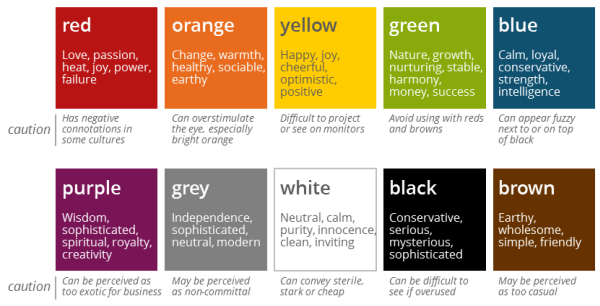\n\nIn addition to this, think about the meaning of brand color.\n\n### Color blindness\n\nThere is a greater percentage of color blindness than you thought. \nConsider also color to prevent color blindness.\n\n### Color Scheme\n\nColor always exists in combination. The combination of good color and good color does not make a good color scheme.\n\nAlways refer to different color combinations.\n\n- [Color Hunt](https://colorhunt.co/)\n- [Visme : 50 Beautiful Color Combinations](https://visme.co/blog/color-combinations/)"},{"metadata":{},"cell_type":"markdown","source":"### A lot of charts don't mean a lot of analysis.\n\nDrawing multiple charts is inconvenient for many reasons.\n\n> In particular, it would be nice to use the facet grid well.\n\nVery few people can read multiple charts at the same time.\n\nThe web environment is quite limited in size, so one neat visualization may be better."},{"metadata":{},"cell_type":"markdown","source":"### Interactive, understand and use.\n\n
\n\n> ref : https://viz.wtf/\n### Stop using the rainbow color palette\n\nColors can be used in two main ways.\n\n1. Distinguish: Data are different from each other.\n2. Emphasis: Emphasize subdata.\n\nThere are three main types of color palette if you look at the classification first.\n\n- **Qualitative palettes**\n- **Sequential palettes**\n- **Diverging palettes**\n\nI think I can refer to [Simple Matplotlib & Visualization Tips 💡](https://www.kaggle.com/subinium/simple-matplotlib-visualization-tips)\n\n### Contrast\n\nFor emphasis or effective differentiation, color contrast should be well utilized. The types of contrast are as follows.\n\n\n\n### Meaning of Colors\n\nLet's make good use of the overall concept of color. Colors all have meanings and impressions.\n\n\n\nIn addition to this, think about the meaning of brand color.\n\n### Color blindness\n\nThere is a greater percentage of color blindness than you thought. \nConsider also color to prevent color blindness.\n\n### Color Scheme\n\nColor always exists in combination. The combination of good color and good color does not make a good color scheme.\n\nAlways refer to different color combinations.\n\n- [Color Hunt](https://colorhunt.co/)\n- [Visme : 50 Beautiful Color Combinations](https://visme.co/blog/color-combinations/)"},{"metadata":{},"cell_type":"markdown","source":"### A lot of charts don't mean a lot of analysis.\n\nDrawing multiple charts is inconvenient for many reasons.\n\n> In particular, it would be nice to use the facet grid well.\n\nVery few people can read multiple charts at the same time.\n\nThe web environment is quite limited in size, so one neat visualization may be better."},{"metadata":{},"cell_type":"markdown","source":"### Interactive, understand and use.\n\n \n\nLet's understand the difference between interactive and static visualizations.\n\nMany of the interactive visualizations used in the Cagle mean no more than static visualizations. \n\nRather, there may be only negative effects that slow down the rendering speed. \n\nThe key reason for interactive is not glamour but to allow users to look at data autonomously. \n\nLet's use meaningful interactive. The representative features of Python Interactive Visualization Library include:\n\n- **Explore**\n - A typical function is panning, which allows you to view the chart in various places while moving the right left side with the mouse pressed.\n - It can be useful on a large scale, such as map data, but is there a reason to use it in the bar chart?\n- **Select**\n- **Abstract** : mouse hover and tooltip\n - Except for information on color and coordinate axes, insufficient information can be filled.\n - However, most of the contents contain color and coordinate information. Of course, you can show more precise values, but there aren't many cases that take advantage of them. Let's put the necessary information.\n- **Animation**\n - It seems useful for time series data. However, when expressing heat maps, etc., let's fix the color scale and add animations that are less confusing meaningfully."},{"metadata":{},"cell_type":"markdown","source":"## The detail completes the visualization.\n\n### Arrangement(Layout), margin, and ratio\n\n- Direction and readability.\n - In many cultures, texts and charts are read left and right, and from top to right.\n - But one looks at the color and the overall structure first, and then again from the beginning.\n- Let's not do all the charts at the same rate. The aspect ratio is important.\n - Even charts of the same kind have different ratios if the number of features is different.\n - If you want to draw it at once, let's vary the size of the chart, such as grid spec.\n- Avoid visual frustration by setting margins or spacing between charts.\n - Let's leave it a little more relaxed than just hitting the x-axis and y-axis limits.\n - Let's also leave a gap between axes.\n\n### Text Utilization\n"},{"metadata":{"_kg_hide-input":true,"trusted":true},"cell_type":"code","source":"import matplotlib.pyplot as plt\n\nfig = plt.figure(figsize=(12,10))\nfig.suptitle('bold figure suptitle', fontsize=14, fontweight='bold')\n\nax = fig.add_subplot(111)\nfig.subplots_adjust(top=0.85)\nax.set_title('axes title')\n\nax.set_xlabel('xlabel')\nax.set_ylabel('ylabel')\n\nax.text(3, 8, 'boxed italics text in data coords', style='italic',\n bbox={'facecolor': 'red', 'alpha': 0.5, 'pad': 10})\n\nax.text(2, 6, r'an equation: $E=mc^2$', fontsize=15)\n\nax.text(3, 2, 'unicode: Institut für Festkörperphysik')\n\nax.text(0.95, 0.01, 'colored text in axes coords',\n verticalalignment='bottom', horizontalalignment='right',\n transform=ax.transAxes,\n color='green', fontsize=15)\n\n\nax.plot([2], [1], 'o')\nax.annotate('annotate', xy=(2, 1), xytext=(3, 4),\n arrowprops=dict(facecolor='black', shrink=0.05))\n\nax.axis([0, 10, 0, 10])\n\nplt.show()","execution_count":null,"outputs":[]},{"metadata":{},"cell_type":"markdown","source":"\n- Text based on location\n \n - Title : The title is a summary of the entire subject of the visualization.\n - Axis\n - Legend\n - Explanation\n - This could be a description of each data point.\n - It could be an explanation of the whole visualization.\n\n\n\n- The setting of the text component.\n\n - fontfamily : I prefer 'serif'\n - fontweight\n - fontsize \n - color \n - bbox : To decorate the border of text, it helps to highlight text and distinguish it from charts.\n\n### Grids, Axis, and Borders\n\n- **Grid**: When there is more data, it helps to understand the scale.\n- **Axis**: Minor tags can be set to show detailed scale, and if the axis is meaningless, remove it.\n - ex) Dimension Reduction\n- **Border**: Let's try various things, such as removing spines or applying a border to data points."},{"metadata":{},"cell_type":"markdown","source":"## You don't have to look at all the data.\n\nWhile data analysis looks at the entire data, it also selects the appropriate subset of the data."},{"metadata":{},"cell_type":"markdown","source":"## Reference\n\n- Visualization Analysis & Design, Tamara Munzner\n- Fundamentals of Data Visualization, Claus O.Wilke\n- A Gentle Introduction to Exploratory Data Analysis : [https://towardsdatascience.com/a-gentle-introduction-to-exploratory-data-analysis-f11d843b8184](https://towardsdatascience.com/a-gentle-introduction-to-exploratory-data-analysis-f11d843b8184)\n- Finding the Right Color Palettes for Data Visualizations : [https://blog.graphiq.com/finding-the-right-color-palettes-for-data-visualizations-fcd4e707a283#.wf7bgbdq2](https://blog.graphiq.com/finding-the-right-color-palettes-for-data-visualizations-fcd4e707a283#.wf7bgbdq2)\n- How to Choose Colors for Your Data Visualizations : [https://medium.com/nightingale/how-to-choose-the-colors-for-your-data-visualizations-50b2557fa335](https://medium.com/nightingale/how-to-choose-the-colors-for-your-data-visualizations-50b2557fa335)\n- The Architecture of a DataVisualization [https://medium.com/accurat-studio/the-architecture-of-a-data-visualization-470b807799b4](https://medium.com/accurat-studio/the-architecture-of-a-data-visualization-470b807799b4)\n- Mistakes, we’ve drawn a few : [https://medium.economist.com/mistakes-weve-drawn-a-few-8cdd8a42d368](https://medium.economist.com/mistakes-weve-drawn-a-few-8cdd8a42d368)\n- [Toward a Deeper Understanding of the Role of Interaction in Information Visualization(2007)](https://www.cc.gatech.edu/~stasko/papers/infovis07-interaction.pdf)"}],"metadata":{"kernelspec":{"language":"python","display_name":"Python 3","name":"python3"},"language_info":{"pygments_lexer":"ipython3","nbconvert_exporter":"python","version":"3.6.4","file_extension":".py","codemirror_mode":{"name":"ipython","version":3},"name":"python","mimetype":"text/x-python"}},"nbformat":4,"nbformat_minor":4}