Image processing techniques have driven cars, read pdfs, and recognized faces. For this exercise, you will learn how to implement one of the more effective models for image processing, Convolutional Neural Networks (CNN). In particular, you will explore a particular use-case in the medical field, which is detecting pathologies in X-Ray scans that are not usually seen by the naked eye. This method may aid the radiologist to detect and treat Pneumonia earlier and faster compared to the usual practice.
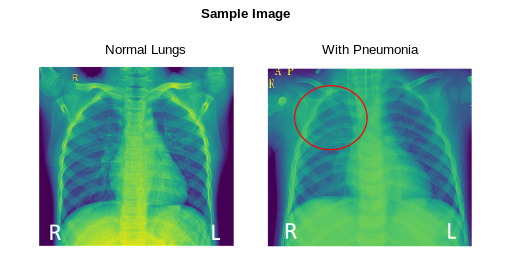
Pneumonia usually presents as opacities in an X-Ray. When compared with normal lungs, pneumonia patients present with lighter-colored lungs localized to one area. In the image below, the patient has pneumonia in their right upper lobe, seen as an opacity:
You will train a CNN in PyTorch to detect Pneumonia from a chest X-Ray scan using the Chest X-Ray Images (Pneumonia) Dataset. It is a validated dataset from Mendeley Data containing 5863 X-Ray images labeled with two categories: Normal/Pneumonia. As this was sourced from the usual patient routine of clinical care, be sure to explore the distribution of the dataset and align your users with the limitations of your model (i.e., can only be used for pediatric patients).
In order to pass this, your model should perform with an accuracy greater than 50. Play around with the parameters (i.e., learning rate, number of hidden layers) that you are choosing and take note of what works best.
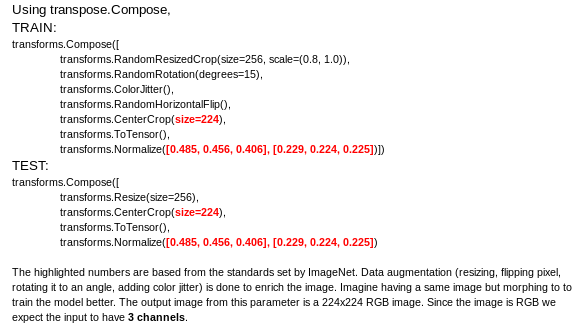 4. After the enriching the dataset, set the batch size to 10 and load the data using DataLoader and make it iterable in PyTorch.
5. Create a model class with two Convolutional layers with same padding (padding = 2, kernel size = 5, stride = 1).
6. Implement two max pooling layers where kernel size = 2.
7. Calculate the size of the output images for convolution using the equation:
$$
\begin{equation}
O = \frac {W - K + 2P}{S} + 1
\end{equation}
$$
8. Calculate the size of the image for pooling:
$$
\begin{equation}
O = \frac {W}{K}
\end{equation}
$$
9. Close off the model class with one fully connected layer.
10. Instantiate the model class.
11. Instantiate the loss class.
12. Instantiate the optimizer class.
13. Train the model.
14. Print the loss and accuracy per epoch.
15. Test your model on the val dataset. You will be given ten submission entries, use it well.
- **Tip**: You might need the PIL package in Python to load the images [https://pillow.readthedocs.io/en/stable/](https://pillow.readthedocs.io/en/stable/).
4. After the enriching the dataset, set the batch size to 10 and load the data using DataLoader and make it iterable in PyTorch.
5. Create a model class with two Convolutional layers with same padding (padding = 2, kernel size = 5, stride = 1).
6. Implement two max pooling layers where kernel size = 2.
7. Calculate the size of the output images for convolution using the equation:
$$
\begin{equation}
O = \frac {W - K + 2P}{S} + 1
\end{equation}
$$
8. Calculate the size of the image for pooling:
$$
\begin{equation}
O = \frac {W}{K}
\end{equation}
$$
9. Close off the model class with one fully connected layer.
10. Instantiate the model class.
11. Instantiate the loss class.
12. Instantiate the optimizer class.
13. Train the model.
14. Print the loss and accuracy per epoch.
15. Test your model on the val dataset. You will be given ten submission entries, use it well.
- **Tip**: You might need the PIL package in Python to load the images [https://pillow.readthedocs.io/en/stable/](https://pillow.readthedocs.io/en/stable/).
The dataset is organized into 2 folders (train, test) and contains subfolders for each image category (Pneumonia/Normal). There are 400 X-Ray images (JPEG) and 2 categories (Pneumonia/Normal). You will be also given a validation data set with 16 unlabeled images for which you will apply your model.