\n

First of all, thanks to organizers for their effort in this amazing competition and congrats to all the winners. Although we need to wait another two months for the final results, let me share my currently 4th place solution.
\nThe basic pipeline of my solution and the summary of the models are shown below.
\n
| Block | \nModel | \nBackbone | \nInput | \nOutput | \n
|---|---|---|---|---|
| Frame Extraction | \nNA | \nNA | \n1920x1080 | \n960x540 (odd frame only) | \n
| Candidate Frame Selection | \nImage Classification | \nefficientnetv2_l | \n512x512 | \n4-class probability | \n
| Event Area Detection | \nUNet | \nefficientnet_b5 | \n512x512 | \nHeatmap | \n
| Event Classification | \nCSN | \nResNet152 | \n224x224 ROI | \n4-class probability | \n
I used FFmpeg to extract and save frames in a video. Note, to reduce the time for disk I/O, I decided to discard even frames and reduce the size of frame to 960x540 (i.e., half the original size).
\nThe purpose of this step is to find the candidate frames in which events are likely to occur. I simply classified each of the extracted frames to four classes, background (not event), play, challenge, and throwin. The backbone is timm's efficientnetv2_l, and an input frame is resized to 512x512.
\nThis process doesn't use temporal information at all, so the accuracy itself is not high, but what I wanted to do here is to find the event frames with a high recall. So I ignored the absolute values of classification scores, and focused on the relative peaks. I used scipy.signal.find_peaks, and picked the frames corresponding to the peaks of the classification scores as candidate frames.
\nThrough a set of experiments, I found that it's difficult to reach a competitive score if I naively used entire frames. Since hand-labeling is allowed in this competition, I decided to train an event area detection model to extract a ROI from frame. I annotated xy coordinate of (roughly) center of an event area (basically the coordinate of player who is most closely associated with the event) for all the event frames in the training set. This took several weeks :-(
\nThe event area detector is a simple UNet, and it outputs a heatmap of event area. The backbone is timm's efficientnet_b5, and an input frame is resized to 512x512. Some example results are shown in the figure below. In the figure, the left is input, the middle is output heatmap overlapped to the input, and the right is zoom-in image centered at the peak of the heatmap.
\n
\nTo detect a ball is one of the promising approaches in this competition, but as discussed here, in many cases a ball is not visible (as you can see from the examples above), or is quite difficult to detect because of various reasons such as background color, lack of resolution and motion blur. So I decided to detect an event area instead of a ball.
The frames from the Candidate Frame Selection contains a lot of wrong (non-event) frames, and also the scores are not reliable. To refine the results, this process applies a more sophisticated action recognition model to the candidate frames.
\nAfter trying several action recognition models, I employed 3D Channel-Separated Networks (CSN) since it showed good performance for both accuracy and speed. The training set for this model was created based on the outputs of two previous steps, Candidate Frame Selection and Event Area Detection. First, I applied the candidate frame selection to all the frames in the training set, and set the labels to background for the wrongly selected non-event frames. Of course, the correctly selected frames had their own events' labels. Then, I used the event area detection model to extract a ROI from each frame. The center of ROI is the peak of output heatmap, and its size is 224x224. Since the number of background frames are much larger (x~10) than those of event frames, I randomly selected around 10% of background frames every 5 epochs during training.
\nThe backbone of CSN is ResNet125, and the number of input frames is 16 (actual time span is 32 frames because even frames are discarded). At both training and inference, a ROI is extracted from candidate frame, and the same regions are also extracted from +/- 8 frames, and fed to the CSN.
\nThe final score is just a probability output from CSN, or ensemble of CSN output and the score from Candidate Frame Selection. The latter is slightly better than the former (+0.01).
\nSince my pipeline consists of several blocks, my biggest challenge was to keep the computation time for each block as low as possible. Using only odd frames is one of the biggest compromises. The per-video computation time for each block in the kaggle kernel is something like below.
\n| Block | \nComputation Time | \n
|---|---|
| Frame Extraction | \n15 min | \n
| Candidate Frame Selection | \n20 min | \n
| Event Area Detection | \n15 min | \n
| Event Classification | \n30 min | \n
| Total | \n80 min | \n
I should have thought about simpler end-to-end method, but I couldn't. Now I'm really impressed by other kagglers' very sophisticated methods, and learning a lot. Thank you, everyone!
", "comments": [ { "id": 2003037, "author_name": "tlx123", "author_url": "", "post_date": "2022-10-25T08:36:18.603000", "content": "@kazuyukimiyazawa
\nCongratulations!
\nYou have already obtained the classification of the event frame in the second step, why not directly use this as the classification result? Is it because of its low accuracy? you wanted to do here is to find the event frames with a high recal, Is it to reduce the background?
\nin the end,you say the score is slightly better,is zhat you mean zhe Candidate Frame Selection is does't work?
The final score is just a probability output from CSN, or ensemble of CSN output and the score from Candidate Frame Selection. The latter is slightly better than the former (+0.01).
\nwhat zhe difference between just a probability output from CSN, or ensemble of CSN output and the score from Candidate Frame Selection., can you tell me?
", "votes": 1, "replies": [ { "id": 2004559, "author_name": "kzykmyzw", "author_url": "", "post_date": "2022-10-26T12:04:49.777000", "content": "As you said, the scores from Candidate Frame Selection are not reliable, so basically I used them only to discard background frames. In Event Classification, I applied more accurate action recognition model (CSN) to the remaining frames. At first, I simply used the probability output from CSN as final score, but eventually I found that the weighted sum of scores from Candidate Frame Selection and scores from Event Classification showed slightly better performance. Of course, the weight of Event Classification is much higher than Candidate Frame Selection (0.8~0.9).
", "votes": 0, "replies": [] } ] }, { "id": 1996171, "author_name": "Y-Haneji", "author_url": "", "post_date": "2022-10-20T05:56:34.943000", "content": "@kazuyukimiyazawa
\nCongratulations!
\nHow did you train the pipeline?
\nI guess that at first you trained the candidate frame selection block and event area detection respectively, and then used them to construct the training data set for the event classification model.
Yes, your guess is completely correct.
", "votes": 0, "replies": [] } ] }, { "id": 2520994, "author_name": "wb-08", "author_url": "", "post_date": "2023-11-11T10:48:07.650000", "content": "Can you please tell us in more detail how you used scipy.signal.find_peaks? Did you rely on distance or prominence as the main parameter?
", "votes": 0, "replies": [] } ], "comment_count": 5, "messages": [ { "id": 1991844, "postDate": "2022-10-17T12:18:02.197Z", "content": "First of all, thanks to organizers for their effort in this amazing competition and congrats to all the winners. Although we need to wait another two months for the final results, let me share my currently 4th place solution.
\nThe basic pipeline of my solution and the summary of the models are shown below.
\n
| Block | \nModel | \nBackbone | \nInput | \nOutput | \n
|---|---|---|---|---|
| Frame Extraction | \nNA | \nNA | \n1920x1080 | \n960x540 (odd frame only) | \n
| Candidate Frame Selection | \nImage Classification | \nefficientnetv2_l | \n512x512 | \n4-class probability | \n
| Event Area Detection | \nUNet | \nefficientnet_b5 | \n512x512 | \nHeatmap | \n
| Event Classification | \nCSN | \nResNet152 | \n224x224 ROI | \n4-class probability | \n
I used FFmpeg to extract and save frames in a video. Note, to reduce the time for disk I/O, I decided to discard even frames and reduce the size of frame to 960x540 (i.e., half the original size).
\nThe purpose of this step is to find the candidate frames in which events are likely to occur. I simply classified each of the extracted frames to four classes, background (not event), play, challenge, and throwin. The backbone is timm's efficientnetv2_l, and an input frame is resized to 512x512.
\nThis process doesn't use temporal information at all, so the accuracy itself is not high, but what I wanted to do here is to find the event frames with a high recall. So I ignored the absolute values of classification scores, and focused on the relative peaks. I used scipy.signal.find_peaks, and picked the frames corresponding to the peaks of the classification scores as candidate frames.
\nThrough a set of experiments, I found that it's difficult to reach a competitive score if I naively used entire frames. Since hand-labeling is allowed in this competition, I decided to train an event area detection model to extract a ROI from frame. I annotated xy coordinate of (roughly) center of an event area (basically the coordinate of player who is most closely associated with the event) for all the event frames in the training set. This took several weeks :-(
\nThe event area detector is a simple UNet, and it outputs a heatmap of event area. The backbone is timm's efficientnet_b5, and an input frame is resized to 512x512. Some example results are shown in the figure below. In the figure, the left is input, the middle is output heatmap overlapped to the input, and the right is zoom-in image centered at the peak of the heatmap.
\n
\nTo detect a ball is one of the promising approaches in this competition, but as discussed here, in many cases a ball is not visible (as you can see from the examples above), or is quite difficult to detect because of various reasons such as background color, lack of resolution and motion blur. So I decided to detect an event area instead of a ball.
The frames from the Candidate Frame Selection contains a lot of wrong (non-event) frames, and also the scores are not reliable. To refine the results, this process applies a more sophisticated action recognition model to the candidate frames.
\nAfter trying several action recognition models, I employed 3D Channel-Separated Networks (CSN) since it showed good performance for both accuracy and speed. The training set for this model was created based on the outputs of two previous steps, Candidate Frame Selection and Event Area Detection. First, I applied the candidate frame selection to all the frames in the training set, and set the labels to background for the wrongly selected non-event frames. Of course, the correctly selected frames had their own events' labels. Then, I used the event area detection model to extract a ROI from each frame. The center of ROI is the peak of output heatmap, and its size is 224x224. Since the number of background frames are much larger (x~10) than those of event frames, I randomly selected around 10% of background frames every 5 epochs during training.
\nThe backbone of CSN is ResNet125, and the number of input frames is 16 (actual time span is 32 frames because even frames are discarded). At both training and inference, a ROI is extracted from candidate frame, and the same regions are also extracted from +/- 8 frames, and fed to the CSN.
\nThe final score is just a probability output from CSN, or ensemble of CSN output and the score from Candidate Frame Selection. The latter is slightly better than the former (+0.01).
\nSince my pipeline consists of several blocks, my biggest challenge was to keep the computation time for each block as low as possible. Using only odd frames is one of the biggest compromises. The per-video computation time for each block in the kaggle kernel is something like below.
\n| Block | \nComputation Time | \n
|---|---|
| Frame Extraction | \n15 min | \n
| Candidate Frame Selection | \n20 min | \n
| Event Area Detection | \n15 min | \n
| Event Classification | \n30 min | \n
| Total | \n80 min | \n
I should have thought about simpler end-to-end method, but I couldn't. Now I'm really impressed by other kagglers' very sophisticated methods, and learning a lot. Thank you, everyone!
", "rawMarkdown": "First of all, thanks to organizers for their effort in this amazing competition and congrats to all the winners. Although we need to wait another two months for the final results, let me share my currently 4th place solution. \n\n# Overview\nThe basic pipeline of my solution and the summary of the models are shown below.\n\n| Block | Model | Backbone | Input | Output |\n| --- | --- | --- | --- |\n| Frame Extraction | NA | NA | 1920x1080 | 960x540 (odd frame only) |\n| Candidate Frame Selection | Image Classification | efficientnetv2_l | 512x512 | 4-class probability |\n| Event Area Detection | UNet | efficientnet_b5 | 512x512 | Heatmap |\n| Event Classification | [CSN](https://openaccess.thecvf.com/content_ICCV_2019/html/Tran_Video_Classification_With_Channel-Separated_Convolutional_Networks_ICCV_2019_paper.html) | ResNet152 | 224x224 ROI | 4-class probability |\n\n# Frame Extraction\nI used FFmpeg to extract and save frames in a video. Note, to reduce the time for disk I/O, I decided to discard even frames and reduce the size of frame to 960x540 (i.e., half the original size).\n\n# Candidate Frame Selection\nThe purpose of this step is to find the candidate frames in which events are likely to occur. I simply classified each of the extracted frames to four classes, background (not event), play, challenge, and throwin. The backbone is [timm](https://github.com/rwightman/pytorch-image-models)'s efficientnetv2_l, and an input frame is resized to 512x512. \n\nThis process doesn't use temporal information at all, so the accuracy itself is not high, but what I wanted to do here is to find the event frames with a high recall. So I ignored the absolute values of classification scores, and focused on the relative peaks. I used [scipy.signal.find_peaks](https://docs.scipy.org/doc/scipy/reference/generated/scipy.signal.find_peaks.html), and picked the frames corresponding to the peaks of the classification scores as candidate frames.\n\n# Event Area Detection\nThrough a set of experiments, I found that it's difficult to reach a competitive score if I naively used entire frames. Since [hand-labeling is allowed in this competition](https://www.kaggle.com/competitions/dfl-bundesliga-data-shootout/discussion/342948), I decided to train an event area detection model to extract a ROI from frame. I annotated xy coordinate of (roughly) center of an event area (basically the coordinate of player who is most closely associated with the event) for all the event frames in the training set. This took several weeks :-(\n\nThe event area detector is a simple UNet, and it outputs a heatmap of event area. The backbone is [timm](https://github.com/rwightman/pytorch-image-models)'s efficientnet_b5, and an input frame is resized to 512x512. Some example results are shown in the figure below. In the figure, the left is input, the middle is output heatmap overlapped to the input, and the right is zoom-in image centered at the peak of the heatmap.\n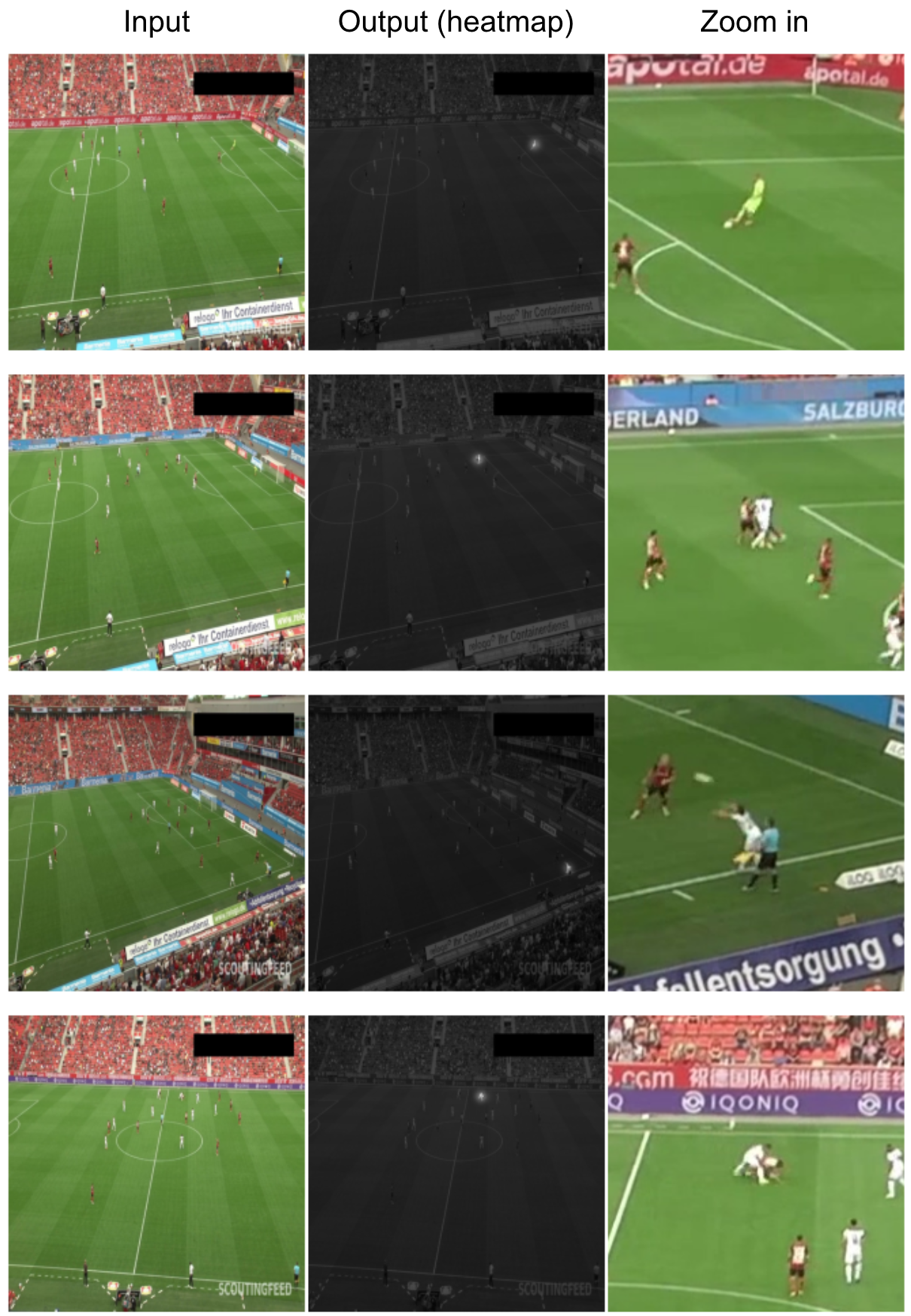\nTo detect a ball is one of the promising approaches in this competition, but as discussed [here](https://www.kaggle.com/competitions/dfl-bundesliga-data-shootout/discussion/343652), in many cases a ball is not visible (as you can see from the examples above), or is quite difficult to detect because of various reasons such as background color, lack of resolution and motion blur. So I decided to detect an event area instead of a ball.\n\n# Event Classification\nThe frames from the **Candidate Frame Selection** contains a lot of wrong (non-event) frames, and also the scores are not reliable. To refine the results, this process applies a more sophisticated action recognition model to the candidate frames. \n\nAfter trying several action recognition models, I employed [3D Channel-Separated Networks (CSN)](https://openaccess.thecvf.com/content_ICCV_2019/html/Tran_Video_Classification_With_Channel-Separated_Convolutional_Networks_ICCV_2019_paper.html) since it showed good performance for both accuracy and speed. The training set for this model was created based on the outputs of two previous steps, **Candidate Frame Selection** and **Event Area Detection**. First, I applied the candidate frame selection to all the frames in the training set, and set the labels to background for the wrongly selected non-event frames. Of course, the correctly selected frames had their own events' labels. Then, I used the event area detection model to extract a ROI from each frame. The center of ROI is the peak of output heatmap, and its size is 224x224. Since the number of background frames are much larger (x~10) than those of event frames, I randomly selected around 10% of background frames every 5 epochs during training. \n\nThe backbone of CSN is ResNet125, and the number of input frames is 16 (actual time span is 32 frames because even frames are discarded). At both training and inference, a ROI is extracted from candidate frame, and the same regions are also extracted from +/- 8 frames, and fed to the CSN.\n\nThe final score is just a probability output from CSN, or ensemble of CSN output and the score from **Candidate Frame Selection**. The latter is slightly better than the former (+0.01). \n\n# Computation Time\nSince my pipeline consists of several blocks, my biggest challenge was to keep the computation time for each block as low as possible. Using only odd frames is one of the biggest compromises. The per-video computation time for each block in the kaggle kernel is something like below.\n| Block | Computation Time |\n| --- | --- |\n| Frame Extraction | 15 min |\n| Candidate Frame Selection | 20 min |\n| Event Area Detection | 15 min |\n| Event Classification | 30 min |\n| Total | 80 min |\n\nI should have thought about simpler end-to-end method, but I couldn't. Now I'm really impressed by other kagglers' very sophisticated methods, and learning a lot. Thank you, everyone!", "votes": 31 }, { "id": 2003037, "postDate": "2022-10-25T08:36:18.603Z", "content": "@kazuyukimiyazawa
\nCongratulations!
\nYou have already obtained the classification of the event frame in the second step, why not directly use this as the classification result? Is it because of its low accuracy? you wanted to do here is to find the event frames with a high recal, Is it to reduce the background?
\nin the end,you say the score is slightly better,is zhat you mean zhe Candidate Frame Selection is does't work?
The final score is just a probability output from CSN, or ensemble of CSN output and the score from Candidate Frame Selection. The latter is slightly better than the former (+0.01).
\nwhat zhe difference between just a probability output from CSN, or ensemble of CSN output and the score from Candidate Frame Selection., can you tell me?
", "rawMarkdown": "@kazuyukimiyazawa \nCongratulations!\nYou have already obtained the classification of the event frame in the second step, why not directly use this as the classification result? Is it because of its low accuracy? you wanted to do here is to find the event frames with a high recal, Is it to reduce the background?\nin the end,you say the score is slightly better,is zhat you mean zhe Candidate Frame Selection is does't work?\n\n\nThe final score is just a probability output from CSN, or ensemble of CSN output and the score from Candidate Frame Selection. The latter is slightly better than the former (+0.01).\n\nwhat zhe difference between just a probability output from CSN, or ensemble of CSN output and the score from Candidate Frame Selection., can you tell me?", "votes": 1, "replies": [ { "id": 2004559, "postDate": "2022-10-26T12:04:49.777Z", "content": "As you said, the scores from Candidate Frame Selection are not reliable, so basically I used them only to discard background frames. In Event Classification, I applied more accurate action recognition model (CSN) to the remaining frames. At first, I simply used the probability output from CSN as final score, but eventually I found that the weighted sum of scores from Candidate Frame Selection and scores from Event Classification showed slightly better performance. Of course, the weight of Event Classification is much higher than Candidate Frame Selection (0.8~0.9).
", "rawMarkdown": "As you said, the scores from **Candidate Frame Selection** are not reliable, so basically I used them only to discard background frames. In **Event Classification**, I applied more accurate action recognition model (CSN) to the remaining frames. At first, I simply used the probability output from CSN as final score, but eventually I found that the weighted sum of scores from **Candidate Frame Selection** and scores from **Event Classification** showed slightly better performance. Of course, the weight of **Event Classification** is much higher than **Candidate Frame Selection** (0.8~0.9). " } ] }, { "id": 1996171, "postDate": "2022-10-20T05:56:34.943Z", "content": "@kazuyukimiyazawa
\nCongratulations!
\nHow did you train the pipeline?
\nI guess that at first you trained the candidate frame selection block and event area detection respectively, and then used them to construct the training data set for the event classification model.
Yes, your guess is completely correct.
", "rawMarkdown": "Yes, your guess is completely correct." } ] }, { "id": 2520994, "postDate": "2023-11-11T10:48:07.650Z", "content": "Can you please tell us in more detail how you used scipy.signal.find_peaks? Did you rely on distance or prominence as the main parameter?
", "rawMarkdown": "Can you please tell us in more detail how you used scipy.signal.find_peaks? Did you rely on distance or prominence as the main parameter?" } ], "complete": true, "source": "live", "fetched_at": "2026-10-22T08:53:31Z", "competition_id": 37244, "competition_slug": "dfl-bundesliga-data-shootout", "team_id": 8957333, "solution_url": "/competitions/dfl-bundesliga-data-shootout/writeups/kzykmyzw-public-4th-place-solution" }