{"cells":[{"metadata":{},"cell_type":"markdown","source":"# 1. Introduction"},{"metadata":{},"cell_type":"markdown","source":"MNIST Handwritten Digits dataset is considered a \"Hello World!\" example in computer vision.\nThis kernel goes through creating a Convolutional Neural Network to classify handwritten digits based on MNIST dataset using Keras API."},{"metadata":{"_uuid":"8f2839f25d086af736a60e9eeb907d3b93b6e0e5","_cell_guid":"b1076dfc-b9ad-4769-8c92-a6c4dae69d19","trusted":true},"cell_type":"code","source":"import numpy as np\nimport pandas as pd\nimport matplotlib.pyplot as plt\nimport matplotlib.image as mpimg\nimport seaborn as sn\n%matplotlib inline\npalette = sn.color_palette('Set3')\nsn.set(style='white', context='notebook')","execution_count":null,"outputs":[]},{"metadata":{"trusted":true},"cell_type":"code","source":"srandom = 42","execution_count":null,"outputs":[]},{"metadata":{},"cell_type":"markdown","source":"# 2. Loading, exploring and preparing data"},{"metadata":{},"cell_type":"markdown","source":"## 2.1. Loading the data\nWe start by loading the data using Pandas and `read_csv()` function"},{"metadata":{"_uuid":"d629ff2d2480ee46fbb7e2d37f6b5fab8052498a","_cell_guid":"79c7e3d0-c299-4dcb-8224-4455121ee9b0","trusted":true},"cell_type":"code","source":"train = pd.read_csv('../input/train.csv')\ntest = pd.read_csv('../input/test.csv')","execution_count":null,"outputs":[]},{"metadata":{},"cell_type":"markdown","source":"## 2.2. Describing the dataset"},{"metadata":{},"cell_type":"markdown","source":"The dataset contains grayscale images of handwritten digits, each row of the dataset represents an image (as a vector of `784 pixels` each pixel has a value between `0` and `255`) which we will reshape into 2D matrices to represent images of `28×28`.\n\nEach row also contains the true label of the number represented in the image as a simple integer value from `0` to `9`.\n\nLet's see how the first 3 samples look like:"},{"metadata":{"trusted":true},"cell_type":"code","source":"train.head(3)","execution_count":null,"outputs":[]},{"metadata":{},"cell_type":"markdown","source":"Let's look how a sample of this dataset looks like as an image of size `28×28`:\n"},{"metadata":{},"cell_type":"markdown","source":"## 2.3. Seperating images from labels\nFirst, we want to seperate the images from their corresponding labels in the training dataset, the images are stored in a variable called `X_train` and the target labels (the first column) are stored in `Y_train` then we plot the count of the different labels (how many images represent different digits from `0` to `9`) using Seaborn's function `countplot()`:"},{"metadata":{"trusted":true},"cell_type":"code","source":"X_train = train.drop(['label'], axis=1)\nY_train = train['label']\n\nsn.countplot(Y_train, palette=palette);","execution_count":null,"outputs":[]},{"metadata":{},"cell_type":"markdown","source":"The counts of different labels are quite similar, so we don't need to worry about the problems skewed classes usually cause."},{"metadata":{},"cell_type":"markdown","source":"## 2.4. Missing values\nWe check if there are any missing values in the training set"},{"metadata":{"trusted":true},"cell_type":"code","source":"print('There are %d missing values.' % X_train.isna().sum().sum())","execution_count":null,"outputs":[]},{"metadata":{},"cell_type":"markdown","source":"The data is clean without any missing values"},{"metadata":{},"cell_type":"markdown","source":"## 2.5. Reshaping\nAs we said, the images in the dataset are rows/vectors of numerical values that represent pixels.\nBefore continuing, we need to reshape every image as 2D matrix, or a grid of numerical values representing pixels (eventually, that's how images are supposed to be represented).\nIn order to do so we can use NumPy's function `reshape()` as follows:"},{"metadata":{"trusted":true},"cell_type":"code","source":"X_train = X_train.values.reshape(-1,28, 28,1)\ntest = test.values.reshape(-1,28, 28,1)","execution_count":null,"outputs":[]},{"metadata":{},"cell_type":"markdown","source":"And if the arguments we passed to `reshape()` look unintuitive to you, the `-1` argument is shortcut/equivalent to specifying the size of our dataset, or how many images we have and it can be replaced with `X_train.shape[0]` (returns the number of rows). `28, 28` means we want the `784` pixels to be represented instead as a grid of `28×28` and the last argument `1` is the number of channels we have and since all images are grayscale representations we specify just one channel."},{"metadata":{},"cell_type":"markdown","source":"## 2.6. Peeking at the data\nNow let's have a look at some random samples:"},{"metadata":{"trusted":true},"cell_type":"code","source":"fig, ax = plt.subplots(4,4,figsize=(6, 6))\nfor i in range(4):\n for j in range(4):\n ax[i,j].imshow(X_train[np.random.randint(len(X_train))][:,:,0], cmap='gray_r')\n ax[i,j].set_axis_off()","execution_count":null,"outputs":[]},{"metadata":{},"cell_type":"markdown","source":"## 2.7. Normalization\nNormalizing your data is an important step in all machine learning applications, it helps your optimization algorithm converge faster. For images we can simply divide every pixel by `255.0` (maximum value a pixel can have) which will bring every pixel value to the range `0.0–1.0`:"},{"metadata":{"trusted":true},"cell_type":"code","source":"X_train = X_train.astype('float32')\ntest = test.astype('float32')\n\nX_train = X_train / 255.0\ntest = test / 255.0","execution_count":null,"outputs":[]},{"metadata":{},"cell_type":"markdown","source":"# 2.8. Label encoding"},{"metadata":{},"cell_type":"markdown","source":"The output layer in our neural network as we will see later, has 10 nodes, with each node represents the probability of the input image representing any digit in the range `0–9`, in order to train our neural network we need to convert the labels in `Y_train` into 10-dimensional vector or what is called One Hot Encoding. For example a `4` will become:\n\n$4 = \\left[\n\\begin{array}{cccccccccc}\n0.0 & 0.0 & 0.0 & 0.0 & 1.0 & 0.0 & 0.0 & 0.0 & 0.0 & 0.0\n\\end{array}\n\\right]$\n\nTo do so, we can use `to_categorical()` function in Keras:"},{"metadata":{"trusted":true},"cell_type":"code","source":"from keras.utils.np_utils import to_categorical;","execution_count":null,"outputs":[]},{"metadata":{"trusted":true},"cell_type":"code","source":"Y_train = to_categorical(Y_train, num_classes = 10)","execution_count":null,"outputs":[]},{"metadata":{},"cell_type":"markdown","source":"# 3. Convolutional Neural Networks"},{"metadata":{},"cell_type":"markdown","source":"## 3.1. What are Convolutional Neural Networks\nConvolutional Neural Networks are a special type neural networks which contains one or more convolutional layers (more on that in a moment).\nCNN proved their reliability when it comes to computer vision problems, especially image classification."},{"metadata":{},"cell_type":"markdown","source":"## 3.2. Structure of CNN\nA Convolutional Neural Network model has two distinct parts:\n* Feature Extraction\n* Classification\nThe Feature Extraction is done in the convolutional (hence the name) and pooling layers.\nThe Classification part is made of densly connected layers (your simple usual neural networks)."},{"metadata":{},"cell_type":"markdown","source":"## 3.3. The convolution layers\nConvolutions are mathematical operations that are applied to images (which are stored in multidimensional arrays) in order to extract some features, thus convolutions preserve the relationship among adjacent pixels and extracts the features those pixels represent in the original image (e.g. horizontal lines, vertical lines, edges, …) which wouldn't be the case if we used standard neural networks where such topological information aren't taken into account.\n\nHere is a visual example of a convolution operation:\n\n \n \n \n Figure 01: Computing the output values of a discrete convolution ([source](https://arxiv.org/abs/1603.07285))\n \n
\nThe light blue grid is called the input feature map. The kernel (shaded area) slides across the feature map. At each location, the product between each element of the kernel and the input element it overlaps is computed and the results are summed up to obtain the output of the current location.\n
\n
\nHere is the animation of the convolution:\n\n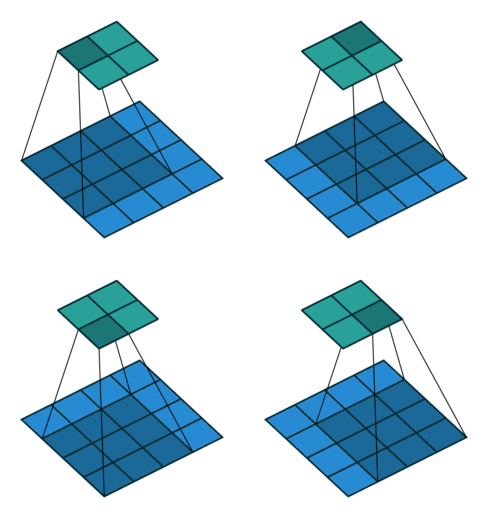\n\n \n Figure 02: Animated convolution ([source](https://github.com/vdumoulin/conv_arithmetic))\n "},{"metadata":{},"cell_type":"markdown","source":"## 3.4. Pooling layers\nPooling operations are another important part of Convolutional Neural Networks.\nJust like the convolution, pooling operation works by sliding a window through our input and performs one of different operations such as taking the average or maximum value of that window, what pooling does actually, is summarizing regions of our data to reduce its complexity.\nThe goal of pooling is to reduce the number of parameters and the amount of computation required.\n\nPooling operation is visualized as:\n\n\nFigure 03: Computing the output values of 3×3 max pooling operation on 5×5 input ([source](https://arxiv.org/abs/1603.07285))"},{"metadata":{},"cell_type":"markdown","source":"# 4. Splitting the data"},{"metadata":{},"cell_type":"markdown","source":"Before going on with creating and training the model, we need to split our dataset into training and validation subsets in order to evaluate our model's performance:"},{"metadata":{"trusted":true},"cell_type":"code","source":"from sklearn.model_selection import train_test_split","execution_count":null,"outputs":[]},{"metadata":{"trusted":true},"cell_type":"code","source":"X_train, X_val, Y_train, Y_val = train_test_split(X_train, Y_train, test_size= 0.1, random_state=srandom)","execution_count":null,"outputs":[]},{"metadata":{},"cell_type":"markdown","source":"# 5. Creating the model"},{"metadata":{},"cell_type":"markdown","source":"We will use Keras API (with TensorFlow backend) to create the model. First, we import the necessary modules:\n+ **Conv2D**: Creates a convolutional layer\n+ **MaxPool2D**: Creates a pooling layer\n+ **Flatten**: Converts the output of convolutional layer into a column vector to serve as an input for the classifier\n+ **Dense**: Creates fully-connected neural network (that is, the usual neural network structure used for classification)\n+ **Dropout**: Applies dropout to the input, dropout helps preventing the model from overfitting\n+ **Sequential**: This model enables us to create a linear stack of layers that we imported so far "},{"metadata":{"trusted":true},"cell_type":"code","source":"from keras.layers import Conv2D, MaxPool2D,Flatten, Dense, Dropout\nfrom keras.models import Sequential","execution_count":null,"outputs":[]},{"metadata":{"trusted":true},"cell_type":"code","source":"def create_model():\n model = Sequential()\n model.add(Conv2D(filters = 32, kernel_size = (3,3), activation = 'relu', input_shape = (28,28,1)))\n model.add(Conv2D(filters = 32, kernel_size = (5,5), activation = 'relu'))\n model.add(MaxPool2D(pool_size = (2,2)))\n model.add(Dropout(0.25))\n model.add(Conv2D(filters = 64, kernel_size = (3,3), activation = 'relu'))\n model.add(MaxPool2D(pool_size = (2,2), strides = (2,2)))\n model.add(Dropout(0.25))\n \n model.add(Flatten())\n model.add(Dense(256, activation = 'relu'))\n model.add(Dropout(0.25))\n model.add(Dense(10, activation = 'softmax'))\n return model","execution_count":null,"outputs":[]},{"metadata":{"trusted":true},"cell_type":"code","source":"model = create_model()","execution_count":null,"outputs":[]},{"metadata":{},"cell_type":"markdown","source":"We need an optimizer to train our network, we will use RMSprop for that with learning rate of `0.001`:"},{"metadata":{"trusted":true},"cell_type":"code","source":"from keras.optimizers import RMSprop","execution_count":null,"outputs":[]},{"metadata":{"trusted":true},"cell_type":"code","source":"optimizer = RMSprop(lr=0.001, rho=0.9, epsilon=1e-08, decay=0.0)","execution_count":null,"outputs":[]},{"metadata":{},"cell_type":"markdown","source":"Now we need to compile the sequential model we created, specifying the optimizer we chose and a loss function. Since this is a multiclass classification problem, the appropriate loss function is *categorical cross entropy*:"},{"metadata":{"trusted":true},"cell_type":"code","source":"model.compile(optimizer = optimizer, loss = 'categorical_crossentropy', metrics = ['accuracy'])","execution_count":null,"outputs":[]},{"metadata":{},"cell_type":"markdown","source":"# 6. Training and evaluating the model"},{"metadata":{},"cell_type":"markdown","source":"## 6.1. Fitting the model"},{"metadata":{},"cell_type":"markdown","source":"To finally train our model we call the function `fit()` and pass it the training images and corresponding true labels (`X_train` and `Y_train`).\n\n`epochs` specifies how many times the model goes through the whole dataset during the training process.\n\n`batch_size` specifies how many samples are used in each cycle of the training process.\n\n`validation_data` we pass the validation split we created earlier to validate our model. The training algorithm DOESN'T USE these samples for training."},{"metadata":{"trusted":true},"cell_type":"code","source":"history = model.fit(X_train, Y_train, epochs=30, batch_size=63, validation_data = (X_val,Y_val), verbose=2)","execution_count":null,"outputs":[]},{"metadata":{},"cell_type":"markdown","source":"## 6.2. History object\nThe `fit()` method returns `History` object. The `History.history` attribute is a dictionary recording training and validation accuracy and loss values at successive epochs. We can what data this object holds by:"},{"metadata":{"trusted":true},"cell_type":"code","source":"print('History object contains: %s' % history.history.keys())","execution_count":null,"outputs":[]},{"metadata":{},"cell_type":"markdown","source":"## 6.3. Plotting accuracy and loss over epochs\nTo see how our model has improved over over time (or epochs), we can plot the different values of model accuracy and model loss for both training and validation data as a function of number of epochs:"},{"metadata":{"trusted":true},"cell_type":"code","source":"fig, (ax1, ax2) = plt.subplots(1,2, figsize=(12,5))\nax1.plot(history.history['acc'])\nax1.plot(history.history['val_acc'])\nax1.legend(['train', 'validation'], loc='best')\nax1.set(xlabel='Epoch', ylabel='Accuracy')\nax1.set_title('Model accuracy');\n\nax2.plot(history.history['loss'])\nax2.plot(history.history['val_loss'])\nax2.legend(['train', 'validation'], loc='best')\nax2.set(xlabel='Epoch', ylabel='Loss')\nax2.set_title('Model loss');\n\n","execution_count":null,"outputs":[]},{"metadata":{},"cell_type":"markdown","source":"# 7. Making predictions\nThe last step would be, of course, to use our model to make predictions on the test data provided by Kaggle.\nFor that we use the `predict()` function and input the variable `test` holding our test data:"},{"metadata":{"trusted":true},"cell_type":"code","source":"Y_predict = model.predict(test)","execution_count":null,"outputs":[]},{"metadata":{},"cell_type":"markdown","source":"The output of the function `predict()` is a 10-dimensional vector (the number of our classes) holding the probability of the input being one of the output classes, think of it as: how much does the model think that the input image is one of the numbers from 0 to 9 (e.g. if the input is an image of `4` and our model predicted it right, the output vector holds 10 values with the value at position 4 is the highest).\n\n Let's see how the first sample in the test set looks like:"},{"metadata":{"trusted":true},"cell_type":"code","source":"plt.imshow(test[0][:,:,0], cmap='gray_r');","execution_count":null,"outputs":[]},{"metadata":{},"cell_type":"markdown","source":"The predictions of our model on this exact sample is:"},{"metadata":{"trusted":true},"cell_type":"code","source":"Y_predict[0]","execution_count":null,"outputs":[]},{"metadata":{},"cell_type":"markdown","source":"The value at position `2` is the highest, obviously the input image represents number `2`.\nWe can use the function `argmax()` in `NumPy` package to find the position (hence, the class) of the maximum value directly:"},{"metadata":{"trusted":true},"cell_type":"code","source":"print('The first sample in the test set is: %d' % Y_predict[0].argmax())","execution_count":null,"outputs":[]},{"metadata":{},"cell_type":"markdown","source":"We will use `argmax()` to find the classes of all our predicted values:"},{"metadata":{"trusted":true},"cell_type":"code","source":"Y_predict_class = np.argmax(Y_predict, axis=1)","execution_count":null,"outputs":[]},{"metadata":{"trusted":true},"cell_type":"code","source":"np.arange(0,len(Y_predict_class)).shape","execution_count":null,"outputs":[]},{"metadata":{"trusted":true},"cell_type":"code","source":"predictions = pd.DataFrame({'ImageId' : np.arange(1,len(Y_predict_class)+1), 'Label' : Y_predict_class})","execution_count":null,"outputs":[]},{"metadata":{"trusted":true},"cell_type":"code","source":"predictions.to_csv('mnist_cnn_keras.csv', index=False)","execution_count":null,"outputs":[]}],"metadata":{"kernelspec":{"language":"python","display_name":"Python 3","name":"python3"},"language_info":{"pygments_lexer":"ipython3","nbconvert_exporter":"python","version":"3.6.4","file_extension":".py","codemirror_mode":{"name":"ipython","version":3},"name":"python","mimetype":"text/x-python"}},"nbformat":4,"nbformat_minor":1}