 \n\n\n
 \n\n# 1. Introduction 📑\n\nThis notebook is just me being frustrated on **deep learning** and trying to understand in \"baby steps\" what is going on here. For somebody that starts in this area with no background whatsoever it can be very confusing, especially because I seem to be unable to find code with many explanations and comments.\n\nSo, if you are frustrated just like I was when I started this stuff I hope the following guidelines will help you. I am by no means a teacher, but in this notebook I will:\n1. Share articles/videos I watched that TRULY helped\n2. Explain code along the way to the best of my ability\n\n
 \n\n# 2. Before we start ✋\n\n> This is my second notebook in the \"series\": **How I taught myself Deep Learning**.\n1. **[How I taught myself Deep Learning: Vanilla NNs](https://www.kaggle.com/andradaolteanu/how-i-taught-myself-deep-learning-1-pytorch-fnn)**\n * PyTorch and Tensors\n * Neural Network Basics, Perceptrons and a Plain Vanilla Neural Net model\n * MNIST Classification using FNN\n * Activation Functions\n * Forward Pass\n * Backpropagation (Loss and Optimizer Functions)\n * Batching, Iterations and Epochs\n * Computing Classification Accuracy\n * Overfitting: Data Augmentation, Weight Decay, Learning Rate, Dropout() and Layer Optimization \n2. **[Recurrent Neural Networks and LSTMs Explained](https://www.kaggle.com/andradaolteanu/recurrent-neural-networks-and-lstms-explained)**\n * 1 Layer RNNs\n * Multiple Neurons RNN\n * Vanilla RNN for MNIST Classification\n * Multilayer RNNs\n * Tanh Activation Function\n * Multilayer RNN for MNIST\n * LSTMs and Vanishing Gradient Problem\n * Bidirectional LSTMs\n * LSTM for MNIST Classification \n\n# 3. Convolutional Neural Networks 🏕🏞🛤🏜🏖🏝🏔\n\n> Pro Tip: Use [this tool](http://alexlenail.me/NN-SVG/LeNet.html) to create your own convolutional neural nets.\n\n## 3.1 Why FNNs might not be the best approach 🤔\nFor **image** classification, Feed Forward Neural Nets are not the best approach for a number of reasons:\n\n1. They do **not** take the 2D geometry of the image into account. This means there is no notion of **proximity**. The human eye detects features in an image locally, meaning that it looks at portions of a picture and recognizes patterns, whereas FNNs don't. Instead, 1 neuron in the Hidden layer connects with ALL pixels from the image, NO matter their position in that image.\n
 \n\n2. FNNs require many connections, therefore they have many weights (parameters) to compute. For example, if we have a 100x100 pixel image => 10,000 neurons in the first layer. If the second layer has 500 neurons, then we end up with 10,000x500 = 5,000,000 weights. Hence, there is *large computing cost*.\n\n3. FNNs are prone to overfitting. This means they learn some features very well instead of learning to generalize.\n\n## 3.2 Youtube Videos to save you time: 🎥\nWatch these 2 Youtube videos to grasp a better understanding of CNNs. \n\n\n## 3.3 Convolutions \n\n**Convolutions** solve the issues encoutered by FNNs:\n* they take spatial structure into account\n* they are made up by *weights* which *learn* to identify patterns and *fire* when they find one\n* same *weights* are used for the *entire* image (weight sharing)\n* you can specify *multiple features* in *one convolutional layer*\n\n> So: convolutional layers have multiple filters, composed by weights, that learn patterns in the data by **sliding** over the entire image.\n\n
 \n\n> Filters (like neurons in human visual cortex) in smaller layers detect edges, lines, and as the layers increase they start detecting shapes, patterns and even faces/ objects.\n\n## 3.4 Computing a convolutional kernel 🧾🖊\nConvolutional Filter == Convolutional Layer == Kernel == Filter\n\nFeature Map == Activation Map\n\n
 ","execution_count":null},{"metadata":{"trusted":true},"cell_type":"code","source":"# Original Image is formed by 3 channels\n# Original pixels are the sum of R + G + B\nprint('Original Image top left corner:', 1+0+0, '\\n')\n\n# Filters: of size 3 x 3 containing trainable weights that identify patterns\nprint('R Output top left corner:', 1*0 + 0*1 + 1*0 + 0*1 + 3*1 + 2*2 + 1*1 + 1*0 + 1*0)\nprint('G Output top left corner:', 0*1 + 3*0 + 3*2 + 0*1 + 2*1 + 4*0 + 1*0 + 2*2 + 0*0)\nprint('B Output top left corner:', 0*1 + 0*1 + 3*1 + 0*0 + 1*0 + 1*2 + 2*1 + 3*1 + 1*2)","execution_count":null,"outputs":[]},{"metadata":{},"cell_type":"markdown","source":"# 4. Understanding Convolutions 🧐\n\nLet's create some convolutions on an image sample. We'll also introduce the notions of:\n* kernel_size\n* stride\n* padding\n\n## 4.1 Imports and Data Preparation 📥\n\n### Libraries 📚","execution_count":null},{"metadata":{"trusted":true},"cell_type":"code","source":"# Imports\nimport torch\nimport torch.nn as nn\nimport torch.nn.functional as F\nimport torch.optim as optim\nfrom torchvision import transforms\nfrom torchvision.datasets import MNIST\nimport torchvision.models # for alexnet model\n\nimport numpy as np\nimport matplotlib.pyplot as plt\n%matplotlib inline\nimport sklearn.metrics\nimport seaborn as sns\nimport random\nimport os","execution_count":null,"outputs":[]},{"metadata":{},"cell_type":"markdown","source":"### Seed 🌱","execution_count":null},{"metadata":{"trusted":true},"cell_type":"code","source":"def set_seed(seed = 1234):\n '''Sets the seed of the entire notebook so results are the same every time we run.\n This is for REPRODUCIBILITY.'''\n np.random.seed(seed)\n random.seed(seed)\n torch.manual_seed(seed)\n torch.cuda.manual_seed(seed)\n # When running on the CuDNN backend, two further options must be set\n torch.backends.cudnn.deterministic = True\n # Set a fixed value for the hash seed\n os.environ['PYTHONHASHSEED'] = str(seed)\n \nset_seed()\ndevice = torch.device('cuda' if torch.cuda.is_available() else 'cpu')\nprint('Device available now:', device)","execution_count":null,"outputs":[]},{"metadata":{"trusted":true},"cell_type":"code","source":"# Import an image example\nimage = plt.imread(\"../input/suki-image/suki.jpg\")\n\n# See Image and Shape\nprint('Image shape:', image.shape)\nplt.imshow(image);","execution_count":null,"outputs":[]},{"metadata":{"trusted":true},"cell_type":"code","source":"# Before aplying any convolutions we need to change the structure of the image:\n\n# 1. Convert to Tensor\nimage = torch.from_numpy(image)\nprint('Image Tensor:', image.shape)\n\n# 2. Bring the channel in front\nimage = image.permute(2, 0, 1)\nprint('Permuted Channel:', image.shape)\n\n# Add 1 more dimension for batching (1 because we have only 1 image)\nimage = image.reshape([1, 3, 320, 320]).float()\nprint('Final image shape:', image.shape)","execution_count":null,"outputs":[]},{"metadata":{},"cell_type":"markdown","source":"## 4.2 Create the Convolutions: 📚\n\nTo create Convolutions you need to have:\n* `in_channels`: the number of input channels (in this case 3, for MNIST data 1)\n* `out_channels`: the number of output channels (any number, this is a hyperparameter that can be tuned) \n* `kernel_size`: the size of the filter (this one is a matrix of 5 by 5 => 25 weights in total)\n* `padding`: the amount of pixels outside the image (used to keep the size of the image intact)\n* `stride`: the amount of pixels the filter is *jumping* (this one shrinks the image in size)\n\n> Example: original image (6x6 pixels) | kernel_size (3x3) | padding (1) | stride (2)\n\n
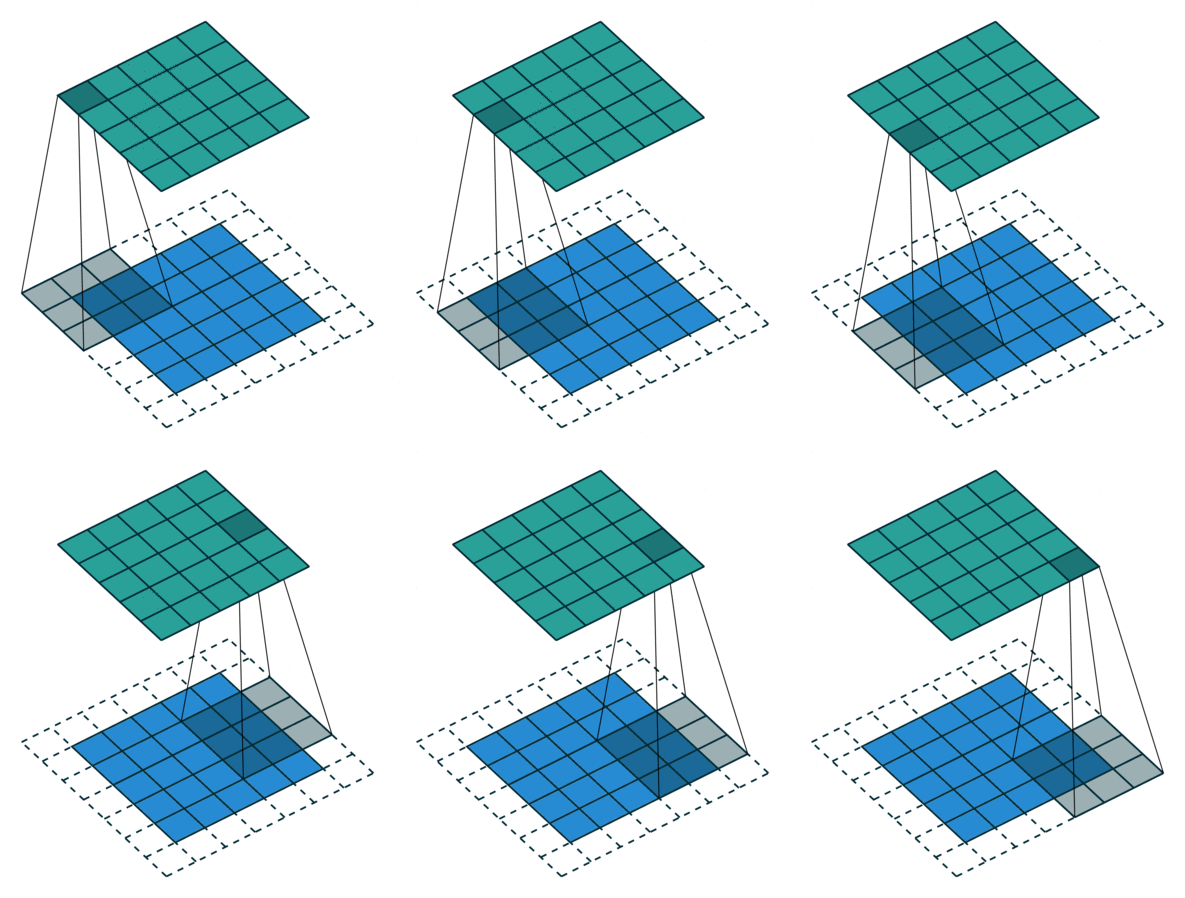 ","execution_count":null},{"metadata":{"trusted":true},"cell_type":"code","source":"# Create 1 convolutional layer\n# Padding and Stride are at default values\nconvolution_1 = nn.Conv2d(in_channels=3, out_channels=5, kernel_size=5, padding=0, stride=1)\n\n# Apply convolution to the image\nconv1_image = convolution_1(image)\nprint('Convoluted Image shape:', conv1_image.shape)","execution_count":null,"outputs":[]},{"metadata":{},"cell_type":"markdown","source":"Let's first visualize the way this convolution works:\n\n
 \n\n
\n\nOutput: [(W - K + 2P)/S + 1] x [(W - K + 2P)/S + 1]
\n ","execution_count":null},{"metadata":{"trusted":true},"cell_type":"code","source":"# Convert result to numpy\nconv2_numpy_image = conv2_image.detach().numpy()\n\n# Remove the dim 1 batch\nconv2_numpy_image = conv2_numpy_image.reshape([8, 156, 156])\n\n# Normalize to [0, 1] for plotting\nmaxim = np.max(conv2_numpy_image)\nminim = np.min(conv2_numpy_image)\n\nconv2_numpy_image = conv2_numpy_image - minim / (maxim - minim)\n\nprint('Image after Conv shape:', conv2_numpy_image.shape)\n\n# Plotting the channels\nplt.figure(figsize = (16, 5))\n\nfor i in range(8):\n plt.subplot(1, 8, i+1)\n plt.imshow(conv2_numpy_image[i]);","execution_count":null,"outputs":[]},{"metadata":{},"cell_type":"markdown","source":"# 5. AlexNet 🎇\n\nAlexNet is a very popular CNN architecture that is capable of achieving high accuracies in classifying 1000 different groups (animals, breeds, onjects etc.). However, removing any layer or changing any of it's parameters could drastically degrade it's performance. \n\nIt is composed of `features` and `classifier`:\n* features can be called by `alexNet.features`: it is the convolutional part of the network that identifies patterns\n* classifier can be called by `alexNet.classifier`: it is the classification part which takes the last output (last activation maps) of the `features` part and takes them through a FNN to output a prediction. There are 1000 different groups in which an image can be classified.\n\n> For more information [head here](https://towardsdatascience.com/alexnet-the-architecture-that-challenged-cnns-e406d5297951)\n\n
 ","execution_count":null},{"metadata":{"_kg_hide-input":false,"trusted":true,"_kg_hide-output":true},"cell_type":"code","source":"# Import alexNet\nalexNet = torchvision.models.alexnet(pretrained=True)","execution_count":null,"outputs":[]},{"metadata":{"trusted":true},"cell_type":"code","source":"# AlexNet Structure:\nalexNet","execution_count":null,"outputs":[]},{"metadata":{},"cell_type":"markdown","source":"# 6. MNIST Classification using CNNs 🔢\nFinally, let's put everything into practice.\n\n## 6.1 CNN_MNISTClassifier neural network\nThe Architecture will contain 2 main parts:\n* the `features` part: which will take the images and put them through 2 convolutional layers that will learn features from the data\n* the `classifier`: a feed forward neural net containing 2 hidden layers and 1 output layer that will classify based on the learned features the image.\n\n> **MaxPool()** - Data is spatially autocorrelated: if a given pixel is green, an adjacent pixel is more likely to be a different tone of green than bright pink. So, to reduce computational load, after each Convolution we can call `MaxPool2d()` to **reduce the activation map size to half**. This method also introduces a degree of spatial invariance.\n
 \n\n> **ReLU()** - It simply takes all the negative numbers in filter and turns them into 0\n\n> So, a natural techinque during convolutions is: `Conv2d()` -> `ReLU()` -> `MaxPool()`","execution_count":null},{"metadata":{"trusted":true},"cell_type":"code","source":"# Creating the Architecture\nclass CNN_MNISTClassifier(nn.Module): # the class inherits from nn.Module\n def __init__(self): # here we define the structure of the network\n super(CNN_MNISTClassifier, self).__init__()\n \n # Convolutional Layers that learn patterns in the data\n self.features = nn.Sequential(nn.Conv2d(1, 16, 3), # output size: (28-3+0)/1 + 1 = 26\n nn.ReLU(), # activation function\n nn.MaxPool2d(2, 2), # 26/2 = 13\n nn.Conv2d(16, 10, 3), # output size: (13-3+0)/1 + 1 = 11\n nn.ReLU(), # activation function\n nn.MaxPool2d(2)) # 11/2 = 5\n \n # FNN which classifies the data\n self.classifier = nn.Sequential(nn.Linear(10*5*5, 128), # 10 channels * 5 by 5 pixel output\n nn.ReLU(),\n nn.Linear(128, 84), \n nn.ReLU(),\n nn.Linear(84, 10)) # 10 possible predictions\n \n def forward(self, image, prints=False): # here we take the images through the network\n if prints: print('Original Image shape:', image.shape)\n \n # Take the image through the convolutions\n image = self.features(image)\n if prints: print('Convol Image shape:', image.shape)\n \n # Reshape the output to vectorize it\n image = image.view(-1, 10*5*5)\n if prints: print('Vectorized Image shape:', image.shape)\n \n # Log Probabilities output\n out = self.classifier(image)\n if prints: print('Out:', out)\n \n # Apply softmax\n out = F.log_softmax(out, dim=1)\n if prints: print('log_softmax(out):', out)\n \n return out","execution_count":null,"outputs":[]},{"metadata":{},"cell_type":"markdown","source":"## 6.2 Understanding how the Network Works: 😎","execution_count":null},{"metadata":{"trusted":true},"cell_type":"code","source":"# Create Model Instance\nmodel_example = CNN_MNISTClassifier()\nmodel_example","execution_count":null,"outputs":[]},{"metadata":{"trusted":true,"_kg_hide-output":true},"cell_type":"code","source":"# Importing the MNIST data\nmnist_example = MNIST('data', train=True, download=True, transform=transforms.ToTensor())\n\n# Select only 1 image (index=13)\nimage_example, label_example = list(mnist_example)[13]\n\n# Add 1 more dimension for batching (1 image in the batch)\nimage_example = image_example.reshape([1, 1, 28, 28])","execution_count":null,"outputs":[]},{"metadata":{},"cell_type":"markdown","source":"> How the schema of this example looks:\n\n
 ","execution_count":null},{"metadata":{"trusted":true},"cell_type":"code","source":"# Print Information\nprint('Image Example shape:', image_example.shape, '\\n' +\n 'Label Example:', label_example, '\\n')\n\n# Create Log Probabilities\nout = model_example(image_example, prints=True)","execution_count":null,"outputs":[]},{"metadata":{"trusted":true},"cell_type":"code","source":"# Create criterion and optimizer\ncriterion = nn.CrossEntropyLoss()\noptimizer = optim.Adam(model_example.parameters(), lr = 0.001, weight_decay=0.0005)\n\n# Compute loss\n# Label Example has been transformed to tensor and reshaped so it suits the requirements of function\nloss = criterion(out, torch.tensor(label_example).reshape(1))\nprint('Loss:', loss)\n\n# Backpropagation\n# Clears all gradients\noptimizer.zero_grad()\n# Compute gradients with respect to the loss\nloss.backward()\n# Update parameters\noptimizer.step()","execution_count":null,"outputs":[]},{"metadata":{},"cell_type":"markdown","source":"## 6.3 Training on all Images: 🚀","execution_count":null},{"metadata":{"trusted":true},"cell_type":"code","source":"# Import the train and test data\n# Transforms data to Tensors using `transforms`\nmnist_train = MNIST('data', train = True, download=True, transform=transforms.ToTensor())\nmnist_test = MNIST('data', train = False, download=True, transform=transforms.ToTensor())\n\n# Select only first 500 instances from each to make training fast\nmnist_train = list(mnist_train)[:500]\nmnist_test = list(mnist_test)[:500]","execution_count":null,"outputs":[]},{"metadata":{},"cell_type":"markdown","source":"### 6.3.1 Accuracy Function: ✔\n\nWe'll use the same accuracy function used in the [How I taught myself Deep Learning: Vanilla NNs](https://www.kaggle.com/andradaolteanu/how-i-taught-myself-deep-learning-1-pytorch-fnn) notebook.","execution_count":null},{"metadata":{"trusted":true},"cell_type":"code","source":"def get_accuracy(model, data, batchSize = 20):\n '''Iterates through data and returnes average accuracy per batch.'''\n # Sets the model in evaluation mode\n model.eval()\n \n # Creates the dataloader\n data_loader = torch.utils.data.DataLoader(data, batch_size=batchSize)\n \n correct_cases = 0\n total_cases = 0\n \n for (images, labels) in iter(data_loader):\n # Is formed by 20 images (by default) with 10 probabilities each\n out = model(images)\n # Choose maximum probability and then select only the label (not the prob number)\n prediction = out.max(dim = 1)[1]\n # First check how many are correct in the batch, then we sum then convert to integer (not tensor)\n correct_cases += (prediction == labels).sum().item()\n # Total cases\n total_cases += images.shape[0]\n \n return correct_cases / total_cases","execution_count":null,"outputs":[]},{"metadata":{},"cell_type":"markdown","source":"### 6.3.2 Training Function: 💪\n\nWe'll use the same `train` function used in the [How I taught myself Deep Learning: Vanilla NNs](https://www.kaggle.com/andradaolteanu/how-i-taught-myself-deep-learning-1-pytorch-fnn) notebook (only change is that we'll create an `Adam` optimizer instead of `SGD`).\n\n
 ","execution_count":null},{"metadata":{"trusted":true},"cell_type":"code","source":"def train_network(model, train_data, test_data, batchSize=20, num_epochs=1, learning_rate=0.01, weight_decay=0,\n show_plot = True, show_acc = True):\n \n '''Trains the model and computes the average accuracy for train and test data.\n If enabled, it also shows the loss and accuracy over the iterations.'''\n \n print('Get data ready...')\n # Create dataloader for training dataset - so we can train on multiple batches\n # Shuffle after every epoch \n train_loader = torch.utils.data.DataLoader(dataset=train_data, batch_size=batchSize, shuffle=True)\n \n # Create criterion and optimizer\n criterion = nn.CrossEntropyLoss()\n optimizer = optim.Adam(model.parameters(), lr=learning_rate, weight_decay=weight_decay)\n \n # Losses & Iterations: to keep all losses during training (for plotting)\n losses = []\n iterations = []\n # Train and test accuracies: to keep their values also (for plotting)\n train_acc = []\n test_acc = []\n \n print('Training started...')\n iteration = 0\n # Train the data multiple times\n for epoch in range(num_epochs):\n \n for images, labels in iter(train_loader):\n # Set model in training mode:\n model.train()\n \n # Create log probabilities\n out = model(images)\n # Clears the gradients from previous iteration\n optimizer.zero_grad()\n # Computes loss: how far is the prediction from the actual?\n loss = criterion(out, labels)\n # Computes gradients for neurons\n loss.backward()\n # Updates the weights\n optimizer.step()\n \n # Save information after this iteration\n iterations.append(iteration)\n iteration += 1\n losses.append(loss)\n # Compute accuracy after this epoch and save\n train_acc.append(get_accuracy(model, train_data))\n test_acc.append(get_accuracy(model, test_data))\n \n \n # Show Accuracies\n # Show the last accuracy registered\n if show_acc:\n print(\"Final Training Accuracy: {}\".format(train_acc[-1]))\n print(\"Final Testing Accuracy: {}\".format(test_acc[-1]))\n \n # Create plots\n if show_plot:\n plt.figure(figsize=(10,4))\n plt.subplot(1,2,1)\n plt.title(\"Loss Curve\")\n plt.plot(iterations[::20], losses[::20], label=\"Train\", linewidth=4, color='#7100FF')\n plt.xlabel(\"Iterations\")\n plt.ylabel(\"Loss\")\n\n plt.subplot(1,2,2)\n plt.title(\"Accuracy Curve\")\n plt.plot(iterations[::20], train_acc[::20], label=\"Train\", linewidth=4, color='#FFD800')\n plt.plot(iterations[::20], test_acc[::20], label=\"Test\", linewidth=4, color='#FF8B00')\n plt.xlabel(\"Iterations\")\n plt.ylabel(\"Accuracy\")\n plt.legend(loc='best')\n plt.show()","execution_count":null,"outputs":[]},{"metadata":{},"cell_type":"markdown","source":"### 6.3.3 Training...\n\nNotice there is a much higher Test Accuracy for the CNN model vs the plain Vanilla FNN in the last notebook.","execution_count":null},{"metadata":{"trusted":true},"cell_type":"code","source":"# Create Model Instance\nmodel1 = CNN_MNISTClassifier()\n\n# Train...\ntrain_network(model1, mnist_train, mnist_test, num_epochs=200)","execution_count":null,"outputs":[]},{"metadata":{},"cell_type":"markdown","source":"# Bonuses 📌\n\n## 1. Confusion Matrix 🙃","execution_count":null},{"metadata":{"trusted":true},"cell_type":"code","source":"def get_confusion_matrix(model, test_data):\n # First we make sure we disable Gradient Computing\n torch.no_grad()\n \n # Model in Evaluation Mode\n model.eval()\n \n preds, actuals = [], []\n\n for image, label in mnist_test:\n # Append 1 more dimension for batching\n image = image.reshape(1, 1, 28, 28)\n # Prediction\n out = model(image)\n\n prediction = torch.max(out, dim=1)[1].item()\n preds.append(prediction)\n actuals.append(label)\n \n return sklearn.metrics.confusion_matrix(preds, actuals)","execution_count":null,"outputs":[]},{"metadata":{"trusted":true},"cell_type":"code","source":"plt.figure(figsize=(16, 5))\nsns.heatmap(get_confusion_matrix(model1, mnist_test), cmap='icefire', annot=True, linewidths=0.1,\n fmt=',')\nplt.title('Confusion Matrix: CNN', fontsize=15);","execution_count":null,"outputs":[]},{"metadata":{},"cell_type":"markdown","source":"## 2. 2D Visualization of Convolutional Neural Nets 💎\n\n[Here is a very good resource to better visualize and understand MNIST Classification using CNN.](https://www.cs.ryerson.ca/~aharley/vis/conv/flat.html)\n\n
 ","execution_count":null},{"metadata":{},"cell_type":"markdown","source":"# Other How I taught myself Deep Learning Notebooks 📒\n* [How I taught myself Deep Learning: Vanilla NNs](https://www.kaggle.com/andradaolteanu/how-i-taught-myself-deep-learning-1-pytorch-fnn)\n* [Recurrent Neural Networks and LSTMs Explained](https://www.kaggle.com/andradaolteanu/recurrent-neural-networks-and-lstms-explained)\n\nIf you have any questions, please do not hesitate to ask. This notebook is made to bring more clear understanding of concepts and coding, so this would also help me add, modify and improve it. \n\n
If you liked this, upvote!
\nCheers!
\n