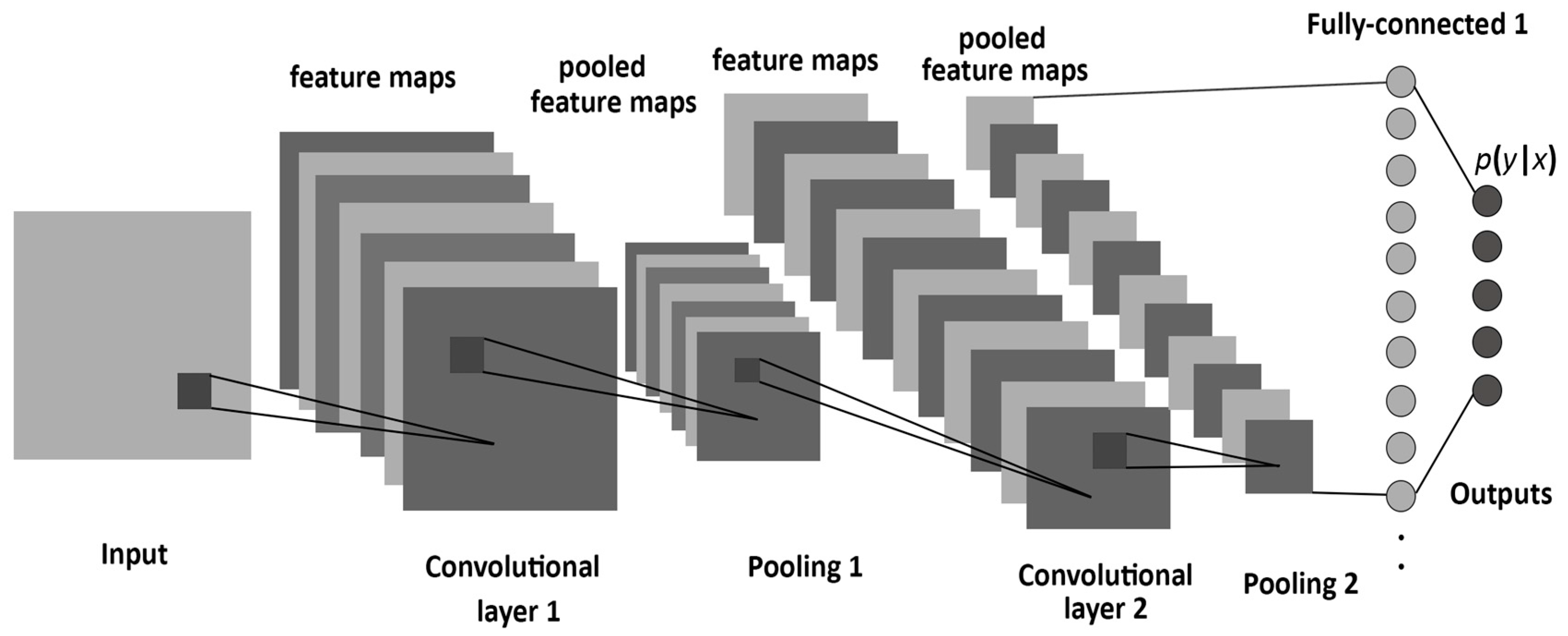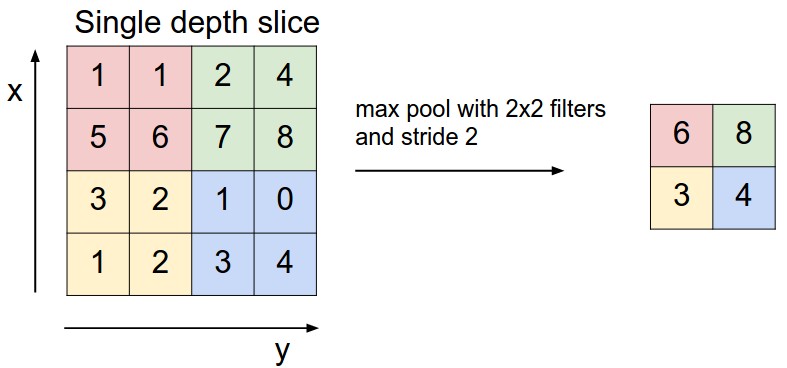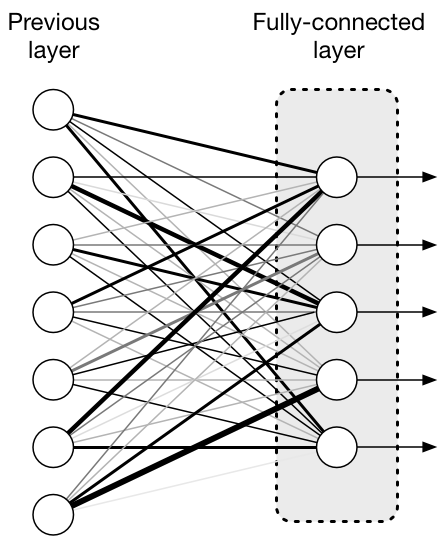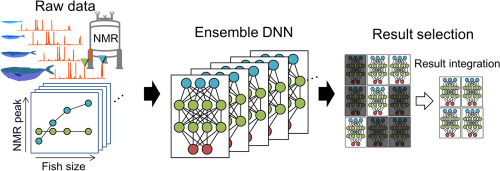
{"metadata":{"kernelspec":{"language":"python","display_name":"Python 3","name":"python3"},"language_info":{"pygments_lexer":"ipython3","nbconvert_exporter":"python","version":"3.6.4","file_extension":".py","codemirror_mode":{"name":"ipython","version":3},"name":"python","mimetype":"text/x-python"}},"nbformat_minor":4,"nbformat":4,"cells":[{"cell_type":"code","source":"# This Python 3 environment comes with many helpful analytics libraries installed\n# It is defined by the kaggle/python Docker image: https://github.com/kaggle/docker-python\n# For example, here's several helpful packages to load\n\nimport numpy as np # linear algebra\nimport pandas as pd # data processing, CSV file I/O (e.g. pd.read_csv)\n\n# Input data files are available in the read-only \"../input/\" directory\n# For example, running this (by clicking run or pressing Shift+Enter) will list all files under the input directory\n\nimport os\nfor dirname, _, filenames in os.walk('/kaggle/input'):\n    for filename in filenames:\n        print(os.path.join(dirname, filename))\n\n# You can write up to 20GB to the current directory (/kaggle/working/) that gets preserved as output when you create a version using \"Save & Run All\" \n# You can also write temporary files to /kaggle/temp/, but they won't be saved outside of the current session","metadata":{"_cell_guid":"b1076dfc-b9ad-4769-8c92-a6c4dae69d19","_uuid":"8f2839f25d086af736a60e9eeb907d3b93b6e0e5","papermill":{"duration":0.057766,"end_time":"2022-05-03T07:34:36.648279","exception":false,"start_time":"2022-05-03T07:34:36.590513","status":"completed"},"tags":[],"execution":{"iopub.status.busy":"2022-05-03T12:05:35.975249Z","iopub.execute_input":"2022-05-03T12:05:35.975702Z","iopub.status.idle":"2022-05-03T12:05:36.020156Z","shell.execute_reply.started":"2022-05-03T12:05:35.975595Z","shell.execute_reply":"2022-05-03T12:05:36.019141Z"},"trusted":true},"execution_count":null,"outputs":[]},{"cell_type":"markdown","source":"# <b><span style=\"color:#27aee3; font-weight:1200\">|</span> About Dataset\n    \nMNIST (\"Modified National Institute of Standards and Technology\") is the de facto “hello world” dataset of computer vision. Since its release in 1999, this classic dataset of handwritten images has served as the basis for benchmarking classification algorithms. As new machine learning techniques emerge, MNIST remains a reliable resource for researchers and learners alike. \n    \nIn this notebook, Modified LeNet CNN along with ensembling will be used to predict the digits.","metadata":{"papermill":{"duration":0.037515,"end_time":"2022-05-03T07:34:36.726229","exception":false,"start_time":"2022-05-03T07:34:36.688714","status":"completed"},"tags":[]}},{"cell_type":"markdown","source":"# 1 <b><span style=\"color:#27aee3; font-weight:1200\">|</span> Required Libraries","metadata":{"papermill":{"duration":0.037712,"end_time":"2022-05-03T07:34:36.802273","exception":false,"start_time":"2022-05-03T07:34:36.764561","status":"completed"},"tags":[]}},{"cell_type":"code","source":"import matplotlib.pyplot as plt\nimport seaborn as sns\n%matplotlib inline\nfrom collections import Counter\n\nimport warnings\nwarnings.filterwarnings('ignore')\n\nimport tensorflow as tf\nfrom tensorflow import keras\nfrom keras.models import Sequential\nfrom keras.layers import Dense, Conv2D, Dropout, BatchNormalization, Flatten\nfrom keras.preprocessing.image import ImageDataGenerator\nfrom keras.callbacks import ModelCheckpoint, LearningRateScheduler\nfrom keras import regularizers\nfrom tensorflow.keras.utils import to_categorical\nfrom tensorflow.keras.preprocessing.image import ImageDataGenerator","metadata":{"papermill":{"duration":5.831388,"end_time":"2022-05-03T07:34:42.671441","exception":false,"start_time":"2022-05-03T07:34:36.840053","status":"completed"},"tags":[],"execution":{"iopub.status.busy":"2022-05-03T12:05:36.022529Z","iopub.execute_input":"2022-05-03T12:05:36.023254Z","iopub.status.idle":"2022-05-03T12:05:45.367605Z","shell.execute_reply.started":"2022-05-03T12:05:36.023201Z","shell.execute_reply":"2022-05-03T12:05:45.366427Z"},"trusted":true},"execution_count":null,"outputs":[]},{"cell_type":"markdown","source":"# 2 <b><span style=\"color:#27aee3; font-weight:1200\">|</span> Data","metadata":{"papermill":{"duration":0.038927,"end_time":"2022-05-03T07:34:42.751204","exception":false,"start_time":"2022-05-03T07:34:42.712277","status":"completed"},"tags":[]}},{"cell_type":"code","source":"train = pd.read_csv('../input/digit-recognizer/train.csv')\n\nprint(f'{train.shape}\\n')\ntrain.head()","metadata":{"papermill":{"duration":3.335942,"end_time":"2022-05-03T07:34:46.125154","exception":false,"start_time":"2022-05-03T07:34:42.789212","status":"completed"},"tags":[],"execution":{"iopub.status.busy":"2022-05-03T12:05:45.369111Z","iopub.execute_input":"2022-05-03T12:05:45.369407Z","iopub.status.idle":"2022-05-03T12:05:49.684039Z","shell.execute_reply.started":"2022-05-03T12:05:45.369370Z","shell.execute_reply":"2022-05-03T12:05:49.682888Z"},"trusted":true},"execution_count":null,"outputs":[]},{"cell_type":"code","source":"test = pd.read_csv('../input/digit-recognizer/test.csv')\n\nprint(f'{test.shape}\\n')\ntest.head()","metadata":{"papermill":{"duration":1.806562,"end_time":"2022-05-03T07:34:47.971606","exception":false,"start_time":"2022-05-03T07:34:46.165044","status":"completed"},"tags":[],"execution":{"iopub.status.busy":"2022-05-03T12:05:49.686332Z","iopub.execute_input":"2022-05-03T12:05:49.686582Z","iopub.status.idle":"2022-05-03T12:05:52.059243Z","shell.execute_reply.started":"2022-05-03T12:05:49.686551Z","shell.execute_reply":"2022-05-03T12:05:52.057826Z"},"trusted":true},"execution_count":null,"outputs":[]},{"cell_type":"markdown","source":"### <b><span style=\"color:#27aee3; font-weight:1200\">※</span> Classes Distribution\n\nTo check the amount of images belonging to each digit from 0-9, **Counter** function can be used. It is used to get the count of individual elements. For example, suppose the list is: \n\n> `from collections import Counter`\n>\n> `a = [1, 1, 2 ,1 ,1 , 2, 1]`\n> \n> `print(Counter(a))`\n\nwill print:\n\n> `Counter({'1': 5, '2': 2})`\n","metadata":{"papermill":{"duration":0.040619,"end_time":"2022-05-03T07:34:48.053569","exception":false,"start_time":"2022-05-03T07:34:48.01295","status":"completed"},"tags":[]}},{"cell_type":"code","source":"print(\"Total values for each digit:\\n\")\nCounter(train[\"label\"])","metadata":{"papermill":{"duration":0.059972,"end_time":"2022-05-03T07:34:48.153365","exception":false,"start_time":"2022-05-03T07:34:48.093393","status":"completed"},"tags":[],"execution":{"iopub.status.busy":"2022-05-03T12:05:52.061500Z","iopub.execute_input":"2022-05-03T12:05:52.063703Z","iopub.status.idle":"2022-05-03T12:05:52.088411Z","shell.execute_reply.started":"2022-05-03T12:05:52.063631Z","shell.execute_reply":"2022-05-03T12:05:52.087344Z"},"trusted":true},"execution_count":null,"outputs":[]},{"cell_type":"code","source":"sns.countplot(data=train, x='label')","metadata":{"papermill":{"duration":0.270392,"end_time":"2022-05-03T07:34:48.465611","exception":false,"start_time":"2022-05-03T07:34:48.195219","status":"completed"},"tags":[],"execution":{"iopub.status.busy":"2022-05-03T12:05:52.090183Z","iopub.execute_input":"2022-05-03T12:05:52.091229Z","iopub.status.idle":"2022-05-03T12:05:52.379820Z","shell.execute_reply.started":"2022-05-03T12:05:52.091175Z","shell.execute_reply":"2022-05-03T12:05:52.378884Z"},"trusted":true},"execution_count":null,"outputs":[]},{"cell_type":"markdown","source":"The no. of classes of digits are balanced. So, no need to worry about upsampling or downsampling! **Hooray!**\n","metadata":{"papermill":{"duration":0.041279,"end_time":"2022-05-03T07:34:48.548691","exception":false,"start_time":"2022-05-03T07:34:48.507412","status":"completed"},"tags":[]}},{"cell_type":"markdown","source":"### <b><span style=\"color:#27aee3; font-weight:1200\">※</span> Checking for any missing pixel value\n","metadata":{"papermill":{"duration":0.04305,"end_time":"2022-05-03T07:34:48.634124","exception":false,"start_time":"2022-05-03T07:34:48.591074","status":"completed"},"tags":[]}},{"cell_type":"code","source":"print(f'Null values (training data): {train.isnull().sum().sum()}\\n')\nprint(f'Null values (testing data): {test.isnull().sum().sum()}')","metadata":{"papermill":{"duration":0.114526,"end_time":"2022-05-03T07:34:48.791852","exception":false,"start_time":"2022-05-03T07:34:48.677326","status":"completed"},"tags":[],"execution":{"iopub.status.busy":"2022-05-03T12:05:52.381353Z","iopub.execute_input":"2022-05-03T12:05:52.381967Z","iopub.status.idle":"2022-05-03T12:05:52.476103Z","shell.execute_reply.started":"2022-05-03T12:05:52.381899Z","shell.execute_reply":"2022-05-03T12:05:52.475079Z"},"trusted":true},"execution_count":null,"outputs":[]},{"cell_type":"markdown","source":"# 3 <b><span style=\"color:#27aee3; font-weight:1200\">|</span> Data Preprocessing\n\nOur dataframes are in the following form:\n \n### <b><span style=\"color:#27aee3; font-weight:1200\">※</span> Train dataframe\n\n    \n <table style=\"width:100%; border: 0.1px solid black\">\n  <tr>\n    <th>label</th>\n    <th>pixel0</th>\n    <th>pixel1</th>\n    <th>...</th>\n    <th>pixel785</th>\n  </tr>\n</table>\n    \nFrom the shape of the train dataframe, total columns are 42000 x 785. The image size that is required is 28 x 28 which means the source should have 784 dimensions. As train set has 785 dimensions including the **label** column, hence **label** needs to be seperated from the training set so that the remaining columns can be reshaped into the required 28 x 28 size.\n    \n    \n    \n   \n### <b><span style=\"color:#27aee3; font-weight:1200\">※</span> Test dataframe\n    \n <table style=\"width:100%; border: 0.1px solid black\">\n  <tr>\n    <th>pixel0</th>\n    <th>pixel1</th>\n    <th>...</th>\n    <th>pixel784</th>\n  </tr>\n</table>\n    \nThe test dataframe already has 784 dimensions, **label** being the column which is to be predicted, hence it can be easily reshaped into 28 x 28 without any transformation.","metadata":{"papermill":{"duration":0.042991,"end_time":"2022-05-03T07:34:48.878663","exception":false,"start_time":"2022-05-03T07:34:48.835672","status":"completed"},"tags":[]}},{"cell_type":"code","source":"x_train = train.values[:, 1:] # get all values from 1st index onwards\ny_train = train.values[:, 0]  # get the label column\n\nx_test = test.values[:, 0:]   # get all values starting from 0th index\n\ndel train # delete train and test set to free up memory\ndel test ","metadata":{"papermill":{"duration":0.048826,"end_time":"2022-05-03T07:34:48.969863","exception":false,"start_time":"2022-05-03T07:34:48.921037","status":"completed"},"tags":[],"execution":{"iopub.status.busy":"2022-05-03T12:05:52.477705Z","iopub.execute_input":"2022-05-03T12:05:52.478082Z","iopub.status.idle":"2022-05-03T12:05:52.484879Z","shell.execute_reply.started":"2022-05-03T12:05:52.478032Z","shell.execute_reply":"2022-05-03T12:05:52.483942Z"},"trusted":true},"execution_count":null,"outputs":[]},{"cell_type":"markdown","source":"### <b><span style=\"color:#27aee3; font-weight:1200\">※</span> Some of the training set contents<br/>","metadata":{"papermill":{"duration":0.041992,"end_time":"2022-05-03T07:34:49.053708","exception":false,"start_time":"2022-05-03T07:34:49.011716","status":"completed"},"tags":[]}},{"cell_type":"code","source":"fig = plt.figure(figsize=[14, 10])\n\nfor i in range(16):\n    ax = fig.add_subplot(4 , 4, i + 1, xticks=[], yticks=[])\n    ax.imshow(x_train[i].reshape((28,28)))\n    ax.set_title(str(y_train[i]))","metadata":{"papermill":{"duration":0.687705,"end_time":"2022-05-03T07:34:49.783317","exception":false,"start_time":"2022-05-03T07:34:49.095612","status":"completed"},"tags":[],"execution":{"iopub.status.busy":"2022-05-03T12:05:52.486670Z","iopub.execute_input":"2022-05-03T12:05:52.487246Z","iopub.status.idle":"2022-05-03T12:05:53.294684Z","shell.execute_reply.started":"2022-05-03T12:05:52.487194Z","shell.execute_reply":"2022-05-03T12:05:53.293715Z"},"trusted":true},"execution_count":null,"outputs":[]},{"cell_type":"markdown","source":"### <b><span style=\"color:#27aee3; font-weight:1200\">※</span> Normalizing the pixel values\n\nNormalizing the pixel values is a necessary step. There may be pixels representing the values say **244** while there may be some having the value **2**, so passing them as it is to a machine learning or deep learning algorithm will make the models perform poorly as there are some values enormously larger than the others. It creates an uneveness among the values. Also, it also messes with our beloved **gradient descent**. 🙂 <br/>\n\n<center><img height=500 width=500 src='https://raw.githubusercontent.com/moelgendy/deep_learning_for_vision_systems/master/chapter_03/normalized.jpg'></img><center>\n    \nThe formula used for normalization is:\n    \n<center><img height=400 width=400 src='https://www.spreadsheetweb.com/wp-content/uploads/2020/07/How-to-normalize-data-in-Excel-011.png'></img></center>","metadata":{"papermill":{"duration":0.042807,"end_time":"2022-05-03T07:34:49.869841","exception":false,"start_time":"2022-05-03T07:34:49.827034","status":"completed"},"tags":[]}},{"cell_type":"code","source":"mean = np.mean(x_train) # take the mean\nstd = np.std(x_train)   # take the standard deviation\nx_train = (x_train-mean)/(std+1e-7)    # normalizing the values\nx_test = (x_test-mean)/(std+1e-7)\n\nx_train = x_train.reshape(-1, 28, 28, 1) # reshaping them\nx_test = x_test.reshape(-1, 28, 28, 1)\n\ny_train","metadata":{"papermill":{"duration":0.467418,"end_time":"2022-05-03T07:34:50.379849","exception":false,"start_time":"2022-05-03T07:34:49.912431","status":"completed"},"tags":[],"execution":{"iopub.status.busy":"2022-05-03T12:05:53.298558Z","iopub.execute_input":"2022-05-03T12:05:53.299251Z","iopub.status.idle":"2022-05-03T12:05:54.097989Z","shell.execute_reply.started":"2022-05-03T12:05:53.299194Z","shell.execute_reply":"2022-05-03T12:05:54.096847Z"},"trusted":true},"execution_count":null,"outputs":[]},{"cell_type":"code","source":"plt.imshow(x_train[2])","metadata":{"papermill":{"duration":0.290254,"end_time":"2022-05-03T07:34:50.756405","exception":false,"start_time":"2022-05-03T07:34:50.466151","status":"completed"},"tags":[],"execution":{"iopub.status.busy":"2022-05-03T12:05:54.099443Z","iopub.execute_input":"2022-05-03T12:05:54.099729Z","iopub.status.idle":"2022-05-03T12:05:54.328488Z","shell.execute_reply.started":"2022-05-03T12:05:54.099695Z","shell.execute_reply":"2022-05-03T12:05:54.327453Z"},"trusted":true},"execution_count":null,"outputs":[]},{"cell_type":"code","source":"y_train[2]","metadata":{"papermill":{"duration":0.087453,"end_time":"2022-05-03T07:34:50.92226","exception":false,"start_time":"2022-05-03T07:34:50.834807","status":"completed"},"tags":[],"execution":{"iopub.status.busy":"2022-05-03T12:05:54.329968Z","iopub.execute_input":"2022-05-03T12:05:54.330273Z","iopub.status.idle":"2022-05-03T12:05:54.338744Z","shell.execute_reply.started":"2022-05-03T12:05:54.330237Z","shell.execute_reply":"2022-05-03T12:05:54.337452Z"},"trusted":true},"execution_count":null,"outputs":[]},{"cell_type":"markdown","source":"### <b><span style=\"color:#27aee3; font-weight:1200\">※</span> One-hot encoding & Validation Set\n    \n\nOne-hot encoding is a process by which categorical targets are converted to a binary form (1's & 0's). The best way to understand is using an example. Suppose like in this set, there are 10 classes, each number representing the equivalent digit:\n\n<h3 align='center'> [ 0, 1, 2, 3, 4, 5, 6, 7, 8, 9 ] </h3>\n    \nNow, once one-hot encoding is done using tensorflow, the result can be interpreted in the following way:\n    \n<b>Image at index 3</b>\n\n<code>plt.imshow(x_train[3])</code>\n    \nwhich is the digit <b> 4 </b> (look in the coming cells). Now, to check the <code>y_train</code> for the answer, the result is as shown below:\n\n<code>y_train[3]</code>\n    \n> $ \\begin{bmatrix}\n0., 0., 0., 0., 1., 0., 0., 0., 0., 0.  \\\\\n\\end{bmatrix}  $\n    \nHere, 0 means the digit is not present at this index while 1 means the digit is present at this index (which in this case is it's value). So, the above result means that the value is at index **4** which in this case is it's value.\n    \nWell, this may take a little time to wrap the head around :)","metadata":{"papermill":{"duration":0.04847,"end_time":"2022-05-03T07:34:51.047069","exception":false,"start_time":"2022-05-03T07:34:50.998599","status":"completed"},"tags":[]}},{"cell_type":"code","source":"num_classes = 10\n\ny_train = to_categorical(y_train, num_classes=num_classes)\n\nx_train, x_val = x_train[:37000], x_train[37000:]\ny_train, y_val = y_train[:37000], y_train[37000:]\n\nprint(f'Training samples: {x_train.shape}\\nValidation samples: {x_val.shape}\\nTesting samples: {x_test.shape}')","metadata":{"papermill":{"duration":0.054372,"end_time":"2022-05-03T07:34:51.146067","exception":false,"start_time":"2022-05-03T07:34:51.091695","status":"completed"},"tags":[],"execution":{"iopub.status.busy":"2022-05-03T12:05:54.340454Z","iopub.execute_input":"2022-05-03T12:05:54.340773Z","iopub.status.idle":"2022-05-03T12:05:54.355396Z","shell.execute_reply.started":"2022-05-03T12:05:54.340726Z","shell.execute_reply":"2022-05-03T12:05:54.354043Z"},"trusted":true},"execution_count":null,"outputs":[]},{"cell_type":"code","source":"plt.imshow(x_train[3])","metadata":{"papermill":{"duration":0.267878,"end_time":"2022-05-03T07:34:51.459459","exception":false,"start_time":"2022-05-03T07:34:51.191581","status":"completed"},"tags":[],"execution":{"iopub.status.busy":"2022-05-03T12:05:54.356638Z","iopub.execute_input":"2022-05-03T12:05:54.357003Z","iopub.status.idle":"2022-05-03T12:05:54.581315Z","shell.execute_reply.started":"2022-05-03T12:05:54.356959Z","shell.execute_reply":"2022-05-03T12:05:54.580019Z"},"trusted":true},"execution_count":null,"outputs":[]},{"cell_type":"code","source":"y_train[3]","metadata":{"papermill":{"duration":0.054486,"end_time":"2022-05-03T07:34:51.560499","exception":false,"start_time":"2022-05-03T07:34:51.506013","status":"completed"},"tags":[],"execution":{"iopub.status.busy":"2022-05-03T12:05:54.583287Z","iopub.execute_input":"2022-05-03T12:05:54.583818Z","iopub.status.idle":"2022-05-03T12:05:54.591537Z","shell.execute_reply.started":"2022-05-03T12:05:54.583772Z","shell.execute_reply":"2022-05-03T12:05:54.590411Z"},"trusted":true},"execution_count":null,"outputs":[]},{"cell_type":"markdown","source":"# 4 <b><span style=\"color:#27aee3; font-weight:1200\">|</span> CNN Model","metadata":{"papermill":{"duration":0.046547,"end_time":"2022-05-03T07:34:51.652757","exception":false,"start_time":"2022-05-03T07:34:51.60621","status":"completed"},"tags":[]}},{"cell_type":"markdown","source":"### <b><span style=\"color:#27aee3; font-weight:1200\">※</span> How CNN (Convolutional Neural Network) works?<br/>\n\n<center><img width=600 height=600 src='https://www.mdpi.com/entropy/entropy-19-00242/article_deploy/html/images/entropy-19-00242-g001.png'></img></center>\n<br/>\n\nIn mathematics, convolution is the operation of two functions to produce a third\nmodified function. In the context of CNNs, the first function is the input image, and\nthe second function is the convolutional filter. Some mathematical\noperations are performed to produce a modified image with new pixel values.\nThe above image summarizes the whole process of a CNN.\n\nThe basic components of a CNN involves:\n- CONV layer\n- POOLING layer\n- FULLY CONNECTED layer\n\n\n\n#### <b><span style=\"color:#27aee3; font-weight:1200\">※</span> CONV Layer<br/>\n\n- The image pixel values are passed to the 1st convolutional layer of a CNN;\n- All the Convolutional layers try to find the relations between the pixels and their neighborhood pixels (with the help of kernels) and extract the different features of the image;\n- Then, the result is passed on to the subsequent layers (the kernel works like below):\n\n<center><img height=700 width=700 src='https://1.cms.s81c.com/sites/default/files/2021-01-06/ICLH_Diagram_Batch_02_17A-ConvolutionalNeuralNetworks-WHITEBG.png'></img></center><br/>\n\n\n\n#### <b><span style=\"color:#27aee3; font-weight:1200\">※</span> POOLING Layer<br/>\n\n- Adding more convolutional layers increases the depth of the output layer, which leads to increase in the number of parameters that the network needs to optimize (learn). This in turn increases the dimensions and hence training may become computationally expensive. So, pooling helps reduce the size of the network by reducing the number of parameters passed to the next layer.\n\n<center><img height=500 width=500 src='https://cs231n.github.io/assets/cnn/maxpool.jpeg'></img></center>\n<br/>\n\n\n\n#### <b><span style=\"color:#27aee3; font-weight:1200\">※</span> FULLY CONNECTED Layer<br/>\n    \n<center><img src='https://miro.medium.com/max/441/1*yjy3dwRL-vmSpmUG7UNJYg@2x.png'></img></center>  \n  \n- Finally, after passing the image through the feature-learning process using convolutional and pooling layers, all the features are extracted and are put in a long tube. Hence, the extracted features are ready to be used for classification with the help of the usual fully connected layers.","metadata":{"papermill":{"duration":0.045535,"end_time":"2022-05-03T07:34:51.744032","exception":false,"start_time":"2022-05-03T07:34:51.698497","status":"completed"},"tags":[]}},{"cell_type":"markdown","source":"### <b><span style=\"color:#27aee3; font-weight:1200\">※</span> Modified LeNet Architecture<br/>\n<br/>\n<center><img src='https://raw.githubusercontent.com/moelgendy/deep_learning_for_vision_systems/2c9d077b43003657cd8f6d5ddfb6f83ee8bae1f3/chapter_05/images/lenet_architecture.png'></img></center>\n\nThe CNN Model that is used is the **LeNet** architecture with the following modifications:\n\n- The 5x5 layers are replaced by two 3x3 layers for better feature extraction;\n- BatchNormalization is added;\n- The pooling layers are replaced by convolutional layers of stride 2;\n- **sigmoid** activation is replaced by **relu** one;\n- Dropout is added; \n- The network is made more deeper; and\n- Ensembling of the CNN's is done.","metadata":{"papermill":{"duration":0.045464,"end_time":"2022-05-03T07:34:51.835541","exception":false,"start_time":"2022-05-03T07:34:51.790077","status":"completed"},"tags":[]}},{"cell_type":"code","source":"nets = 4  # change here the amount of CNN ensembles\nmodel = [0] * nets\n\nfor j in range(nets):\n    model[j] = Sequential()\n\n    model[j].add(Conv2D(32, kernel_size = 3, activation='relu', input_shape = (28, 28, 1)))\n    model[j].add(BatchNormalization())\n    model[j].add(Conv2D(32, kernel_size = 3, activation='relu'))\n    model[j].add(BatchNormalization())\n    model[j].add(Conv2D(32, kernel_size = 5, strides=2, padding='same', activation='relu'))\n    model[j].add(BatchNormalization())\n    model[j].add(Dropout(0.4))\n\n    model[j].add(Conv2D(64, kernel_size = 3, activation='relu'))\n    model[j].add(BatchNormalization())\n    model[j].add(Conv2D(64, kernel_size = 3, activation='relu'))\n    model[j].add(BatchNormalization())\n    model[j].add(Conv2D(64, kernel_size = 5, strides=2, padding='same', activation='relu'))\n    model[j].add(BatchNormalization())\n    model[j].add(Dropout(0.4))\n\n    model[j].add(Conv2D(128, kernel_size = 4, activation='relu'))\n    model[j].add(BatchNormalization())\n    model[j].add(Flatten())\n    model[j].add(Dropout(0.4))\n    model[j].add(Dense(10, activation='softmax'))\n    \n    model[j].compile(optimizer='adam', loss='categorical_crossentropy', metrics=['accuracy'])\n    \n    \nmodel[0].summary() # summary of one of the models","metadata":{"papermill":{"duration":3.436329,"end_time":"2022-05-03T07:34:55.317753","exception":false,"start_time":"2022-05-03T07:34:51.881424","status":"completed"},"tags":[],"execution":{"iopub.status.busy":"2022-05-03T12:05:54.594544Z","iopub.execute_input":"2022-05-03T12:05:54.595717Z","iopub.status.idle":"2022-05-03T12:05:55.907291Z","shell.execute_reply.started":"2022-05-03T12:05:54.595660Z","shell.execute_reply":"2022-05-03T12:05:55.906115Z"},"trusted":true},"execution_count":null,"outputs":[]},{"cell_type":"markdown","source":"# 5 <b><span style=\"color:#27aee3; font-weight:1200\">|</span> Data Augmentation","metadata":{"papermill":{"duration":0.046288,"end_time":"2022-05-03T07:34:55.412609","exception":false,"start_time":"2022-05-03T07:34:55.366321","status":"completed"},"tags":[]}},{"cell_type":"markdown","source":"Neural Networks are data hungry. The more they are fed with, the more better they perform. Sometimes the data that is available is not that large, so in order to increase the amount of data fed, Data Augmentation is used.\n\nData Augmentation doesn't add new images to the present data but when they are passed to the network, along with them different variations of the images are also passed. Hence, we generate more images out of thin air!\n\n\n<center><img src='https://i.gifer.com/origin/a5/a51dfe73c77cdcbac1b33fe8009bd0bc_w200.gif'></img></center>","metadata":{"papermill":{"duration":0.046534,"end_time":"2022-05-03T07:34:55.506112","exception":false,"start_time":"2022-05-03T07:34:55.459578","status":"completed"},"tags":[]}},{"cell_type":"code","source":"datagen = ImageDataGenerator(\n                rotation_range=10,  \n                zoom_range = 0.10,  \n                width_shift_range=0.1, \n                height_shift_range=0.1\n)\n\naug = datagen.flow(x_train[6].reshape(-1, 28, 28, 1))\n\nfig = plt.figure(figsize=[10, 8])\nfor i in range(24):\n    \n    ax = fig.add_subplot(3, 8, i+1, xticks=[], yticks=[])\n    aug_img = next(aug)[0]\n    ax.imshow(aug_img, cmap = 'gray')\n    \nplt.show()","metadata":{"papermill":{"duration":0.791497,"end_time":"2022-05-03T07:34:56.344596","exception":false,"start_time":"2022-05-03T07:34:55.553099","status":"completed"},"tags":[],"execution":{"iopub.status.busy":"2022-05-03T12:05:55.909483Z","iopub.execute_input":"2022-05-03T12:05:55.909835Z","iopub.status.idle":"2022-05-03T12:05:56.886421Z","shell.execute_reply.started":"2022-05-03T12:05:55.909789Z","shell.execute_reply":"2022-05-03T12:05:56.885200Z"},"trusted":true},"execution_count":null,"outputs":[]},{"cell_type":"markdown","source":"# 6 <b><span style=\"color:#27aee3; font-weight:1200\">|</span> Network Training","metadata":{"papermill":{"duration":0.048146,"end_time":"2022-05-03T07:34:56.44247","exception":false,"start_time":"2022-05-03T07:34:56.394324","status":"completed"},"tags":[]}},{"cell_type":"markdown","source":"LearningRateScheduler is used to update the learning rate with each new epoch.","metadata":{"papermill":{"duration":0.047964,"end_time":"2022-05-03T07:34:56.538606","exception":false,"start_time":"2022-05-03T07:34:56.490642","status":"completed"},"tags":[]}},{"cell_type":"code","source":"annealer = LearningRateScheduler(lambda x: 1e-3 * 0.95 ** x)\n\nhist = [0] * nets\nepochs = 20\nbatch_size = 64\n\nfor j in range(nets):\n    hist[j] = model[j].fit(\n        datagen.flow(x_train, y_train, batch_size=batch_size), \n        epochs = epochs,\n        steps_per_epoch=x_train.shape[0] // batch_size,\n        validation_data = (x_val, y_val),\n        callbacks = [annealer],\n        verbose = 1)\n    \n    print(f'CNN {j+1}: Epochs = {epochs}, Training accuracy = {max(hist[j].history[\"accuracy\"])}, Val accuracy = {max(hist[j].history[\"val_accuracy\"])}')\n    print()\n    ","metadata":{"papermill":{"duration":2705.424984,"end_time":"2022-05-03T08:20:02.01201","exception":false,"start_time":"2022-05-03T07:34:56.587026","status":"completed"},"tags":[],"execution":{"iopub.status.busy":"2022-05-03T12:05:56.888490Z","iopub.execute_input":"2022-05-03T12:05:56.889547Z","iopub.status.idle":"2022-05-03T13:38:05.413704Z","shell.execute_reply.started":"2022-05-03T12:05:56.889481Z","shell.execute_reply":"2022-05-03T13:38:05.412659Z"},"trusted":true},"execution_count":null,"outputs":[]},{"cell_type":"markdown","source":"# 7 <b><span style=\"color:#27aee3; font-weight:1200\">|</span> Ensembling Predictions\n    ","metadata":{"papermill":{"duration":11.034967,"end_time":"2022-05-03T08:20:23.790401","exception":false,"start_time":"2022-05-03T08:20:12.755434","status":"completed"},"tags":[]}},{"cell_type":"markdown","source":"The results of all the CNN models are combined to get the maximun accuracy. \n\n<center><img src='https://editor.analyticsvidhya.com/uploads/990813.jpg'></img></center>","metadata":{"papermill":{"duration":10.777754,"end_time":"2022-05-03T08:20:45.84028","exception":false,"start_time":"2022-05-03T08:20:35.062526","status":"completed"},"tags":[]}},{"cell_type":"code","source":"results = np.zeros((x_test.shape[0], 10))\n\nfor j in range(nets):\n    results += model[j].predict(x_test)\n    \nresults = np.argmax(results, axis=1)\nresults = pd.Series(results, name=\"Label\")\nsubmission = pd.concat([pd.Series(range(1,28001), name=\"ImageId\"), results], axis=1)\nsubmission.to_csv('sub.csv', index=False) # creating the submission file","metadata":{"papermill":{"duration":29.979328,"end_time":"2022-05-03T08:21:26.582949","exception":false,"start_time":"2022-05-03T08:20:56.603621","status":"completed"},"tags":[],"execution":{"iopub.status.busy":"2022-05-03T13:38:05.415381Z","iopub.execute_input":"2022-05-03T13:38:05.416308Z","iopub.status.idle":"2022-05-03T13:38:56.065994Z","shell.execute_reply.started":"2022-05-03T13:38:05.416261Z","shell.execute_reply":"2022-05-03T13:38:56.065012Z"},"trusted":true},"execution_count":null,"outputs":[]},{"cell_type":"markdown","source":"# 8 <b><span style=\"color:#27aee3; font-weight:1200\">|</span> Accuracy & Loss Plots","metadata":{"papermill":{"duration":10.948973,"end_time":"2022-05-03T08:21:48.866618","exception":false,"start_time":"2022-05-03T08:21:37.917645","status":"completed"},"tags":[]}},{"cell_type":"markdown","source":"### <b><span style=\"color:#27aee3; font-weight:1200\">※</span> Accuracy<br/>","metadata":{"papermill":{"duration":11.423559,"end_time":"2022-05-03T08:22:11.094436","exception":false,"start_time":"2022-05-03T08:21:59.670877","status":"completed"},"tags":[]}},{"cell_type":"code","source":"fig = plt.figure(figsize=[15, 10])\n\nfor i in range(4):\n    ax = fig.add_subplot(4, 2, i+1)\n    \n    ax.plot([None] + hist[i].history['accuracy'], 'o-')\n    ax.plot([None] + hist[i].history['val_accuracy'], 'x-')\n    \n    ax.legend(['Train acc', 'Validation acc'], loc = 0)\n    ax.set_title(f'Model {i+1} Training/Validation acc per Epoch')\n    ax.set_xlabel('Epoch')\n    plt.tight_layout()","metadata":{"papermill":{"duration":11.468532,"end_time":"2022-05-03T08:22:33.35546","exception":false,"start_time":"2022-05-03T08:22:21.886928","status":"completed"},"tags":[],"execution":{"iopub.status.busy":"2022-05-03T13:38:56.067483Z","iopub.execute_input":"2022-05-03T13:38:56.067707Z","iopub.status.idle":"2022-05-03T13:38:56.966466Z","shell.execute_reply.started":"2022-05-03T13:38:56.067678Z","shell.execute_reply":"2022-05-03T13:38:56.965500Z"},"trusted":true},"execution_count":null,"outputs":[]},{"cell_type":"markdown","source":"### <b><span style=\"color:#27aee3; font-weight:1200\">※</span> Loss<br/>","metadata":{"papermill":{"duration":10.854162,"end_time":"2022-05-03T08:22:55.57782","exception":false,"start_time":"2022-05-03T08:22:44.723658","status":"completed"},"tags":[]}},{"cell_type":"code","source":"fig = plt.figure(figsize=[15, 10])\n\nfor i in range(4):\n    ax = fig.add_subplot(4, 2, i+1)\n    \n    ax.plot([None] + hist[i].history['loss'], 'o-')\n    ax.plot([None] + hist[i].history['val_loss'], 'x-')\n    \n    ax.legend(['Train loss', 'Validation loss'], loc = 0)\n    ax.set_title(f'Model {i+1} Training/Validation loss per Epoch')\n    ax.set_xlabel('Epoch')\n    plt.tight_layout()","metadata":{"papermill":{"duration":12.119101,"end_time":"2022-05-03T08:23:18.443924","exception":false,"start_time":"2022-05-03T08:23:06.324823","status":"completed"},"tags":[],"execution":{"iopub.status.busy":"2022-05-03T13:38:56.968332Z","iopub.execute_input":"2022-05-03T13:38:56.968593Z","iopub.status.idle":"2022-05-03T13:38:57.889859Z","shell.execute_reply.started":"2022-05-03T13:38:56.968560Z","shell.execute_reply":"2022-05-03T13:38:57.888833Z"},"trusted":true},"execution_count":null,"outputs":[]},{"cell_type":"markdown","source":"# 9 <b><span style=\"color:#27aee3; font-weight:1200\">|</span> Some of the predictions","metadata":{"papermill":{"duration":10.839087,"end_time":"2022-05-03T08:23:40.400771","exception":false,"start_time":"2022-05-03T08:23:29.561684","status":"completed"},"tags":[]}},{"cell_type":"code","source":"fig = plt.figure(figsize=[15, 10])\n\n\nfor i in range(20):\n    img = x_test[i];\n    ax = fig.add_subplot(2, 10, i+1)\n    ax.grid(False)\n    ax.get_xaxis().set_visible(False)\n    ax.get_yaxis().set_visible(False)\n    ax.title.set_text(f'Pred:{results[i]}')\n    plt.imshow(img, cmap='gray')\n    \nplt.show()","metadata":{"papermill":{"duration":11.707097,"end_time":"2022-05-03T08:24:03.30113","exception":false,"start_time":"2022-05-03T08:23:51.594033","status":"completed"},"tags":[],"execution":{"iopub.status.busy":"2022-05-03T13:38:57.891949Z","iopub.execute_input":"2022-05-03T13:38:57.892286Z","iopub.status.idle":"2022-05-03T13:38:58.866233Z","shell.execute_reply.started":"2022-05-03T13:38:57.892238Z","shell.execute_reply":"2022-05-03T13:38:58.865243Z"},"trusted":true},"execution_count":null,"outputs":[]},{"cell_type":"markdown","source":"# 10 <b><span style=\"color:#27aee3; font-weight:1200\">|</span> Acknowledgements\n    \n- https://www.kaggle.com/code/cdeotte/25-million-images-0-99757-mnist\n- https://www.kaggle.com/code/samuelcortinhas/mnist-cnn-data-augmentation-99-6-accuracy","metadata":{"papermill":{"duration":11.287011,"end_time":"2022-05-03T08:24:25.340266","exception":false,"start_time":"2022-05-03T08:24:14.053255","status":"completed"},"tags":[]}},{"cell_type":"markdown","source":"## Thanks for reading this. Would love to hear your views! 😄","metadata":{"papermill":{"duration":10.953703,"end_time":"2022-05-03T08:24:47.080941","exception":false,"start_time":"2022-05-03T08:24:36.127238","status":"completed"},"tags":[]}}]}