{"cells":[{"metadata":{"_cell_guid":"b1076dfc-b9ad-4769-8c92-a6c4dae69d19","_uuid":"8f2839f25d086af736a60e9eeb907d3b93b6e0e5","collapsed":true},"cell_type":"markdown","source":"Objectives Set: \n1. Learn to build Model \n2. Data Augmentation\n3. Batch Normalization, ReLU activation, Adam Optimization\n4. Enseble to get a better accuracy\n5. Referenced from Kaggle Kernels\n6. Tensorflow's tensorwatch\n"},{"metadata":{"trusted":false},"cell_type":"code","source":"# !pip install tensorwatch","execution_count":null,"outputs":[]},{"metadata":{"trusted":false},"cell_type":"code","source":"# !pip install regim","execution_count":null,"outputs":[]},{"metadata":{"_cell_guid":"79c7e3d0-c299-4dcb-8224-4455121ee9b0","_kg_hide-input":true,"_kg_hide-output":true,"_uuid":"d629ff2d2480ee46fbb7e2d37f6b5fab8052498a","trusted":false},"cell_type":"code","source":"# # LOAD LIBRARIES\n# import pandas as pd\n# import numpy as np\n# from sklearn.model_selection import train_test_split\n# from keras.utils.np_utils import to_categorical\n# from keras.models import Sequential\n# from keras.layers import Dense, Dropout, Flatten, Conv2D, MaxPool2D, BatchNormalization\n# from keras.preprocessing.image import ImageDataGenerator\n# from keras.callbacks import LearningRateScheduler\n\n# # Tensorwatch\n# import tensorwatch as tw\n# import time\n# from regim import DataUtils\n","execution_count":null,"outputs":[]},{"metadata":{"_uuid":"cd31c62c12088bfa6f2b26dcecc714182627c767"},"cell_type":"markdown","source":"# Load Kaggle's 42,000 training images"},{"metadata":{"_uuid":"d71b3fa2b10620dc8870352fc18d4548f824a88a","trusted":false},"cell_type":"code","source":"# # LOAD THE DATA\n# train = pd.read_csv(\"../input/digit-recognizer/train.csv\")\n# test = pd.read_csv(\"../input/digit-recognizer/test.csv\")\n\n# numOfImages = train.shape[0]\n# print(numOfImages)","execution_count":null,"outputs":[]},{"metadata":{"_kg_hide-input":true,"_uuid":"b3c56055d1ba56d28d982f9647c33439c46753ff","trusted":false},"cell_type":"code","source":"# # PREPARE DATA FOR NEURAL NETWORK\n# Y_train = train[\"label\"]\n# Y_train = to_categorical(Y_train, num_classes = 10)\n# Y_train_visualize = Y_train[50]\n\n# # X_train = train.drop(labels = [\"label\"],axis = 1)\n# X_train = X_train / 255.0\n\n# X_train_visualize = X_train.iloc[:500,:]\n# X_train = X_train.values.reshape(-1,28,28,1)\n\n# X_test = test / 255.0\n# X_test = X_test.values.reshape(-1,28,28,1)\n# print(X_train_visualize.shape)\n# print(X_train.shape)\n# print(Y_train_visualize)","execution_count":null,"outputs":[]},{"metadata":{"trusted":false},"cell_type":"code","source":"# # First we will get MNIST dataset\n# # The regim package has DataUtils class that allows to get entire MNIST dataset without train/test split and reshaping each image as vector of 784 integers instead of 28x28 matrix.\n# data = DataUtils.mnist_datasets(linearize=True, train_test=False)","execution_count":null,"outputs":[]},{"metadata":{"trusted":false},"cell_type":"code","source":"# # The regim package has utility method that allows us to take k random samples for each class.\n# # We also set as_np=True to convert images to numpy array from PyTorch tensor.\n# # The no_test=True parameter instructs that we don't want to split our data as train and test.\n# # The return value is a tuple of two numpy arrays, one containing input images and other labels.\n# inputs, labels = DataUtils.sample_by_class(data, k=50, shuffle=True, as_np=True, no_test=True)\n","execution_count":null,"outputs":[]},{"metadata":{"trusted":false},"cell_type":"code","source":"# # supply this dataset to TensorWatch and in just one line we can get lower dimensional components.\n# # The get_tsne_components method takes a tuple of input and labels. \n# # The optional parameters features_col=0 and labels_col=1 tells which member of tuple is input features and truth labels.\n# # Another optional parameter n_components=3 says that we should generate 3 components for each data point.\n# components = tw.get_tsne_components((inputs, labels))\n","execution_count":null,"outputs":[]},{"metadata":{"trusted":false},"cell_type":"code","source":"# # Now that we have 3D component for each data point in our dataset\n# # we use ArrayStream class from TensorWatch that allows you to convert any iterables in to TensorWatch stream.\n# # This stream then we supply to Visualizer class asking it to use tsne visualization type which is just fency 3D scatter plot.\n# component_stream = tw.ArrayStream(components)\n# vis = tw.Visualizer(component_stream, vis_type='tsne', \n# hover_images=inputs, hover_image_reshape=(28,28))\n# vis.show()","execution_count":null,"outputs":[]},{"metadata":{"trusted":false},"cell_type":"code","source":"# print(train.head(1))","execution_count":null,"outputs":[]},{"metadata":{"trusted":false},"cell_type":"code","source":"# numofImagesTest = test.shape[0]\n# print(numofImagesTest)","execution_count":null,"outputs":[]},{"metadata":{"trusted":false},"cell_type":"code","source":"# print(X_test.shape)\n# print(X_train.shape)\n","execution_count":null,"outputs":[]},{"metadata":{"_kg_hide-input":true,"_uuid":"b95ca2c1e71cb5457684eff3c35bb8d68b4a0f97","trusted":false},"cell_type":"code","source":"# # PREVIEW IMAGES\n# plt.figure(figsize=(15,4.5))\n# for i in range(30): \n# plt.subplot(3, 10, i+1)\n# plt.imshow(X_train[i].reshape((28,28)),cmap=plt.cm.binary)\n# plt.axis('off')\n# plt.subplots_adjust(wspace=-0.1, hspace=-0.1)\n# plt.show()","execution_count":null,"outputs":[]},{"metadata":{"_uuid":"cfcb89d7d2dab632986e80d9f68d194c3c1c9e9f"},"cell_type":"markdown","source":"# Generate 25 million more images!!\nby randomly rotating, scaling, and shifting Kaggle's 42,000 images."},{"metadata":{"_uuid":"1e61e07d14b9b012748fdaac9eaf02e5263a475e","trusted":false},"cell_type":"code","source":"# # CREATE MORE IMAGES VIA DATA AUGMENTATION\n# datagen = ImageDataGenerator(\n# rotation_range=10, \n# zoom_range = 0.10, \n# width_shift_range=0.1, \n# height_shift_range=0.1)","execution_count":null,"outputs":[]},{"metadata":{"_kg_hide-input":true,"_uuid":"fcf6daaae4424b95978856d7e75271c97b971c71","trusted":false},"cell_type":"code","source":"# # PREVIEW AUGMENTED IMAGES\n# X_train3 = X_train[9,].reshape((1,28,28,1))\n# Y_train3 = Y_train[9,].reshape((1,10))\n# plt.figure(figsize=(15,4.5))\n# for i in range(30): \n# plt.subplot(3, 10, i+1)\n# X_train2, Y_train2 = datagen.flow(X_train3,Y_train3).next()\n# plt.imshow(X_train2[0].reshape((28,28)),cmap=plt.cm.binary)\n# plt.axis('off')\n# if i==9: X_train3 = X_train[11,].reshape((1,28,28,1))\n# if i==19: X_train3 = X_train[18,].reshape((1,28,28,1))\n# plt.subplots_adjust(wspace=-0.1, hspace=-0.1)\n# plt.show()","execution_count":null,"outputs":[]},{"metadata":{"_uuid":"9ea116cd3688cb26ac79b9fecc7309a1aebf3b63"},"cell_type":"markdown","source":"# Build 15 Convolutional Neural Networks!"},{"metadata":{"_uuid":"f6703f3f53c659e95579122755454899d842722a","trusted":false},"cell_type":"code","source":"# # BUILD CONVOLUTIONAL NEURAL NETWORKS\n# nets = 15\n# model = [0] *nets\n# for j in range(nets):\n# model[j] = Sequential()\n\n# model[j].add(Conv2D(32, kernel_size = 3, activation='relu', input_shape = (28, 28, 1)))\n# model[j].add(BatchNormalization())\n# model[j].add(Conv2D(32, kernel_size = 3, activation='relu'))\n# model[j].add(BatchNormalization())\n# model[j].add(Conv2D(32, kernel_size = 5, strides=2, padding='same', activation='relu'))\n# model[j].add(BatchNormalization())\n# model[j].add(Dropout(0.4))\n\n# model[j].add(Conv2D(64, kernel_size = 3, activation='relu'))\n# model[j].add(BatchNormalization())\n# model[j].add(Conv2D(64, kernel_size = 3, activation='relu'))\n# model[j].add(BatchNormalization())\n# model[j].add(Conv2D(64, kernel_size = 5, strides=2, padding='same', activation='relu'))\n# model[j].add(BatchNormalization())\n# model[j].add(Dropout(0.4))\n\n# model[j].add(Conv2D(128, kernel_size = 4, activation='relu'))\n# model[j].add(BatchNormalization())\n# model[j].add(Flatten())\n# model[j].add(Dropout(0.4))\n# model[j].add(Dense(10, activation='softmax'))\n\n# # COMPILE WITH ADAM OPTIMIZER AND CROSS ENTROPY COST\n# model[j].compile(optimizer=\"adam\", loss=\"categorical_crossentropy\", metrics=[\"accuracy\"])","execution_count":null,"outputs":[]},{"metadata":{"_uuid":"843d2cb58465b81404c47559ceaf96c139ff82da"},"cell_type":"markdown","source":"# Architectural highlights\n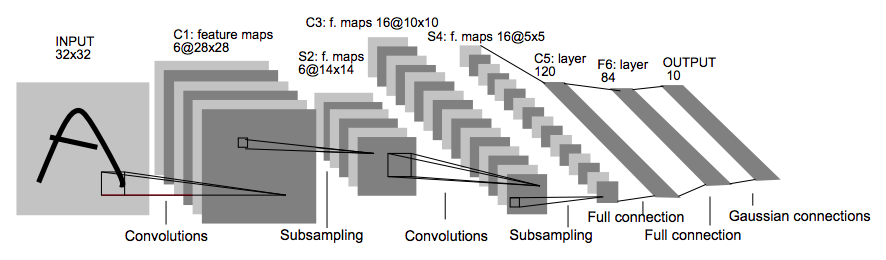\nThe CNNs in this kernel follow [LeNet5's][1] design (pictured above) with the following improvements: \n* Two stacked 3x3 filters replace the single 5x5 filters. These become nonlinear 5x5 convolutions\n* A convolution with stride 2 replaces pooling layers. These become learnable pooling layers.\n* ReLU activation replaces sigmoid.\n* Batch normalization is added\n* Dropout is added\n* More feature maps (channels) are added\n* An ensemble of 15 CNNs with bagging is used \n \nExperiments [(here)][2] show that each of these changes improve classification accuracy.\n\n[1]:http://yann.lecun.com/exdb/publis/pdf/lecun-01a.pdf\n[2]:https://www.kaggle.com/cdeotte/how-to-choose-cnn-architecture-mnist"},{"metadata":{"_uuid":"e433661c7762b947c0fbfc4ad3f5e1d2e056312c"},"cell_type":"markdown","source":"# Train 15 CNNs"},{"metadata":{"_uuid":"9f1dd8a54aa0fab8530c0095f7d4c4b35984ea6d","trusted":false},"cell_type":"code","source":"# # DECREASE LEARNING RATE EACH EPOCH\n# annealer = LearningRateScheduler(lambda x: 1e-3 * 0.95 ** x)\n# # TRAIN NETWORKS\n# history = [0] * nets\n# epochs = 45\n# for j in range(nets):\n# X_train2, X_val2, Y_train2, Y_val2 = train_test_split(X_train, Y_train, test_size = 0.1)\n# history[j] = model[j].fit_generator(datagen.flow(X_train2,Y_train2, batch_size=64),\n# epochs = epochs, steps_per_epoch = X_train2.shape[0]//64, \n# validation_data = (X_val2,Y_val2), callbacks=[annealer], verbose=0)\n# print(\"CNN {0:d}: Epochs={1:d}, Train accuracy={2:.5f}, Validation accuracy={3:.5f}\".format(\n# j+1,epochs,max(history[j].history['acc']),max(history[j].history['val_acc']) ))","execution_count":null,"outputs":[]},{"metadata":{"_uuid":"28b78b6502d2d1c993555725383f3e30728fa5be"},"cell_type":"markdown","source":"# Ensemble 15 CNN predictions and submit"},{"metadata":{"trusted":false},"cell_type":"code","source":"# import cv2\n# img_pred = cv2.imread(\"../input/picstotest/3.jpg\", 0)\n\n# plt.imshow(img_pred, cmap='gray')\n# if img_pred.shape != [28,28]:\n# img = cv2.resize(img_pred, (28,28))\n# img_pred = img.reshape(28,28,1)\n# else:\n# img_pred = img_pred.reshape(28,28,1)\n# img_pred = img_pred/255.0\n# img_pred = img_pred.reshape(1,28,28,1)\n# img_pred.shape","execution_count":null,"outputs":[]},{"metadata":{"trusted":false},"cell_type":"code","source":"# prediction = model[13].predict(img_pred)","execution_count":null,"outputs":[]},{"metadata":{"trusted":false},"cell_type":"code","source":"# prediction","execution_count":null,"outputs":[]},{"metadata":{"trusted":false},"cell_type":"code","source":"# prediction_probability = model[14].predict_proba(img_pred)\n# prediction_probability","execution_count":null,"outputs":[]},{"metadata":{"trusted":false},"cell_type":"code","source":"# model[14].save('../input/model.h5')\n# model[14].save('model.h5')","execution_count":null,"outputs":[]},{"metadata":{"_uuid":"6e4e01ffe692c34c555bdbf5d606611f9a128b9c","trusted":false},"cell_type":"code","source":"# # ENSEMBLE PREDICTIONS AND SUBMIT\n# results = np.zeros( (X_test.shape[0],10) ) \n# for j in range(nets):\n# results = results + model[j].predict(X_test)\n# results = np.argmax(results,axis = 1)\n# results = pd.Series(results,name=\"Label\")\n# submission = pd.concat([pd.Series(range(1,28001),name = \"ImageId\"),results],axis = 1)\n# submission.to_csv(\"MNIST-CNN-ENSEMBLE.csv\",index=False)","execution_count":null,"outputs":[]},{"metadata":{"_kg_hide-input":true,"_uuid":"4a9d7710a3b69c2b48bc1687e5b6a27a7076f40a","trusted":false},"cell_type":"code","source":"# # PREVIEW PREDICTIONS\n# plt.figure(figsize=(15,6))\n# for i in range(40): \n# plt.subplot(4, 10, i+1)\n# plt.imshow(X_test[i].reshape((28,28)),cmap=plt.cm.binary)\n# plt.title(\"predict=%d\" % results[i],y=0.9)\n# plt.axis('off')\n# plt.subplots_adjust(wspace=0.3, hspace=-0.1)\n# plt.show()","execution_count":null,"outputs":[]},{"metadata":{"trusted":false},"cell_type":"code","source":"# print('a')","execution_count":null,"outputs":[]},{"metadata":{},"cell_type":"markdown","source":" Download File \nDownload Model\n"},{"metadata":{"_uuid":"372eaad5737aeef94f084c9c3317f6537db2cf2f"},"cell_type":"markdown","source":"Referenced Articles\n* 99.79% [Regularization of Neural Networks using DropConnect, 2013][1]\n* 99.77% [Multi-column Deep Neural Networks for Image Classification, 2012][2]\n* 99.77% [APAC: Augmented PAttern Classification with Neural Networks, 2015][3]\n* 99.76% [Batch-normalized Maxout Network in Network, 2015][4]\n* **99.75% [This Kaggle published kernel, 2018][12]**\n* 99.73% [Convolutional Neural Network Committees, 2011][13]\n* 99.71% [Generalized Pooling Functions in Convolutional Neural Networks, 2016][5]\n* More examples: [here][7], [here][8], and [here][9] \n\n[1]:https://cs.nyu.edu/~wanli/dropc/dropc.pdf\n[2]:http://people.idsia.ch/~ciresan/data/cvpr2012.pdf\n[3]:https://arxiv.org/abs/1505.03229\n[4]:https://arxiv.org/abs/1511.02583\n[5]:https://arxiv.org/abs/1509.08985\n[7]:http://rodrigob.github.io/are_we_there_yet/build/classification_datasets_results.html\n[8]:http://yann.lecun.com/exdb/mnist/\n[9]:https://en.wikipedia.org/wiki/MNIST_database\n[10]:https://www.kaggle.com/cdeotte/mnist-perfect-100-using-knn/\n[12]:https://www.kaggle.com/cdeotte/35-million-images-0-99757-mnist\n[13]:http://people.idsia.ch/~ciresan/data/icdar2011a.pdf\n[14]:http://www.mva-org.jp/Proceedings/2015USB/papers/14-21.pdf\n"},{"metadata":{"_uuid":"1d55f8c054432beabeed62024a998234c7cdb7b6"},"cell_type":"markdown","source":"# Inspired models\nThe code here was inspired by the following outstanding Kaggle kernels (in addition to the publications above).\n\n* [Yassine Ghouzam][1] - [Introduction to CNN Keras - 0.997 (top 6%)][2]****\n* [Peter Grenholm][5] - [Welcome to deep learning (CNN 99%)][6]\n* [Ding Li][3] - [Digits Recognition With CNN Keras][4]\n* [Aditya Soni][7] - [MNIST with Keras for Beginners(.99457)][8]\n\n[1]:https://www.kaggle.com/yassineghouzam\n[2]:https://www.kaggle.com/yassineghouzam/introduction-to-cnn-keras-0-997-top-6\n[3]:https://www.kaggle.com/dingli\n[4]:https://www.kaggle.com/dingli/digits-recognition-with-cnn-keras\n[5]:https://www.kaggle.com/toregil\n[6]:https://www.kaggle.com/toregil/welcome-to-deep-learning-cnn-99/\n[8]:https://www.kaggle.com/adityaecdrid/mnist-with-keras-for-beginners-99457/\n[7]:https://www.kaggle.com/adityaecdrid"},{"metadata":{"_uuid":"e716712230dda4fc08bc4705cfbbb3c9a9942228"},"cell_type":"markdown","source":"# How ensembling 15 CNNs gave my architecture better performance despite computation load and time?\nHow should we evaluate performance of any Neural Network? \nWhy is it difficult to measure the performace of the NN?\n\nAnswer: A trained neural network performs differently each time you train it since the weights are randomly initialized. Thus we must train a lot of times and find the average of all the accuracy for each model. \n\nWhy we ensemble?\nEnsemble methods is a machine learning technique that combines several base models in order to produce one optimal predictive model.\nTypes of Ensembling:\n1. BAGGing, or Bootstrap AGGregating. BAGGing gets its name because it combines Bootstrapping and Aggregation to form one ensemble model. \n\n2. Random Forest Models. Random Forest Models can be thought of as BAGGing, with a slight tweak. When deciding where to split and how to make decisions, BAGGed Decision Trees have the full disposal of features to choose from. Therefore, although the bootstrapped samples may be slightly different, the data is largely going to break off at the same features throughout each model.\n3. \n\n\n\nThe ensemble in this notebook was trained and evaluated 100 times!! (on the original MNIST dataset with 60k/10k split using the code template [here][1] on GitHub.) Below is a histogram of its accuracy. \n \nThe maximum accuracy of an individual CNN was 99.81% with average accuracy 99.641% and standard deviation 0.047. The maximum accuracy of an ensemble of fifteen CNNs was 99.79% with average accuracy 99.745% and standard deviation 0.020. \n \n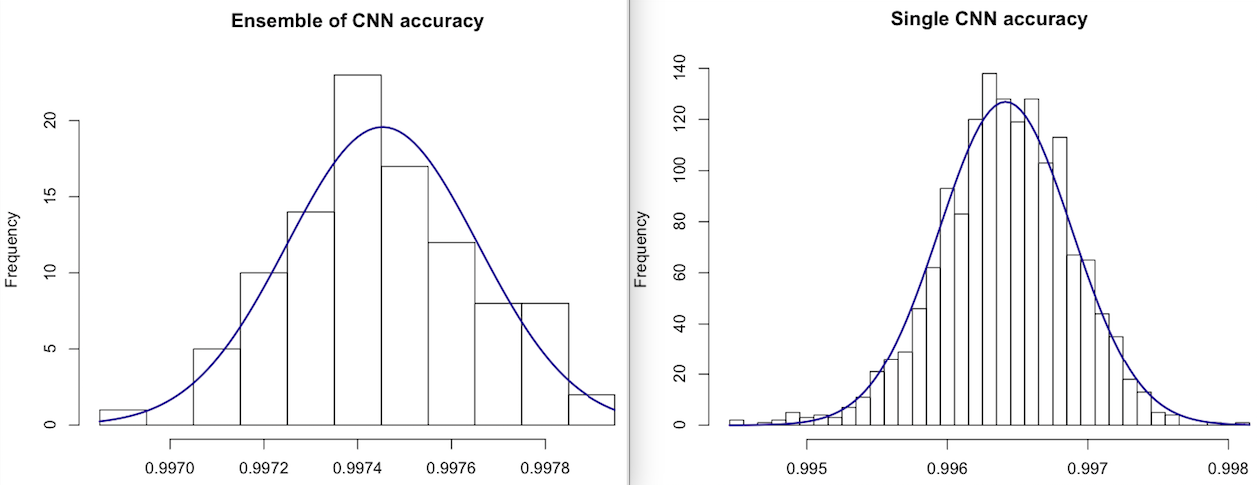\n"},{"metadata":{},"cell_type":"markdown","source":"\n## Why Data-Augmentation?\n# Data!\n\nData augmentation is all about fabricating more data from the data you actually got — adding variance without losing the information the data carries. Doing this reduces the risk of overfitting and generally the accuracy on unseen data can be improved.\n\nTo determine the best hyper-parameters for data augmentation, grid search was used. Below is the accuracy of an ensemble (of 15 CNNs) with various data augmentation settings. The columns are `rotation` and `zoom`. The rows are `w_shift` and `h_shift`. For example: row 2, column 4 is `r = 15, z = 0.15, w = 0.1, h = 0.1`. Each cell is the average of 6 trials: \n \n 0 5 10 15 20 25 30 \n 0 99.70 99.70 99.70 99.70 99.69 99.65 99.62\n 0.1 99.73 99.73 99.75 99.75 99.72 99.67 99.64 \n 0.2 99.72 99.72\n\nBelow is the accuracy of a single CNN with various data augmentation settings. Each cell is the average of 30 trials. \n \n 0 5 10 15 20 25 30 \n 0 99.57 99.58 99.62 99.62 99.62 99.57 99.52\n 0.1 99.62 99.63 99.65 99.65 99.63 99.58 99.52 \n 0.2 99.62 99.62\n \nLastly, I calculated the variance of the MNIST training images. The average center in pixels = (14.9, 15.2). The standard deviation of centers in pixels = (0.99, 1.34). That means that a setting of `w_shift = 0.07` together with `h_shift = 0.09` contains 95% of the centers. Similar analysis shows that a setting of `rotation_range = 13` together with `zoom_range = 0.13` contains 95% of the images. \n \nBased on this analysis, the settings of `rotation_range = 10, zoom_range = 0.10, w_shift = 0.1, and h_shift = 0.1` were chosen.\n\n[1]:https://github.com/cdeotte/MNIST-CNN-99.75"},{"metadata":{"trusted":false},"cell_type":"code","source":"","execution_count":null,"outputs":[]}],"metadata":{"kernelspec":{"display_name":"Python 3","language":"python","name":"python3"},"language_info":{"codemirror_mode":{"name":"ipython","version":3},"file_extension":".py","mimetype":"text/x-python","name":"python","nbconvert_exporter":"python","pygments_lexer":"ipython3","version":"3.6.6"}},"nbformat":4,"nbformat_minor":1}