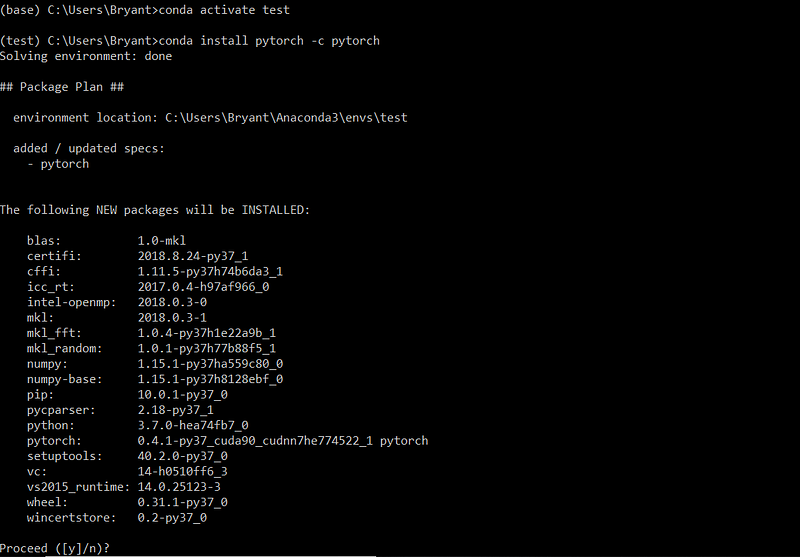
{"cells":[{"metadata":{"_uuid":"e7763a789c82f7c6c6d451353c383ba2ffa7f649"},"cell_type":"markdown","source":"## Zero to Hero Tutorial in Fast Ai\n<p><img src=\"https://cdn-images-1.medium.com/max/1600/1*EoktyGnUpOv9Zq-85AIDZw.png\" alt=\"Smiley face\" height=\"200\" width=\"500\"><p>\n    \n\n<hr>\nOutline of Notebook\n<hr>\n## Section - 1 \n* [**1. About Fast AI**](#1.-About-Fast-AI)\n* [**2. System Requirement**](#2.-System-Requirement)\n* [**3. Installation fast.ai**](#3.-Installation-fast.ai)\n## Section -2\n* [**1. About Fast AI**](#1.-About-Fast-AI)\n* [**1. About Fast AI**](#1.-About-Fast-AI)\n\n\n<hr>"},{"metadata":{"_cell_guid":"79c7e3d0-c299-4dcb-8224-4455121ee9b0","collapsed":true,"_uuid":"d629ff2d2480ee46fbb7e2d37f6b5fab8052498a","trusted":false},"cell_type":"markdown","source":"## 1. About Fast AI [References](https://www.pytorchtutorial.com/pytorch-tutorials-list/)\n---\n> * **fast.ai** is dedicated to making the **power of deep learning** accessible to all. \n> * **Deep learning** is dramatically **improving medicine, education, agriculture, transport and many other fields**, with the greatest potential impact in the developing world.\n\n> <p><img src=\"https://image.slidesharecdn.com/fastaitalk-170518062514/95/fastai-learning-deep-learning-6-638.jpg\" alt=\"Smiley face\" height=\"100\" width=\"800\"><p>\n    \n  ## 2. System Requirement\n  ---\n>  * **Python** : Above 3.6 or Above\n>  * **Operating System**:  **fastai 1.0** is based on **PyTorch 1.0**, we must be able to ****install PyTorch 1.0 first.*** Supported installation methods.\n  \n <table style=\"height: 122px;\" width=\"282\"><thead><tr><th><font style=\"vertical-align: inherit;\"><font style=\"vertical-align: inherit;\"><b>System</b></font></font></th><th><b>GPU</b></th><th><b>CPU</b></th></tr></thead><tbody><tr><td>linux</td><td>binary</td><td><font style=\"vertical-align: inherit;\"><font style=\"vertical-align: inherit;\">binary</font></font></td></tr><tr><td>mac</td><td>source</td><td><font style=\"vertical-align: inherit;\"><font style=\"vertical-align: inherit;\">binary</font></font></td></tr><tr><td>windows</td><td><font style=\"vertical-align: inherit;\"><font style=\"vertical-align: inherit;\">source</font></font></td><td><font style=\"vertical-align: inherit;\"><font style=\"vertical-align: inherit;\">source</font></font></td></tr></tbody></table>\n> Remarks:  **binary** = can be installed directly,  **source** = must be compiled from source\n\n## 3. Installation fast.ai\n----\n### Conda Installation\n<hr>\n> It can be installed in the following two steps. Please follow the first step and then the second step.\n* 1. Install **PyTorch** compiled nightly at nightly. Note that the version of **cuda** is the same as your own system, such as installing on **CUDA 9.2**:\n Reference : [Step By Step Installation pytorch](https://medium.com/@bryant.kou/how-to-install-pytorch-on-windows-step-by-step-cc4d004adb2a)\n<pre>conda install -c pytorch pytorch-nightly cuda92\n</pre>\n\n> ![](https://cdn-images-1.medium.com/max/800/1*wNW60f3deppcwmd_HOV-gQ.png)\n\n> If cuda is not installed on your system, you can install the cpu version of PyTorch with the following command:\n* 2. Install **fastai**.\n<pre>conda install -c fastai fastai\n</pre>\n\n> If there is something wrong with the installation process, make sure your conda version has been updated to the latest:\n<pre>conda update conda</pre>\n\n### Pip Installation\n---\n>  You can install fastai with pip in the following three steps, and you must perform the strict installation sequence.\n*  1. Install **PyTorch** compiled nightly at nightly. Note that the version of **cuda** is the same as your own system, such as installing on **CUDA 9.2**:\n Reference : [Step By Step Installation pytorch](https://medium.com/@bryant.kou/how-to-install-pytorch-on-windows-step-by-step-cc4d004adb2a)  \n `pip install torch_nightly -f https://download.pytorch.org/whl/nightly/cu92/torch_nightly.html`\n*  2. Install custom torchvision, this version is compiled on nightly-pytorch:   \n `pip install --index-url https://test.pypi.org/simple/ --extra-index-url https://pypi.org/simple/ torchvision==0.2.1.post2`\n > *  3. Install fastai:  \n `pip install fastai`\n > * 4. In some cases, the above command will attempt to install torch-0.4.1. In this case, you can use the following command:  \n`\npip uninstall torchvision fastai\npip install --no-deps torchvision\npip install fastai\n`\n> * Enjoyable Moment : After the installation is complete, everyone will experience the new features of fastai!\n\n<p><img src=\"https://media.giphy.com/media/BpCY5uqyEJbmJ1ZBIE/giphy.gif\" alt=\"Smiley face\" height=\"100\" width=\"600\"><p>\n \n    "},{"metadata":{"trusted":true,"_uuid":"434a522cf56bddd5b338c87ea662b68305c694c8"},"cell_type":"code","source":"","execution_count":null,"outputs":[]}],"metadata":{"kernelspec":{"display_name":"Python 3","language":"python","name":"python3"},"language_info":{"name":"python","version":"3.6.6","mimetype":"text/x-python","codemirror_mode":{"name":"ipython","version":3},"pygments_lexer":"ipython3","nbconvert_exporter":"python","file_extension":".py"}},"nbformat":4,"nbformat_minor":1}