{"metadata":{"kernelspec":{"language":"python","display_name":"Python 3","name":"python3"},"language_info":{"pygments_lexer":"ipython3","nbconvert_exporter":"python","version":"3.6.4","file_extension":".py","codemirror_mode":{"name":"ipython","version":3},"name":"python","mimetype":"text/x-python"}},"nbformat_minor":4,"nbformat":4,"cells":[{"cell_type":"code","source":"# This Python 3 environment comes with many helpful analytics libraries installed\n# It is defined by the kaggle/python Docker image: https://github.com/kaggle/docker-python\n# For example, here's several helpful packages to load\n\nimport numpy as np # linear algebra\nimport pandas as pd # data processing, CSV file I/O (e.g. pd.read_csv)\n\n# Input data files are available in the read-only \"../input/\" directory\n# For example, running this (by clicking run or pressing Shift+Enter) will list all files under the input directory\n\nimport os\nfor dirname, _, filenames in os.walk('/kaggle/input'):\n for filename in filenames:\n print(os.path.join(dirname, filename))\n\n# You can write up to 20GB to the current directory (/kaggle/working/) that gets preserved as output when you create a version using \"Save & Run All\" \n# You can also write temporary files to /kaggle/temp/, but they won't be saved outside of the current session","metadata":{"_uuid":"8f2839f25d086af736a60e9eeb907d3b93b6e0e5","_cell_guid":"b1076dfc-b9ad-4769-8c92-a6c4dae69d19","execution":{"iopub.status.busy":"2022-06-09T14:52:42.004784Z","iopub.execute_input":"2022-06-09T14:52:42.005891Z","iopub.status.idle":"2022-06-09T14:52:42.014697Z","shell.execute_reply.started":"2022-06-09T14:52:42.005814Z","shell.execute_reply":"2022-06-09T14:52:42.013581Z"},"trusted":true},"execution_count":null,"outputs":[]},{"cell_type":"markdown","source":" Cat vs Dog A beginner's guide to convolutional neural networks
\n “Tell me and I forget, teach me and I may remember, involve me and I learn.” – Benjamin Franklinr","metadata":{}},{"cell_type":"markdown","source":"","metadata":{}},{"cell_type":"markdown","source":"\n 📌 Please vote up if you like this note book. 🙏\n
","metadata":{}},{"cell_type":"markdown","source":"## Table of Contents\n\n1 [Introduction](#1)\n\n2 [Importing Libraries](#2)\n\n2.1 [Setting Path](#2.1)\n\n2.2 [Importing Data](#2.2)\n\n3 [Data Distribution of whole Data](#3)\n\n4 [Siplting the Data into Train test and Val](#4)\n\n4.1 [Distributation of Train Data](#4.1)\n\n4.2 [Distributation of val Data 5 Displaying Images](#4.2)\n\n5 [Image Data Generator](#5)\n\n6 [Convolutional Neural Network](#6)\n\n6.1 [Displaying The Model](#6.1)\n\n\n7 [Plotting the result](#7)\n\n8 [Model Evaluation](#8)\n\n8.1[Classification Report](#8.1)\n\n9 [Predition Comparsion](#9)\n\n10 [Confusion Matrix](#10)","metadata":{}},{"cell_type":"markdown","source":" Introduction
\n \n \n\nIn this notebook, we will learn how to classify images of dog and cat by building a simple Neural Network. What we will learn: \n\n\nLoad the images.. \n\n\n\nVisulaise the Data distribution of all data. \n\n\n\nVisulaise the Data distribution of all data. \n\n\nVisualizing some of the images \n\n\nHow CNN Wokrs \n\n\n\nUse Image Data Generator \n\n\n\nGraph the training loss and validation loss \n\n\nModel Evaluation\n\n\nConfusion Matrix\n\n\n\n \n\n\n\n\n\n\n\n\n\n\n\n\n\n\n\n\n \n ","metadata":{}},{"cell_type":"markdown","source":"\n 2 Importing Libraries
\n \n \n\n\nWe are Importing Libraries. \n\n\nLibraries which need for\n \n\n\nData visualization \n\n\nMaking Model Architecture. \n\n\n\n\n\n\n\n\n\n","metadata":{}},{"cell_type":"markdown","source":"\n\n","metadata":{}},{"cell_type":"code","source":"''' importing library''' \n\nimport numpy as np\nimport sys\nimport tensorflow as tf\nimport os\nimport sys\nimport pandas as pd\nfrom keras.models import Sequential\nfrom keras.layers import Dense, Dropout, Flatten, Conv2D, MaxPooling2D\nfrom sklearn.model_selection import train_test_split\nfrom tensorflow.keras.preprocessing.image import ImageDataGenerator\n\n\n%matplotlib inline\nimport matplotlib.image as img\nimport matplotlib.pyplot as plt\n\nfrom sklearn.metrics import confusion_matrix\nimport plotly.graph_objects as go\nimport itertools\nimport plotly.express as px","metadata":{"execution":{"iopub.status.busy":"2022-07-04T12:25:03.461461Z","iopub.execute_input":"2022-07-04T12:25:03.462153Z","iopub.status.idle":"2022-07-04T12:25:12.430158Z","shell.execute_reply.started":"2022-07-04T12:25:03.462070Z","shell.execute_reply":"2022-07-04T12:25:12.429341Z"},"trusted":true},"execution_count":null,"outputs":[]},{"cell_type":"code","source":"'''setting seed'''\nseed = 0\nnp.random.seed(seed)\ntf.random.set_seed(3)","metadata":{"execution":{"iopub.status.busy":"2022-07-04T12:30:06.758288Z","iopub.execute_input":"2022-07-04T12:30:06.758665Z","iopub.status.idle":"2022-07-04T12:30:06.763460Z","shell.execute_reply.started":"2022-07-04T12:30:06.758619Z","shell.execute_reply":"2022-07-04T12:30:06.762480Z"},"trusted":true},"execution_count":null,"outputs":[]},{"cell_type":"markdown","source":" 2.1 Setting Path and Extracting Files
","metadata":{}},{"cell_type":"code","source":"import zipfile\n\nzip_files = ['test1', 'train']\n\nfor zip_file in zip_files:\n with zipfile.ZipFile(\"../input/dogs-vs-cats/{}.zip\".format(zip_file),\"r\") as z:\n z.extractall(\".\")\n print(\"{} unzipped\".format(zip_file))","metadata":{"execution":{"iopub.status.busy":"2022-07-04T12:25:51.083324Z","iopub.execute_input":"2022-07-04T12:25:51.083699Z","iopub.status.idle":"2022-07-04T12:26:06.646787Z","shell.execute_reply.started":"2022-07-04T12:25:51.083663Z","shell.execute_reply":"2022-07-04T12:26:06.645939Z"},"trusted":true},"execution_count":null,"outputs":[]},{"cell_type":"code","source":"'''test1, train Data is in current working folder'''\nprint(os.listdir('../working'))","metadata":{"execution":{"iopub.status.busy":"2022-07-04T12:26:11.095604Z","iopub.execute_input":"2022-07-04T12:26:11.096401Z","iopub.status.idle":"2022-07-04T12:26:11.100890Z","shell.execute_reply.started":"2022-07-04T12:26:11.096366Z","shell.execute_reply":"2022-07-04T12:26:11.100113Z"},"trusted":true},"execution_count":null,"outputs":[]},{"cell_type":"markdown","source":" Importing Data
","metadata":{}},{"cell_type":"code","source":"IMAGE_FOLDER_PATH = \"../working/train\"\nFILE_NAMES = os.listdir(IMAGE_FOLDER_PATH)\nWIDTH = 150\nHEIGHT = 150","metadata":{"execution":{"iopub.status.busy":"2022-07-04T12:26:15.300956Z","iopub.execute_input":"2022-07-04T12:26:15.301297Z","iopub.status.idle":"2022-07-04T12:26:15.320237Z","shell.execute_reply.started":"2022-07-04T12:26:15.301269Z","shell.execute_reply":"2022-07-04T12:26:15.319102Z"},"trusted":true},"execution_count":null,"outputs":[]},{"cell_type":"code","source":"FILE_NAMES[0:5]","metadata":{"execution":{"iopub.status.busy":"2022-07-04T12:26:18.749824Z","iopub.execute_input":"2022-07-04T12:26:18.750418Z","iopub.status.idle":"2022-07-04T12:26:18.759261Z","shell.execute_reply.started":"2022-07-04T12:26:18.750383Z","shell.execute_reply":"2022-07-04T12:26:18.758317Z"},"trusted":true},"execution_count":null,"outputs":[]},{"cell_type":"code","source":"labels = []\nfor i in os.listdir(IMAGE_FOLDER_PATH):\n labels+=[i]","metadata":{"execution":{"iopub.status.busy":"2022-07-04T12:26:22.196321Z","iopub.execute_input":"2022-07-04T12:26:22.196945Z","iopub.status.idle":"2022-07-04T12:26:22.220527Z","shell.execute_reply.started":"2022-07-04T12:26:22.196908Z","shell.execute_reply":"2022-07-04T12:26:22.219709Z"},"trusted":true},"execution_count":null,"outputs":[]},{"cell_type":"code","source":"","metadata":{"trusted":true},"execution_count":null,"outputs":[]},{"cell_type":"markdown","source":" Data distribuation of all data
","metadata":{}},{"cell_type":"code","source":"# empty list\ntargets = list()\nfull_paths = list()\ntrain_cats_dir = list()\ntrain_dogs_dir = list()\n\n# finding each file's target\nfor file_name in FILE_NAMES:\n target = file_name.split(\".\")[0] # target name\n full_path = os.path.join(IMAGE_FOLDER_PATH, file_name)\n \n if(target == \"dog\"):\n train_dogs_dir.append(full_path)\n if(target == \"cat\"):\n train_cats_dir.append(full_path)\n \n full_paths.append(full_path)\n targets.append(target)\n\ndataset = pd.DataFrame() # make dataframe\ndataset['image_path'] = full_paths # file path\ndataset['target'] = targets # file's target","metadata":{"execution":{"iopub.status.busy":"2022-07-04T12:26:29.633545Z","iopub.execute_input":"2022-07-04T12:26:29.634102Z","iopub.status.idle":"2022-07-04T12:26:29.723973Z","shell.execute_reply.started":"2022-07-04T12:26:29.634067Z","shell.execute_reply":"2022-07-04T12:26:29.723188Z"},"trusted":true},"execution_count":null,"outputs":[]},{"cell_type":"code","source":"dataset.head(10)","metadata":{"execution":{"iopub.status.busy":"2022-07-04T12:26:33.984030Z","iopub.execute_input":"2022-07-04T12:26:33.984468Z","iopub.status.idle":"2022-07-04T12:26:34.004783Z","shell.execute_reply.started":"2022-07-04T12:26:33.984431Z","shell.execute_reply":"2022-07-04T12:26:34.004051Z"},"trusted":true},"execution_count":null,"outputs":[]},{"cell_type":"code","source":"print(\"total data counts:\", dataset['target'].count())\ncounts = dataset['target'].value_counts()\nprint(counts)","metadata":{"execution":{"iopub.status.busy":"2022-07-04T12:26:38.523430Z","iopub.execute_input":"2022-07-04T12:26:38.523876Z","iopub.status.idle":"2022-07-04T12:26:38.546560Z","shell.execute_reply.started":"2022-07-04T12:26:38.523836Z","shell.execute_reply":"2022-07-04T12:26:38.545816Z"},"trusted":true},"execution_count":null,"outputs":[]},{"cell_type":"markdown","source":"\n\nBelow there are two chart \n\n\nBar Chart. \n\nPie Chart. \n\n\n\nData is equally distributed. ","metadata":{}},{"cell_type":"code","source":"fig = go.Figure(go.Bar(\n x= counts.values,\n y=counts.index,\n orientation='h'))\n\nfig.update_layout(title='Data Distribution in Bars',font_size=15,title_x=0.45)\n\n\nfig.show()","metadata":{"execution":{"iopub.status.busy":"2022-07-04T12:26:43.741408Z","iopub.execute_input":"2022-07-04T12:26:43.741775Z","iopub.status.idle":"2022-07-04T12:26:43.823062Z","shell.execute_reply.started":"2022-07-04T12:26:43.741746Z","shell.execute_reply":"2022-07-04T12:26:43.822309Z"},"trusted":true},"execution_count":null,"outputs":[]},{"cell_type":"code","source":"fig=px.pie(counts.head(10),values= 'target', names=dataset['target'].unique(),hole=0.425)\nfig.update_layout(title='Data Distribution of Data',font_size=15,title_x=0.45,annotations=[dict(text='Cat vs Dog',font_size=18, showarrow=False,height=800,width=700)])\nfig.update_traces(textfont_size=15,textinfo='percent')\nfig.show()","metadata":{"execution":{"iopub.status.busy":"2022-07-04T12:26:48.667462Z","iopub.execute_input":"2022-07-04T12:26:48.668141Z","iopub.status.idle":"2022-07-04T12:26:49.482049Z","shell.execute_reply.started":"2022-07-04T12:26:48.668091Z","shell.execute_reply":"2022-07-04T12:26:49.481258Z"},"trusted":true},"execution_count":null,"outputs":[]},{"cell_type":"markdown","source":" Displaying Images of Cat
","metadata":{}},{"cell_type":"code","source":"rows = 4\ncols = 4\naxes = []\nfig=plt.figure(figsize=(10,10))\ni = 0\n\nfor a in range(rows*cols):\n b = img.imread(train_cats_dir[i])\n axes.append(fig.add_subplot(rows,cols,a+1))\n plt.imshow(b)\n i+=1\nfig.tight_layout()\nplt.show()","metadata":{"execution":{"iopub.status.busy":"2022-07-04T12:27:37.591498Z","iopub.execute_input":"2022-07-04T12:27:37.592142Z","iopub.status.idle":"2022-07-04T12:27:39.504608Z","shell.execute_reply.started":"2022-07-04T12:27:37.592106Z","shell.execute_reply":"2022-07-04T12:27:39.503877Z"},"trusted":true},"execution_count":null,"outputs":[]},{"cell_type":"markdown","source":" Displaying Images of Dog
","metadata":{}},{"cell_type":"code","source":"rows = 4\ncols = 4\naxes = []\nfig=plt.figure(figsize=(10,10))\ni = 0\n\nfor a in range(rows*cols):\n b = img.imread(train_dogs_dir[i])\n axes.append(fig.add_subplot(rows,cols,a+1))\n plt.imshow(b)\n i+=1\nfig.tight_layout()\nplt.show()","metadata":{"execution":{"iopub.status.busy":"2022-07-04T12:28:36.536523Z","iopub.execute_input":"2022-07-04T12:28:36.537351Z","iopub.status.idle":"2022-07-04T12:28:38.562382Z","shell.execute_reply.started":"2022-07-04T12:28:36.537316Z","shell.execute_reply":"2022-07-04T12:28:38.561216Z"},"trusted":true},"execution_count":null,"outputs":[]},{"cell_type":"markdown","source":" 6 Siplitting the data
","metadata":{}},{"cell_type":"code","source":"dataset_train, dataset_test = train_test_split(dataset, test_size=0.2, random_state=seed)","metadata":{"execution":{"iopub.status.busy":"2022-07-04T12:30:13.780547Z","iopub.execute_input":"2022-07-04T12:30:13.781334Z","iopub.status.idle":"2022-07-04T12:30:13.791446Z","shell.execute_reply.started":"2022-07-04T12:30:13.781299Z","shell.execute_reply":"2022-07-04T12:30:13.790519Z"},"trusted":true},"execution_count":null,"outputs":[]},{"cell_type":"markdown","source":" 7 Data Distribution of Train Data
","metadata":{}},{"cell_type":"markdown","source":"Below there are Two Charts of Training Data Set. \n\nBar Chart. \n\nPie Chart \n\n\n\n\n","metadata":{}},{"cell_type":"code","source":"class_id_distributionTrain = dataset_train['target'].value_counts()\nclass_id_distributionTrain.head(10)","metadata":{"execution":{"iopub.status.busy":"2022-07-04T12:30:18.029765Z","iopub.execute_input":"2022-07-04T12:30:18.030388Z","iopub.status.idle":"2022-07-04T12:30:18.042409Z","shell.execute_reply.started":"2022-07-04T12:30:18.030353Z","shell.execute_reply":"2022-07-04T12:30:18.041679Z"},"trusted":true},"execution_count":null,"outputs":[]},{"cell_type":"code","source":"fig = go.Figure(go.Bar(\n x=class_id_distributionTrain.values,\n y=class_id_distributionTrain.index,\n orientation='h'))\n\nfig.update_layout(title='Data Distribution Of Train Data in Bars',font_size=15,title_x=0.45)\n\nfig.show()","metadata":{"execution":{"iopub.status.busy":"2022-07-04T12:30:21.596977Z","iopub.execute_input":"2022-07-04T12:30:21.597507Z","iopub.status.idle":"2022-07-04T12:30:21.616520Z","shell.execute_reply.started":"2022-07-04T12:30:21.597462Z","shell.execute_reply":"2022-07-04T12:30:21.615827Z"},"trusted":true},"execution_count":null,"outputs":[]},{"cell_type":"code","source":"fig=px.pie(class_id_distributionTrain.head(10),values= 'target', names=dataset_train['target'].unique(),hole=0.425)\nfig.update_layout(title='Data Distribution of Train Data in Pie Chart',font_size=15,title_x=0.45,annotations=[dict(text='Cat vs Dog',font_size=18, showarrow=False,height=800,width=700)])\nfig.update_traces(textfont_size=15,textinfo='percent')\nfig.show()","metadata":{"execution":{"iopub.status.busy":"2022-07-04T12:30:27.018233Z","iopub.execute_input":"2022-07-04T12:30:27.018825Z","iopub.status.idle":"2022-07-04T12:30:27.074269Z","shell.execute_reply.started":"2022-07-04T12:30:27.018791Z","shell.execute_reply":"2022-07-04T12:30:27.073472Z"},"trusted":true},"execution_count":null,"outputs":[]},{"cell_type":"markdown","source":" 7.1 Data Distribution of Test data
","metadata":{}},{"cell_type":"markdown","source":"Below there are Two Charts of Training Data Set. \n\nBar Chart. \n\nPie Chart \n\n\n\n\n","metadata":{}},{"cell_type":"code","source":"class_id_distributionTest = dataset_test['target'].value_counts()\nclass_id_distributionTest.head(10)","metadata":{"execution":{"iopub.status.busy":"2022-07-04T12:30:33.024493Z","iopub.execute_input":"2022-07-04T12:30:33.025255Z","iopub.status.idle":"2022-07-04T12:30:33.035610Z","shell.execute_reply.started":"2022-07-04T12:30:33.025219Z","shell.execute_reply":"2022-07-04T12:30:33.034567Z"},"trusted":true},"execution_count":null,"outputs":[]},{"cell_type":"code","source":"fig = go.Figure(go.Bar(\n x=class_id_distributionTest.values,\n y=class_id_distributionTest.index,\n orientation='h'))\n\nfig.update_layout(title='Data Distribution Of Train Data in Bars',font_size=15,title_x=0.45)\n\nfig.show()","metadata":{"execution":{"iopub.status.busy":"2022-07-04T12:30:36.624633Z","iopub.execute_input":"2022-07-04T12:30:36.625522Z","iopub.status.idle":"2022-07-04T12:30:36.638453Z","shell.execute_reply.started":"2022-07-04T12:30:36.625456Z","shell.execute_reply":"2022-07-04T12:30:36.637578Z"},"trusted":true},"execution_count":null,"outputs":[]},{"cell_type":"code","source":"fig=px.pie(class_id_distributionTrain.head(10),values= 'target', names=dataset_train['target'].unique(),hole=0.425)\nfig.update_layout(title='Data Distribution of Train Data in Pie Chart',font_size=15,title_x=0.45,annotations=[dict(text='Cat vs Dog',font_size=18, showarrow=False,height=800,width=700)])\nfig.update_traces(textfont_size=15,textinfo='percent')\nfig.show()","metadata":{"execution":{"iopub.status.busy":"2022-07-04T12:30:41.036794Z","iopub.execute_input":"2022-07-04T12:30:41.037146Z","iopub.status.idle":"2022-07-04T12:30:41.089855Z","shell.execute_reply.started":"2022-07-04T12:30:41.037117Z","shell.execute_reply":"2022-07-04T12:30:41.089102Z"},"trusted":true},"execution_count":null,"outputs":[]},{"cell_type":"markdown","source":"\n 9 Image Data Generator
\n \n \n\n\n\nWhen there is little data to train, we have to use ImageDataGenerator to increase the number of data.\n\n1. rescale = 1./255 : change the value between 0 and 1\n\n\n\n2. rotation_range = 15 : Random rotation within 15 degrees\n\n\n3. shear_range = 0.1 : shear range 10% \n\n4. zoom_range = 0.2 : zoom range 20%\n\n5. horizontal_flip = True : Randomly flip horizontally. \n\n6. width_shift_range = 0.1 : Randomly move the original image horizontally within 10% of the width \n\n\n7. height_shift_range=0.1 : Randomly move the original image vertically within 10% of the width\n\n\n\n\n\n\n\n\n\n\n\n\n\n\n\n","metadata":{}},{"cell_type":"code","source":"train_datagen=ImageDataGenerator(\nrotation_range=15,\nrescale=1./255,\nshear_range=0.1,\nzoom_range=0.2,\nhorizontal_flip=True,\nwidth_shift_range=0.1,\nheight_shift_range=0.1)\n\ntrain_datagenerator=train_datagen.flow_from_dataframe(dataframe=dataset_train,\n x_col=\"image_path\",\n y_col=\"target\",\n target_size=(WIDTH, HEIGHT),\n class_mode=\"binary\",\n batch_size=150)","metadata":{"execution":{"iopub.status.busy":"2022-07-04T12:31:00.115724Z","iopub.execute_input":"2022-07-04T12:31:00.116255Z","iopub.status.idle":"2022-07-04T12:31:00.434316Z","shell.execute_reply.started":"2022-07-04T12:31:00.116215Z","shell.execute_reply":"2022-07-04T12:31:00.433392Z"},"trusted":true},"execution_count":null,"outputs":[]},{"cell_type":"code","source":"test_datagen = ImageDataGenerator(rescale=1./255)\ntest_datagenerator=test_datagen.flow_from_dataframe(dataframe=dataset_test,\n x_col=\"image_path\",\n y_col=\"target\",\n target_size=(WIDTH, HEIGHT),\n class_mode=\"binary\",\n batch_size=150)","metadata":{"execution":{"iopub.status.busy":"2022-07-04T12:31:04.297493Z","iopub.execute_input":"2022-07-04T12:31:04.298082Z","iopub.status.idle":"2022-07-04T12:31:04.356522Z","shell.execute_reply.started":"2022-07-04T12:31:04.298047Z","shell.execute_reply":"2022-07-04T12:31:04.355715Z"},"trusted":true},"execution_count":null,"outputs":[]},{"cell_type":"markdown","source":"\n 10 Making CNN Model
","metadata":{}},{"cell_type":"markdown","source":"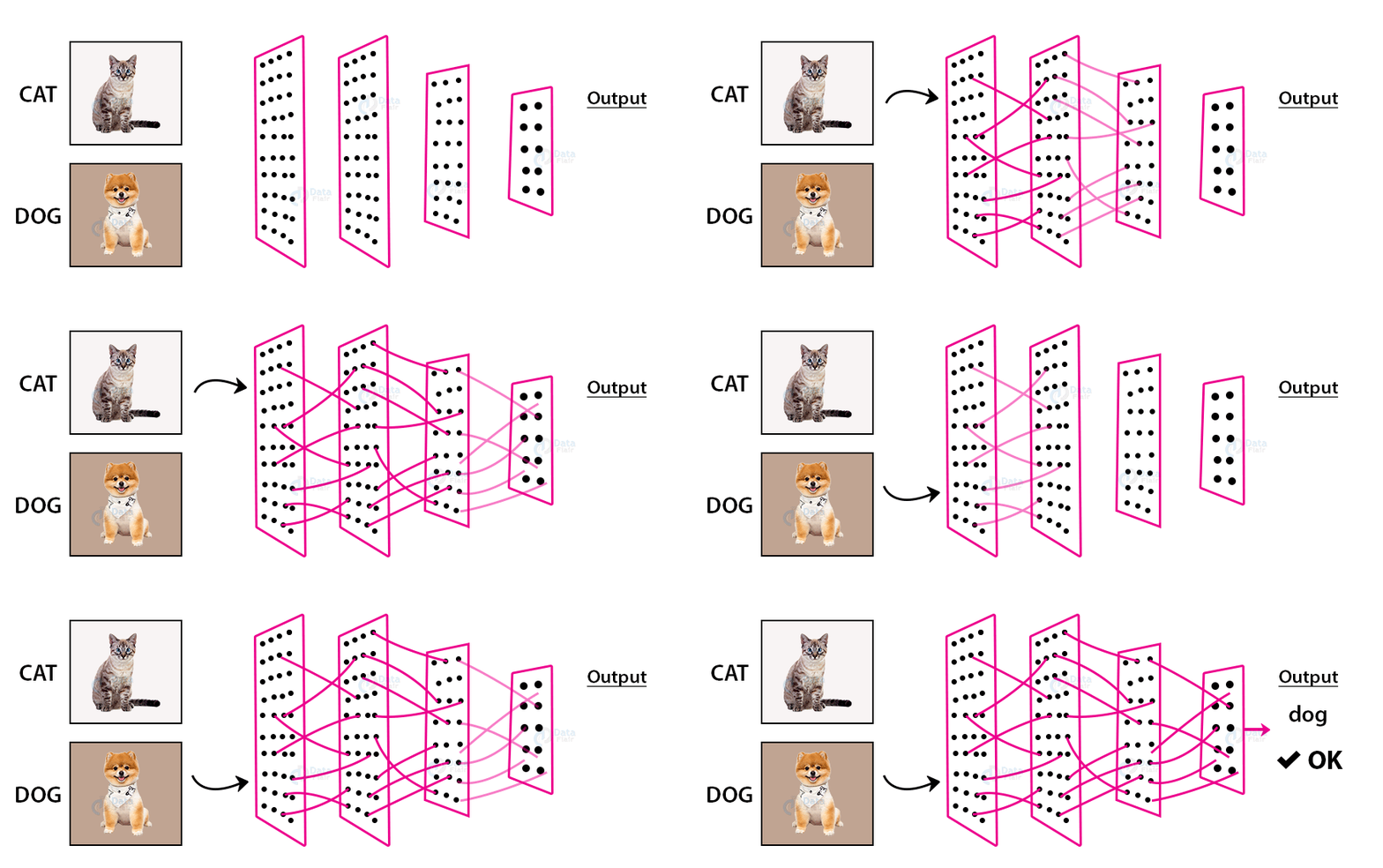","metadata":{}},{"cell_type":"markdown","source":"\nYan LeCun and Yoshua Bengoi introduced a Convolutional Neural Network in the Year 1995. Later on, they proved a remarkable achievement because they showed exceptional results in the domain of Images \n\n\n\nA convolutional neural network has three parts.\n. \n\n\n1 Convolutional Layer \n\n\n2 Pooling Layer \n\n3 Fully Connected Layer ","metadata":{}},{"cell_type":"markdown","source":" convolutional layer
\n \nA convolutional layer help to extract the information from the image with the help of filter. \n\nPlease have a look the following image. \n\n","metadata":{}},{"cell_type":"markdown","source":" Feature Map
","metadata":{}},{"cell_type":"markdown","source":"\nIt will Take filter and map into image into size of 3 *3. \n\nThen It will do some mathematical operation . \n\nThe Elements get Multiplied and then added to get one output and that out put will save in output feature map . \n\nBelow Image will clearfiy alot of thing \n\n","metadata":{}},{"cell_type":"markdown","source":"\n Pooling layer
\n\n\n\nThe Intitution behind the pooling layer is to reduce the dimension of feature map. \n\n\nthe 2*2 pooling layer will apply to the input image and take the maximum value at each slide\n\nFollowing Image will clear the concept more easily\n\n","metadata":{}},{"cell_type":"markdown","source":" Fully Connected Layer
","metadata":{}},{"cell_type":"markdown","source":"The final layer is fully connected layer\n\nThe input to the fully connected layer is the rich features that have been extracted using convolutional filters.\n\nThis will follow to the output layer where the probablities will be calculated of the image\n","metadata":{}},{"cell_type":"markdown","source":" Compile all of three
","metadata":{}},{"cell_type":"code","source":"model = Sequential() # implement model layer \nmodel.add(Conv2D(32, kernel_size=(3,3), input_shape=(WIDTH, HEIGHT, 3), activation='relu'))\nmodel.add(Conv2D(64, kernel_size=(3,3), activation = 'relu'))\nmodel.add(MaxPooling2D(pool_size=2))\nmodel.add(Dropout(0.25))\nmodel.add(Flatten())\nmodel.add(Dense(128, activation='relu'))\nmodel.add(Dropout(0.5))\nmodel.add(Dense(1, activation='sigmoid'))","metadata":{"execution":{"iopub.status.busy":"2022-07-04T12:31:22.028159Z","iopub.execute_input":"2022-07-04T12:31:22.028530Z","iopub.status.idle":"2022-07-04T12:31:24.895453Z","shell.execute_reply.started":"2022-07-04T12:31:22.028493Z","shell.execute_reply":"2022-07-04T12:31:24.894673Z"},"trusted":true},"execution_count":null,"outputs":[]},{"cell_type":"markdown","source":"The Final Architecture looks like\n\n","metadata":{}},{"cell_type":"markdown","source":"\n 11 Displaying The Model
","metadata":{}},{"cell_type":"code","source":"from tensorflow.keras.utils import plot_model\nfrom IPython.display import Image\nplot_model(model, to_file='convnet.png', show_shapes=True,show_layer_names=True)\nImage(filename='convnet.png') ","metadata":{"execution":{"iopub.status.busy":"2022-07-04T12:32:02.776497Z","iopub.execute_input":"2022-07-04T12:32:02.777270Z","iopub.status.idle":"2022-07-04T12:32:03.739568Z","shell.execute_reply.started":"2022-07-04T12:32:02.777236Z","shell.execute_reply":"2022-07-04T12:32:03.738568Z"},"trusted":true},"execution_count":null,"outputs":[]},{"cell_type":"code","source":"!pip install visualkeras\nimport visualkeras\nvisualkeras.layered_view(model, legend=True) ","metadata":{"execution":{"iopub.status.busy":"2022-07-04T12:32:20.416487Z","iopub.execute_input":"2022-07-04T12:32:20.417338Z","iopub.status.idle":"2022-07-04T12:32:31.993481Z","shell.execute_reply.started":"2022-07-04T12:32:20.417299Z","shell.execute_reply":"2022-07-04T12:32:31.992611Z"},"trusted":true},"execution_count":null,"outputs":[]},{"cell_type":"code","source":"model.compile(loss=\"binary_crossentropy\", optimizer='adam', metrics=['accuracy'])\nmodel.summary()","metadata":{"execution":{"iopub.status.busy":"2022-07-04T12:32:59.755952Z","iopub.execute_input":"2022-07-04T12:32:59.756369Z","iopub.status.idle":"2022-07-04T12:32:59.777295Z","shell.execute_reply.started":"2022-07-04T12:32:59.756315Z","shell.execute_reply":"2022-07-04T12:32:59.776318Z"},"trusted":true},"execution_count":null,"outputs":[]},{"cell_type":"markdown","source":"\n 12 Train The Model
","metadata":{}},{"cell_type":"code","source":"History=model.fit(train_datagenerator,\n epochs=10,\n validation_data=test_datagenerator,\n validation_steps=dataset_test.shape[0]/150,\n steps_per_epoch=dataset_train.shape[0]/150)","metadata":{"execution":{"iopub.status.busy":"2022-07-04T12:33:04.569057Z","iopub.execute_input":"2022-07-04T12:33:04.569432Z","iopub.status.idle":"2022-07-04T13:00:37.970804Z","shell.execute_reply.started":"2022-07-04T12:33:04.569401Z","shell.execute_reply":"2022-07-04T13:00:37.969905Z"},"trusted":true},"execution_count":null,"outputs":[]},{"cell_type":"markdown","source":"\n\n\nThis Notebook is for learning purposes and I am deliberately setting the epoch value to a minimum so you can see the concept\n. \n\n You can see the previous version on which I ran this model on 80 Epocs and get the accuracy of 90 on this model \n","metadata":{}},{"cell_type":"markdown","source":"\n 13 Plotting Loss and Accuracy
","metadata":{}},{"cell_type":"code","source":"acc = History.history['accuracy']\nval_acc = History.history['val_accuracy']\nloss = History.history['loss']\nval_loss = History.history['val_loss']\n\nepochs = range(len(acc))\n\nplt.plot(epochs, acc, 'bo', label='Training accuracy')\nplt.plot(epochs, val_acc, 'b', label='Validation accuracy')\nplt.title('Training and validation accuracy')\nplt.legend()\n\nplt.figure()\n\nplt.plot(epochs, loss, 'go', label='Training Loss')\nplt.plot(epochs, val_loss, 'g', label='Validation Loss')\nplt.title('Training and validation loss')\nplt.legend()\n\nplt.show()","metadata":{"execution":{"iopub.status.busy":"2022-07-04T13:01:05.223633Z","iopub.execute_input":"2022-07-04T13:01:05.224356Z","iopub.status.idle":"2022-07-04T13:01:05.608750Z","shell.execute_reply.started":"2022-07-04T13:01:05.224326Z","shell.execute_reply":"2022-07-04T13:01:05.607843Z"},"trusted":true},"execution_count":null,"outputs":[]},{"cell_type":"markdown","source":"[](http://)","metadata":{}},{"cell_type":"markdown","source":"\n\n Model Evaluation
","metadata":{}},{"cell_type":"code","source":" test_loss, test_acc = model.evaluate(test_datagenerator, steps=len(test_datagenerator), verbose=1)\n print('Loss: %.3f' % (test_loss * 100.0))\n print('Accuracy: %.3f' % (test_acc * 100.0)) ","metadata":{"execution":{"iopub.status.busy":"2022-07-04T13:01:13.084255Z","iopub.execute_input":"2022-07-04T13:01:13.084586Z","iopub.status.idle":"2022-07-04T13:01:34.019073Z","shell.execute_reply.started":"2022-07-04T13:01:13.084558Z","shell.execute_reply":"2022-07-04T13:01:34.018208Z"},"trusted":true},"execution_count":null,"outputs":[]},{"cell_type":"markdown","source":"\n 15 Confusion Matrix
","metadata":{}},{"cell_type":"code","source":"from sklearn.metrics import confusion_matrix\nimport itertools","metadata":{"execution":{"iopub.status.busy":"2022-07-04T13:01:41.937614Z","iopub.execute_input":"2022-07-04T13:01:41.938422Z","iopub.status.idle":"2022-07-04T13:01:41.942859Z","shell.execute_reply.started":"2022-07-04T13:01:41.938387Z","shell.execute_reply":"2022-07-04T13:01:41.941847Z"},"trusted":true},"execution_count":null,"outputs":[]},{"cell_type":"code","source":"predictions = model.predict(x=test_datagenerator, steps= len(test_datagenerator), verbose=0)","metadata":{"execution":{"iopub.status.busy":"2022-07-04T13:01:45.013027Z","iopub.execute_input":"2022-07-04T13:01:45.013367Z","iopub.status.idle":"2022-07-04T13:02:00.860523Z","shell.execute_reply.started":"2022-07-04T13:01:45.013340Z","shell.execute_reply":"2022-07-04T13:02:00.859695Z"},"trusted":true},"execution_count":null,"outputs":[]},{"cell_type":"code","source":"test_datagenerator.classes","metadata":{"trusted":true},"execution_count":null,"outputs":[]},{"cell_type":"code","source":"cm = confusion_matrix(y_true=test_datagenerator.classes, y_pred=np.argmax(predictions, axis=-1))","metadata":{"execution":{"iopub.status.busy":"2022-07-04T13:02:34.493037Z","iopub.execute_input":"2022-07-04T13:02:34.493401Z","iopub.status.idle":"2022-07-04T13:02:34.503050Z","shell.execute_reply.started":"2022-07-04T13:02:34.493372Z","shell.execute_reply":"2022-07-04T13:02:34.502073Z"},"trusted":true},"execution_count":null,"outputs":[]},{"cell_type":"code","source":"def plot_confusion_matrix(cm, classes,normalize=False,title='Confusion matrix',cmap=plt.cm.Blues):\n \n plt.imshow(cm, interpolation='nearest', cmap=cmap)\n plt.title(title)\n plt.colorbar()\n tick_marks = np.arange(len(classes))\n plt.xticks(tick_marks, classes, rotation=45)\n plt.yticks(tick_marks, classes)\n if normalize:\n cm = cm.astype('float') / cm.sum(axis=1)[:, np.newaxis]\n print(\"Normalized confusion matrix\")\n else:\n print('Confusion matrix, without normalization')\n print(cm)\n \n thresh = cm.max() / 2.\n for i, j in itertools.product(range(cm.shape[0]), range(cm.shape[1])):\n plt.text(j, i, cm[i, j],\n horizontalalignment=\"center\",\n color=\"white\" if cm[i, j] > thresh else \"black\")\n plt.tight_layout()\n plt.ylabel('True label')\n plt.xlabel('Predicted label')","metadata":{"execution":{"iopub.status.busy":"2022-07-04T13:02:37.498620Z","iopub.execute_input":"2022-07-04T13:02:37.499489Z","iopub.status.idle":"2022-07-04T13:02:37.508462Z","shell.execute_reply.started":"2022-07-04T13:02:37.499440Z","shell.execute_reply":"2022-07-04T13:02:37.507304Z"},"trusted":true},"execution_count":null,"outputs":[]},{"cell_type":"code","source":"cm_plot_labels = ['0_cat', '1_dog']\n\nplot_confusion_matrix(cm=cm, classes=cm_plot_labels, title='Confusion Matrix')","metadata":{"execution":{"iopub.status.busy":"2022-07-04T13:02:42.449488Z","iopub.execute_input":"2022-07-04T13:02:42.450333Z","iopub.status.idle":"2022-07-04T13:02:42.708279Z","shell.execute_reply.started":"2022-07-04T13:02:42.450297Z","shell.execute_reply":"2022-07-04T13:02:42.707471Z"},"trusted":true},"execution_count":null,"outputs":[]},{"cell_type":"markdown","source":"\n 📌 Please vote up if you like this note book. 🙏\n
","metadata":{}},{"cell_type":"markdown","source":"\nWhat's Next. \n\nBrain Tumor Classification , Transfer Learning. \n[Kaggle Link](https://www.kaggle.com/code/abdulbasitniazi/resnet50-eda-cmatrix)\n\nEfficent Net Explained , Fine Tuning. \n[Kaggle Link](https://www.kaggle.com/code/abdulbasitniazi/enetb7-explained-98-fine-tuning-eda)\n\nMulti Image Classification , ResNet 50 From Scratch. \n[Kaggle Link](https://www.kaggle.com/code/abdulbasitniazi/resnet50fromscratch-eda)\n\nHow to make Note book Beautiful. \n[Kaggle Link](https://www.kaggle.com/code/abdulbasitniazi/making-notebook-beautiful)\n\n Lets Connect on Git Hub Repo , Youtube, Medium \n\n[GitHUb Link](https://github.com/106AbdulBasit/Kaggle-Projects), [Youtube Link](https://www.youtube.com/channel/UCSAw-QDHdXjrAMpg7-TELVA), [Medium Link](https://medium.com/@AB_Niazi)","metadata":{}}]}