\n

First, I’d like to thank the organizers for their hard work in running this competition! I’d also like to thank @richolson for sharing two extremely helpful bits of code: his OCR decoy trick and image to SVG conversion.
\nMy pipeline first generates images with Stable Diffusion 3.5 Medium, fine-tuned with DRaFT to produce high-quality, score-optimized outputs. The images are then heuristically converted to rough SVGs, which are further refined using diffvg, a differentiable rasterizer.
\n
After experimenting with a few models, I decided to use Stable Diffusion 3.5 Medium without the T5 text encoder. It has a relatively small memory footprint, which is important for fine-tuning.
\nI trained a LoRA for SD3.5M with DRaFT (more precisely, DRaFT-LV), which trains the diffusion model to generate high-scoring images according to reward models. Unlike RL/DPO, DRaFT takes advantage of the fact that diffusion models are differentiable and backpropagates the reward directly into the diffusion model. You can see the training code here
\n
Training data: I generated a set of 1000 training prompts with corresponding questions/answers using GPT-4o. I took a two stage-approach of first generating 50 image categories and then sampling prompts from those categories, with the known evaluation set categories (landscapes, abstract, and fashion) producing more prompts.
\nReward functions: I used two general reward functions that I knew worked well from my previous work on DRaFT:
\n\nThese models were trained on human preference data. I also added three competition-specific rewards:
\nResults: The fine-tuning improves aesthetic score by ~10% and VQA score by about ~5%. The overall LB score went up by around 0.03. A side benefit of the training is that I didn’t need to do any prompt engineering; I instead just relied on the fine-tuning to lead the model to produce the right image style. Here are some examples of generations before/after the fine-tuning (using the same random seed):
\n
I used a simple heuristic image-to-SVG converter inspired by Rich Olson’s notebook, with several tweaks to improve both visual quality and compression efficiency. The resulting SVG is then optimized with diffvg, a differentiable SVG rasterizer. The optimization minimizes the L1 distance between the rendered SVG and the original diffusion image using gradient descent on the locations/colors of the paths. This worked amazingly well, and meant I could get away with a pretty basic initial SVG converter, as the refinement would fix most issues that arose. I also used Rich Olson’s OCR decoy trick to reduce OCR hallucinations.
\nFor each prompt, my notebook keeps generating SVGs until roughly 60 seconds have passed, with some adaptivity based on whether it is behind or ahead of schedule. This typically produces 5-6 candidates. The SVG with the highest VQA score given the yes/no question “Does this image show {prompt}?” is returned. There is also a check to make sure the returned image has an OCR score of 1.
", "comments": [ { "id": 3211423, "author_name": "Raki", "author_url": "", "post_date": "2025-05-28T12:21:23.273000", "content": "Really nice solution and congrats to 4th place!
\nThe exploits at the very top are also cool to see, but I feel like your solution is the best variant of those keeping close to the intent of the competition.
Could your model reliable generate geometric shapes after training? Our team struggled a lot with that part, complex landscapes being pretty accurate and beautiful by default, but the model just not being able to output a single trapezoid.
", "votes": 5, "replies": [ { "id": 3211544, "author_name": "Kevin Clark", "author_url": "", "post_date": "2025-05-28T14:33:17.873000", "content": "The fine-tuning did help with geometric shapes a bit, but not as much as on other examples. Quantitatively, on my train set vqa improved 0.784 -> 0.808 for the for the \"abstract\" category vs 0.836 -> 0.877 for the other categories. Qualitatively, it would definitely still mess up basic shapes. Maybe one alleviating factor is that whlie diffusion models are bad with geometric shapes, so are VQA models! I found cases where it would for example generate hexagons rather then pentagons but the VQA model would still gave a high score.
", "votes": 1, "replies": [] } ] }, { "id": 3211473, "author_name": "Yuri Barbashov", "author_url": "", "post_date": "2025-05-28T13:22:28.880000", "content": "Brilliant solution. It looks like DRaFT is much better than RL/DPO, which, in my case, didn’t work at all on 2,000 samples.
\nWhat HW did you use for training?
", "votes": 0, "replies": [ { "id": 3211527, "author_name": "Kevin Clark", "author_url": "", "post_date": "2025-05-28T14:23:40.660000", "content": "I did everything in colab. The fine-tuning took 18 hours on a single A100.
", "votes": 0, "replies": [] } ] } ], "comment_count": 4, "messages": [ { "id": 3211384, "postDate": "2025-05-28T11:11:28.667Z", "content": "First, I’d like to thank the organizers for their hard work in running this competition! I’d also like to thank @richolson for sharing two extremely helpful bits of code: his OCR decoy trick and image to SVG conversion.
\nMy pipeline first generates images with Stable Diffusion 3.5 Medium, fine-tuned with DRaFT to produce high-quality, score-optimized outputs. The images are then heuristically converted to rough SVGs, which are further refined using diffvg, a differentiable rasterizer.
\n
After experimenting with a few models, I decided to use Stable Diffusion 3.5 Medium without the T5 text encoder. It has a relatively small memory footprint, which is important for fine-tuning.
\nI trained a LoRA for SD3.5M with DRaFT (more precisely, DRaFT-LV), which trains the diffusion model to generate high-scoring images according to reward models. Unlike RL/DPO, DRaFT takes advantage of the fact that diffusion models are differentiable and backpropagates the reward directly into the diffusion model. You can see the training code here
\n
Training data: I generated a set of 1000 training prompts with corresponding questions/answers using GPT-4o. I took a two stage-approach of first generating 50 image categories and then sampling prompts from those categories, with the known evaluation set categories (landscapes, abstract, and fashion) producing more prompts.
\nReward functions: I used two general reward functions that I knew worked well from my previous work on DRaFT:
\n\nThese models were trained on human preference data. I also added three competition-specific rewards:
\nResults: The fine-tuning improves aesthetic score by ~10% and VQA score by about ~5%. The overall LB score went up by around 0.03. A side benefit of the training is that I didn’t need to do any prompt engineering; I instead just relied on the fine-tuning to lead the model to produce the right image style. Here are some examples of generations before/after the fine-tuning (using the same random seed):
\n
I used a simple heuristic image-to-SVG converter inspired by Rich Olson’s notebook, with several tweaks to improve both visual quality and compression efficiency. The resulting SVG is then optimized with diffvg, a differentiable SVG rasterizer. The optimization minimizes the L1 distance between the rendered SVG and the original diffusion image using gradient descent on the locations/colors of the paths. This worked amazingly well, and meant I could get away with a pretty basic initial SVG converter, as the refinement would fix most issues that arose. I also used Rich Olson’s OCR decoy trick to reduce OCR hallucinations.
\nFor each prompt, my notebook keeps generating SVGs until roughly 60 seconds have passed, with some adaptivity based on whether it is behind or ahead of schedule. This typically produces 5-6 candidates. The SVG with the highest VQA score given the yes/no question “Does this image show {prompt}?” is returned. There is also a check to make sure the returned image has an OCR score of 1.
", "rawMarkdown": "First, I’d like to thank the organizers for their hard work in running this competition! I’d also like to thank @richolson for sharing two extremely helpful bits of code: his [OCR decoy trick](https://www.kaggle.com/code/richolson/let-s-defeat-ocr-easy-lb-boost) and [image to SVG conversion](https://www.kaggle.com/code/richolson/stable-diffusion-svg-scoring-metric). \n\n## Overall approach\n\nMy pipeline first generates images with Stable Diffusion 3.5 Medium, fine-tuned with [DRaFT](https://arxiv.org/abs/2309.17400) to produce high-quality, score-optimized outputs. The images are then heuristically converted to rough SVGs, which are further refined using [diffvg](https://github.com/BachiLi/diffvg), a differentiable rasterizer.\n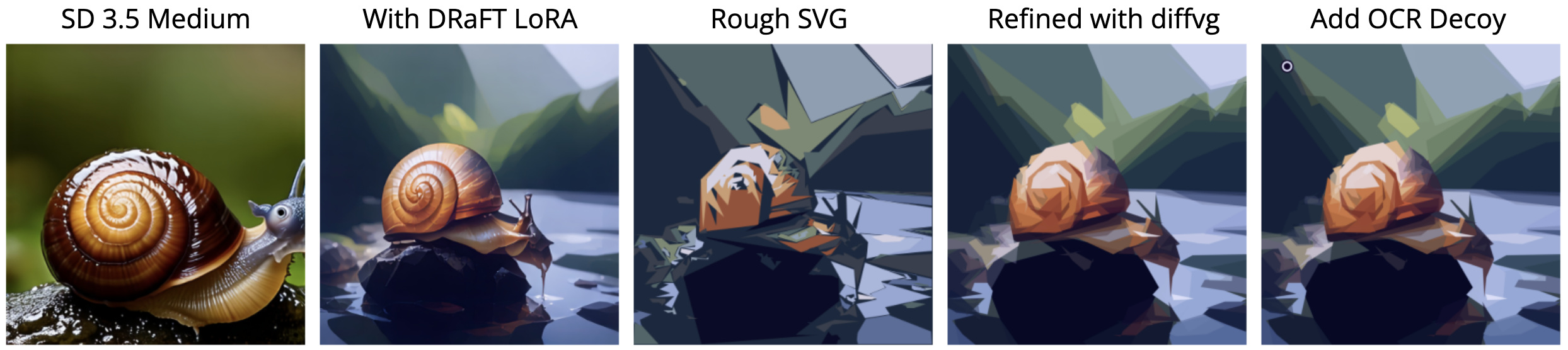\n\n## Diffusion Model\nAfter experimenting with a few models, I decided to use Stable Diffusion 3.5 Medium without the T5 text encoder. It has a relatively small memory footprint, which is important for fine-tuning. \n\n## DRaFT Fine-Tuning\n\nI trained a LoRA for SD3.5M with [DRaFT](https://arxiv.org/abs/2309.17400) (more precisely, DRaFT-LV), which trains the diffusion model to generate high-scoring images according to reward models. Unlike RL/DPO, DRaFT takes advantage of the fact that diffusion models are differentiable and backpropagates the reward directly into the diffusion model. You can see the training code [here](https://github.com/clarkkev/svg-diffusion)\n\n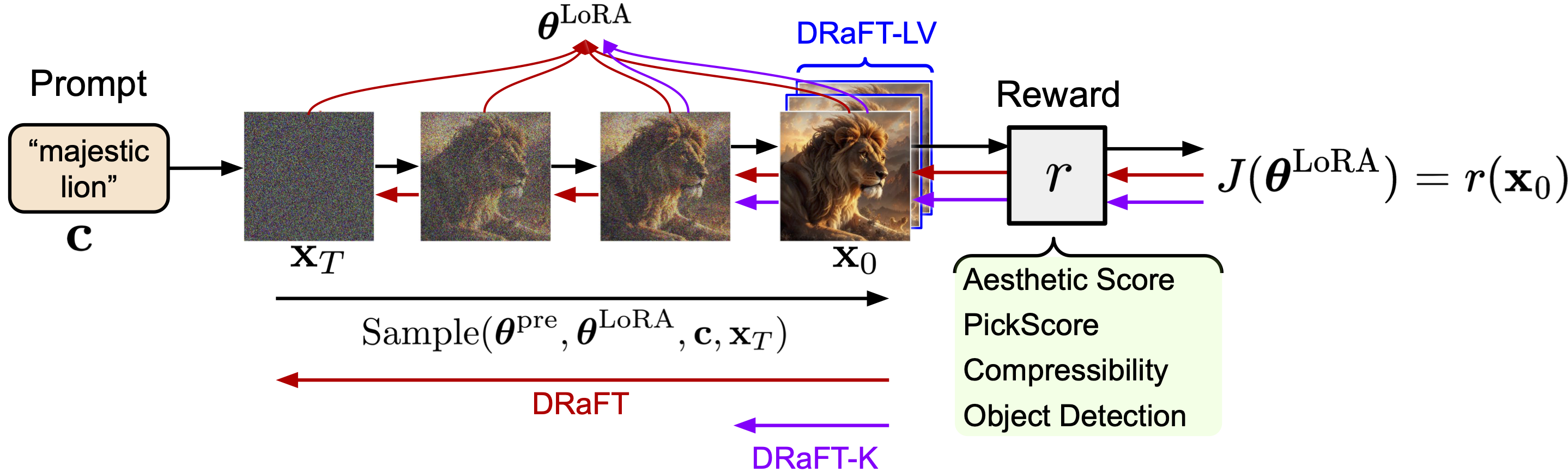\n\n**Training data:** I generated a set of 1000 training prompts with corresponding questions/answers using GPT-4o. I took a two stage-approach of first generating 50 image categories and then sampling prompts from those categories, with the known evaluation set categories (landscapes, abstract, and fashion) producing more prompts. \n\n**Reward functions:** I used two general reward functions that I knew worked well from my previous work on DRaFT: \n- [Human Preference Score v2](https://github.com/tgxs002/HPSv2)\n- [PickScore](https://github.com/yuvalkirstain/PickScore) \n\nThese models were trained on human preference data. I also added three competition-specific rewards:\n- The competition aesthetic score\n- A proxy for the VQA score (yes/no on “Does the image show {prompt}?”). This was faster and surprisingly seemed to work better than using the actual set of questions for each image. \n- Negative [LPIPs](https://github.com/richzhang/PerceptualSimilarity) distance between the image and convert_to_svg(image), so the model generates images that are easy to convert. \n\n**Results:** The fine-tuning improves aesthetic score by ~10% and VQA score by about ~5%. The overall LB score went up by around 0.03. A side benefit of the training is that I didn’t need to do any prompt engineering; I instead just relied on the fine-tuning to lead the model to produce the right image style. Here are some examples of generations before/after the fine-tuning (using the same random seed):\n\n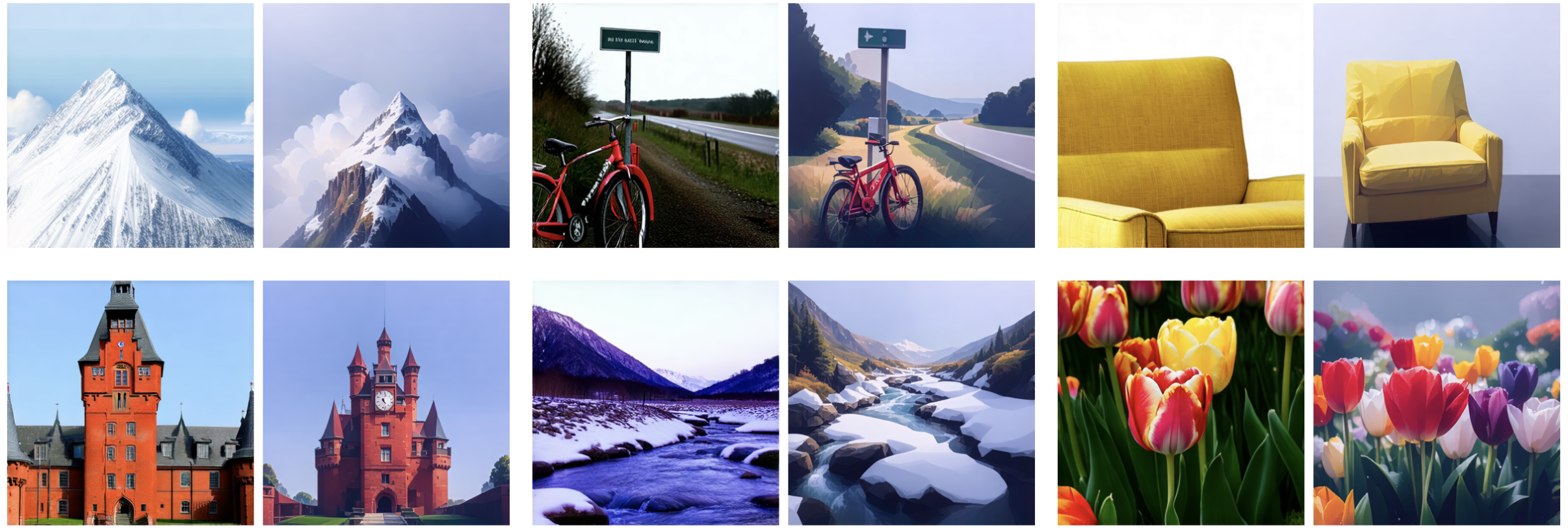\n\n## SVG Conversion\nI used a simple heuristic image-to-SVG converter inspired by Rich Olson’s notebook, with several tweaks to improve both visual quality and compression efficiency. The resulting SVG is then optimized with [diffvg](https://github.com/BachiLi/diffvg), a differentiable SVG rasterizer. The optimization minimizes the L1 distance between the rendered SVG and the original diffusion image using gradient descent on the locations/colors of the paths. This worked amazingly well, and meant I could get away with a pretty basic initial SVG converter, as the refinement would fix most issues that arose. I also used Rich Olson’s OCR decoy trick to reduce OCR hallucinations. \n\n## Best of n\nFor each prompt, my notebook keeps generating SVGs until roughly 60 seconds have passed, with some adaptivity based on whether it is behind or ahead of schedule. This typically produces 5-6 candidates. The SVG with the highest VQA score given the yes/no question “Does this image show {prompt}?” is returned. There is also a check to make sure the returned image has an OCR score of 1. ", "votes": 40 }, { "id": 3211423, "postDate": "2025-05-28T12:21:23.273Z", "content": "Really nice solution and congrats to 4th place!
\nThe exploits at the very top are also cool to see, but I feel like your solution is the best variant of those keeping close to the intent of the competition.
Could your model reliable generate geometric shapes after training? Our team struggled a lot with that part, complex landscapes being pretty accurate and beautiful by default, but the model just not being able to output a single trapezoid.
", "rawMarkdown": "Really nice solution and congrats to 4th place!\nThe exploits at the very top are also cool to see, but I feel like your solution is the best variant of those keeping close to the intent of the competition.\n\nCould your model reliable generate geometric shapes after training? Our team struggled a lot with that part, complex landscapes being pretty accurate and beautiful by default, but the model just not being able to output a single trapezoid.", "votes": 5, "replies": [ { "id": 3211544, "postDate": "2025-05-28T14:33:17.873Z", "content": "The fine-tuning did help with geometric shapes a bit, but not as much as on other examples. Quantitatively, on my train set vqa improved 0.784 -> 0.808 for the for the \"abstract\" category vs 0.836 -> 0.877 for the other categories. Qualitatively, it would definitely still mess up basic shapes. Maybe one alleviating factor is that whlie diffusion models are bad with geometric shapes, so are VQA models! I found cases where it would for example generate hexagons rather then pentagons but the VQA model would still gave a high score.
", "rawMarkdown": "The fine-tuning did help with geometric shapes a bit, but not as much as on other examples. Quantitatively, on my train set vqa improved 0.784 -> 0.808 for the for the \"abstract\" category vs 0.836 -> 0.877 for the other categories. Qualitatively, it would definitely still mess up basic shapes. Maybe one alleviating factor is that whlie diffusion models are bad with geometric shapes, so are VQA models! I found cases where it would for example generate hexagons rather then pentagons but the VQA model would still gave a high score.", "votes": 1 } ] }, { "id": 3211473, "postDate": "2025-05-28T13:22:28.880Z", "content": "Brilliant solution. It looks like DRaFT is much better than RL/DPO, which, in my case, didn’t work at all on 2,000 samples.
\nWhat HW did you use for training?
", "rawMarkdown": "Brilliant solution. It looks like DRaFT is much better than RL/DPO, which, in my case, didn’t work at all on 2,000 samples.\n\nWhat HW did you use for training?", "replies": [ { "id": 3211527, "postDate": "2025-05-28T14:23:40.660Z", "content": "I did everything in colab. The fine-tuning took 18 hours on a single A100.
", "rawMarkdown": "I did everything in colab. The fine-tuning took 18 hours on a single A100." } ] } ], "complete": true, "source": "live", "fetched_at": "2026-10-20T09:10:19Z", "competition_id": 89659, "competition_slug": "drawing-with-llms", "team_id": 13713309, "solution_url": "/competitions/drawing-with-llms/writeups/kevin-clark-4th-place-solution-sd3-5m-draft-diffvg" }