{"cells":[{"metadata":{"_uuid":"a8f9622945156d6337ba73c481da2de7efef7384"},"cell_type":"markdown","source":"# Statistical Analysis for Elo
\n### Quite Practical and Far from any Theoretical Concepts
\nlast update: 19/02/2019
\n \n\n>You are reading **10 Steps to Become a Data Scientist** and are now in the 8th step : \n\n1. [Leren Python](https://www.kaggle.com/mjbahmani/the-data-scientist-s-toolbox-tutorial-1)\n2. [Python Packages](https://www.kaggle.com/mjbahmani/the-data-scientist-s-toolbox-tutorial-2)\n3. [Mathematics and Linear Algebra](https://www.kaggle.com/mjbahmani/linear-algebra-for-data-scientists)\n4. [Programming & Analysis Tools](https://www.kaggle.com/mjbahmani/20-ml-algorithms-15-plot-for-beginners)\n5. [Big Data](https://www.kaggle.com/mjbahmani/a-data-science-framework-for-quora)\n6. [Data visualization](https://www.kaggle.com/mjbahmani/top-5-data-visualization-libraries-tutorial)\n7. [Data Cleaning](https://www.kaggle.com/mjbahmani/machine-learning-workflow-for-house-prices)\n8. You are in the 8th step\n9. [A Comprehensive ML Workflow with Python](https://www.kaggle.com/mjbahmani/a-comprehensive-ml-workflow-with-python)\n10. [Deep Learning](https://www.kaggle.com/mjbahmani/top-5-deep-learning-frameworks-tutorial)\n\nYou can Fork and Run this kernel on **Github**:\n> ###### [ GitHub](https://github.com/mjbahmani/10-steps-to-become-a-data-scientist)\n\n-------------------------------------------------------------------------------------------------------------\n **I hope you find this kernel helpful and some UPVOTES would be very much appreciated**\n \n -----------"},{"metadata":{"_uuid":"750903cc2679d39058f56df6c6c040be02b748df"},"cell_type":"markdown","source":"
\n## 1- Introduction\n**[Elo](https://www.cartaoelo.com.br/)** has defined a competition in **Kaggle**. A realistic and attractive data set for data scientists.\non this notebook, I will provide a **comprehensive** approach to solve Elo Recommendation problem for **Beginners**.\n
\n## 1-1 Kaggle kernels\nI have just listed some more important kernels that inspired my work and I've used them in this kernel:\n1. [simple-python-lightgbm-example](https://www.kaggle.com/ezietsman/simple-python-lightgbm-example)\n1. [simple-exploration-notebook-elo](https://www.kaggle.com/sudalairajkumar/simple-exploration-notebook-elo)\n1. [prediction-using-xgboost](https://www.kaggle.com/harshit92/prediction-using-xgboost-3-771)\n1. [elo-world](https://www.kaggle.com/mjbahmani/elo-world)\n1. [simple-lightgbm-without-blending](https://www.kaggle.com/mfjwr1/simple-lightgbm-without-blending)\n
\n
\nI am open to getting your feedback for improving this **kernel**.\n"},{"metadata":{"_uuid":"cda11210a88d6484112cbe2c3624225328326c6a"},"cell_type":"markdown","source":"
\n## Notebook Content\n1. [Introduction](#1)\n 1. [Kaggle kernels](#11)\n1. [Data Science Workflow for Elo](#2)\n1. [Problem Definition](#3)\n 1. [About Elo](#31)\n 1. [Business View](#32)\n 1. [Real world Application Vs Competitions](#321)\n1. [Problem feature](#4)\n 1. [Aim](#41)\n 1. [Variables](#42)\n 1. [ Inputs & Outputs](#43)\n 1. [Evaluation](#44)\n1. [Select Framework](#5)\n 1. [Import](#51)\n 1. [Version](#52)\n 1. [Setup](#53)\n1. [Exploratory data analysis](#6)\n 1. [Data Collection](#61)\n 1. [data_dictionary Analysis](#611)\n 1. [Explorer Dataset](#612)\n 1. [Data Cleaning](#62)\n 1. [Data Visualization](#63)\n 1. [countplot](#631)\n 1. [pie plot](#632)\n 1. [Histogram](#633)\n 1. [violin plot](#634)\n 1. [kdeplot](#635)\n 1. [Data Preprocessing](#64)\n1. [Apply Learning](#7)\n 1. [Evaluation](#71)\n1. [Conclusion](#8)\n1. [References](#9)"},{"metadata":{"_uuid":"e9438d850fcacb93c4dc1f7873255803ecbf521c"},"cell_type":"markdown","source":"-------------------------------------------------------------------------------------------------------------\n\n **I hope you find this kernel helpful and some UPVOTES would be very much appreciated**\n \n -----------"},{"metadata":{"_uuid":"e11b73b618b0f6e4335520ef80267c6d577d1ba5"},"cell_type":"markdown","source":"
\n## 2- A Data Science Workflow for Elo\nOf course, the same solution can not be provided for all problems, so the best way is to create a **general framework** and adapt it to new problem.\n\n**You can see my workflow in the below image** :\n\n  \n\n**You should feel free\tto\tadjust \tthis\tchecklist \tto\tyour needs**\n###### [Go to top](#top)"},{"metadata":{"_uuid":"600be852c0d28e7c0c5ebb718904ab15a536342c"},"cell_type":"markdown","source":"
\n## 3- Problem Definition\nI think one of the important things when you start a new machine learning project is Defining your problem. that means you should understand business problem.( **Problem Formalization**)\n \n >Note: \nWe are predicting a **loyalty score** for each card_id represented in test.csv and sample_submission.csv."},{"metadata":{"_uuid":"098f8cc653e55276c366f5c515b56c0971b4486f"},"cell_type":"markdown","source":"
\n## 3-1 About Elo\n [Elo](https://www.cartaoelo.com.br/) is one of the largest **payment brands** in Brazil, has built partnerships with merchants in order to offer promotions or discounts to cardholders. But \n1. do these promotions work for either the consumer or the merchant?\n1. Do customers enjoy their experience? \n1. Do merchants see repeat business? \n\n >Note: \n**Personalization is key**.\n"},{"metadata":{"_uuid":"e2a7568d0008e141952fd5130fa5fda9fedad544"},"cell_type":"markdown","source":"
\n## 3-2 Business View \n**Elo** has built machine learning models to understand the most important aspects and preferences in their customers’ lifecycle, from food to shopping. But so far none of them is specifically tailored for an individual or profile. This is where you come in.\n\n###### [Go to top](#top)"},{"metadata":{"_uuid":"556980c672d2f7b2a4ee943b9d13b88de6e41e04"},"cell_type":"markdown","source":"
\n## 4- Problem Feature\nProblem Definition has four steps that have illustrated in the picture below:\n\n\n1. Aim\n1. Variable\n1. Inputs & Outputs\n1. Evaluation\n
\n\n### 4-1 Aim\nDevelop algorithms to identify and serve the most relevant opportunities to individuals, by uncovering signal in customer loyalty.\nWe are predicting a **loyalty score** for each card_id represented in test.csv and sample_submission.csv.\n\n
\n### 4-2 Variables\nThe data is formatted as follows:\n\ntrain.csv and test.csv contain card_ids and information about the card itself - the first month the card was active, etc. train.csv also contains the target.\n\nhistorical_transactions.csv and new_merchant_transactions.csv are designed to be joined with train.csv, test.csv, and merchants.csv. They contain information about transactions for each card, as described above.\n\nmerchants can be joined with the transaction sets to provide additional merchant-level information.\n\n\n
\n### 4-3 Inputs & Outputs\nwe use **train.csv** and **test.csv** as Input and we should upload a **submission.csv** as Output"},{"metadata":{"_uuid":"fbedcae8843986c2139f18dad4b5f313e6535ac5"},"cell_type":"markdown","source":"
\n## 5- Select Framework\nAfter problem definition and problem feature, we should select our **framework** to solve the **problem**.\nWhat we mean by the framework is that the programming languages you use and by what modules the problem will be solved.\n###### [Go to top](#top)"},{"metadata":{"_uuid":"c90e261f3b150e10aaec1f34ab3be768acf7aa25"},"cell_type":"markdown","source":"
\n## 5-1 Import"},{"metadata":{"_cell_guid":"b1076dfc-b9ad-4769-8c92-a6c4dae69d19","_kg_hide-input":true,"_uuid":"8f2839f25d086af736a60e9eeb907d3b93b6e0e5","trusted":true},"cell_type":"code","source":"from sklearn import model_selection, preprocessing, metrics\nfrom sklearn.metrics import mean_squared_error\nfrom sklearn.model_selection import train_test_split\nimport matplotlib.pylab as pylab\nimport matplotlib.pyplot as plt\nfrom pandas import get_dummies\nimport lightgbm as lgb\nimport matplotlib as mpl\nimport xgboost as xgb\nimport seaborn as sns\nimport pandas as pd\nimport numpy as np\nimport matplotlib\nimport warnings\nimport sklearn\nimport scipy\nimport numpy\nimport json\nimport sys\nimport csv\nimport os","execution_count":null,"outputs":[]},{"metadata":{"_uuid":"1c2beac253f7ddddcc2e1aa26dc850d5b87268f3"},"cell_type":"markdown","source":"
\n## 5-2 version"},{"metadata":{"_kg_hide-input":true,"_uuid":"9ffe2f1e5995150c8138f9e98509c7525fb230b4","trusted":true},"cell_type":"code","source":"print('matplotlib: {}'.format(matplotlib.__version__))\nprint('sklearn: {}'.format(sklearn.__version__))\nprint('scipy: {}'.format(scipy.__version__))\nprint('seaborn: {}'.format(sns.__version__))\nprint('pandas: {}'.format(pd.__version__))\nprint('numpy: {}'.format(np.__version__))\nprint('Python: {}'.format(sys.version))\n","execution_count":null,"outputs":[]},{"metadata":{"_uuid":"431bf889ae401c1089a13835356c13f2b6a06f6c"},"cell_type":"markdown","source":"
\n## 5-3 Setup\n\nA few tiny adjustments for better **code readability**"},{"metadata":{"_kg_hide-input":false,"trusted":true,"_uuid":"05ccd847c8212f67972d1f127b67931eb546110f"},"cell_type":"code","source":"sns.set(style='white', context='notebook', palette='deep')\nwarnings.filterwarnings('ignore')\nwarnings.simplefilter(action='ignore', category=FutureWarning)\nsns.set_style('white')\npd.set_option('display.max_columns', 500)\n%matplotlib inline","execution_count":null,"outputs":[]},{"metadata":{"_uuid":"04ff1a533119d589baee777c21194a951168b0c7"},"cell_type":"markdown","source":"
\n## 6- EDA\nBy the end of the section, you'll be able to answer these questions and more, while generating graphics that are both insightful and beautiful. then We will review analytical and statistical operations:\n\n1. Data Collection\n1. Visualization\n1. Data Cleaning\n1. Data Preprocessing\n \n\n ###### [Go to top](#top)"},{"metadata":{"_uuid":"cedecea930b278f86292367cc28d2996a235a169"},"cell_type":"markdown","source":"
\n## 6-1 Data Collection\nI start Collection Data by the training and testing datasets into **Pandas DataFrames**.\n###### [Go to top](#top)"},{"metadata":{"_kg_hide-input":false,"trusted":true,"_uuid":"3ab7e42ef3c17e344893d7e61154fa8a94ddf21a"},"cell_type":"code","source":"import os\nprint(os.listdir(\"../input\"))\n","execution_count":null,"outputs":[]},{"metadata":{"_kg_hide-input":false,"_uuid":"9269ae851b744856bce56840637030a16a5877e1","trusted":true},"cell_type":"code","source":"main_train = pd.read_csv('../input/train.csv', parse_dates=[\"first_active_month\"] )\nmain_test = pd.read_csv('../input/test.csv' ,parse_dates=[\"first_active_month\"] )\nmain_merchants=pd.read_csv('../input/merchants.csv')\nmain_new_merchant_transactions=pd.read_csv('../input/new_merchant_transactions.csv')\nmain_historical_transactions = pd.read_csv(\"../input/historical_transactions.csv\")","execution_count":null,"outputs":[]},{"metadata":{"trusted":true,"_uuid":"0157b2280eddb3279577511318d16eec7fcc7ffe"},"cell_type":"code","source":"sample_submission = pd.read_csv(\"../input/sample_submission.csv\")","execution_count":null,"outputs":[]},{"metadata":{"trusted":true,"_uuid":"cadbfa0c2788c500f9ec2f33e0f26c4bd0263cb8"},"cell_type":"code","source":"sample_submission.shape","execution_count":null,"outputs":[]},{"metadata":{"trusted":true,"_uuid":"1566e23ea774b0ac34cc9491a2015103f6b431d1"},"cell_type":"code","source":"sample_submission.head()","execution_count":null,"outputs":[]},{"metadata":{"_kg_hide-input":false,"_uuid":"ca840f02925751186f87e402fcb5f637ab1ab8a0","trusted":true},"cell_type":"code","source":"print(main_train.info())","execution_count":null,"outputs":[]},{"metadata":{"_uuid":"4cbcf76344a6e3c8e841ccf1f43bf00d040a06a1","trusted":true,"_kg_hide-input":true},"cell_type":"code","source":"print(main_test.info())","execution_count":null,"outputs":[]},{"metadata":{"_uuid":"73ab30f86273b590a51fc363d9bf78c2709558fa"},"cell_type":"markdown","source":"
\n## 6-1-2 Explorer Dataset\n1- Dimensions of the dataset.\n\n2- Peek at the data itself.\n\n3- Statistical summary of all attributes.\n\n4- Breakdown of the data by the class variable.\n\n >Note: Don’t worry, each look at the data is **one command**. These are useful commands that you can use again and again on future projects.\n###### [Go to top](#top)"},{"metadata":{"_uuid":"58ed9c838069f54de5cf90b20a774c3e236149b3"},"cell_type":"markdown","source":" >Note: \n \n* All **data** is simulated and fictitious, and is not real customer data\n* Each **row** is an observation (also known as : sample, example, instance, record).\n* Each **column** is a feature (also known as: Predictor, attribute, Independent Variable, input, regressor, Covariate).\n###### [Go to top](#top)"},{"metadata":{"_kg_hide-input":false,"trusted":true,"_uuid":"88bad715c0032fdb08a8d22db2384e73dfa1e911"},"cell_type":"code","source":"print(\"Shape of train set : \",main_train.shape)\nprint(\"Shape of test set : \",main_test.shape)\nprint(\"Shape of historical_transactions : \",main_historical_transactions.shape)\nprint(\"Shape of merchants : \",main_merchants.shape)\nprint(\"Shape of new_merchant_transactions : \",main_new_merchant_transactions.shape)\n","execution_count":null,"outputs":[]},{"metadata":{"_uuid":"8a8d34d874032d0aa0898f44832a23c623ed330f"},"cell_type":"markdown","source":"
\n## 6-1-2-1 data_dictionary Analysis\nElo Provides a excel file to describe about data(feature). It has four sheet and we have just read them with below code:"},{"metadata":{"trusted":true,"_uuid":"1e882cf7e8696a51d8aa2fe05dd9035bd7063b56","_kg_hide-input":false},"cell_type":"code","source":"data_dictionary_train=pd.read_excel('../input/Data_Dictionary.xlsx',sheet_name='train')\ndata_dictionary_history=pd.read_excel('../input/Data_Dictionary.xlsx',sheet_name='history')\ndata_dictionary_new_merchant_period=pd.read_excel('../input/Data_Dictionary.xlsx',sheet_name='new_merchant_period')\ndata_dictionary_merchant=pd.read_excel('../input/Data_Dictionary.xlsx',sheet_name='merchant')","execution_count":null,"outputs":[]},{"metadata":{"_uuid":"581b90e6a869c3793472c7edd59091d6d6342fb2"},"cell_type":"markdown","source":"
\n## 6-1-3 Features\nFeatures can be from following types:\n* numeric\n* categorical\n* ordinal\n* datetime\n* coordinates\n\nFind the type of features in **Elo dataset**?!\n\nFor getting some information about the dataset you can use **info()** command."},{"metadata":{"_uuid":"bcf89ac9e4b2944e241279956859a257b049d2e6"},"cell_type":"markdown","source":"
\n## 6-1-4 Train Analysis"},{"metadata":{"_uuid":"3483fbc1e932d9f387703a796248963e77cefa1d"},"cell_type":"markdown","source":"you can use tails command to explorer dataset, such as "},{"metadata":{"_uuid":"08a94b16129d4c231b64d4691374e18aa80f1d80","trusted":true,"_kg_hide-input":false},"cell_type":"code","source":"main_train.tail()","execution_count":null,"outputs":[]},{"metadata":{"_uuid":"513bf092e78388de9a1337b8e2f401a1aa61704a"},"cell_type":"markdown","source":"
\n### 6-1-4-1 Train Description\nsome info about train set"},{"metadata":{"trusted":true,"_uuid":"cb0c886bd76df2497a3845e805db69e31cda4bf1","_kg_hide-input":false},"cell_type":"code","source":"data_dictionary_train.head(10)\n# what we know about train:","execution_count":null,"outputs":[]},{"metadata":{"_uuid":"5e75b8bcdcbec72a9cd5c56be4aeee20771ebea3"},"cell_type":"markdown","source":"We have three features that they are **Anonymized** "},{"metadata":{"trusted":true,"_uuid":"b7089fa19da3dc0c2c862bcf655e00366c9a48bb"},"cell_type":"code","source":"main_train.tail()","execution_count":null,"outputs":[]},{"metadata":{"_uuid":"7b5fd1034cd591ebd29fba1c77d342ec2b408d13"},"cell_type":"markdown","source":"After loading the data via **pandas**, we should checkout what the content is, description and via the following:"},{"metadata":{"_uuid":"1b8b6f0c962a59e5258e74ed9e740a4aaf7c8113","trusted":true,"_kg_hide-input":false},"cell_type":"code","source":"main_train.describe()","execution_count":null,"outputs":[]},{"metadata":{"_uuid":"9ef27bfbe249d1d51a763b2bf6e08ab4f1cb8c3c"},"cell_type":"markdown","source":"1. The train set is approximately twice the test set\n2. The target data value is between -33.219281 and 17.965068"},{"metadata":{"_uuid":"ad773f73d53183a9503e24cfb48251e1896e8099"},"cell_type":"markdown","source":"## 6-1-5 Test Analysis"},{"metadata":{"_kg_hide-input":false,"trusted":true,"_uuid":"3c0ae9d99f97445f1798843ec4aae9cb5cb07a03"},"cell_type":"code","source":"print('----- test set--------')\nprint(main_test.head(5))","execution_count":null,"outputs":[]},{"metadata":{"trusted":true,"_uuid":"5ea1682405591853046c984fbb2ec7b18568aba3","_kg_hide-input":true},"cell_type":"code","source":"main_test.info()","execution_count":null,"outputs":[]},{"metadata":{"trusted":true,"_uuid":"12103cf75eaaf44c8fe8e8c2aeb66691c8e54a42"},"cell_type":"code","source":"main_test.describe()","execution_count":null,"outputs":[]},{"metadata":{"_uuid":"02af42695d78aed3559749237e062191a4c16c12"},"cell_type":"markdown","source":"If you compare **describe()** function for test and train, you find that they are so similar!"},{"metadata":{"_uuid":"ac8d426954246fea0684765402be77c40a4beaf1"},"cell_type":"markdown","source":"
\n## 6-1-5 Historical Transactions Analysis"},{"metadata":{"trusted":true,"_uuid":"2dc908cd4b38873830f70ed4af8f7e9e951a896d"},"cell_type":"code","source":"data_dictionary_history.head(10)\n# what we know about history:","execution_count":null,"outputs":[]},{"metadata":{"trusted":true,"_uuid":"27486b18846df59597b051041a5e098461a81289"},"cell_type":"code","source":"main_historical_transactions.head()","execution_count":null,"outputs":[]},{"metadata":{"trusted":true,"_uuid":"a5038fec8be23ac0b7e0911bddbda053e0a94b06"},"cell_type":"code","source":"main_historical_transactions.shape","execution_count":null,"outputs":[]},{"metadata":{"_uuid":"ce946d38bbfdfb90ab6622656e3511bb6d5e6b29"},"cell_type":"markdown","source":"
\n## 6-1-4 Merchant Analysis"},{"metadata":{"trusted":true,"_uuid":"aba73da7f5b98fb5ee0edb62c60227f0bf5fc61c"},"cell_type":"code","source":"main_merchants.head()","execution_count":null,"outputs":[]},{"metadata":{"trusted":true,"_uuid":"5b2e4f8c61d7eb96e486999144dd35e1dbc8e4a7"},"cell_type":"code","source":"data_dictionary_merchant.head(30)\n# what we know about merchant:","execution_count":null,"outputs":[]},{"metadata":{"_uuid":"d899bc495a0345967ea4c58959b62e47742af090"},"cell_type":"markdown","source":"## 6-1-5 New Merchant Transactions Analysis"},{"metadata":{"trusted":true,"_uuid":"501ec46300880b04dcf08b7bf359cd35d4e6c8a9"},"cell_type":"code","source":"main_new_merchant_transactions.head()","execution_count":null,"outputs":[]},{"metadata":{"trusted":true,"_uuid":"9e8f388465e2e8684eb00f0d20094441b4a0155e"},"cell_type":"code","source":"data_dictionary_new_merchant_period.head(10)\n# what we know about new_merchant_period:","execution_count":null,"outputs":[]},{"metadata":{"_uuid":"8280749a19af32869978c61941d1dea306632d71"},"cell_type":"markdown","source":"
\n## 6-2 Data Cleaning\nWhen dealing with real-world data, dirty data is the norm rather than the exception.\n\n###### [Go to top](#top)"},{"metadata":{"_uuid":"a6315bf510cecb907b2d23aad25faf6ccad32ac4"},"cell_type":"markdown","source":"How many NA elements in every column!!\n\nGood news, it is Zero!\n\n >Note: To check out how many null info are on the dataset, we can use **isnull().sum()**."},{"metadata":{"trusted":true,"_uuid":"d3d292619fa61eadd82020092a154e58a93fa087"},"cell_type":"code","source":"def check_missing_data(df):\n flag=df.isna().sum().any()\n if flag==True:\n total = df.isnull().sum()\n percent = (df.isnull().sum())/(df.isnull().count()*100)\n output = pd.concat([total, percent], axis=1, keys=['Total', 'Percent'])\n data_type = []\n # written by MJ Bahmani\n for col in df.columns:\n dtype = str(df[col].dtype)\n data_type.append(dtype)\n output['Types'] = data_type\n return(np.transpose(output))\n else:\n return(False)","execution_count":null,"outputs":[]},{"metadata":{"_kg_hide-input":true,"_uuid":"675f72fb58d83c527f71819e71ed8e17f81126f5","trusted":true},"cell_type":"code","source":"print ('for train :',check_missing_data(main_train))\nprint ('for test:',check_missing_data(main_test))","execution_count":null,"outputs":[]},{"metadata":{"_uuid":"5faa6528c6667060c05268757ff46e211b4fea3f"},"cell_type":"markdown","source":" >Note: But if we had , we can just use **dropna()**(be careful sometimes you should not do this!)"},{"metadata":{"_kg_hide-input":true,"_uuid":"e8e124ca20643ad307d9bfdc34328d548c6ddcbc","trusted":true},"cell_type":"code","source":"# remove rows that have NA's\nprint('Before Droping',main_train.shape)\nmain_train = main_train.dropna()\nprint('After Droping',main_train.shape)","execution_count":null,"outputs":[]},{"metadata":{"_uuid":"277e1998627d6a3ddeff4e913a6b8c3dc81dec96"},"cell_type":"markdown","source":"\nWe can get a quick idea of how many instances (rows) and how many attributes (columns) the data contains with the shape property."},{"metadata":{"_uuid":"c2f1eaf0b6dfdc7cc4dace04614e99ed56425d00"},"cell_type":"markdown","source":"To print dataset **columns**, we can use columns atribute."},{"metadata":{"_uuid":"909d61b33ec06249d0842e6115597bbacf21163f","trusted":true,"_kg_hide-input":true},"cell_type":"code","source":"main_train.columns","execution_count":null,"outputs":[]},{"metadata":{"_uuid":"055772bd170aa8018aabd85106b76675802c33b3"},"cell_type":"markdown","source":"
\n## 6-3 Data Visualization\n###### [Go to top](#top)"},{"metadata":{"_uuid":"fbe8c50bcc1b632f42dd249e27a9a7c14517fd29"},"cell_type":"markdown","source":"
\n## 6-3-1 Histogram"},{"metadata":{"_uuid":"7c8fdaf09413e808075062380d23e61d84f2e4b5"},"cell_type":"markdown","source":"Most of the targets almost have the value between +8 or -8,please check the plot below. and some of data have value (-30)"},{"metadata":{"_kg_hide-input":true,"_uuid":"e065ebff5374a9ab83df9c099a05962eb3645934","trusted":true},"cell_type":"code","source":"main_train[\"target\"].hist();","execution_count":null,"outputs":[]},{"metadata":{"_uuid":"24aa1c6c130d949888caaf7538f75fe382c10759"},"cell_type":"markdown","source":"we should be careful about them!"},{"metadata":{"trusted":true,"_uuid":"e8aa0f40b8987621f2a74e2860c097b1bebb64b7"},"cell_type":"code","source":"main_train[main_train[\"target\"]<-29].count()","execution_count":null,"outputs":[]},{"metadata":{"trusted":true,"_uuid":"42991453dab1bac979de2207dcbbbe98e2c7921a"},"cell_type":"code","source":"# histograms\nmain_train.hist(figsize=(15,20))\nplt.figure()","execution_count":null,"outputs":[]},{"metadata":{"trusted":true,"_uuid":"1026049fc9949cd408fd3687d2fb8fd46b4a91cf"},"cell_type":"code","source":"f,ax=plt.subplots(1,2,figsize=(20,10))\nmain_train[main_train['feature_3']==0].target.plot.hist(ax=ax[0],bins=20,edgecolor='black',color='red')\nax[0].set_title('feature_3= 0')\nx1=list(range(0,85,5))\nax[0].set_xticks(x1)\nmain_train[main_train['feature_3']==1].target.plot.hist(ax=ax[1],color='green',bins=20,edgecolor='black')\nax[1].set_title('feature_3= 1')\nx2=list(range(0,85,5))\nax[1].set_xticks(x2)\nplt.show()","execution_count":null,"outputs":[]},{"metadata":{"trusted":true,"_uuid":"8dc3a96d6f689c8d50dec8f0099f3d2eade17d56"},"cell_type":"code","source":"f,ax=plt.subplots(1,2,figsize=(18,8))\nmain_train['feature_3'].value_counts().plot.pie(explode=[0,0.1],autopct='%1.1f%%',ax=ax[0],shadow=True)\nax[0].set_title('feature_3')\nax[0].set_ylabel('')\nsns.countplot('feature_3',data=main_train,ax=ax[1])\nax[1].set_title('feature_3')\nplt.show()","execution_count":null,"outputs":[]},{"metadata":{"trusted":true,"_uuid":"517f0ceb6ad267a9aff9f8cac0f2f103669a25c5"},"cell_type":"code","source":"f,ax=plt.subplots(1,2,figsize=(18,8))\nmain_train[['feature_3','feature_2']].groupby(['feature_3']).mean().plot.bar(ax=ax[0])\nax[0].set_title('Survived vs feature_2')\nsns.countplot('feature_3',hue='feature_2',data=main_train,ax=ax[1])\nax[1].set_title('feature_3:feature')\nplt.show()","execution_count":null,"outputs":[]},{"metadata":{"_uuid":"6ac47758b3b5019e9171d2f97e3b2237d6c023b6"},"cell_type":"markdown","source":"
\n## 6-3-2 distplot"},{"metadata":{"_kg_hide-input":true,"trusted":true,"_uuid":"2c1ec5a796a1fe04d7ebf2623f4878d0d155fa7a"},"cell_type":"code","source":"sns.distplot(main_train['target'])","execution_count":null,"outputs":[]},{"metadata":{"_uuid":"2ad9e0a985358467c2ee96f886f36f704ca06c91"},"cell_type":"markdown","source":"
\n## 6-3-3 violinplot"},{"metadata":{"_kg_hide-input":true,"trusted":true,"_uuid":"5ae31260ab611ea0b7c4f794c11d49ec2b679aba"},"cell_type":"code","source":"sns.violinplot(data=main_train, x=\"feature_1\", y='target')","execution_count":null,"outputs":[]},{"metadata":{"_uuid":"93b7635568ef38bd6c12b23750dd960fa942aab8"},"cell_type":"markdown","source":"
\n## 6-3-4 Scatter plot\nScatter plot Purpose to identify the type of relationship (if any) between two quantitative variables"},{"metadata":{"trusted":true,"_uuid":"e17d60e1bb81a209836bdd7e94045f52840a08f3"},"cell_type":"code","source":"plt.figure(figsize=(8,6))\nplt.scatter(range(main_train.shape[0]), np.sort(main_train['target'].values),marker='o',c='green')\nplt.xlabel('index', fontsize=12)\nplt.ylabel('Loyalty Score', fontsize=12)\nplt.title('Explore: Target')\nplt.show();","execution_count":null,"outputs":[]},{"metadata":{"trusted":true,"_uuid":"362ecd283f5a648d08f5b82b5c26882f6cf9620b"},"cell_type":"code","source":"# Modify the graph above by assigning each species an individual color.\ng = sns.FacetGrid(main_train, hue=\"feature_3\", col=\"feature_2\", margin_titles=True,\n palette={1:\"blue\", 0:\"red\"} )\ng=g.map(plt.scatter, \"first_active_month\", \"target\",edgecolor=\"w\").add_legend();","execution_count":null,"outputs":[]},{"metadata":{"_uuid":"e4a41e83625a4d4fe831a104e973adbd30f566df"},"cell_type":"markdown","source":"
\n## 6-3-5 Box\n"},{"metadata":{"trusted":true,"_uuid":"2cb7dc55fb72a95fa786cefaa5c016c09d311cbd"},"cell_type":"code","source":"sns.boxplot(x=\"feature_3\", y=\"feature_2\", data=main_test )\nplt.show()","execution_count":null,"outputs":[]},{"metadata":{"_uuid":"91dda1f631cf4ed362162501aaaac6d19cfd6cc7"},"cell_type":"markdown","source":"
\n## 6-4 Data Preprocessing\n\n\n>What methods of preprocessing can we run on Elo?! \n###### [Go to top](#top)"},{"metadata":{"_uuid":"6c8c838f497c66a227975fb9a2f588e431f0c568"},"cell_type":"markdown","source":"**<< Note 2 >>**\nin pandas's data frame you can perform some query such as \"where\""},{"metadata":{"_uuid":"c8c8d9fd63d9bdb601183aeb4f1435affeb8a596","trusted":true,"_kg_hide-input":true},"cell_type":"code","source":"main_train.where(main_train ['target']==1).count()","execution_count":null,"outputs":[]},{"metadata":{"_uuid":"33fc33a18489b438a884819d99dc00a02b113be8"},"cell_type":"markdown","source":"As you can see in the below in python, it is so easy perform some query on the dataframe:"},{"metadata":{"_uuid":"8b545ff7e8367c5ab9c1db710f70b6936ac8422c","trusted":true,"_kg_hide-input":true},"cell_type":"code","source":"main_train[main_train['target']<-32].head(5)","execution_count":null,"outputs":[]},{"metadata":{"_uuid":"d517b2b99a455a6b89c238faf1647515b8a67d87","trusted":true,"_kg_hide-input":true},"cell_type":"code","source":"main_train[main_train['target']==1].head(5)","execution_count":null,"outputs":[]},{"metadata":{"_kg_hide-input":true,"trusted":true,"_uuid":"19d3ed2ef536b88a079e563b8fd237ff4b64ccaa"},"cell_type":"code","source":"main_train.feature_1.unique()","execution_count":null,"outputs":[]},{"metadata":{"_kg_hide-input":true,"trusted":true,"_uuid":"679c51cf1d0818124da821835f6aa394a511f6c4"},"cell_type":"code","source":"main_train.feature_2.unique()","execution_count":null,"outputs":[]},{"metadata":{"_kg_hide-input":true,"trusted":true,"_uuid":"31c3542bf74e1552d93aa22419d19c329efb9446"},"cell_type":"code","source":"main_train.feature_3.unique()","execution_count":null,"outputs":[]},{"metadata":{"_kg_hide-input":false,"trusted":true,"_uuid":"600b1b02db54739461e00e2f56675dee4cedf977","_kg_hide-output":true},"cell_type":"code","source":"main_train.first_active_month.unique()","execution_count":null,"outputs":[]},{"metadata":{"_uuid":"aa882e5bcdc7d5f440489eff75d1d225269655a4"},"cell_type":"markdown","source":"**<< Note >>**\n>**Preprocessing and generation pipelines depend on a model type**"},{"metadata":{"_uuid":"7b60d5b9c898f9874d71259016f0efb676e9447c"},"cell_type":"markdown","source":"
\n## 6-4-1Some New Feature"},{"metadata":{"trusted":true,"_uuid":"b300b7a14ad9aae80ea308ae489589e4254f8247"},"cell_type":"code","source":"df_train=main_train\ndf_test=main_test","execution_count":null,"outputs":[]},{"metadata":{"trusted":true,"_uuid":"ae46b7fc19441eec8602f468a20422814048ea8a"},"cell_type":"code","source":"df_train[\"year\"] = main_train[\"first_active_month\"].dt.year\ndf_test[\"year\"] = main_test[\"first_active_month\"].dt.year","execution_count":null,"outputs":[]},{"metadata":{"trusted":true,"_uuid":"0519aaf14d445bfd3a84cb2ae1147d9141b7694d"},"cell_type":"code","source":"df_train[\"month\"] = main_train[\"first_active_month\"].dt.month\ndf_test[\"month\"] = main_test[\"first_active_month\"].dt.month","execution_count":null,"outputs":[]},{"metadata":{"_uuid":"197f6a0fdf6b10d4d09ad61b22802bd3dab413b8"},"cell_type":"markdown","source":"
\n## 6-4-2 Feature Encoding"},{"metadata":{"trusted":true,"_uuid":"21bd7f9e614a58ce3d66d6c51fbcc6cb04b64f1d"},"cell_type":"code","source":"x_train = df_train.drop([\"target\",\"card_id\",\"first_active_month\"],axis=1)\nx_test = df_test.drop([\"card_id\",\"first_active_month\"],axis=1)","execution_count":null,"outputs":[]},{"metadata":{"trusted":true,"_uuid":"13b614e671ca643b726f9d71e7cfb772c4c2b8e9"},"cell_type":"code","source":"y_train = df_train[\"target\"]\ndf_train = df_train.sample(frac=1, random_state = 7)","execution_count":null,"outputs":[]},{"metadata":{"trusted":true,"_uuid":"b8f723cac7217f1a390b9e00040d31b793f1eb9b"},"cell_type":"code","source":"\nTrn_x,val_x,Trn_y,val_y = train_test_split(x_train,y_train,test_size =0.1,random_state = 7)\ntrn_x , test_x, trn_y, test_y = train_test_split(Trn_x , Trn_y, test_size =0.1, random_state = 7)","execution_count":null,"outputs":[]},{"metadata":{"_uuid":"72cc7c7b60a33390a85b16bc34e3b9e424650cdd"},"cell_type":"markdown","source":"
\n## 7- Apply Learning\nHow to understand what is the best way to solve our problem?!"},{"metadata":{"_uuid":"4dc477f4ec361454ffd2bc8e11375be67bbec6eb"},"cell_type":"markdown","source":"
\n## 7-1 Evaluation\nSubmissions are scored on the root mean squared error. RMSE(Root Mean Squared Error) is defined as:\n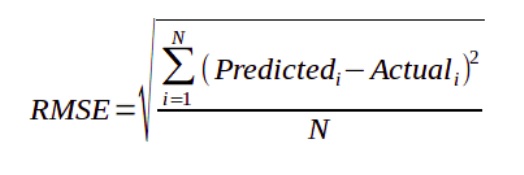 \nwhere y^ is the predicted loyalty score for each card_id, and y is the actual loyalty score assigned to a card_id.\n\n >Note: \n You must answer the following question:\nHow does your company expect to use and benefit from **your model**.\n###### [Go to top](#top)"},{"metadata":{"trusted":true,"_uuid":"35576529f4a9682819b40817e6b81d047b2f726c"},"cell_type":"code","source":"# rmse\ndef rmse(y_true, y_pred):\n return np.sqrt(mean_squared_error(y_true, y_pred))","execution_count":null,"outputs":[]},{"metadata":{"trusted":true,"_uuid":"fae7002ec7d71627d9b3c35e61c175fc35f1619a"},"cell_type":"code","source":"# converting into xgb DMatrix\nTrain = xgb.DMatrix(trn_x,label = trn_y)\nValidation = xgb.DMatrix(val_x, label = val_y)\nTest = xgb.DMatrix(test_x)","execution_count":null,"outputs":[]},{"metadata":{"trusted":true,"_uuid":"cdd77fd509c17cbcdf3718f8b743660963d7edb0"},"cell_type":"code","source":"params = {\"booster\":\"gbtree\",\"eta\":0.1,'min_split_loss':0,'max_depth':6,\n 'min_child_weight':1, 'max_delta_step':0,'subsample':1,'colsample_bytree':1,\n 'colsample_bylevel':1,'reg_lambda':1,'reg_alpha':0,\n 'grow_policy':'depthwise','max_leaves':0,'objective':'reg:linear','eval_metric':'rmse',\n 'seed':7}\nhistory ={} # This will record rmse score of training and test set\neval_list =[(Train,\"Training\"),(Validation,\"Validation\")]","execution_count":null,"outputs":[]},{"metadata":{"_kg_hide-output":true,"trusted":true,"_uuid":"2cba5616557554302a583214bd8f64958e778a7f"},"cell_type":"code","source":"clf = xgb.train(params, Train, num_boost_round=119, evals=eval_list, obj=None, feval=None, maximize=False, \n early_stopping_rounds=40, evals_result=history);","execution_count":null,"outputs":[]},{"metadata":{"trusted":true,"_uuid":"9ea729a53e6e6cf64b1cf44c47b32a2501fd6c9a"},"cell_type":"code","source":"prediction = clf.predict(xgb.DMatrix(x_test))","execution_count":null,"outputs":[]},{"metadata":{"trusted":true,"_uuid":"fb2941352f19c667edb542af3836763cdfc8c179"},"cell_type":"code","source":"submission = pd.DataFrame({\n \"card_id\": main_test[\"card_id\"].values,\n \"target\": np.ravel(prediction)\n })","execution_count":null,"outputs":[]},{"metadata":{"_uuid":"d67f43bc3f49ef1accb71d4721e0d92f91e7db2b"},"cell_type":"markdown","source":"
\n# 8- Conclusion\nThis kernel is not completed yet , I have tried to cover all the parts related to the process of **Elo problem** with a variety of Python packages and I know that there are still some issues then I hope to get your feedback to improve it.\n"},{"metadata":{"_uuid":"fe24746ce6fec833c8fc56950d28026c79da82b0"},"cell_type":"markdown","source":"
\n# 9- References & Credits\n1. [hackernoon](https://hackernoon.com/choosing-the-right-machine-learning-algorithm-68126944ce1f)\n1. [medium](https://medium.com/@pushkarmandot/https-medium-com-pushkarmandot-what-is-lightgbm-how-to-implement-it-how-to-fine-tune-the-parameters-60347819b7fc)\n1. [encoding-categorical-features](https://towardsdatascience.com/encoding-categorical-features-21a2651a065c)"},{"metadata":{"_uuid":"cf3679a51c72dbe2d2549b5fe97e4ac5f1fa0fa0"},"cell_type":"markdown","source":"you can Fork and Run this kernel on **Github**:\n> ###### [ GitHub](https://github.com/mjbahmani/10-steps-to-become-a-data-scientist)\n"},{"metadata":{"_uuid":"c5512d9728d688f5c22e4f38ff3a298600f59094"},"cell_type":"markdown","source":"Go to first step: [**Course Home Page**](https://www.kaggle.com/mjbahmani/10-steps-to-become-a-data-scientist)\n\nGo to next step : [**Mathematics and Linear Algebra**](https://www.kaggle.com/mjbahmani/linear-algebra-for-data-scientists)\n"},{"metadata":{"_uuid":"3218340bb7dfc4ab53987820284a5c2b1c34eb45"},"cell_type":"markdown","source":"### The kernel is not completed and will be updated soon !!!"}],"metadata":{"kernelspec":{"display_name":"Python 3","language":"python","name":"python3"},"language_info":{"name":"python","version":"3.6.6","mimetype":"text/x-python","codemirror_mode":{"name":"ipython","version":3},"pygments_lexer":"ipython3","nbconvert_exporter":"python","file_extension":".py"}},"nbformat":4,"nbformat_minor":1}