\n  \n
\n
\n \n \n  \n
\n
\n\n  \n\nIn this notebook, we will learn about different data augmentation techniques for object detection i.e images with bounding boxes. ","execution_count":null},{"metadata":{"_uuid":"d629ff2d2480ee46fbb7e2d37f6b5fab8052498a","_cell_guid":"79c7e3d0-c299-4dcb-8224-4455121ee9b0","trusted":true},"cell_type":"code","source":"import os\nimport re\nimport cv2\nimport ast\nimport random\nimport pandas as pd\nimport numpy as np\n\nfrom PIL import Image\nimport albumentations as A\nfrom collections import namedtuple\nfrom albumentations.pytorch.transforms import ToTensorV2\n\nimport matplotlib.pyplot as plt\nimport matplotlib.patches as patches\n\nfrom pathlib import Path\nbase_dir = Path('/kaggle/input/global-wheat-detection')\ntrain_dir = base_dir/'train'","execution_count":null,"outputs":[]},{"metadata":{},"cell_type":"markdown","source":"We will start by loading our data and processing it.","execution_count":null},{"metadata":{"trusted":true},"cell_type":"code","source":"def load_data():\n train_df = pd.read_csv(base_dir/'train.csv')\n bboxes = np.stack(train_df['bbox'].apply(lambda x: ast.literal_eval(x)))\n for i, col in enumerate(['x_min', 'y_min', 'w', 'h']):\n train_df[col] = bboxes[:, i]\n\n train_df[\"x_max\"] = train_df.apply(lambda col: col.x_min + col.w, axis=1)\n train_df[\"y_max\"] = train_df.apply(lambda col: col.y_min + col.h, axis = 1)\n train_df.drop(['bbox', 'w', 'h'], axis=1, inplace=True)\n print('DataFrame size: ',train_df.shape)\n return train_df","execution_count":null,"outputs":[]},{"metadata":{"trusted":true},"cell_type":"code","source":"df = load_data()\ndf.head()","execution_count":null,"outputs":[]},{"metadata":{},"cell_type":"markdown","source":"### Helper functions","execution_count":null},{"metadata":{"trusted":true},"cell_type":"code","source":"def draw_rect(img, bboxes, color=(255, 0, 0)):\n img = img.copy()\n for bbox in bboxes:\n bbox = np.array(bbox).astype(int)\n pt1, pt2 = (bbox[0], bbox[1]), (bbox[2], bbox[3])\n img = cv2.rectangle(img, pt1, pt2, color, int(max(img.shape[:2]) / 200))\n return img\n\ndef read_img(img_id):\n img_path = train_dir/f'{img_id}.jpg'\n img = cv2.imread(str(img_path))\n return img\n\ndef read_bboxes(img_id):\n return df.loc[df.image_id == img_id, 'x_min y_min x_max y_max'.split()].values\n\ndef plot_img(img_id, bbox=False):\n img = read_img(img_id)\n if bbox:\n bboxes = read_bboxes(img_id)\n img = draw_rect(img, bboxes)\n plt.imshow(img);\n \ndef plot_multiple_img(img_matrix_list, title_list, ncols, nrows=3, main_title=\"\"):\n fig, myaxes = plt.subplots(figsize=(20, 15), nrows=nrows, ncols=ncols, squeeze=False)\n fig.suptitle(main_title, fontsize = 30)\n fig.subplots_adjust(wspace=0.3)\n fig.subplots_adjust(hspace=0.3)\n for i, (img, title) in enumerate(zip(img_matrix_list, title_list)):\n \n myaxes[i // ncols][i % ncols].imshow(img)\n myaxes[i // ncols][i % ncols].set_title(title, fontsize=15)\n myaxes[i // ncols][i % ncols].grid(False)\n myaxes[i // ncols][i % ncols].set_xticks([])\n myaxes[i // ncols][i % ncols].set_yticks([])\n\n plt.show()","execution_count":null,"outputs":[]},{"metadata":{},"cell_type":"markdown","source":"Lets select an `image_id` for our experiments","execution_count":null},{"metadata":{"trusted":true},"cell_type":"code","source":"img_id = '0b5b60131'","execution_count":null,"outputs":[]},{"metadata":{},"cell_type":"markdown","source":"[Albumentations](https://albumentations.ai/docs/) library makes it super easy to apply transforms to your images. The library provides wide range of transformations (that can be very easily customized). I highly recommended you to checkout their [github repository](https://github.com/albumentations-team/albumentations). \n\nLets have a look at some of these transforms:","execution_count":null},{"metadata":{"trusted":true},"cell_type":"code","source":"chosen_img = read_img(img_id)\n\nalbumentation_list = [A.RandomFog(p=1), \n A.RandomBrightness(p=1), \n A.RandomCrop(p=1,height = 512, width = 512), \n A.Rotate(p=1, limit=90),\n A.RGBShift(p=1), \n A.RandomSnow(p=1), \n A.VerticalFlip(p=1), \n A.RandomContrast(limit = 0.5,p = 1)]\n\ntitles_list = [\"Original\", \n \"RandomFog\",\n \"RandomBrightness\", \n \"RandomCrop\",\n \"Rotate\", \n \"RGBShift\", \n \"RandomSnow\", \n \"VerticalFlip\", \n \"RandomContrast\"]\n\nimg_matrix_list = [chosen_img]\nfor aug_type in albumentation_list:\n img = aug_type(image = chosen_img)['image']\n img_matrix_list.append(img)\n\nplot_multiple_img(img_matrix_list, \n titles_list, \n ncols = 3, \n main_title=\"Different Types of Augmentations\")","execution_count":null,"outputs":[]},{"metadata":{},"cell_type":"markdown","source":"This is pretty dope. Applying a transformation is just a function call. Albumentations has many more augmentations, so if you are seeing albumentations for the first time, then you should definitely learning it. Its simply great and once you have learnt this library, you will not have to learn anything else for image augmentation.\n\nThey also have a [website](https://albumentations-demo.herokuapp.com/) that can help you visualize your transformations.","execution_count":null},{"metadata":{},"cell_type":"markdown","source":"### Bounding Boxes\n\nAugmenting images is easy and straight forward. But things get pretty complex when you start working with bounding boxes. When you transform an image, the coordinates of bounding boxes are also altered. Apply same transformations to your image and bounding box is very sophisticated and prone to errors. Things get even more complex when you start chaining these transformations. \n\nLucky for us, albumentations library supports working with bounding boxes. You should refer [this](https://albumentations.ai/docs/getting_started/bounding_boxes_augmentation/) doc page for more details. \n\nThe most important thing when working with bounding boxes is the **annotations**. There are different annotations formats for bounding boxes. Each format uses its specific representation of bouning boxes coordinates. Albumentations supports four formats: `pascal_voc`, `albumentations`, `coco`, and `yolo`. The image below will help you understand different annotations better.\n\n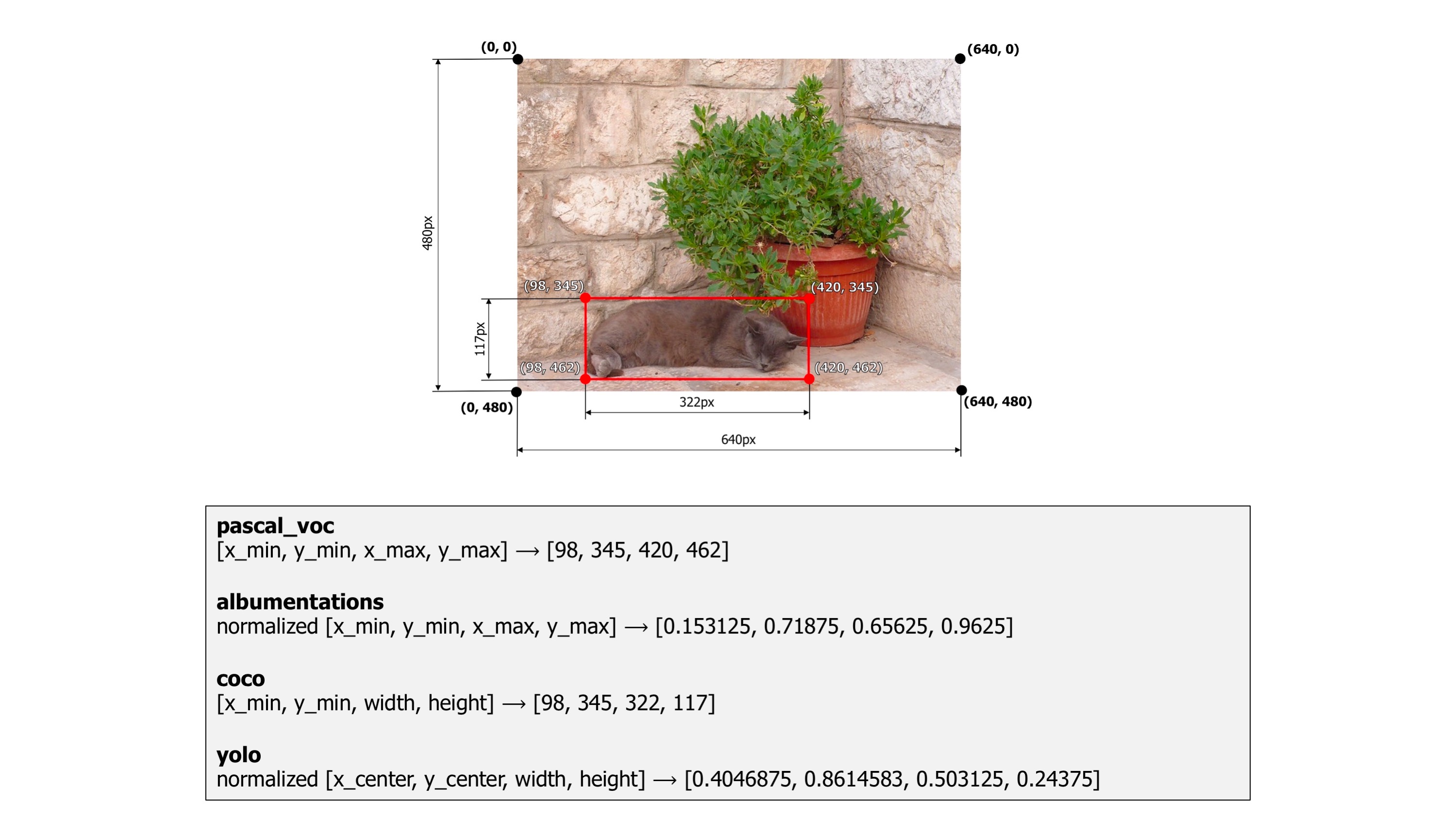\n\n**Note:** Different models (like yolo, faster-rcnn, etc.) expects bboxes in different formats. So, before using any model just make sure that you know the annotation type that it uses. And then format your bboxes accordingly.","execution_count":null},{"metadata":{},"cell_type":"markdown","source":"Here, we have our bounding boxes formatted in `pascal_voc` because our faster-RCNN model expects so. Lets plot all the above transformations again, but this time with bounding boxes.","execution_count":null},{"metadata":{"trusted":true},"cell_type":"code","source":"chosen_img = read_img(img_id)\nbboxes = read_bboxes(img_id)\nbbox_params = {'format': 'pascal_voc', 'label_fields': ['labels']}\n\nalbumentation_list = [A.Compose([A.RandomFog(p=1)], bbox_params=bbox_params),\n A.Compose([A.RandomBrightness(p=1)], bbox_params=bbox_params),\n A.Compose([A.RandomCrop(p=1, height=512, width=512)], bbox_params=bbox_params), \n A.Compose([A.Rotate(p=1, limit=90)], bbox_params=bbox_params),\n A.Compose([A.RGBShift(p=1)], bbox_params=bbox_params), \n A.Compose([A.RandomSnow(p=1)], bbox_params=bbox_params),\n A.Compose([A.VerticalFlip(p=1)], bbox_params=bbox_params), \n A.Compose([A.RandomContrast(limit=0.5, p = 1)], bbox_params=bbox_params)\n ]\n\ntitles_list = [\"Original\", \n \"RandomFog\",\n \"RandomBrightness\", \n \"RandomCrop\",\n \"Rotate\", \n \"RGBShift\", \n \"RandomSnow\", \n \"VerticalFlip\", \n \"RandomContrast\"]\n\nimg_matrix_list = [draw_rect(chosen_img, bboxes)]\n\nfor aug_type in albumentation_list:\n anno = aug_type(image=chosen_img, bboxes=bboxes, labels=np.ones(len(bboxes)))\n img = draw_rect(anno['image'], anno['bboxes'])\n img_matrix_list.append(img)\n\nplot_multiple_img(img_matrix_list, \n titles_list, \n ncols = 3, \n main_title=\"Different Types of Augmentations\")","execution_count":null,"outputs":[]},{"metadata":{},"cell_type":"markdown","source":"Albumentations library automatically takes care of bboxes, amazing right? Doing it manually would be a nightmare. Not just bounding boxes but albumentations also support mask augmentation for segmentation and keypoints augmentation. You can also apply all these things simultaneously, what else do you want from an augmentation library?! You can check the complete list of transforms and their supported targets, [here](https://albumentations.ai/docs/getting_started/transforms_and_targets/#spatial-level-transforms). ","execution_count":null},{"metadata":{},"cell_type":"markdown","source":"## Advance Augmentations\n\nIn recent times, many new augmentation techniques have been devloped. Some of them are extremely powerful. When applied, they can help your model generalize better and make it more robust. We will look are four of them: \n- CutOut\n- Mixup\n- CutMix\n- Mosaic\n\nLets get started . . .","execution_count":null},{"metadata":{},"cell_type":"markdown","source":"## Cutout Augmentation\n\n**CutOut** is a technique for regularizing CNN models. It works by masking square regions of the image. By randomly masking regions of the image we can prevent the model from falling prey to noice in the data and overfit. \n\n**Note:** Reading research papers is one of the most under rated skill set in Deep Learning community, but to become a good practitioner you must regularly spend time reading research papers. This [cutout paper](https://arxiv.org/pdf/1708.04552) is an easy read, give it a try.\n\nAlbumentations already has a working implementation of CutOut. So, we will use it directly. ","execution_count":null},{"metadata":{"trusted":true},"cell_type":"code","source":"from albumentations.augmentations.transforms import Cutout","execution_count":null,"outputs":[]},{"metadata":{"trusted":true},"cell_type":"code","source":"img_id = '3a4672486'\nchosen_img = read_img(img_id)\nbboxes = read_bboxes(img_id)\n\nbbox_params = {'format': 'pascal_voc', 'label_fields': ['labels']}\naugmentation = A.Compose([Cutout(num_holes=8, \n max_h_size=80, \n max_w_size=80, \n fill_value=0, \n p=1),\n ], \n bbox_params=bbox_params)\n\nimg_matrix_list = [draw_rect(chosen_img, bboxes)]\n\nanno = augmentation(image=chosen_img, bboxes=bboxes, labels=np.ones(len(bboxes)))\nimg = draw_rect(anno['image'], anno['bboxes'])\nimg_matrix_list.append(img)\n\ntitles_list = [\"Original\", \"CutOut\"]\n\nplot_multiple_img(img_matrix_list, titles_list, ncols = 2, nrows= 1, main_title=\"\")","execution_count":null,"outputs":[]},{"metadata":{},"cell_type":"markdown","source":"There is one problem with this, if you make the `max_h_size` and `max_w_size` very high, say 250 px. Then you will have some bounding boxes inside the patch. This is what I am talking about. \n\n
\n\nIn this notebook, we will learn about different data augmentation techniques for object detection i.e images with bounding boxes. ","execution_count":null},{"metadata":{"_uuid":"d629ff2d2480ee46fbb7e2d37f6b5fab8052498a","_cell_guid":"79c7e3d0-c299-4dcb-8224-4455121ee9b0","trusted":true},"cell_type":"code","source":"import os\nimport re\nimport cv2\nimport ast\nimport random\nimport pandas as pd\nimport numpy as np\n\nfrom PIL import Image\nimport albumentations as A\nfrom collections import namedtuple\nfrom albumentations.pytorch.transforms import ToTensorV2\n\nimport matplotlib.pyplot as plt\nimport matplotlib.patches as patches\n\nfrom pathlib import Path\nbase_dir = Path('/kaggle/input/global-wheat-detection')\ntrain_dir = base_dir/'train'","execution_count":null,"outputs":[]},{"metadata":{},"cell_type":"markdown","source":"We will start by loading our data and processing it.","execution_count":null},{"metadata":{"trusted":true},"cell_type":"code","source":"def load_data():\n train_df = pd.read_csv(base_dir/'train.csv')\n bboxes = np.stack(train_df['bbox'].apply(lambda x: ast.literal_eval(x)))\n for i, col in enumerate(['x_min', 'y_min', 'w', 'h']):\n train_df[col] = bboxes[:, i]\n\n train_df[\"x_max\"] = train_df.apply(lambda col: col.x_min + col.w, axis=1)\n train_df[\"y_max\"] = train_df.apply(lambda col: col.y_min + col.h, axis = 1)\n train_df.drop(['bbox', 'w', 'h'], axis=1, inplace=True)\n print('DataFrame size: ',train_df.shape)\n return train_df","execution_count":null,"outputs":[]},{"metadata":{"trusted":true},"cell_type":"code","source":"df = load_data()\ndf.head()","execution_count":null,"outputs":[]},{"metadata":{},"cell_type":"markdown","source":"### Helper functions","execution_count":null},{"metadata":{"trusted":true},"cell_type":"code","source":"def draw_rect(img, bboxes, color=(255, 0, 0)):\n img = img.copy()\n for bbox in bboxes:\n bbox = np.array(bbox).astype(int)\n pt1, pt2 = (bbox[0], bbox[1]), (bbox[2], bbox[3])\n img = cv2.rectangle(img, pt1, pt2, color, int(max(img.shape[:2]) / 200))\n return img\n\ndef read_img(img_id):\n img_path = train_dir/f'{img_id}.jpg'\n img = cv2.imread(str(img_path))\n return img\n\ndef read_bboxes(img_id):\n return df.loc[df.image_id == img_id, 'x_min y_min x_max y_max'.split()].values\n\ndef plot_img(img_id, bbox=False):\n img = read_img(img_id)\n if bbox:\n bboxes = read_bboxes(img_id)\n img = draw_rect(img, bboxes)\n plt.imshow(img);\n \ndef plot_multiple_img(img_matrix_list, title_list, ncols, nrows=3, main_title=\"\"):\n fig, myaxes = plt.subplots(figsize=(20, 15), nrows=nrows, ncols=ncols, squeeze=False)\n fig.suptitle(main_title, fontsize = 30)\n fig.subplots_adjust(wspace=0.3)\n fig.subplots_adjust(hspace=0.3)\n for i, (img, title) in enumerate(zip(img_matrix_list, title_list)):\n \n myaxes[i // ncols][i % ncols].imshow(img)\n myaxes[i // ncols][i % ncols].set_title(title, fontsize=15)\n myaxes[i // ncols][i % ncols].grid(False)\n myaxes[i // ncols][i % ncols].set_xticks([])\n myaxes[i // ncols][i % ncols].set_yticks([])\n\n plt.show()","execution_count":null,"outputs":[]},{"metadata":{},"cell_type":"markdown","source":"Lets select an `image_id` for our experiments","execution_count":null},{"metadata":{"trusted":true},"cell_type":"code","source":"img_id = '0b5b60131'","execution_count":null,"outputs":[]},{"metadata":{},"cell_type":"markdown","source":"[Albumentations](https://albumentations.ai/docs/) library makes it super easy to apply transforms to your images. The library provides wide range of transformations (that can be very easily customized). I highly recommended you to checkout their [github repository](https://github.com/albumentations-team/albumentations). \n\nLets have a look at some of these transforms:","execution_count":null},{"metadata":{"trusted":true},"cell_type":"code","source":"chosen_img = read_img(img_id)\n\nalbumentation_list = [A.RandomFog(p=1), \n A.RandomBrightness(p=1), \n A.RandomCrop(p=1,height = 512, width = 512), \n A.Rotate(p=1, limit=90),\n A.RGBShift(p=1), \n A.RandomSnow(p=1), \n A.VerticalFlip(p=1), \n A.RandomContrast(limit = 0.5,p = 1)]\n\ntitles_list = [\"Original\", \n \"RandomFog\",\n \"RandomBrightness\", \n \"RandomCrop\",\n \"Rotate\", \n \"RGBShift\", \n \"RandomSnow\", \n \"VerticalFlip\", \n \"RandomContrast\"]\n\nimg_matrix_list = [chosen_img]\nfor aug_type in albumentation_list:\n img = aug_type(image = chosen_img)['image']\n img_matrix_list.append(img)\n\nplot_multiple_img(img_matrix_list, \n titles_list, \n ncols = 3, \n main_title=\"Different Types of Augmentations\")","execution_count":null,"outputs":[]},{"metadata":{},"cell_type":"markdown","source":"This is pretty dope. Applying a transformation is just a function call. Albumentations has many more augmentations, so if you are seeing albumentations for the first time, then you should definitely learning it. Its simply great and once you have learnt this library, you will not have to learn anything else for image augmentation.\n\nThey also have a [website](https://albumentations-demo.herokuapp.com/) that can help you visualize your transformations.","execution_count":null},{"metadata":{},"cell_type":"markdown","source":"### Bounding Boxes\n\nAugmenting images is easy and straight forward. But things get pretty complex when you start working with bounding boxes. When you transform an image, the coordinates of bounding boxes are also altered. Apply same transformations to your image and bounding box is very sophisticated and prone to errors. Things get even more complex when you start chaining these transformations. \n\nLucky for us, albumentations library supports working with bounding boxes. You should refer [this](https://albumentations.ai/docs/getting_started/bounding_boxes_augmentation/) doc page for more details. \n\nThe most important thing when working with bounding boxes is the **annotations**. There are different annotations formats for bounding boxes. Each format uses its specific representation of bouning boxes coordinates. Albumentations supports four formats: `pascal_voc`, `albumentations`, `coco`, and `yolo`. The image below will help you understand different annotations better.\n\n\n\n**Note:** Different models (like yolo, faster-rcnn, etc.) expects bboxes in different formats. So, before using any model just make sure that you know the annotation type that it uses. And then format your bboxes accordingly.","execution_count":null},{"metadata":{},"cell_type":"markdown","source":"Here, we have our bounding boxes formatted in `pascal_voc` because our faster-RCNN model expects so. Lets plot all the above transformations again, but this time with bounding boxes.","execution_count":null},{"metadata":{"trusted":true},"cell_type":"code","source":"chosen_img = read_img(img_id)\nbboxes = read_bboxes(img_id)\nbbox_params = {'format': 'pascal_voc', 'label_fields': ['labels']}\n\nalbumentation_list = [A.Compose([A.RandomFog(p=1)], bbox_params=bbox_params),\n A.Compose([A.RandomBrightness(p=1)], bbox_params=bbox_params),\n A.Compose([A.RandomCrop(p=1, height=512, width=512)], bbox_params=bbox_params), \n A.Compose([A.Rotate(p=1, limit=90)], bbox_params=bbox_params),\n A.Compose([A.RGBShift(p=1)], bbox_params=bbox_params), \n A.Compose([A.RandomSnow(p=1)], bbox_params=bbox_params),\n A.Compose([A.VerticalFlip(p=1)], bbox_params=bbox_params), \n A.Compose([A.RandomContrast(limit=0.5, p = 1)], bbox_params=bbox_params)\n ]\n\ntitles_list = [\"Original\", \n \"RandomFog\",\n \"RandomBrightness\", \n \"RandomCrop\",\n \"Rotate\", \n \"RGBShift\", \n \"RandomSnow\", \n \"VerticalFlip\", \n \"RandomContrast\"]\n\nimg_matrix_list = [draw_rect(chosen_img, bboxes)]\n\nfor aug_type in albumentation_list:\n anno = aug_type(image=chosen_img, bboxes=bboxes, labels=np.ones(len(bboxes)))\n img = draw_rect(anno['image'], anno['bboxes'])\n img_matrix_list.append(img)\n\nplot_multiple_img(img_matrix_list, \n titles_list, \n ncols = 3, \n main_title=\"Different Types of Augmentations\")","execution_count":null,"outputs":[]},{"metadata":{},"cell_type":"markdown","source":"Albumentations library automatically takes care of bboxes, amazing right? Doing it manually would be a nightmare. Not just bounding boxes but albumentations also support mask augmentation for segmentation and keypoints augmentation. You can also apply all these things simultaneously, what else do you want from an augmentation library?! You can check the complete list of transforms and their supported targets, [here](https://albumentations.ai/docs/getting_started/transforms_and_targets/#spatial-level-transforms). ","execution_count":null},{"metadata":{},"cell_type":"markdown","source":"## Advance Augmentations\n\nIn recent times, many new augmentation techniques have been devloped. Some of them are extremely powerful. When applied, they can help your model generalize better and make it more robust. We will look are four of them: \n- CutOut\n- Mixup\n- CutMix\n- Mosaic\n\nLets get started . . .","execution_count":null},{"metadata":{},"cell_type":"markdown","source":"## Cutout Augmentation\n\n**CutOut** is a technique for regularizing CNN models. It works by masking square regions of the image. By randomly masking regions of the image we can prevent the model from falling prey to noice in the data and overfit. \n\n**Note:** Reading research papers is one of the most under rated skill set in Deep Learning community, but to become a good practitioner you must regularly spend time reading research papers. This [cutout paper](https://arxiv.org/pdf/1708.04552) is an easy read, give it a try.\n\nAlbumentations already has a working implementation of CutOut. So, we will use it directly. ","execution_count":null},{"metadata":{"trusted":true},"cell_type":"code","source":"from albumentations.augmentations.transforms import Cutout","execution_count":null,"outputs":[]},{"metadata":{"trusted":true},"cell_type":"code","source":"img_id = '3a4672486'\nchosen_img = read_img(img_id)\nbboxes = read_bboxes(img_id)\n\nbbox_params = {'format': 'pascal_voc', 'label_fields': ['labels']}\naugmentation = A.Compose([Cutout(num_holes=8, \n max_h_size=80, \n max_w_size=80, \n fill_value=0, \n p=1),\n ], \n bbox_params=bbox_params)\n\nimg_matrix_list = [draw_rect(chosen_img, bboxes)]\n\nanno = augmentation(image=chosen_img, bboxes=bboxes, labels=np.ones(len(bboxes)))\nimg = draw_rect(anno['image'], anno['bboxes'])\nimg_matrix_list.append(img)\n\ntitles_list = [\"Original\", \"CutOut\"]\n\nplot_multiple_img(img_matrix_list, titles_list, ncols = 2, nrows= 1, main_title=\"\")","execution_count":null,"outputs":[]},{"metadata":{},"cell_type":"markdown","source":"There is one problem with this, if you make the `max_h_size` and `max_w_size` very high, say 250 px. Then you will have some bounding boxes inside the patch. This is what I am talking about. \n\n \n\nThis makes it really difficult for the model to learn from the images. Ideally, we should also remove the bounding boxes that lies inside the mask. So, I would recommend you to use it with small values of `max_h_size` and `max_w_size`. \n\n**Note:** All the data augmentation techniques that we have use so far can be applied to any type of computer vision problem. From here on, the code can only be used for object detection.","execution_count":null},{"metadata":{},"cell_type":"markdown","source":"To use bigger cutouts we need to write a custom transformer, that would also remove the bounding boxes. The code is taken from [this kernel](http://www.kaggle.com/kaushal2896/data-augmentation-tutorial-basic-cutout-mixup). I have removed some less important parts and made some changes to make it easy to use.","execution_count":null},{"metadata":{"trusted":true},"cell_type":"code","source":"from albumentations.core.transforms_interface import DualTransform\nfrom albumentations.augmentations.bbox_utils import denormalize_bbox, normalize_bbox\n\nclass CustomCutout(DualTransform):\n \"\"\"\n Custom Cutout augmentation with handling of bounding boxes \n Note: (only supports square cutout regions)\n \n Author: Kaushal28\n Reference: https://arxiv.org/pdf/1708.04552.pdf\n \"\"\"\n \n def __init__(\n self,\n fill_value=0,\n bbox_removal_threshold=0.50,\n min_cutout_size=192,\n max_cutout_size=512,\n always_apply=False,\n p=0.5\n ):\n \"\"\"\n Class construstor\n \n :param fill_value: Value to be filled in cutout (default is 0 or black color)\n :param bbox_removal_threshold: Bboxes having content cut by cutout path more than this threshold will be removed\n :param min_cutout_size: minimum size of cutout (192 x 192)\n :param max_cutout_size: maximum size of cutout (512 x 512)\n \"\"\"\n super(CustomCutout, self).__init__(always_apply, p) # Initialize parent class\n self.fill_value = fill_value\n self.bbox_removal_threshold = bbox_removal_threshold\n self.min_cutout_size = min_cutout_size\n self.max_cutout_size = max_cutout_size\n \n def _get_cutout_position(self, img_height, img_width, cutout_size):\n \"\"\"\n Randomly generates cutout position as a named tuple\n \n :param img_height: height of the original image\n :param img_width: width of the original image\n :param cutout_size: size of the cutout patch (square)\n :returns position of cutout patch as a named tuple\n \"\"\"\n position = namedtuple('Point', 'x y')\n return position(\n np.random.randint(0, img_width - cutout_size + 1),\n np.random.randint(0, img_height - cutout_size + 1)\n )\n \n def _get_cutout(self, img_height, img_width):\n \"\"\"\n Creates a cutout pacth with given fill value and determines the position in the original image\n \n :param img_height: height of the original image\n :param img_width: width of the original image\n :returns (cutout patch, cutout size, cutout position)\n \"\"\"\n cutout_size = np.random.randint(self.min_cutout_size, self.max_cutout_size + 1)\n cutout_position = self._get_cutout_position(img_height, img_width, cutout_size)\n return np.full((cutout_size, cutout_size, 3), self.fill_value), cutout_size, cutout_position\n \n def apply(self, image, **params):\n \"\"\"\n Applies the cutout augmentation on the given image\n \n :param image: The image to be augmented\n :returns augmented image\n \"\"\"\n image = image.copy() # Don't change the original image\n self.img_height, self.img_width, _ = image.shape\n cutout_arr, cutout_size, cutout_pos = self._get_cutout(self.img_height, self.img_width)\n \n # Set to instance variables to use this later\n self.image = image\n self.cutout_pos = cutout_pos\n self.cutout_size = cutout_size\n \n image[cutout_pos.y:cutout_pos.y+cutout_size, cutout_pos.x:cutout_size+cutout_pos.x, :] = cutout_arr\n return image\n \n def apply_to_bbox(self, bbox, **params):\n \"\"\"\n Removes the bounding boxes which are covered by the applied cutout\n \n :param bbox: A single bounding box coordinates in pascal_voc format\n :returns transformed bbox's coordinates\n \"\"\"\n\n # Denormalize the bbox coordinates\n bbox = denormalize_bbox(bbox, self.img_height, self.img_width)\n x_min, y_min, x_max, y_max = tuple(map(int, bbox))\n\n bbox_size = (x_max - x_min) * (y_max - y_min) # width * height\n overlapping_size = np.sum(\n (self.image[y_min:y_max, x_min:x_max, 0] == self.fill_value) &\n (self.image[y_min:y_max, x_min:x_max, 1] == self.fill_value) &\n (self.image[y_min:y_max, x_min:x_max, 2] == self.fill_value)\n )\n\n # Remove the bbox if it has more than some threshold of content is inside the cutout patch\n if overlapping_size / bbox_size > self.bbox_removal_threshold:\n return normalize_bbox((0, 0, 0, 0), self.img_height, self.img_width)\n\n return normalize_bbox(bbox, self.img_height, self.img_width)\n\n def get_transform_init_args_names(self):\n \"\"\"\n Fetches the parameter(s) of __init__ method\n :returns: tuple of parameter(s) of __init__ method\n \"\"\"\n return ('fill_value', 'bbox_removal_threshold', 'min_cutout_size', 'max_cutout_size', 'always_apply', 'p')","execution_count":null,"outputs":[]},{"metadata":{"trusted":true},"cell_type":"code","source":"img_id = '1b399c9a7'\nchosen_img = read_img(img_id)\nbboxes = read_bboxes(img_id)\n\nbbox_params = {'format': 'pascal_voc', 'label_fields': ['labels']}\naugmentation = A.Compose([CustomCutout(p=1),], bbox_params = bbox_params)\n\nimg_matrix_list = [draw_rect(chosen_img, bboxes)]\n\nanno = augmentation(image=chosen_img, bboxes=bboxes, labels=np.ones(len(bboxes)))\nimg = draw_rect(anno['image'], anno['bboxes'])\nimg_matrix_list.append(img)\n\ntitles_list = [\"Original\", \n f'CutOut Image: Removed bboxes: {len(bboxes)-len(anno[\"bboxes\"])}']\n\nplot_multiple_img(img_matrix_list, titles_list, ncols = 2, nrows= 1, main_title=\"\")","execution_count":null,"outputs":[]},{"metadata":{},"cell_type":"markdown","source":"Here, we are also removing the bboxes that are completely inside the patch. You can see the number of removed boxes at the top of the CutOut image. Amazing! Lets write our second custom transformer for MixUp.","execution_count":null},{"metadata":{},"cell_type":"markdown","source":"## Mixup Augmentation\nIn mixup, two images are mixed with weights: λ and 1−λ . λ is generated from symmetric beta distribution with parameter alpha. This creates new virtual training samples.\n\nIn image classification images and labels can be mixed up as following:\n\n[Image source](https://www.kaggle.com/kaushal2896/data-augmentation-tutorial-basic-cutout-mixup)\n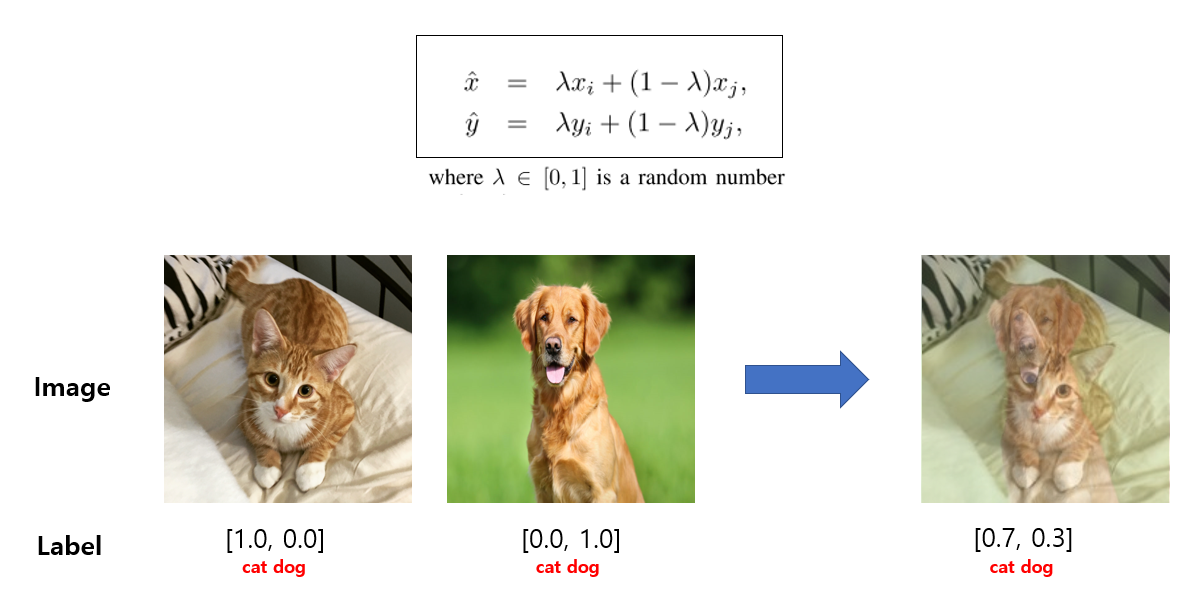\n\nYou read the MixUp research paper, [here](https://arxiv.org/pdf/1710.09412.pdf). Again, this is an easy read. \n\nBut in object detection tasks, the labels are not one hot encoded classes and hence after mixing two images, the resultant image's label would be the union of bounding boxes of both the images and this makes implementation simpler.\n\nNow let's implement it.","execution_count":null},{"metadata":{"trusted":true},"cell_type":"code","source":"def mixup(images, bboxes, areas=None, alpha=1.0):\n \"\"\"\n Randomly mixes the given list if images with each other\n \n :param images: The images to be mixed up\n :param bboxes: The bounding boxes (labels)\n :param alpha: Required to generate image wieghts (lambda) using beta distribution. In this case we'll use alpha=1, which is same as uniform distribution\n \"\"\"\n # Generate image weight (minimum 0.4 and maximum 0.6)\n lam = np.clip(np.random.beta(alpha, alpha), 0.4, 0.6)\n print(f'lambda: {lam}')\n \n # Weighted Mixup\n mixedup_images = (lam*images[0] + (1 - lam)*images[1]).astype(np.uint8)\n mixedup_bboxes = np.vstack(bboxes)\n if areas: \n mixedup_areas = areas[0] + areas[1]\n return mixedup_images, mixedup_bboxes, mixedup_areas\n \n return mixedup_images, mixedup_bboxes","execution_count":null,"outputs":[]},{"metadata":{},"cell_type":"markdown","source":"As you can see, its pretty straight forward. Just combine two images and bboxes. We also have bbox areas, because some models also take area as input. Lets test it . . . ","execution_count":null},{"metadata":{"trusted":true},"cell_type":"code","source":"image_ids = ['00e903abe', '0bb1adbd8']\nimages = [read_img(img_id) for img_id in image_ids]\nbboxes = [read_bboxes(img_id) for img_id in image_ids]\n\naug_image, aug_bbox = mixup(images, bboxes)\n\nimages += [aug_image]\nbboxes += [aug_bbox]\n\nimg_matrix_list = []\nfor img, bbox in zip(images, bboxes): \n img_matrix_list.append(draw_rect(img, bbox))\n \ntitles_list = ['Image 1', 'Image 2', 'Augmented Image']\nplot_multiple_img(img_matrix_list, titles_list, ncols = 3, nrows= 1, main_title=\"\")","execution_count":null,"outputs":[]},{"metadata":{},"cell_type":"markdown","source":"You can see the augmented image has many more bounding boxes. And if you observe carefully, you will also see some overlapping components.","execution_count":null},{"metadata":{},"cell_type":"markdown","source":"## CutMix Augmentation\n\nCutmix involves cutting a rectangular portion of a random image and then pasting it onto the concerned image at the same spot from where the portion was cut. Here is the link to the paper for details: https://arxiv.org/abs/1905.04899.\n\nA samll part of the code is inspired by this [notebook](https://www.kaggle.com/debanga/cutmix-in-python). I would highly recommend you to checkout this notebook for more details.","execution_count":null},{"metadata":{"trusted":true},"cell_type":"code","source":"def rand_bbox(size, lamb):\n \"\"\" Generate random bounding box \n Args:\n - size: [width, breadth] of the bounding box\n - lamb: (lambda) cut ratio parameter\n Returns:\n - Bounding box\n \"\"\"\n W = size[0]\n H = size[1]\n cut_rat = np.sqrt(1. - lamb)\n cut_w = np.int(W * cut_rat)\n cut_h = np.int(H * cut_rat)\n\n # uniform\n cx = np.random.randint(W)\n cy = np.random.randint(H)\n\n bbx1 = np.clip(cx - cut_w // 2, 0, W)\n bby1 = np.clip(cy - cut_h // 2, 0, H)\n bbx2 = np.clip(cx + cut_w // 2, 0, W)\n bby2 = np.clip(cy + cut_h // 2, 0, H)\n\n return bbx1, bby1, bbx2, bby2\n\n\ndef generate_cutmix_image(images, bboxes, beta=1.0, th=0.25):\n \"\"\" Generate a CutMix augmented image from a batch \n Args:\n - image_batch: a batch of input images\n - image_batch_labels: labels corresponding to the image batch\n - beta: a parameter of Beta distribution.\n Returns:\n - CutMix image batch, updated labels\n \"\"\"\n # generate mixed sample\n fill_value = 255\n lam = np.random.beta(beta, beta)\n target_a = bboxes[0]\n target_b = bboxes[1]\n w, h, c = images[0].shape\n bbx1, bby1, bbx2, bby2 = rand_bbox((w,h,c), lam)\n cutmix_image = images[0].copy()\n cutmix_image[bby1:bby2, bbx1:bbx2, :] = fill_value\n \n # bboxes\n new_bboxes = []\n for bbox in bboxes[0]:\n x_min, y_min, x_max, y_max = map(int, bbox)\n \n bbox_size = (x_max - x_min) * (y_max - y_min) # width * height\n overlapping_size = np.sum(\n (cutmix_image[y_min:y_max, x_min:x_max, 0] == fill_value) &\n (cutmix_image[y_min:y_max, x_min:x_max, 1] == fill_value) &\n (cutmix_image[y_min:y_max, x_min:x_max, 2] == fill_value)\n )\n\n # Add the bbox if it has less than some threshold of content is inside the cutout patch\n if overlapping_size / bbox_size < th:\n new_bboxes.append(bbox)\n \n mask = np.zeros(images[1].shape)\n mask[bby1:bby2, bbx1:bbx2, :] = 1\n image2 = images[1]*mask\n \n for bbox in bboxes[1]:\n x_min, y_min, x_max, y_max = map(int, bbox)\n \n bbox_size = (x_max - x_min) * (y_max - y_min) # width * height\n overlapping_size = np.sum(\n (image2[y_min:y_max, x_min:x_max, 0] == 0) &\n (image2[y_min:y_max, x_min:x_max, 1] == 0) &\n (image2[y_min:y_max, x_min:x_max, 2] == 0)\n )\n\n # Add the bbox if it has less than some threshold of content is inside the cutout patch\n if overlapping_size / bbox_size < th:\n new_bboxes.append(bbox)\n \n cutmix_image[bby1:bby2, bbx1:bbx2, :] = image2[bby1:bby2, bbx1:bbx2, :]\n \n return cutmix_image, new_bboxes","execution_count":null,"outputs":[]},{"metadata":{"trusted":true},"cell_type":"code","source":"image_ids = ['00e903abe', '0bb1adbd8']\nimages = [read_img(img_id) for img_id in image_ids]\nbboxes = [read_bboxes(img_id) for img_id in image_ids]\n\naug_image, aug_bbox = generate_cutmix_image(images, bboxes)\n\nimages += [aug_image]\nbboxes += [aug_bbox]\n\nimg_matrix_list = []\nfor img, bbox in zip(images, bboxes): \n img_matrix_list.append(draw_rect(img, bbox))\n \ntitles_list = ['Image 1', 'Image 2', 'Augmented Image']\nplot_multiple_img(img_matrix_list, titles_list, ncols = 3, nrows= 1, main_title=\"\")","execution_count":null,"outputs":[]},{"metadata":{},"cell_type":"markdown","source":"## Mosaic Augmentation\n\nIn mosaic, instead of using 2 images we use 4 images. We stitch them together to make one big image and then randomly select a portion of that image. The image below will help you to understand the process better.\n\n
\n\nThis makes it really difficult for the model to learn from the images. Ideally, we should also remove the bounding boxes that lies inside the mask. So, I would recommend you to use it with small values of `max_h_size` and `max_w_size`. \n\n**Note:** All the data augmentation techniques that we have use so far can be applied to any type of computer vision problem. From here on, the code can only be used for object detection.","execution_count":null},{"metadata":{},"cell_type":"markdown","source":"To use bigger cutouts we need to write a custom transformer, that would also remove the bounding boxes. The code is taken from [this kernel](http://www.kaggle.com/kaushal2896/data-augmentation-tutorial-basic-cutout-mixup). I have removed some less important parts and made some changes to make it easy to use.","execution_count":null},{"metadata":{"trusted":true},"cell_type":"code","source":"from albumentations.core.transforms_interface import DualTransform\nfrom albumentations.augmentations.bbox_utils import denormalize_bbox, normalize_bbox\n\nclass CustomCutout(DualTransform):\n \"\"\"\n Custom Cutout augmentation with handling of bounding boxes \n Note: (only supports square cutout regions)\n \n Author: Kaushal28\n Reference: https://arxiv.org/pdf/1708.04552.pdf\n \"\"\"\n \n def __init__(\n self,\n fill_value=0,\n bbox_removal_threshold=0.50,\n min_cutout_size=192,\n max_cutout_size=512,\n always_apply=False,\n p=0.5\n ):\n \"\"\"\n Class construstor\n \n :param fill_value: Value to be filled in cutout (default is 0 or black color)\n :param bbox_removal_threshold: Bboxes having content cut by cutout path more than this threshold will be removed\n :param min_cutout_size: minimum size of cutout (192 x 192)\n :param max_cutout_size: maximum size of cutout (512 x 512)\n \"\"\"\n super(CustomCutout, self).__init__(always_apply, p) # Initialize parent class\n self.fill_value = fill_value\n self.bbox_removal_threshold = bbox_removal_threshold\n self.min_cutout_size = min_cutout_size\n self.max_cutout_size = max_cutout_size\n \n def _get_cutout_position(self, img_height, img_width, cutout_size):\n \"\"\"\n Randomly generates cutout position as a named tuple\n \n :param img_height: height of the original image\n :param img_width: width of the original image\n :param cutout_size: size of the cutout patch (square)\n :returns position of cutout patch as a named tuple\n \"\"\"\n position = namedtuple('Point', 'x y')\n return position(\n np.random.randint(0, img_width - cutout_size + 1),\n np.random.randint(0, img_height - cutout_size + 1)\n )\n \n def _get_cutout(self, img_height, img_width):\n \"\"\"\n Creates a cutout pacth with given fill value and determines the position in the original image\n \n :param img_height: height of the original image\n :param img_width: width of the original image\n :returns (cutout patch, cutout size, cutout position)\n \"\"\"\n cutout_size = np.random.randint(self.min_cutout_size, self.max_cutout_size + 1)\n cutout_position = self._get_cutout_position(img_height, img_width, cutout_size)\n return np.full((cutout_size, cutout_size, 3), self.fill_value), cutout_size, cutout_position\n \n def apply(self, image, **params):\n \"\"\"\n Applies the cutout augmentation on the given image\n \n :param image: The image to be augmented\n :returns augmented image\n \"\"\"\n image = image.copy() # Don't change the original image\n self.img_height, self.img_width, _ = image.shape\n cutout_arr, cutout_size, cutout_pos = self._get_cutout(self.img_height, self.img_width)\n \n # Set to instance variables to use this later\n self.image = image\n self.cutout_pos = cutout_pos\n self.cutout_size = cutout_size\n \n image[cutout_pos.y:cutout_pos.y+cutout_size, cutout_pos.x:cutout_size+cutout_pos.x, :] = cutout_arr\n return image\n \n def apply_to_bbox(self, bbox, **params):\n \"\"\"\n Removes the bounding boxes which are covered by the applied cutout\n \n :param bbox: A single bounding box coordinates in pascal_voc format\n :returns transformed bbox's coordinates\n \"\"\"\n\n # Denormalize the bbox coordinates\n bbox = denormalize_bbox(bbox, self.img_height, self.img_width)\n x_min, y_min, x_max, y_max = tuple(map(int, bbox))\n\n bbox_size = (x_max - x_min) * (y_max - y_min) # width * height\n overlapping_size = np.sum(\n (self.image[y_min:y_max, x_min:x_max, 0] == self.fill_value) &\n (self.image[y_min:y_max, x_min:x_max, 1] == self.fill_value) &\n (self.image[y_min:y_max, x_min:x_max, 2] == self.fill_value)\n )\n\n # Remove the bbox if it has more than some threshold of content is inside the cutout patch\n if overlapping_size / bbox_size > self.bbox_removal_threshold:\n return normalize_bbox((0, 0, 0, 0), self.img_height, self.img_width)\n\n return normalize_bbox(bbox, self.img_height, self.img_width)\n\n def get_transform_init_args_names(self):\n \"\"\"\n Fetches the parameter(s) of __init__ method\n :returns: tuple of parameter(s) of __init__ method\n \"\"\"\n return ('fill_value', 'bbox_removal_threshold', 'min_cutout_size', 'max_cutout_size', 'always_apply', 'p')","execution_count":null,"outputs":[]},{"metadata":{"trusted":true},"cell_type":"code","source":"img_id = '1b399c9a7'\nchosen_img = read_img(img_id)\nbboxes = read_bboxes(img_id)\n\nbbox_params = {'format': 'pascal_voc', 'label_fields': ['labels']}\naugmentation = A.Compose([CustomCutout(p=1),], bbox_params = bbox_params)\n\nimg_matrix_list = [draw_rect(chosen_img, bboxes)]\n\nanno = augmentation(image=chosen_img, bboxes=bboxes, labels=np.ones(len(bboxes)))\nimg = draw_rect(anno['image'], anno['bboxes'])\nimg_matrix_list.append(img)\n\ntitles_list = [\"Original\", \n f'CutOut Image: Removed bboxes: {len(bboxes)-len(anno[\"bboxes\"])}']\n\nplot_multiple_img(img_matrix_list, titles_list, ncols = 2, nrows= 1, main_title=\"\")","execution_count":null,"outputs":[]},{"metadata":{},"cell_type":"markdown","source":"Here, we are also removing the bboxes that are completely inside the patch. You can see the number of removed boxes at the top of the CutOut image. Amazing! Lets write our second custom transformer for MixUp.","execution_count":null},{"metadata":{},"cell_type":"markdown","source":"## Mixup Augmentation\nIn mixup, two images are mixed with weights: λ and 1−λ . λ is generated from symmetric beta distribution with parameter alpha. This creates new virtual training samples.\n\nIn image classification images and labels can be mixed up as following:\n\n[Image source](https://www.kaggle.com/kaushal2896/data-augmentation-tutorial-basic-cutout-mixup)\n\n\nYou read the MixUp research paper, [here](https://arxiv.org/pdf/1710.09412.pdf). Again, this is an easy read. \n\nBut in object detection tasks, the labels are not one hot encoded classes and hence after mixing two images, the resultant image's label would be the union of bounding boxes of both the images and this makes implementation simpler.\n\nNow let's implement it.","execution_count":null},{"metadata":{"trusted":true},"cell_type":"code","source":"def mixup(images, bboxes, areas=None, alpha=1.0):\n \"\"\"\n Randomly mixes the given list if images with each other\n \n :param images: The images to be mixed up\n :param bboxes: The bounding boxes (labels)\n :param alpha: Required to generate image wieghts (lambda) using beta distribution. In this case we'll use alpha=1, which is same as uniform distribution\n \"\"\"\n # Generate image weight (minimum 0.4 and maximum 0.6)\n lam = np.clip(np.random.beta(alpha, alpha), 0.4, 0.6)\n print(f'lambda: {lam}')\n \n # Weighted Mixup\n mixedup_images = (lam*images[0] + (1 - lam)*images[1]).astype(np.uint8)\n mixedup_bboxes = np.vstack(bboxes)\n if areas: \n mixedup_areas = areas[0] + areas[1]\n return mixedup_images, mixedup_bboxes, mixedup_areas\n \n return mixedup_images, mixedup_bboxes","execution_count":null,"outputs":[]},{"metadata":{},"cell_type":"markdown","source":"As you can see, its pretty straight forward. Just combine two images and bboxes. We also have bbox areas, because some models also take area as input. Lets test it . . . ","execution_count":null},{"metadata":{"trusted":true},"cell_type":"code","source":"image_ids = ['00e903abe', '0bb1adbd8']\nimages = [read_img(img_id) for img_id in image_ids]\nbboxes = [read_bboxes(img_id) for img_id in image_ids]\n\naug_image, aug_bbox = mixup(images, bboxes)\n\nimages += [aug_image]\nbboxes += [aug_bbox]\n\nimg_matrix_list = []\nfor img, bbox in zip(images, bboxes): \n img_matrix_list.append(draw_rect(img, bbox))\n \ntitles_list = ['Image 1', 'Image 2', 'Augmented Image']\nplot_multiple_img(img_matrix_list, titles_list, ncols = 3, nrows= 1, main_title=\"\")","execution_count":null,"outputs":[]},{"metadata":{},"cell_type":"markdown","source":"You can see the augmented image has many more bounding boxes. And if you observe carefully, you will also see some overlapping components.","execution_count":null},{"metadata":{},"cell_type":"markdown","source":"## CutMix Augmentation\n\nCutmix involves cutting a rectangular portion of a random image and then pasting it onto the concerned image at the same spot from where the portion was cut. Here is the link to the paper for details: https://arxiv.org/abs/1905.04899.\n\nA samll part of the code is inspired by this [notebook](https://www.kaggle.com/debanga/cutmix-in-python). I would highly recommend you to checkout this notebook for more details.","execution_count":null},{"metadata":{"trusted":true},"cell_type":"code","source":"def rand_bbox(size, lamb):\n \"\"\" Generate random bounding box \n Args:\n - size: [width, breadth] of the bounding box\n - lamb: (lambda) cut ratio parameter\n Returns:\n - Bounding box\n \"\"\"\n W = size[0]\n H = size[1]\n cut_rat = np.sqrt(1. - lamb)\n cut_w = np.int(W * cut_rat)\n cut_h = np.int(H * cut_rat)\n\n # uniform\n cx = np.random.randint(W)\n cy = np.random.randint(H)\n\n bbx1 = np.clip(cx - cut_w // 2, 0, W)\n bby1 = np.clip(cy - cut_h // 2, 0, H)\n bbx2 = np.clip(cx + cut_w // 2, 0, W)\n bby2 = np.clip(cy + cut_h // 2, 0, H)\n\n return bbx1, bby1, bbx2, bby2\n\n\ndef generate_cutmix_image(images, bboxes, beta=1.0, th=0.25):\n \"\"\" Generate a CutMix augmented image from a batch \n Args:\n - image_batch: a batch of input images\n - image_batch_labels: labels corresponding to the image batch\n - beta: a parameter of Beta distribution.\n Returns:\n - CutMix image batch, updated labels\n \"\"\"\n # generate mixed sample\n fill_value = 255\n lam = np.random.beta(beta, beta)\n target_a = bboxes[0]\n target_b = bboxes[1]\n w, h, c = images[0].shape\n bbx1, bby1, bbx2, bby2 = rand_bbox((w,h,c), lam)\n cutmix_image = images[0].copy()\n cutmix_image[bby1:bby2, bbx1:bbx2, :] = fill_value\n \n # bboxes\n new_bboxes = []\n for bbox in bboxes[0]:\n x_min, y_min, x_max, y_max = map(int, bbox)\n \n bbox_size = (x_max - x_min) * (y_max - y_min) # width * height\n overlapping_size = np.sum(\n (cutmix_image[y_min:y_max, x_min:x_max, 0] == fill_value) &\n (cutmix_image[y_min:y_max, x_min:x_max, 1] == fill_value) &\n (cutmix_image[y_min:y_max, x_min:x_max, 2] == fill_value)\n )\n\n # Add the bbox if it has less than some threshold of content is inside the cutout patch\n if overlapping_size / bbox_size < th:\n new_bboxes.append(bbox)\n \n mask = np.zeros(images[1].shape)\n mask[bby1:bby2, bbx1:bbx2, :] = 1\n image2 = images[1]*mask\n \n for bbox in bboxes[1]:\n x_min, y_min, x_max, y_max = map(int, bbox)\n \n bbox_size = (x_max - x_min) * (y_max - y_min) # width * height\n overlapping_size = np.sum(\n (image2[y_min:y_max, x_min:x_max, 0] == 0) &\n (image2[y_min:y_max, x_min:x_max, 1] == 0) &\n (image2[y_min:y_max, x_min:x_max, 2] == 0)\n )\n\n # Add the bbox if it has less than some threshold of content is inside the cutout patch\n if overlapping_size / bbox_size < th:\n new_bboxes.append(bbox)\n \n cutmix_image[bby1:bby2, bbx1:bbx2, :] = image2[bby1:bby2, bbx1:bbx2, :]\n \n return cutmix_image, new_bboxes","execution_count":null,"outputs":[]},{"metadata":{"trusted":true},"cell_type":"code","source":"image_ids = ['00e903abe', '0bb1adbd8']\nimages = [read_img(img_id) for img_id in image_ids]\nbboxes = [read_bboxes(img_id) for img_id in image_ids]\n\naug_image, aug_bbox = generate_cutmix_image(images, bboxes)\n\nimages += [aug_image]\nbboxes += [aug_bbox]\n\nimg_matrix_list = []\nfor img, bbox in zip(images, bboxes): \n img_matrix_list.append(draw_rect(img, bbox))\n \ntitles_list = ['Image 1', 'Image 2', 'Augmented Image']\nplot_multiple_img(img_matrix_list, titles_list, ncols = 3, nrows= 1, main_title=\"\")","execution_count":null,"outputs":[]},{"metadata":{},"cell_type":"markdown","source":"## Mosaic Augmentation\n\nIn mosaic, instead of using 2 images we use 4 images. We stitch them together to make one big image and then randomly select a portion of that image. The image below will help you to understand the process better.\n\n ","execution_count":null},{"metadata":{},"cell_type":"markdown","source":"Here are some sample images generated by mosaic augmentation. \n\n\n \n