{"metadata":{"kernelspec":{"language":"python","display_name":"Python 3","name":"python3"},"language_info":{"pygments_lexer":"ipython3","nbconvert_exporter":"python","version":"3.6.4","file_extension":".py","codemirror_mode":{"name":"ipython","version":3},"name":"python","mimetype":"text/x-python"}},"nbformat_minor":4,"nbformat":4,"cells":[{"cell_type":"markdown","source":"# What is YOLO?\n**YOLO** refers to “You Only Look Once” is one of the most versatile and famous object detection models. For every **real-time object detection** work.\n\nYOLO algorithms divide all the given input images into the SxS grid system. Each grid is responsible for object detection. Now those Grid cells predict the boundary boxes for the detected object. For every box, we have five main attributes: x and y for coordinates, w and h for width and height of the object, and a confidence score for the probability that the box containing the object.\n# YOLOv5\nYOLOv5 got released Utralytics. It is publicly released on [Github](https://github.com/ultralytics/yolov5). \nUtralytics introduced the YOLOv5 Pytorch based approach, and Yes! YOLOv5 is written in the **Pytorch framework**.That's why it is super fast.\nAnd it comes with some default augmentation technique, which makes help it to converge it toward accuracy\n\n# Comparison\nYOLOv5 set the benchmark for object detection models very high. It already surpussed previous state of the art object detection model EfficientDet and other models from YOLO family.\n\n ","metadata":{}},{"cell_type":"markdown","source":"**In the notebook, We'll detect head of the wheat**\n\n
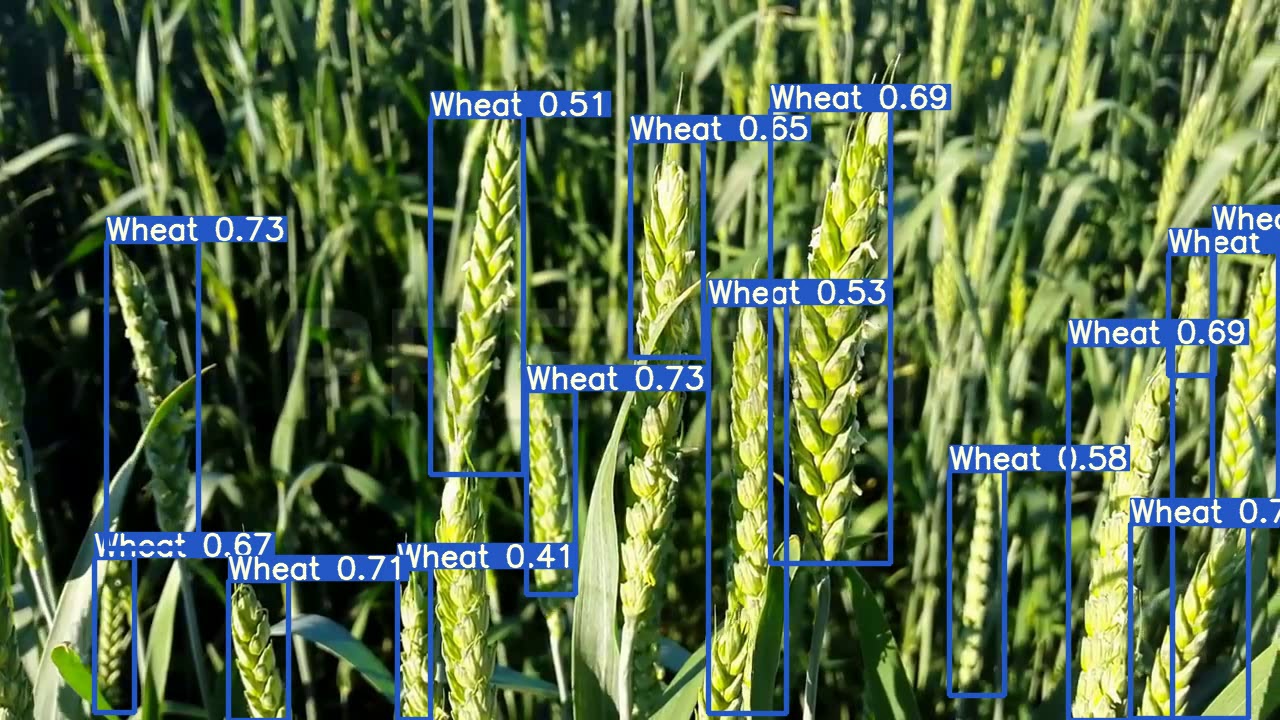 ","metadata":{}},{"cell_type":"markdown","source":"# Firstly we'll preprocess the dataset in suitable format for YOLOv5.\nThe format should look like this:\n\n - converter(main directory)\n - val\n - labels (contains all the box dimensions)\n - images (contains images)\n - train\n - labels\n - images","metadata":{}},{"cell_type":"code","source":"# Importing Required packages\nimport os\nimport torch\nimport numpy as np\nimport pandas as pd\n\nfrom tqdm.auto import tqdm\nimport shutil as sh\n\nimport matplotlib.pyplot as plt\nfrom IPython.display import Image, clear_output\n%matplotlib inline","metadata":{"trusted":true},"execution_count":null,"outputs":[]},{"cell_type":"code","source":"# Reading the dataframe\ndf = pd.read_csv('../input/global-wheat-detection/train.csv')\ndf.head()","metadata":{"trusted":true},"execution_count":null,"outputs":[]},{"cell_type":"code","source":"# read the training data.\n\ndf = pd.read_csv('../input/global-wheat-detection/train.csv')\nbboxs = np.stack(df['bbox'].apply(lambda x: np.fromstring(x[1:-1], sep=',')))\nfor i, column in enumerate(['x', 'y', 'w', 'h']):\n df[column] = bboxs[:,i]\ndf.drop(columns=['bbox'], inplace=True)\ndf['x_center'] = (df['x'] + df['w'])/2\ndf['y_center'] = (df['y'] + df['h'])/2\ndf['classes'] = 0\n\n# Making new dataframe, suitable to make suitable dataset for yolov5\ndf = df[['image_id','x', 'y', 'w', 'h','x_center','y_center','classes']]\ndf.head()","metadata":{"trusted":true},"execution_count":null,"outputs":[]},{"cell_type":"code","source":"index = list(set(df.image_id))\nprint(\"Total Images: \",len(index))","metadata":{"trusted":true},"execution_count":null,"outputs":[]},{"cell_type":"code","source":"# This cell will automatically make the dataset and save it to convertor folder\nsource = 'train'\nif True:\n for fold in [0]:\n val_index = index[len(index)*fold//5:len(index)*(fold+1)//5]\n for name,mini in tqdm(df.groupby('image_id')):\n if name in val_index:\n path2save = 'val/'\n else:\n path2save = 'train/'\n if not os.path.exists('convertor/fold{}/labels/'.format(fold)+path2save):\n os.makedirs('convertor/fold{}/labels/'.format(fold)+path2save)\n with open('convertor/fold{}/labels/'.format(fold)+path2save+name+\".txt\", 'w+') as f:\n row = mini[['classes','x_center','y_center','w','h']].astype(float).values\n row = row/1024\n row = row.astype(str)\n for j in range(len(row)):\n text = ' '.join(row[j])\n f.write(text)\n f.write(\"\\n\")\n if not os.path.exists('convertor/fold{}/images/{}'.format(fold,path2save)):\n os.makedirs('convertor/fold{}/images/{}'.format(fold,path2save))\n sh.copy(\"../input/global-wheat-detection/{}/{}.jpg\".format(source,name),'convertor/fold{}/images/{}/{}.jpg'.format(fold,path2save,name))\n \n# Bases on this notebook: https://www.kaggle.com/orkatz2/yolov5-train","metadata":{"trusted":true},"execution_count":null,"outputs":[]},{"cell_type":"markdown","source":"# Now it's turn to train the dataset using YOLOv5\nOur stategy is to:\n1. Clone [yolov5](https://github.com/ultralytics/yolov5.git) directory from github\n\n2. Install the requirements for yolov5\n\n3. Make a [data.yml](https://github.com/ultralytics/yolov5/blob/master/data/coco.yaml) file indicating our training directory, validation directory, number of classes, and classname \n\n4. Chose a model bases on your requirement(YOLOv5s, YOLOv5m, YOLOv5l, YOLOv5x)\n\n5. Change the YOLOv5(..).yml acording to your dataset. As we have only one class, we'll use nc: 1\n\n6. Start the Training","metadata":{}},{"cell_type":"code","source":"# Cloning the repo\n!git clone https://github.com/ultralytics/yolov5.git\nclear_output()","metadata":{"trusted":true},"execution_count":null,"outputs":[]},{"cell_type":"code","source":"# Moving the folders to our working directory\n!mv ./yolov5/* ./","metadata":{"trusted":true},"execution_count":null,"outputs":[]},{"cell_type":"code","source":"# Checking if the files correctly cloned and moved\n!ls","metadata":{"trusted":true},"execution_count":null,"outputs":[]},{"cell_type":"code","source":"# installing the requirements file\n!pip install -r requirements.txt\nclear_output()","metadata":{"trusted":true},"execution_count":null,"outputs":[]},{"cell_type":"code","source":"#customize iPython writefile so we can write variables\n\nfrom IPython.core.magic import register_line_cell_magic\n@register_line_cell_magic\ndef writetemplate(line, cell):\n with open(line, 'w') as f:\n f.write(cell.format(**globals()))","metadata":{"trusted":true},"execution_count":null,"outputs":[]},{"cell_type":"code","source":"# Our image and annotation files are saved into this directory\n\nprint(os.listdir(\"./convertor/fold0\"))","metadata":{"trusted":true},"execution_count":null,"outputs":[]},{"cell_type":"code","source":"# Making a directory for storing our data.yaml and custom YOLOv5(..).yml files\n!mkdir DataFile","metadata":{"trusted":true},"execution_count":null,"outputs":[]},{"cell_type":"code","source":"%%writetemplate ./DataFile/data.yaml\n\ntrain: ./convertor/fold0/images/train # training directory\nval: ./convertor/fold0/images/val # validation directory\ntest: ./convertor/fold0/images/val # I'll use validation directory for test image\nnc: 1 # number of class\nnames: ['Wheat'] # name of the class","metadata":{"trusted":true},"execution_count":null,"outputs":[]},{"cell_type":"markdown","source":"Our models structure files are save here. These are used for training [coco dataset](https://cocodataset.org/#home). But for using for our custom dataset, we have to change the nc parameter to 1, insted of 80.","metadata":{}},{"cell_type":"code","source":"print(os.listdir(\"./models\"))","metadata":{"trusted":true},"execution_count":null,"outputs":[]},{"cell_type":"code","source":"# checking the yolov5s model architecture\n!cat ./models/yolov5.yaml","metadata":{"trusted":true},"execution_count":null,"outputs":[]},{"cell_type":"markdown","source":"Modifying the yolov5s model architecture for nc: 1","metadata":{}},{"cell_type":"code","source":"%%writetemplate ./DataFile/customYOLOv5x.yaml\n\n# parameters\nnc: 80 # number of classes\ndepth_multiple: 1.33 # model depth multiple\nwidth_multiple: 1.25 # layer channel multiple\n\n# anchors\nanchors:\n - [10,13, 16,30, 33,23] # P3/8\n - [30,61, 62,45, 59,119] # P4/16\n - [116,90, 156,198, 373,326] # P5/32\n\n# YOLOv5 backbone\nbackbone:\n # [from, number, module, args]\n [[-1, 1, Focus, [64, 3]], # 0-P1/2\n [-1, 1, Conv, [128, 3, 2]], # 1-P2/4\n [-1, 3, C3, [128]],\n [-1, 1, Conv, [256, 3, 2]], # 3-P3/8\n [-1, 9, C3, [256]],\n [-1, 1, Conv, [512, 3, 2]], # 5-P4/16\n [-1, 9, C3, [512]],\n [-1, 1, Conv, [1024, 3, 2]], # 7-P5/32\n [-1, 1, SPP, [1024, [5, 9, 13]]],\n [-1, 3, C3, [1024, False]], # 9\n ]\n\n# YOLOv5 head\nhead:\n [[-1, 1, Conv, [512, 1, 1]],\n [-1, 1, nn.Upsample, [None, 2, 'nearest']],\n [[-1, 6], 1, Concat, [1]], # cat backbone P4\n [-1, 3, C3, [512, False]], # 13\n\n [-1, 1, Conv, [256, 1, 1]],\n [-1, 1, nn.Upsample, [None, 2, 'nearest']],\n [[-1, 4], 1, Concat, [1]], # cat backbone P3\n [-1, 3, C3, [256, False]], # 17 (P3/8-small)\n\n [-1, 1, Conv, [256, 3, 2]],\n [[-1, 14], 1, Concat, [1]], # cat head P4\n [-1, 3, C3, [512, False]], # 20 (P4/16-medium)\n\n [-1, 1, Conv, [512, 3, 2]],\n [[-1, 10], 1, Concat, [1]], # cat head P5\n [-1, 3, C3, [1024, False]], # 23 (P5/32-large)\n\n [[17, 20, 23], 1, Detect, [nc, anchors]], # Detect(P3, P4, P5)\n ]","metadata":{"trusted":true},"execution_count":null,"outputs":[]},{"cell_type":"markdown","source":"With our __data.yaml__ and __custom_yolov5s.yaml__ files ready to go we are ready to train!\n\nTo kick off training we running the training command with the following options:\n\n- ```img```: define input image size\n- ```batch```: determine batch size\n- ```epochs```: define the number of training epochs.\n- ```data```: set the path to our yaml file\n- ```cfg```: specify our model configuration\n- ```weights```: specify a custom path to weights. (Note: you can download weights from the Ultralytics Google Drive folder)\n- ```name```: result names\n- ```cache```: cache images for faster training\n- ```evolve```: evolve hyperparameters","metadata":{}},{"cell_type":"code","source":"# You should skip this line\n!wandb off","metadata":{"trusted":true},"execution_count":null,"outputs":[]},{"cell_type":"code","source":"%%time\n!python train.py --img 640 --batch 16 --epochs 1 --data ./DataFile/data.yaml --cfg ./DataFile/customYOLOv5x.yaml --weights yolov5x.pt --name Result --cache","metadata":{"trusted":true},"execution_count":null,"outputs":[]},{"cell_type":"markdown","source":"# Training is completed.\nResults are saved in ./runs/train directory","metadata":{}},{"cell_type":"code","source":"# let's check the training result directory.\n# Here model and result are saved\n!ls -R ./runs/train","metadata":{"trusted":true},"execution_count":null,"outputs":[]},{"cell_type":"code","source":"# Analize the training and validation result\nImage('./runs/train/Result/results.png')","metadata":{"trusted":true},"execution_count":null,"outputs":[]},{"cell_type":"code","source":"# Analize the Confusion matrix\nImage('./runs/train/Result/confusion_matrix.png',width=400)","metadata":{"trusted":true},"execution_count":null,"outputs":[]},{"cell_type":"markdown","source":"# Let's run detection on test images\nParameters to consider:\n\n- ```img-size```: define input image size\n- ```conf```: Minimum threshold of confidence\n- ```source```: Location of the image/video file\n- ```weights```: specify our trined weight file\n- ```augment```: Augmentation of the images during detection for better result","metadata":{}},{"cell_type":"code","source":"!python detect.py --img-size 800 --conf 0.2 --source ../input/global-wheat-detection/test --weights ./runs/train/Result/weights/best.pt --augment ","metadata":{"trusted":true},"execution_count":null,"outputs":[]},{"cell_type":"code","source":"# Detected images/video are saved in this path\n!ls -R runs/detect","metadata":{"trusted":true},"execution_count":null,"outputs":[]},{"cell_type":"code","source":"Image('runs/detect/exp/2fd875eaa.jpg',width=400)","metadata":{"trusted":true},"execution_count":null,"outputs":[]},{"cell_type":"markdown","source":"# Techniques to push the training result\n\n* Experimenting with hyper parameters\n* increasing the image size","metadata":{}},{"cell_type":"code","source":"# hyper parameters data are saved in this location\n!ls ./data","metadata":{"trusted":true},"execution_count":null,"outputs":[]},{"cell_type":"markdown","source":"**Let's train the model with better hyper parameter**","metadata":{}},{"cell_type":"code","source":"%cat ./data/hyp.finetune.yaml","metadata":{"trusted":true},"execution_count":null,"outputs":[]},{"cell_type":"code","source":"%%writetemplate ./DataFile/hyp.custom.yaml\n\nlr0: 0.0032\nlrf: 0.12\nmomentum: 0.843\nweight_decay: 0.00036\nwarmup_epochs: 2.0\nwarmup_momentum: 0.5\nwarmup_bias_lr: 0.05\nbox: 0.0296\ncls: 0.243\ncls_pw: 0.631\nobj: 0.301\nobj_pw: 0.911\niou_t: 0.2\nanchor_t: 2.91\n# anchors: 3.63\nfl_gamma: 0.0 # \nhsv_h: 0.0138\nhsv_s: 0.002\nhsv_v: 0.2\ndegrees: 0.2\ntranslate: 0.0\nscale: 0.3\nshear: 0.0\nperspective: 0.0\nflipud: 0.00856\nfliplr: 0.5\nmosaic: 1.0\nmixup: 0.5","metadata":{"trusted":true},"execution_count":null,"outputs":[]},{"cell_type":"markdown","source":"- ```--hyp```: Location of new custom hyper parameter","metadata":{}},{"cell_type":"markdown","source":"# I've used weight of previous trained model.So, this training will initilize from the best result(weight) of the previous model","metadata":{}},{"cell_type":"code","source":"%%time\n!python train.py --img 1024 --batch 4 --epochs 1 --data ./DataFile/data.yaml --cfg ./DataFile/customYOLOv5x.yaml --hyp ./DataFile/hyp.custom.yaml --weights ./runs/train/Result/weights/best.pt --name FineTuned","metadata":{"trusted":true},"execution_count":null,"outputs":[]},{"cell_type":"code","source":"# new training result\nos.listdir('./runs/train')","metadata":{"trusted":true},"execution_count":null,"outputs":[]},{"cell_type":"code","source":"!ls -R ./runs/train/FineTuned","metadata":{"trusted":true},"execution_count":null,"outputs":[]},{"cell_type":"markdown","source":"# Model Ensembling\nI've used two models during detection. It'll increase detection result.","metadata":{}},{"cell_type":"code","source":"!python detect.py --img 800 --weights ./runs/train/Result/weights/best.pt ./runs/train/FineTuned/weights/best.pt --source ../input/global-wheat-detection/test","metadata":{"trusted":true},"execution_count":null,"outputs":[]},{"cell_type":"code","source":"!ls runs/detect","metadata":{"trusted":true},"execution_count":null,"outputs":[]},{"cell_type":"code","source":"!ls -R runs/detect/exp","metadata":{"trusted":true},"execution_count":null,"outputs":[]},{"cell_type":"code","source":"Image('runs/detect/exp/2fd875eaa.jpg', width=400)","metadata":{"trusted":true},"execution_count":null,"outputs":[]},{"cell_type":"markdown","source":"# TTA(Test Time Augmentation) and Model Ensembling","metadata":{}},{"cell_type":"code","source":"!python test.py --weights ./runs/train/Result/weights/best.pt ./runs/train/FineTuned/weights/best.pt --data ./DataFile/data.yaml --img 800 --augment","metadata":{"trusted":true},"execution_count":null,"outputs":[]},{"cell_type":"code","source":"!ls -R runs/test/exp","metadata":{"trusted":true},"execution_count":null,"outputs":[]},{"cell_type":"code","source":"# That's all for today, I'll update the notebook for pseudo labelling soon.\n# Please let me know if you face any issue or want have any confusion","metadata":{"trusted":true},"execution_count":null,"outputs":[]}]}