# Google Cloud & NCAA® ML Competition 2020-NCAAW — Data

来源：https://www.kaggle.com/competitions/google-cloud-ncaa-march-madness-2020-division-1-womens-tournament/data

本地 Meta Kaggle 快照；不是本次实时页面。

# Dataset Description

<p>Each season there are thousands of NCAA&reg; basketball games played between Division I women's teams, culminating in March Madness, the 64-team national championship that starts in the middle of March.  We have provided a large amount of historical data about college basketball games and teams, going back many years.  Armed with this historical data, you can explore it and develop your own distinctive ways of predicting March Madness&reg; game outcomes.  You can even evaluate and compare different approaches by seeing which of them would have done best at predicting tournament games from the past.</p>
<p>If you are unfamiliar with the format and intricacies of the tournament, we encourage reading the <a href="http://en.wikipedia.org/wiki/NCAA_Division_I_Women%27s_Basketball_Championship">wikipedia page</a> before diving into the data.  The data description and schema may seem daunting at first, but is not as complicated as it appears.</p>
<p>As a reminder, you are encouraged to incorporate your own sources of data. We have provided extensive historical data to jump-start the modeling process, and this data is self-consistent (for instance, dates and team ID's are always treated the same way).  Nevertheless, you may also be able to make productive use of external data.  If you head down this path, please be forewarned that many sources have their own distinctive way of identifying the names of teams, and this can make it challenging to link up with our data.  The WTeamSpellings file, which is listed in the bottom section below, may help you map external team references into our own Team ID structure. You will probably also need to understand exactly how dates work in our data. Remember as well that you are required to disclose your external sources of data prior to the start of the tournament.</p>
<p>We extend our gratitude to <a href="http://www.masseyratings.com/">Kenneth Massey</a> for providing much of the historical data.</p>
<p>Special Acknowledgment to <strong>Jeff Sonas</strong> of Sonas Consulting for his support in assembling the dataset for this competition.</p>
<h2>What to predict</h2>
<p><strong>Stage 1</strong> - You should submit predicted probabilities for every possible matchup in the past 5 NCAA&reg; tournaments (seasons 2015-2019).</p>
<p><strong>Stage 2</strong> - You should submit predicted probabilities for every possible matchup before the 2020 tournament begins.</p>
<p>Refer to the Timeline page for specific dates. In both stages, the sample submission will tell you which games to predict.</p>
<h2>File descriptions</h2>
<p>Below we describe the format and fields of the contest data files. The data will likely be refreshed once in early March while Stage 1 of the competition is running. Many of the files are only complete through the end of last season. At the start of Stage 2, we will provide updates to these files to incorporate data from the current season. Right now the WSeasons and WTeamConferences files are the only two files that reference the 2020 season, since those are the only files where the final 2020 data is already finalized; the other files will be updated later on when we provide preliminary data (in early March) and final Stage 2 data (after Selection Sunday) for the current season.</p>
<hr>
<h2>Data Section 1 - The Basics</h2>
<p><strong>This section provides everything you need to build a simple prediction model and submit predictions.</strong></p>
<ul>
<li><span style="font-size: 1em; line-height: 1.5em;">Team ID's and Team Names</span></li>
<li><span style="font-size: 1em; line-height: 1.5em;">Tournament seeds since 1997-98 season</span></li>
<li><span style="font-size: 1em; line-height: 1.5em;">Final scores of all regular season, conference tournament, and NCAA&reg; tournament games since 1997-98 season</span></li>
<li><span style="font-size: 1em; line-height: 1.5em;">Season-level details including dates and region names</span></li>
<li><span style="font-size: 1em; line-height: 1.5em;">Example submission file for stage 1</span></li>
</ul>
<p><strong>Special note about "Season" numbers:</strong> the college basketball season lasts from early November until the national championship tournament that starts in the middle of March.  For instance, this year the first women’s Division I games were played on November 5th, 2019 and the women’s national championship game will be played on April 5th, 2020.  Because a basketball season spans two calendar years like this, it can be confusing to refer to the year of the season.  By convention, when we identify a particular season, we will reference the year that the season ends in, not the year that it starts in.  So for instance, the current season will be identified in our data as the 2020 season, not the 2019 season or the 2019-20 season or the 2019-2020 season, though you may see any of these in everyday use outside of our data.</p>
<hr>
<p><strong>Data Section 1 file: WTeams.csv</strong></p>
<p>This file identifies the different college teams present in the dataset. Each school is uniquely identified by a 4 digit id number. You will not see games present for all teams in all seasons, because the games listing is only for matchups where both teams are Division-I teams.  There are 351 teams currently in Division-I, and an overall total of 365 teams in our team listing. Each year, some teams might start being Division-I programs, and others might stop being Division-I programs, and in fact this year is no exception. Savannah State (TeamID=3366) is no longer part of Division I and so their data in our dataset stops after the 2019 season, and they are no longer part of the Mid-Eastern Athletic Conference. To balance this out, Merrimack (TeamID=3467) has just moved to Division I this year, so they show up as a new team in the data and they are now part of the America East Conference. Other than the teams file and team conferences file, you won't see any data for Merrimack until preliminary 2020 season data starts coming in, as we approach Stage 2 of the contest. Also please note that we recently determined that VMI and Citadel only have men's basketball teams, not women's teams, and so we shouldn't have those schools in the women's data at all.  This means all references to TeamID 3154 and TeamID 3440 have been removed from the women's contest data this year, and there are two fewer Division 1 teams this year because of this.</p>
<ul>
<li><span style="font-size: 1em; line-height: 1.5em;"><strong>TeamID</strong> - a 4 digit id number, from 3000-3999, uniquely identifying each NCAA&reg; women's team.  A school's TeamID does not change from one year to the next, so for instance the Duke women's TeamID is 3181 for all seasons.  To avoid possible confusion between the men's data and the women's data, all of the men's team ID's range from 1000-1999, whereas all of the women's team ID's range from 3000-3999.</span></li>
<li><span style="font-size: 1em; line-height: 1.5em;"><strong>TeamName</strong> - a compact spelling of the team's college name, 16 characters or fewer. There are no commas or double-quotes in the team names, but you will see some characters that are not letters or spaces, e.g., Texas A&M, St Mary's CA, TAM C. Christi, and Bethune-Cookman. Also note that several teams have had their team names changed slightly since last year: "Albany NY" is now "SUNY Albany", "Santa Barbara" is now "UC Santa Barbara", "VA Commonwealth" is now "VCU", "Edwardsville" is now "SIUE", "Cal Poly SLO" is now "Cal Poly", "IPFW" is now "PFW", "Long Island" is now "LIU Brooklyn", and "ULL" is now "Louisiana".</span></li>
</ul>
<hr>
<p><strong>Data Section 1 file: WSeasons.csv</strong></p>
<p>This file identifies the different seasons included in the historical data, along with certain season-level properties.</p>
<ul>
<li><span style="font-size: 1em; line-height: 1.5em;"><strong>Season</strong> - indicates the year in which the tournament was played. Remember that the current season counts as 2020.</span></li>
<li><span style="font-size: 1em; line-height: 1.5em;"><strong>DayZero</strong> - tells you the date corresponding to DayNum=0 during that season. All game dates have been aligned upon a common scale so that (each year) Selection Monday is on day 133. All game data includes the day number in order to make it easier to perform date calculations. If you need to know the exact date a game was played on, you can combine the game's "DayNum" with the season's "DayZero". For instance, since day zero during the 2011-2012 season was 10/31/2011, if we know that the earliest regular season games that year were played on DayNum=7, they were therefore played on 11/07/2011.</span></li>
<li><span style="font-size: 1em; line-height: 1.5em;"><strong>RegionW, RegionX, Region Y, Region Z</strong> - by convention, the four regions in the final tournament are always named W, X, Y, and Z. Whichever region's name comes first alphabetically, that region will be Region W. And whichever Region plays against Region W in the national semifinals, that will be Region X. For the other two regions, whichever region's name comes first alphabetically, that region will be Region Y, and the other will be Region Z. This allows us to identify the regions and brackets in a standardized way in other files. For instance, during the 2012 tournament, the four regions were DesMoines, Fresno, Kingston, and Raleigh. Being the first alphabetically, DesMoines becomes W. Since the Fresno regional champion (Stanford) played against the DesMoines regional champion (Baylor) in the national semifinals, that makes Fresno be region X. For the other two (Kingston and Raleigh), since Kingston comes first alphabetically, that makes Kingston Y and therefore Raleigh is Z. So for that season, the W/X/Y/Z are DesMoines,Fresno,Kingston,Raleigh.  And so for instance, Baylor, the #1 seed in the DesMoines region, is listed in the WNCAATourneySeeds file with a seed of W01, meaning they were the #1 seed in the W region (the DesMoines region).  We will not know the final W/X/Y/Z designations until Selection Monday, because the national semifinal pairings in the Final Four will depend upon the overall ranks of the four #1 seeds.</span></li>
</ul>
<p>The game dates in this dataset are expressed in relative terms, as the number of days since the start of the regular season, and aligned for each season so that day number #133 is the Monday right before the tournament, when team selections are made.  During any given season, day number zero is defined to be exactly 19 weeks earlier than Selection Monday, so Day #0 is a Monday in late October or early November such that Day #132 is Selection Sunday (for the men's tournament) and Day #133 is Selection Monday (for the women's tournament).</p>
<p>This doesn't necessarily mean that the regular season will always start exactly on day #0 or day #1; in fact, during the past decade, regular season games typically start being played on a Friday that is either Day #4 or Day #11, but further back there was more variety.</p>
<hr>
<p><strong>Data Section 1 file: WNCAATourneySeeds.csv</strong></p>
<p>This file identifies the seeds for all teams in each NCAA&reg; tournament, for all seasons of historical data. Thus, there are exactly 64 rows for each year, since there are no play-in teams in the women's tournament.  We will not know the seeds of the respective tournament teams, or even exactly which 64 teams it will be, until Selection Monday on March 16, 2020 (DayNum=133).</p>
<ul>
<li><span style="font-size: 1em; line-height: 1.5em;"><strong>Season</strong> - the year that the tournament was played in</span></li>
<li><span style="font-size: 1em; line-height: 1.5em;"><strong>Seed</strong> - this is a 3-character identifier of the seed, where the first character is either W, X, Y, or Z (identifying the region the team was in) and the next two digits (either 01, 02, ..., 15, or 16) tell you the seed within the region. For example, the first record in the file is seed W01, which means we are looking at the #1 seed in the W region (which we can see from the "WSeasons.csv" file was the East region).</span></li>
<li><span style="font-size: 1em; line-height: 1.5em;"><strong>TeamID</strong> - this identifies the id number of the team, as specified in the WTeams.csv file</span></li>
</ul>
<hr>
<p><strong>Data Section 1 file: WRegularSeasonCompactResults.csv</strong></p>
<p>This file identifies the game-by-game results for many seasons of historical data, starting with the 1998 season. For each season, the file includes all games played from DayNum 0 through 132.  It is important to realize that the "Regular Season" games are simply defined to be all games played on DayNum=132 or earlier (DayNum=133 is Selection Monday).  Thus a game played before Selection Monday will show up here whether it was a pre-season tournament, a non-conference game, a regular conference game, a conference tournament game, or whatever.</p>
<ul>
<li><span style="font-size: 1em; line-height: 1.5em;"><strong>Season</strong> - this is the year of the associated entry in WSeasons.csv (the year in which the final tournament occurs).  For example, during the 2016 season, there were regular season games played between November 2015 and March 2016, and all of those games will show up with a Season of 2016.</span></li>
<li><span style="font-size: 1em; line-height: 1.5em;"><strong>DayNum</strong> - this integer always ranges from 0 to 132, and tells you what day the game was played on. It represents an offset from the "DayZero" date in the "WSeasons.csv" file. For example, the first game in the file was DayNum=18. Combined with the fact from the "WSeasons.csv" file that day zero was 10/27/1997 that year, this means the first game was played 18 days later, or 11/14/1997. There are no teams that ever played more than one game on a given date, so you can use this fact if you need a unique key (combining Season and DayNum and WTeamID).</span></li>
<li><span style="font-size: 1em; line-height: 1.5em;"><strong>WTeamID</strong> - this identifies the id number of the team that won the game, as listed in the "WTeams.csv" file. No matter whether the game was won by the home team or visiting team, or if it was a neutral-site game, the "WTeamID" always identifies the winning team.</span></li>
<li><span style="font-size: 1em; line-height: 1.5em;"><strong>WScore</strong> - this identifies the number of points scored by the winning team.</span></li>
<li><span style="font-size: 1em; line-height: 1.5em;"><strong>LTeamID</strong> - this identifies the id number of the team that lost the game.</span></li>
<li><span style="font-size: 1em; line-height: 1.5em;"><strong>LScore</strong> - this identifies the number of points scored by the losing team.  Thus you can be confident that WScore will be greater than LScore for all games listed.</span></li>
<li><span style="font-size: 1em; line-height: 1.5em;"><strong>NumOT</strong> - this indicates the number of overtime periods in the game, an integer 0 or higher.</span></li>
<li><span style="font-size: 1em; line-height: 1.5em;"><strong>WLoc</strong> - this identifies the "location" of the winning team. If the winning team was the home team, this value will be "H". If the winning team was the visiting team, this value will be "A". If it was played on a neutral court, then this value will be "N". Sometimes it is unclear whether the site should be considered neutral, since it is near one team's home court, or even on their court during a tournament, but for this determination we have simply used the Kenneth Massey data in its current state, where the "@" sign is either listed with the winning team, the losing team, or neither team.  If you would like to investigate this factor more closely, we invite you to explore Data Section 3, which provides the city that each game was played in, irrespective of whether it was considered to be a neutral site.</span></li>
</ul>
<hr>
<p><strong>Data Section 1 file: WNCAATourneyCompactResults.csv</strong></p>
<p>This file identifies the game-by-game NCAA&reg; tournament results for all seasons of historical data. The data is formatted exactly like the WRegularSeasonCompactResults data. Each season you will see 63 games listed, since there are no women's play-in games.</p>
<p>Although the scheduling of the men's tournament rounds has been consistent for many years, there has been more variety in the scheduling of the women's rounds.  There have been four different schedules over the course of the past 20+ years for the women's tournament, as follows:</p>
<p>2017 season through 2020 season:</p><ul>
<li><span style="font-size: 1em; line-height: 1.5em;">Round 1 = days 137/138 (Fri/Sat)</span></li>
<li><span style="font-size: 1em; line-height: 1.5em;">Round 2 = days 139/140 (Sun/Mon)</span></li>
<li><span style="font-size: 1em; line-height: 1.5em;">Round 3 = days 144/145 (Sweet Sixteen, Fri/Sat)</span></li>
<li><span style="font-size: 1em; line-height: 1.5em;">Round 4 = days 146/147 (Elite Eight, Sun/Mon)</span></li>
<li><span style="font-size: 1em; line-height: 1.5em;">National Seminfinal = day 151 (Fri)</span></li>
<li><span style="font-size: 1em; line-height: 1.5em;">National Final = day 153 (Sun)</span></li>
</ul>
<p>2015 season and 2016 season:</p><ul>
<li><span style="font-size: 1em; line-height: 1.5em;">Round 1 = days 137/138 (Fri/Sat)</span></li>
<li><span style="font-size: 1em; line-height: 1.5em;">Round 2 = days 139/140 (Sun/Mon)</span></li>
<li><span style="font-size: 1em; line-height: 1.5em;">Round 3 = days 144/145 (Sweet Sixteen, Fri/Sat)</span></li>
<li><span style="font-size: 1em; line-height: 1.5em;">Round 4 = days 146/147 (Elite Eight, Sun/Mon)</span></li>
<li><span style="font-size: 1em; line-height: 1.5em;">National Seminfinal = day 153 (Sun)</span></li>
<li><span style="font-size: 1em; line-height: 1.5em;">National Final = day 155 (Tue)</span></li>
</ul>
<p>2003 season through 2014 season:</p><ul>
<li><span style="font-size: 1em; line-height: 1.5em;">Round 1 = days 138/139 (Sat/Sun)</span></li>
<li><span style="font-size: 1em; line-height: 1.5em;">Round 2 = days 140/141 (Mon/Tue)</span></li>
<li><span style="font-size: 1em; line-height: 1.5em;">Round 3 = days 145/146 (Sweet Sixteen, Sat/Sun)</span></li>
<li><span style="font-size: 1em; line-height: 1.5em;">Round 4 = days 147/148 (Elite Eight, Mon/Tue)</span></li>
<li><span style="font-size: 1em; line-height: 1.5em;">National Seminfinal = day 153 (Sun)</span></li>
<li><span style="font-size: 1em; line-height: 1.5em;">National Final = day 155 (Tue)</span></li>
</ul>
<p>1998 season through 2002 season:</p><ul>
<li><span style="font-size: 1em; line-height: 1.5em;">Round 1 = days 137/138 (Fri/Sat)</span></li>
<li><span style="font-size: 1em; line-height: 1.5em;">Round 2 = days 139/140 (Sun/Mon)</span></li>
<li><span style="font-size: 1em; line-height: 1.5em;">Round 3 = day 145 only (Sweet Sixteen, Sat)</span></li>
<li><span style="font-size: 1em; line-height: 1.5em;">Round 4 = day 147 only (Elite Eight, Mon)</span></li>
<li><span style="font-size: 1em; line-height: 1.5em;">National Seminfinal = day 151 (Fri)</span></li>
<li><span style="font-size: 1em; line-height: 1.5em;">National Final = day 153 (Sun)</span></li>
</ul>
<hr>
<p><strong>Data Section 1 file: WSampleSubmissionStage1.csv</strong></p>
<p>This file illustrates the submission file format for Stage 1.  It is the simplest possible submission: a 50% winning percentage is predicted for each possible matchup.</p>
<p>A submission file lists every possible matchup between tournament teams for one or more years.  During Stage 1, you are asked to make predictions for all possible matchups from the past five NCAA&reg; tournaments (seasons 2015, 2016, 2017, 2018, and 2019).  In Stage 2, you will be asked to make predictions for all possible matchups from the current NCAA&reg; tournament (season 2020).</p>
<p>Since there are 64 teams in the tournament, there are 64*63/2=2,016 predictions to make for that year, so a Stage 1 submission file will have 2,016*5=10,080 data rows.</p>
<ul>
<li><span style="font-size: 1em; line-height: 1.5em;"><strong>ID</strong> - this is a 14-character string of the format SSSS_XXXX_YYYY, where SSSS is the four digit season number, XXXX is the four-digit TeamID of the lower-ID team, and YYYY is the four-digit TeamID of the higher-ID team.</span></li>
<li><span style="font-size: 1em; line-height: 1.5em;"><strong>Pred</strong> - this contains the predicted winning percentage for the first team identified in the ID field, the one represented above by XXXX.</span></li>
</ul>
<p>Example #1: You want to make a prediction for Duke (TeamID=3181) against Arizona (TeamID=3112) in the 2005 tournament, with Duke given a 53% chance to win and Arizona given a 47% chance to win.  In this case, Arizona has the lower numerical ID so they would be listed first, and the winning percentage would be expressed from Arizona's perspective (47%):</p>
<p><strong>2005_3112_3181,0.47</strong></p>
<p>Example #2: You want to make a prediction for Duke (TeamID=3181) against North Carolina (TeamID=3314) in the 2005 tournament, with Duke given a 51.6% chance to win and North Carolina given a 48.4% chance to win.  In this case, Duke has the lower numerical ID so they would be listed first, and the winning percentage would be expressed from Duke's perspective (51.6%):</p>
<p><strong>2005_3181_3314,0.516</strong></p>
<p>Also note that a single prediction row serves as a prediction for each of the two teams' winning chances. So for instance, in Example #1, the submission row of "2005_3112_3181,0.47" specifically gives a 47% chance for Arizona to win, and doesn't explicitly mention Duke's 53% chance to win. However, our evaluation utility will automatically infer the winning percentage in the other direction, so a 47% prediction for Arizona to win also means a 53% prediction for Duke to win. And similarly, because the submission row in Example #2 gives Duke a 51.6% chance to beat North Carolina, we will automatically figure out that this also means North Carolina has a 48.4% chance to beat Duke.</p>
<hr>
<h2>Data Section 2 - Team Box Scores</h2>
<p><strong>This section provides game-by-game stats at a team level (free throws attempted, defensive rebounds, turnovers, etc.) for all regular season, conference tournament, and NCAA&reg; tournament games since the 2009-10 season.</strong></p>
<p>Team Box Scores are provided in "Detailed Results" files rather than "Compact Results" files.  However, the two files are strongly related.  
<p>In a Detailed Results file, the first eight columns (<strong>Season, DayNum, WTeamID, WScore, LTeamID, LScore, WLoc, and NumOT</strong>) are exactly the same as a Compact Results file.  However, in a Detailed Results file, there are many additional columns.  The column names should be self-explanatory to basketball fans (as above, "W" or "L" refers to the winning or losing team):</p>
<ul>
<li><span style="font-size: 1em; line-height: 1.5em;"><strong>WFGM</strong> - field goals made (by the winning team)</span></li>
<li><span style="font-size: 1em; line-height: 1.5em;"><strong>WFGA</strong> - field goals attempted (by the winning team)</span></li>
<li><span style="font-size: 1em; line-height: 1.5em;"><strong>WFGM3</strong> - three pointers made (by the winning team)</span></li>
<li><span style="font-size: 1em; line-height: 1.5em;"><strong>WFGA3</strong> - three pointers attempted (by the winning team)</span></li>
<li><span style="font-size: 1em; line-height: 1.5em;"><strong>WFTM</strong> - free throws made (by the winning team)</span></li>
<li><span style="font-size: 1em; line-height: 1.5em;"><strong>WFTA</strong> - free throws attempted (by the winning team)</span></li>
<li><span style="font-size: 1em; line-height: 1.5em;"><strong>WOR</strong> - offensive rebounds (pulled by the winning team)</span></li>
<li><span style="font-size: 1em; line-height: 1.5em;"><strong>WDR</strong> - defensive rebounds (pulled by the winning team)</span></li>
<li><span style="font-size: 1em; line-height: 1.5em;"><strong>WAst</strong> - assists (by the winning team)</span></li>
<li><span style="font-size: 1em; line-height: 1.5em;"><strong>WTO</strong> - turnovers committed (by the winning team)</span></li>
<li><span style="font-size: 1em; line-height: 1.5em;"><strong>WStl</strong> - steals (accomplished by the winning team)</span></li>
<li><span style="font-size: 1em; line-height: 1.5em;"><strong>WBlk</strong> - blocks (accomplished by the winning team)</span></li>
<li><span style="font-size: 1em; line-height: 1.5em;"><strong>WPF</strong> - personal fouls committed (by the winning team)</span></li>
</ul>
<p>(and then the same set of stats from the perspective of the losing team: <strong>LFGM</strong> is the number of field goals made by the losing team, and so on up to <strong>LPF</strong>).</p>
<p><strong>Note: </strong>by convention, "field goals made" (either WFGM or LFGM) refers to the total number of fields goals made by a team, a combination of both two-point field goals and three-point field goals.  And "three point field goals made" (either WFGM3 or LFGM3) is just the three-point fields goals made, of course.  So if you want to know specifically about two-point field goals, you have to subtract one from the other (e.g., WFGM - WFGM3).  And the total number of points scored is most simply expressed as 2*FGM + FGM3 + FTM.</p>
<hr>
<p><strong>Data Section 2 file: WRegularSeasonDetailedResults.csv</strong></p>
<p>This file provides team-level box scores for many regular seasons of historical data, starting with the 2010 season.  All games listed in the WRegularSeasonCompactResults file since the 2010 season should exactly be present in the WRegularSeasonDetailedResults file.</p>
<hr>
<p><strong>Data Section 2 file: WNCAATourneyDetailedResults.csv</strong></p>
<p>This file provides team-level box scores for many NCAA&reg; tournaments, starting with the 2010 season.  All games listed in the WNCAATourneyCompactResults file since the 2010 season should exactly be present in the WNCAATourneyDetailedResults file.</p>
<hr>
<h2>Data Section 3 - Geography</h2>
<p><strong>This section provides city locations of all regular season, conference tournament, and NCAA&reg; tournament games since the 2009-10 season</strong></p>
<hr>
<p><strong>Data Section 3 file: Cities.csv</strong></p>
<p>This file provides a master list of cities that have been locations for games played. Please notice that the Cities and Conferences files are the only two that don't start with an W; this is because the data files are identical between men's and women's data, so you don't need to maintain separate listings of cities or conferences across the two contests.</p>
<ul>
<li><span style="font-size: 1em; line-height: 1.5em;"><strong>CityID</strong> - a four-digit ID number uniquely identifying a city.</span></li>
<li><span style="font-size: 1em; line-height: 1.5em;"><strong>City</strong> - the text name of the city.</span></li>
<li><span style="font-size: 1em; line-height: 1.5em;"><strong>State</strong> - the state abbreviation of the state that the city is in.  In a few rare cases, the game location is not inside one of the 50 U.S. states and so other abbreviations are used, for instance Cancun, Mexico has a state abbreviation of MX.</span></li>
</ul>
<hr>
<p><strong>Data Section 3 file: WGameCities.csv</strong></p>
<p>This file identifies all games, starting with the 2010 season, along with the city that the game was played in.  Games from the regular season and the NCAA&reg; tourney are all listed together. The CityID is present in more than 98% of games since the 2010 season. Games from the 2009 season and before are not listed in this file.</p>
<ul>
<li><span style="font-size: 1em; line-height: 1.5em;"><strong>Season, DayNum, WTeamID, LTeamID</strong> - these four columns are sufficient to uniquely identify each game.  Additional data, such as the score of the game and other stats, can be found in the corresponding Compact Results file.</span></li>
<li><span style="font-size: 1em; line-height: 1.5em;"><strong>CRType</strong> - this can be either <strong>Regular</strong> or <strong>NCAA</strong>.  If it is <strong>Regular</strong>, you can find more about the game in the WRegularSeasonCompactResults.csv file.  If it is <strong>NCAA</strong>, you can find more about the game in the WNCAATourneyCompactResults.csv file.</span></li>
<li><span style="font-size: 1em; line-height: 1.5em;"><strong>CityID</strong> - the ID of the city where the game was played, as specified by the CityID column in the Cities.csv file.</span></li>
</ul>
<hr>
<h2>Data Section 4 - Play-by-play</h2>
<p><strong>This section provides play-by-play event logs for more than 99% of each year's regular season and NCAA&reg; tournament, and secondary tournament women's games since the 2014-15 season - including plays by individual players.</strong></p>
<hr>
<p>This year we are transitioning to a different play-by-play source, which includes data since the 2014-2015 season rather than since the 2009-2010 season (that's what we had previously for men's data).  However, we are now able to provide play-by-play for both men's and women's data, and there is locational play-by-play detail starting with games from the 2018-2019 season.  This includes an X/Y location (ranging from 0 to 100 in each dimension) on the court for each shot attempt, turnover, and foul for many games, as well as an overall categorization of the area on the court that the shot or turnover or foul occurred in (inside left wing, outside right wing, under the basket, etc.)  Some games in these recent seasons still lack the locational detail.  The data from last year (2019 season) matches what you can expect for the current year (2020 season) as we approach the postseason.  Despite the 99.5% coverage, there are still a few games missing annually, and we will try to bring those in as well, if possible.</p>
<hr>
<p><strong>Data Section 4 file: WEvents2015.csv, WEvents2016.csv, WEvents2017.csv, WEvents2018.csv, WEvents2019.csv</strong></p>
<p>Each WEvents file lists the play-by-play event logs for more than 99% of games from that season.  Each event is assigned to either a team or a single one of the team's players.  Thus if a basket is made by one player and an assist is credited to a second player, that would show up as two separate records.  The players are listed by PlayerID within the WPlayers.csv file.</p>
<ul>
<li><span style="font-size: 1em; line-height: 1.5em;"><strong>EventID</strong> - this is a unique ID for each logged event.  The EventID's are different within each year and uniquely identify each play-by-play event.  They ought to be listed in chronological order for the events within their game.</span></li>
<li><span style="font-size: 1em; line-height: 1.5em;"><strong>Season, DayNum, WTeamID, LTeamID</strong> - these four columns are sufficient to uniquely identify each game.  The games are a mix of Regular Season and NCAA&reg; Tourney games.</span></li>
<li><span style="font-size: 1em; line-height: 1.5em;"><strong>WFinalScore, LFinalScore</strong> - these two columns match the WScore and LScore numbers as found elsewhere in the Compact Results and Detailed Results files.  They are provided here to indicate the final score at the end of the game.  Note that the event-by-event totals are not guaranteed to add up to the final scores, due to possible data recording errors in the play-by-play.</span></li>
<li><span style="font-size: 1em; line-height: 1.5em;"><strong>WCurrentScore, LCurrentScore</strong> - whenever a scoring play happens (1 point, 2 points, or 3 points) the updated score is provided, from the perspective of the winning team (WPoints) and the losing team (LPoints), although of course during the game we didn't know yet that they were the winning team or losing team.  Note that in the earlier years of the play-by-play data from this source, the running WCurrentScore and LCurrentScore were not calculated, and so they show up as zero throughout the event log for those years.  However, they can still be calculated manually when looping through the game events that are present, by watching for rows like "made1", "made2", and "made3" that represent scoring events.</span></li>
<li><span style="font-size: 1em; line-height: 1.5em;"><strong>ElapsedSeconds</strong> - this is the number of seconds that have elapsed from the start of the game until the event occurred.  With 10-minute quarters, that means that an ElapsedSeconds value from 0 to 600 represents an event in the first quarter, a value from 1200 to 1800 represents an event in the third quarter, and a value above 2400 represents an event in overtime.  For example, since overtime periods are five minutes long (that's 300 seconds), a value of 2699 would represent one second left in the first overtime.</span></li>
<li><span style="font-size: 1em; line-height: 1.5em;"><strong>EventTeamID</strong> - this is the ID of the team that the event is logged for, which will either be the WTeamID or the LTeamID.</span></li>
<li><span style="font-size: 1em; line-height: 1.5em;"><strong>EventPlayerID</strong> - this is the ID of the player that the event is logged for, as described in the WPlayers.csv file.</span></li>
<li><span style="font-size: 1em; line-height: 1.5em;"><strong>EventType, EventSubType</strong> - these indicate the type of the event that was logged (see listing below).</span></li>
</ul>
<p>Event Types and Subtypes:</p>
<ul>

<li><span style="font-size: 1em; line-height: 1.5em;"><strong>assist</strong> - an assist was credited on a made shot</span></li>

<li><span style="font-size: 1em; line-height: 1.5em;"><strong>block</strong> - a blocked shot was recorded</span></li>

<li><span style="font-size: 1em; line-height: 1.5em;"><strong>steal</strong> - a steal was recorded</span></li>

<li><span style="font-size: 1em; line-height: 1.5em;"><strong>sub</strong> - a substitution occurred, with one of the following subtypes:
      in=player entered the game; 
      out=player exited the game; 
      start=player started the game</span></li>

<li><span style="font-size: 1em; line-height: 1.5em;"><strong>timeout</strong> - a timeout was called, with one of the following subtypes:
      unk=unknown type of timeout; 
      comm=commercial timeout; 
      full=full timeout; 
      short= short timeout</span></li>

<li><span style="font-size: 1em; line-height: 1.5em;"><strong>turnover</strong> - a turnover was recorded, with one of the following subtypes:
      unk=unknown type of turnover; 
      10sec=10 second violation; 
      3sec=3 second violation; 
      5sec=5 second violation; 
      bpass=bad pass turnover; 
      dribb=dribbling turnover; 
      lanev=lane violation; 
      lostb=lost ball; 
      offen=offensive turnover (?); 
      offgt=offensive goaltending; 
      other=other type of turnover; 
      shotc=shot clock violation; 
      trav=travelling</span></li>

<li><span style="font-size: 1em; line-height: 1.5em;"><strong>foul</strong> - a foul was committed, with one of the following subtypes:
      unk=unknown type of foul; 
      admT=administrative technical; 
      benT=bench technical; 
      coaT=coach technical; 
      off=offensive foul; 
      pers=personal foul; 
      tech=technical foul</span></li>

<li><span style="font-size: 1em; line-height: 1.5em;"><strong>fouled</strong> - a player was fouled</span></li>

<li><span style="font-size: 1em; line-height: 1.5em;"><strong>reb</strong> - a rebound was recorded, with one of the following subtypes:
      deadb=a deadball rebound; 
      def=a defensive rebound; 
      defdb=a defensive deadball rebound; 
      off=an offensive rebound; 
      offdb=an offensive deadball rebound</span></li>

<li><span style="font-size: 1em; line-height: 1.5em;"><strong>made1, miss1</strong> - a one-point free throw was made or missed, with one of the following subtypes:
      1of1=the only free throw of the trip to the line; 
      1of2=the first of two free throw attempts; 
      2of2=the second of two free throw attempts; 
      1of3=the first of three free throw attempts; 
      2of3=the second of three free throw attempts; 
      3of3=the third of three free throw attempts; 
      unk=unknown what the free throw sequence is</span></li>

<li><span style="font-size: 1em; line-height: 1.5em;"><strong>made2, miss2</strong> - a two-point field goal was made or missed, with one of the following subtypes:
      unk=unknown type of two-point shot; 
      dunk=dunk; 
      lay=layup; 
      tip=tip-in; 
      jump=jump shot; 
      alley=alley-oop; 
      drive=driving layup; 
      hook=hook shot; 
      stepb=step-back jump shot; 
      pullu=pull-up jump shot; 
      turna=turn-around jump shot; 
      wrong=wrong basket</span></li>

<li><span style="font-size: 1em; line-height: 1.5em;"><strong>made3, miss3</strong> - a three-point field goal was made or missed, with one of the following subtypes:
      unk=unknown type of three-point shot; 
      jump=jump shot; 
      stepb=step-back jump shot; 
      pullu=pull-up jump shot; 
      turna=turn-around jump shot; 
      wrong=wrong basket</span></li>

<li><span style="font-size: 1em; line-height: 1.5em;"><strong>jumpb</strong> - a jumpball was called or resolved, with one of the following subtypes:
      start=start period; 
      block=block tie-up; 
      heldb=held ball; 
      lodge=lodged ball; 
      lost=jump ball lost; 
      outof=out of bounds; 
      outrb=out of bounds rebound; 
      won=jump ball won</span></li>
</ul>
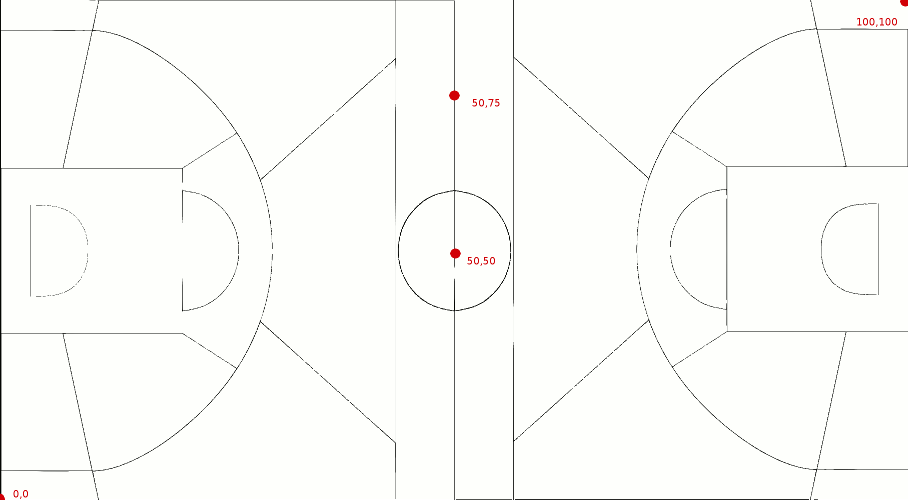
<li><span style="font-size: 1em; line-height: 1.5em;"><strong>X, Y</strong> - for games where it is available, this describes an X/Y position on the court where the lower-left corner of the full court is (0,0), the upper-right corner of the full court is (100,100), the exact middle of the full court (where the initial jump ball happens) is (50,50), and so on.  The X/Y position is provided for fouls, turnovers, and field-goal attempts (either 2-point or 3-point).</span></li>

<p>This is the diagram provided by the play-by-play source:</p>
<img src="https://developer.geniussports.com/warehouse/rest/basketball_coords.png">

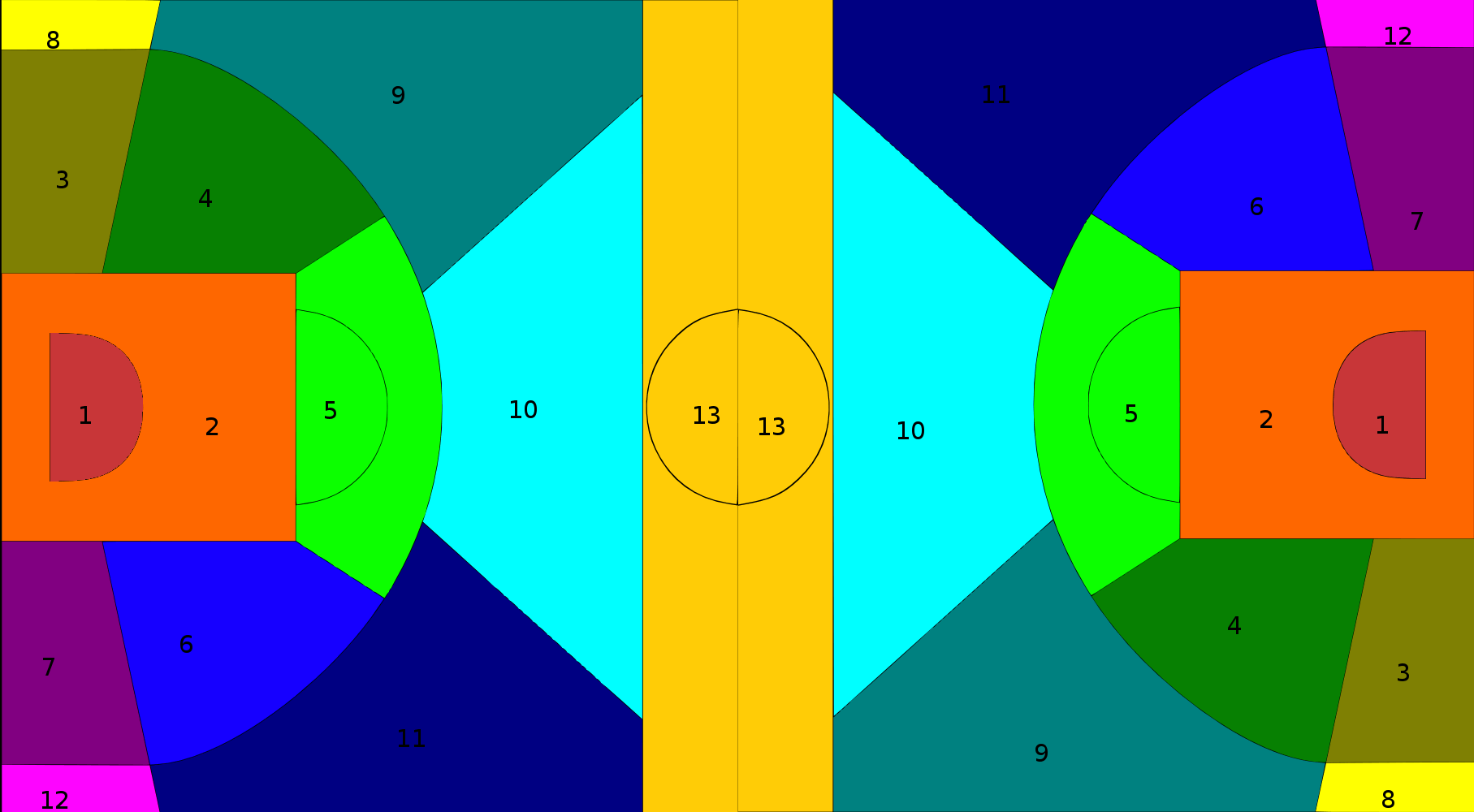
<li><span style="font-size: 1em; line-height: 1.5em;"><strong>Area</strong> - for events where an X/Y position is provided, this position is more generally categorized into one of 13 "areas" of the court, as follows: 
1=under basket; 
2=in the paint; 
3=inside right wing; 
4=inside right; 
5=inside center; 
6=inside left; 
7=inside left wing; 
8=outside right wing; 
9=outside right; 
10=outside center; 
11=outside left; 
12=outside left wing; 
13=backcourt</span></li>
<hr>
<p>Here is a diagram of these regions on a typical court:</p>
<img src="https://developer.geniussports.com/warehouse/rest/basketball_courtmap.png">

<p>And you may also have noticed that the three-point-arc is different this year in college basketball.  The width of the court is still 15.2 m (50 ft) and the length of the court is still 28.7 m (94 feet), but the distance to the arc has changed from 6.32 m (20 feet 9 inches) to 6.75 m (22.15 feet).</p>

<p>Here is a diagram of the old court, which would apply for play-by-play in seasons 2019 and before:</p>
<img src="https://developer.geniussports.com/warehouse/rest/basketball_court-2_(NCAAOld).svg">

<p>And here is a diagram of the new court, which only applies for season 2020:</p>
<img src="https://developer.geniussports.com/warehouse/rest/basketball_court-3_(NCAANew).svg">

<hr>
<p><strong>Data Section 4 file: WPlayers.csv</strong></p>
<ul>
<li><span style="font-size: 1em; line-height: 1.5em;"><strong>PlayerID</strong> - this is a unique ID for each distinct player name/team combination.  If the same player name spelling appears on a team for multiple seasons, it should stay as one player record rather than a separate one for each year.</span></li>
<li><span style="font-size: 1em; line-height: 1.5em;"><strong>LastName, FirstName</strong> - these are the player's last and first names.</span></li>
<li><span style="font-size: 1em; line-height: 1.5em;"><strong>TeamID</strong> - this is the TeamID of the player's team, as described in WTeams.csv.</span></li>
</ul>
<p>Note: there are data collection errors within the events, in that they don't necessarily add up to the final stats for the game.  In addition, the player name spellings may vary over the course of a season or career for the same player, which would lead to the same player showing up with different PlayerID values.  Nevertheless, this was the highest quality data we could manage for play-by-play with the near-complete set of games.</p>
<hr>
<h2>Data Section 5 - Supplements</h2>
<p><strong>This section contains additional supporting information, including alternative team name spellings and representations of bracket structure</strong></p>
<hr>
<p><strong>Data Section 5 file: WTeamSpellings.csv</strong></p>
<p>This file indicates alternative spellings of many team names.  It is intended for use in associating external spellings against our own TeamID numbers, thereby helping to relate the external data properly with our datasets.  Over the years we have identified various external spellings of different team names (as an example, for Ball State we have seen "ball st", and "ball st.", and "ball state", and "ball-st", and "ball-state").  Other teams have had more significant changes to their names over the years; for example, "Texas Pan-American" and "Texas-Rio Grande Valley" are actually the same school.  The current list is obviously not exhaustive, and we encourage participants to identify additional mappings and upload extended versions of this file to the forums.</p>
<ul>
<li><span style="font-size: 1em; line-height: 1.5em;"><strong>TeamNameSpelling</strong> - this is the spelling of the team name.  It is always expressed in all lowercase letters - e.g. "ball state" rather than "Ball State" - in order to emphasize that any comparisons should be case-insensitive when matching.</span></li>
<li><span style="font-size: 1em; line-height: 1.5em;"><strong>TeamID</strong> - this identifies the TeamID for the team that has the alternative spelling (as described in WTeams.csv).</span></li>
</ul><hr>
<p><strong>Data Section 5 file: WNCAATourneySlots</strong></p>
<p>This file identifies the mechanism by which teams are paired against each other, depending upon their seeds, as the tournament proceeds through its rounds. It can be of use in identifying, for a given historical game, what round it occurred in, and what the seeds/slots were for the two teams (the meaning of "slots" is described below).  You may need to know these specifics if you are trying to represent/simulate the exact workings of the tournament bracket.  Unlike the analogous file on the men's side, it is not necessary to provide a Season within this file, because the women's tournament has never had play-in-games and so the 64-team women's bracket has always had the same structure each season.</p>
<ul>
<li><span style="font-size: 1em; line-height: 1.5em;"><strong>Slot</strong> - this uniquely identifies one of the tournament games. It is a four-character string, where the first two characters tell you which round the game is (R1, R2, R3, R4, R5, or R6) and the second two characters tell you the expected seed of the favored team. Thus the first row is R1W1, identifying the Round 1 game played in the W bracket, where the favored team is the 1 seed. As a further example, the R2W1 slot indicates the Round 2 game that would have the 1 seed from the W bracket, assuming that all favored teams have won up to that point. The slot names are different for the final two rounds, where R5WX identifies the national semifinal game between the winners of regions W and X, and R5YZ identifies the national semifinal game between the winners of regions Y and Z, and R6CH identifies the championship game. The "slot" value is used in other columns in order to represent the advancement and pairings of winners of previous games.</span></li>
<li><span style="font-size: 1em; line-height: 1.5em;"><strong>StrongSeed</strong> - this indicates the expected stronger-seeded team that plays in this game. For Round 1 games, a team seed is identified in this column (as listed in the "Seed" column in the WNCAATourneySeeds.csv file), whereas for subsequent games, a slot is identified in this column. In the first record of this file (slot R1W1), we see that seed W01 is the "StrongSeed".  Whereas for games from Round 2 or later, rather than a team seed, we will see a "slot" referenced in this column. So in the 33rd record of this file (slot R2W1), it tells us that the winners of slots R1W1 and R1W8 will face each other in Round 2. Of course, in the last few games of the tournament - the national semifinals and finals - it's not really meaningful to talk about a "strong seed" or "weak seed", since you would have #1 seeds favored to face each other, but those games are nevertheless represented in the same format for the sake of consistency.</span></li>
<li><span style="font-size: 1em; line-height: 1.5em;"><strong>WeakSeed</strong> - this indicates the expected weaker-seeded team that plays in this game, assuming all favored teams have won so far. For Round 1 games, a team seed is identified in this column (as listed in the "Seed" column in the WNCAATourneySeeds.csv file), whereas for subsequent games, a slot is identified in this column.</span></li>
</ul><hr>
<p><strong>Data Section 5 file: Conferences.csv</strong></p>
<p>This file indicates the Division I conferences that have existed over the years since 1985.  Each conference is listed with an abbreviation and a longer name.  There has been no attempt to link up conferences who merged with other conferences, or whose names changed over time.  Thus you will see, for instance, a "Pacific-10" conference up through the 2011 season, and then a "Pacific-12" conference starting in the 2012 season, and these look like different conferences in the data, even though it was still mostly the same teams. Please notice that the Cities and Conferences files are the only two that don't start with an M; this is because the data files are identical between men's and women's data, so you don't need to maintain separate listings of cities or conferences across the two contests. However, the Team Conferences data differs slightly between men's and women's, so those files do have the prefixes.</p>
<ul>
<li><span style="font-size: 1em; line-height: 1.5em;"><strong>ConfAbbrev</strong> - this is a short abbreviation for each conference; the abbreviation is used in some other files to indicate the parent conference of a team or of a conference tournament.</span></li>
<li><span style="font-size: 1em; line-height: 1.5em;"><strong>Description</strong> - this is a longer text name for the conference.</span></li>
</ul><hr>
<p><strong>Data Section 5 file: WTeamConferences.csv</strong></p>
<p>This file indicates the conference affiliations for each team during each season.  Some conferences have changed their names from year to year, and/or changed which teams are part of the conference.  This file tracks this information historically.</p>
<ul>
<li><span style="font-size: 1em; line-height: 1.5em;"><strong>Season</strong> - this is the year of the associated entry in WSeasons.csv (the year in which the final tournament occurs)</span></li>
<li><span style="font-size: 1em; line-height: 1.5em;"><strong>TeamID</strong> - this identifies the TeamID (as described in WTeams.csv).</span></li>
<li><span style="font-size: 1em; line-height: 1.5em;"><strong>ConfAbbrev</strong> - this identifies the conference (as described in Conferences.csv).</span></li>
</ul><hr>