
First and foremost, we are very grateful to the organizers of the competition for such a unique opportunity to engage in competitive code golf with the broader Kaggle community. The last three months have been a thrilling experience for all of us, and finishing in first is a tremendous honor.
\nOur code repository is here. The final contest submission was from this commit. To reproduce our entry, you can download the repo and simply run python auto_zip.py, which will create the submission.zip file.
Our team consisted of 5 experienced code golfers. Our approach to this competition was very manual, with all solutions authored by hand. The only important automation was zlib-based compression, which applied to 21 of the 400 tasks (more on that below).
\nOur good results in the competition can be mainly attributed to expertise in golfing and a large investment of time. To help understand the time investment, the average task might take a few hours to hand-optimize to a high level (including time of both the original author and people who reviewed), plus many tasks needed to be revisited as we discovered new or improved techniques. Multiplying by 400 tasks and it becomes quite an undertaking, even for a team of 5 splitting the work.
\nThe competition was extremely close among the top 3 teams, and there is no particular technique or strategy we possessed that gave a decisive advantage over 2nd or 3rd. Indeed, reviewing others' solutions post-competition, we missed some useful techniques that the other teams had.
\nBecause all the problems are grid-based, there were many recurring techniques in our solutions. In this section, we outline some of the highlights, focusing on techniques that were unique to this contest rather than standard Python golf knowledge. However, this is in no way a complete list: every problem was hand-optimized and so there are many unique tricks.
\nBecause these operations are quite short, they were essential building blocks of solutions.
\nGrid operations
\nzip(*g) transposes the gridg[::-1] vertically mirrors the gridzip(*g[::-1]) rotates 90 degreessum(g,[]) flattens the 2-d grid to a 1-d list. Note that in many cases sum(g,g) could be used to save a byte.filter(any,g) removes empty rowsRow operations
\nmin, max, any, all, and sorted built-in functions were used ubiquitously. For min, max, and sorted, the key argument was often utilized, e.g., to get the least/most common color.{}.fromkeys(r) will get the unique colors, sorted in order of first appearance. Alternatively, a dict comprehension could be used: {v:0for v in r}filter(int,r) removes black cellsAnother fundamental building block was using recursion or loops to repeat operations. Many solutions are of the form \"do operation X, rotate 90 degrees, repeat 3 more times\".
\nThe baseline recursion template is p=lambda g,n=3:-n*g or F(p(g,n-1)), taking advantage that -n*g is falsy for n=0...3. This is more efficient than writing out a loop such as for n in range(4). In special cases, there are shorter methods or useful alternatives:
p=lambda g,h=0:F(h or p(g,g)), saving 4 bytes in most cases. The variation p=lambda g,*h:F(*h or p(*g)) saves another 2 bytes but removes the first row.p=lambda g:[*map(F:=lambda*r:...,*map(F,*g))], saving 1 more byte.p=lambda g:F(g[70:]or p(g*2)) will iterate 4 times on a 10x10 grid. This saves bytes because it eliminates extra arguments to p. For example, task 093 uses p=lambda g:g[57330:]or ... to iterate 12 times over a 14x14 grid, because 57330 = 14 * (2^12 - 1).p=lambda g:[g:=F(g)for _ in g][3]. This is useful when g needs to be used multiple times inside F.exec/eval can be used with string multiplication to repeat code, e.g., exec(\"F(x);\"*9). It's very situational whether it's useful, but it can lead to small byte saves in a number of cases. An example is task 007:
p= g:(*)\nIn this task, there is a pattern that repeats with length 3, and we must fill in the missing cells. To do so, we take the maximum element of the flattened grid after slicing by steps of 3, and we mutate the grid so that we can always use the same slice, avoiding any need for loop variables. Because the grid is always 7x7, we can use string multiplication with eval to do each cell operation 7 times and each row operation 7 times.
The most common structure of our solutions was to use a list comprehension to transform the grid. The most basic form of the code will look like this:
\np= g:[[F(x) x r] r g]\nThis operates on single cells only, which is quite limiting. To do more complex operations that require looking beyond a single cell, state variables can be introduced with the walrus := operator. For example, to include the cumulative sum of the row, one can write
p= g:[(s:=)[F(x,s:=s+x) x r] r g]\nInitializing the state variable could sometimes be done more efficiently using map and lambda:
[(a:=)[F(x,a:=...) x r)*r, (*g)]\n\n[*(*r,a=:[F(x,a:=...) x r],*g)]\nAnother technique is mutating the list while operating on it. In particular, list.pop() was a source of multiple tricks. For example, it could facilitate \"lookahead\" in a list comprehension, such as testing whether a certain color appears later in the row:
\np= g:[[F(x, r[i:]) i,x (r)] r g]\n\np= g:[[F(r.pop(), r) _ r*] r g] \nlist.pop() can also implicitly reverse a list when popping from the back instead of front:
p= g:[[F(r.pop()) _ r*][::-] r g] \n\np= g:[[F(r.pop()) _ r*] r g] \nRegular expressions, in particular re.sub, are extremely powerful for concisely editing strings. Therefore, it is often shorter to convert the given input matrix into a string, perform the substitution, and convert back to a matrix using eval. Our final submission used regex in a total of 46 solutions.
A simple example of regex can be seen for Task 294:
\n
re\np= g:(re.sub(,,(g)))\nThe above substitution replaces all gray pixels with red if they are in the middle of a diagonal of three gray pixels. Since the grid size is fixed (10x10), we know that diagonally connected pixels are 34 characters apart.
\nFor more complex drawing tasks, a rotate-and-replace strategy was often used:
\np= g:[g:=(re.sub(,,)) _ g][]\nWe employed different variations of this approach (list comprehension, recursion, or loops) depending on the task. \nAn interesting trick we found to save one byte is that f-strings allow unpacking, i.e., f\"{*zip(*g[::-1]),}\" vs str([*zip(*g[::-1])]).
In some of the most complex tasks, we utilized multiple substitutions with different expressions. One way of doing so is:
\np= g:[g:=(re.sub(*s,)) s [(,)]*+[(,)]*][-]\nBecause the result after re.sub is evaled, the replacement could be any Python expression. This was a source for some interesting tricks. For example, in task 154, we use the replacement *[\\g<0>][::-1] to reverse the matched substring.

re\np= g,k=:(re.sub(*+,,))\nA conceptually difficult but very powerful technique is to re-use the function p for different shapes of input: a 2d grid (list[list[int]]), 1d row (list[int]), or 0d cell (int). This can lead to significant savings in cases where the 2d operation and 1d operation can use overlapping code. There are several variations, but one template is
p= g:g*!=[p(r) r g] F(g)\nwhere F is the int -> int operation. The condition g*0!=0 checks if the input is a list, and separates the 2d/1d cases from the int case. For example, task 021:

p= g:g*-*-[p(g:=r) r g g!=r][::]\nIn this task, the row and column operations can use the exact same code: skip identical consecutive elements and downsample by 2. Note that the formula g*-1*-1 can be used here instead of g*0!=0 because cells never have value 0 (black) in this task.
This technique becomes extremely potent when utilizing additional arguments to p. For example, task 040:

p= g,h=[]:g*!=[*(p,g[:]*+g[:]*,h+g)] h%~h&g\nThe high-level idea behind this solution is to color each cell according to the nearest corner of the grid. The trick is that recursively applying g[:1]*5+g[9:]*5 will yield the colors of the nearest corners (taking advantage that the grid is always 10x10). At the end of the recursion, h will contain the current cell and g will contain the nearest corner. Note that h%~h&g is a math trick to efficiently express h and g.
In some problems, it is difficult to search for an object, but easy to verify whether an object is correct. As such, it is more efficient to simply keep guessing the object until the correct one is found. One example is task 124:
\n
p= g,x=,y=:(G:=[(i//y*x*[]+g[i%y])[:] i ()])*(G[:]<g<G) p(g,~-x%,y^)\nThe goal of this task is to extend a pattern of height 2–3 and a horizontal offset of 0–2. In this solution, we guess the height y and offset x and use G[:4]<g<G to check if it agrees with the input. If the condition is true, the function returns, otherwise it will proceed to the next guess p(g,~-x%3,y^1).
Built-ins such as max and min could also be used to choose the correct guess. For example, task 216:

p= g:((-(c:=(l:=[r[x%:x%] r g[x%:x%]],g).count)(),c(),c(),l) x (**))[]\nIt's difficult to enumerate only the blue rectangles; it's much easier to enumerate every rectangular region and check that it's a valid blue rectangle. To enumerate every rectangular region, we use the math trick that x%17, x%21, x%19, x%22 go through every combination of values (by the Chinese Remainder Theorem). To pick out the answer, we use max to simultaneously find the most red cells (via c(2)) and verify the region is, in fact, a complete blue rectangle, i.e., has no black cells -c(0) and cannot be extended with more blue cells c(1).
A compact method to iterate over all 3x3 neighborhoods in the grid is
\n[F(i)*h, (,g,g[:],g[:])*i, (,h,h[:],h[:])]\nUsing eval/exec, the repetition in the two for clauses can be reduced, as seen in our solution to task 271:

()\nMany problems required small lookup tables, e.g., mapping of one color to another. We used the utility pysearch extensively to find the shortest expressions that reproduced a desired input–output relationship.
\nA more sophisticated usage of pysearch was to find formulas that could be iterated to produce the desired transformation. One example is task 282:
\n
Using pysearch with custom code to simulate four rotate-and-transform operations, we found that the desired pattern could be produced with the formula p//5|p^c, where p is the previous color (when scanning left-to-right in each row) and c is the current color. With some clever usage of eval and slice recursion, our solution is:
p= g:g[:][(*)*r, (*p(g*))]\nIn code golf parlance, \"cheese\" refers to solutions that exploit weaknesses in the judge, rather than adhering to the intended solution (similar to the concept of overfitting in machine learning). In this competition, most tasks had hundreds of tests, so opportunities for cheese were limited. However, an example of severe cheese is task 346:
\n
For human eyes, the intention is obviously to pick the color which has a point surrounded by the other color. But that usually is the least frequent color in the grid, which is much easier to express in Python. By optimizing the slice of the grid to look at, we can force the least frequent color to always match the solution:
\np= g:[[(f:=(g[:]+g,[])[:],key=f.count)]]\nIn addition, we solved two problems by hard coding a lookup table: task 048 and task 319. Both of these tasks need only 1 bit to resolve, so hard coding a table of bits was reasonably efficient. (In fact, task 048 required less than 1 bit per test case, because the answer was more likely to be 8 than 0 by a factor of about 2:1, which has an entropy of 0.92 bits.) Our hard-coding technique is quite interesting by itself, using the hash of the grid combined with data stored in a byte string:
\n(o:=((*%g,)))//[o%]%\nExtra bytes can be added to the hashed data b\"%a\"%g to optimize the efficiency of the look up table, which can be searched by brute force.
Using a combination of Python's zlib and exec, it is possible to run compressed code. This technique was useful for solutions longer than about 200 bytes. To get the best possible compression, we had two pieces of infrastructure:
zopfli or libdeflate for an initial pass of compression. However, these tools do not account for the extra cost of embedding data into a Python script, i.e., certain bytes must be escaped. We wrote a re-encoder that used the same Huffman tree from zopfli or libdeflate, and then used dynamic programming to find the optimal encoding.Golfing with compression completely changed the techniques for optimal code size. Compression would make code repetition almost free, so the goal with zlib golfing is to use the same constructs over and over, rather than trying to find the shortest construct for each step of the algorithm.
\nIt is worth mentioning that although shell commands were allowed in the competition (e.g. os.popen), and likely would have been useful in certain tasks (e.g., perl was available and is an excellent golfing language), we did not use this technique as per mutual agreement among the teams in the top 3. The reason being that the legality of this technique was clarified somewhat late in the competition, and fully exploring this technique would add considerably more work to an already large workload.
We are grateful to @garrymoss's Golfed solutions and explanations to hard problems, @kenkrige's Chipping skills 3: Regex\n, and the commenters there for sharing solutions that improved on our best at the time. We would also like to thank everyone who contributed to the public scores spreadsheet, which was an invaluable source of score benchmarks.
", "comments": [ { "id": 3310235, "author_name": "Michael Tkach", "author_url": "", "post_date": "2025-11-02T12:37:55.150000", "content": "Fantastic write-up! And congratulations on the first place!
", "votes": 1, "replies": [] }, { "id": 3309666, "author_name": "Mr. Bruce", "author_url": "", "post_date": "2025-11-01T06:15:08.450000", "content": "I really enjoy reading about your all's way of doing the whole approach in different ways, and yeah, that's fun.
", "votes": -2, "replies": [] } ], "comment_count": 2, "messages": [ { "id": 3309606, "postDate": "2025-11-01T03:23:14.807Z", "content": "First and foremost, we are very grateful to the organizers of the competition for such a unique opportunity to engage in competitive code golf with the broader Kaggle community. The last three months have been a thrilling experience for all of us, and finishing in first is a tremendous honor.
\nOur code repository is here. The final contest submission was from this commit. To reproduce our entry, you can download the repo and simply run python auto_zip.py, which will create the submission.zip file.
Our team consisted of 5 experienced code golfers. Our approach to this competition was very manual, with all solutions authored by hand. The only important automation was zlib-based compression, which applied to 21 of the 400 tasks (more on that below).
\nOur good results in the competition can be mainly attributed to expertise in golfing and a large investment of time. To help understand the time investment, the average task might take a few hours to hand-optimize to a high level (including time of both the original author and people who reviewed), plus many tasks needed to be revisited as we discovered new or improved techniques. Multiplying by 400 tasks and it becomes quite an undertaking, even for a team of 5 splitting the work.
\nThe competition was extremely close among the top 3 teams, and there is no particular technique or strategy we possessed that gave a decisive advantage over 2nd or 3rd. Indeed, reviewing others' solutions post-competition, we missed some useful techniques that the other teams had.
\nBecause all the problems are grid-based, there were many recurring techniques in our solutions. In this section, we outline some of the highlights, focusing on techniques that were unique to this contest rather than standard Python golf knowledge. However, this is in no way a complete list: every problem was hand-optimized and so there are many unique tricks.
\nBecause these operations are quite short, they were essential building blocks of solutions.
\nGrid operations
\nzip(*g) transposes the gridg[::-1] vertically mirrors the gridzip(*g[::-1]) rotates 90 degreessum(g,[]) flattens the 2-d grid to a 1-d list. Note that in many cases sum(g,g) could be used to save a byte.filter(any,g) removes empty rowsRow operations
\nmin, max, any, all, and sorted built-in functions were used ubiquitously. For min, max, and sorted, the key argument was often utilized, e.g., to get the least/most common color.{}.fromkeys(r) will get the unique colors, sorted in order of first appearance. Alternatively, a dict comprehension could be used: {v:0for v in r}filter(int,r) removes black cellsAnother fundamental building block was using recursion or loops to repeat operations. Many solutions are of the form \"do operation X, rotate 90 degrees, repeat 3 more times\".
\nThe baseline recursion template is p=lambda g,n=3:-n*g or F(p(g,n-1)), taking advantage that -n*g is falsy for n=0...3. This is more efficient than writing out a loop such as for n in range(4). In special cases, there are shorter methods or useful alternatives:
p=lambda g,h=0:F(h or p(g,g)), saving 4 bytes in most cases. The variation p=lambda g,*h:F(*h or p(*g)) saves another 2 bytes but removes the first row.p=lambda g:[*map(F:=lambda*r:...,*map(F,*g))], saving 1 more byte.p=lambda g:F(g[70:]or p(g*2)) will iterate 4 times on a 10x10 grid. This saves bytes because it eliminates extra arguments to p. For example, task 093 uses p=lambda g:g[57330:]or ... to iterate 12 times over a 14x14 grid, because 57330 = 14 * (2^12 - 1).p=lambda g:[g:=F(g)for _ in g][3]. This is useful when g needs to be used multiple times inside F.exec/eval can be used with string multiplication to repeat code, e.g., exec(\"F(x);\"*9). It's very situational whether it's useful, but it can lead to small byte saves in a number of cases. An example is task 007:
p= g:(*)\nIn this task, there is a pattern that repeats with length 3, and we must fill in the missing cells. To do so, we take the maximum element of the flattened grid after slicing by steps of 3, and we mutate the grid so that we can always use the same slice, avoiding any need for loop variables. Because the grid is always 7x7, we can use string multiplication with eval to do each cell operation 7 times and each row operation 7 times.
The most common structure of our solutions was to use a list comprehension to transform the grid. The most basic form of the code will look like this:
\np= g:[[F(x) x r] r g]\nThis operates on single cells only, which is quite limiting. To do more complex operations that require looking beyond a single cell, state variables can be introduced with the walrus := operator. For example, to include the cumulative sum of the row, one can write
p= g:[(s:=)[F(x,s:=s+x) x r] r g]\nInitializing the state variable could sometimes be done more efficiently using map and lambda:
[(a:=)[F(x,a:=...) x r)*r, (*g)]\n\n[*(*r,a=:[F(x,a:=...) x r],*g)]\nAnother technique is mutating the list while operating on it. In particular, list.pop() was a source of multiple tricks. For example, it could facilitate \"lookahead\" in a list comprehension, such as testing whether a certain color appears later in the row:
\np= g:[[F(x, r[i:]) i,x (r)] r g]\n\np= g:[[F(r.pop(), r) _ r*] r g] \nlist.pop() can also implicitly reverse a list when popping from the back instead of front:
p= g:[[F(r.pop()) _ r*][::-] r g] \n\np= g:[[F(r.pop()) _ r*] r g] \nRegular expressions, in particular re.sub, are extremely powerful for concisely editing strings. Therefore, it is often shorter to convert the given input matrix into a string, perform the substitution, and convert back to a matrix using eval. Our final submission used regex in a total of 46 solutions.
A simple example of regex can be seen for Task 294:
\n
re\np= g:(re.sub(,,(g)))\nThe above substitution replaces all gray pixels with red if they are in the middle of a diagonal of three gray pixels. Since the grid size is fixed (10x10), we know that diagonally connected pixels are 34 characters apart.
\nFor more complex drawing tasks, a rotate-and-replace strategy was often used:
\np= g:[g:=(re.sub(,,)) _ g][]\nWe employed different variations of this approach (list comprehension, recursion, or loops) depending on the task. \nAn interesting trick we found to save one byte is that f-strings allow unpacking, i.e., f\"{*zip(*g[::-1]),}\" vs str([*zip(*g[::-1])]).
In some of the most complex tasks, we utilized multiple substitutions with different expressions. One way of doing so is:
\np= g:[g:=(re.sub(*s,)) s [(,)]*+[(,)]*][-]\nBecause the result after re.sub is evaled, the replacement could be any Python expression. This was a source for some interesting tricks. For example, in task 154, we use the replacement *[\\g<0>][::-1] to reverse the matched substring.
re\np= g,k=:(re.sub(*+,,))\nA conceptually difficult but very powerful technique is to re-use the function p for different shapes of input: a 2d grid (list[list[int]]), 1d row (list[int]), or 0d cell (int). This can lead to significant savings in cases where the 2d operation and 1d operation can use overlapping code. There are several variations, but one template is
p= g:g*!=[p(r) r g] F(g)\nwhere F is the int -> int operation. The condition g*0!=0 checks if the input is a list, and separates the 2d/1d cases from the int case. For example, task 021:
p= g:g*-*-[p(g:=r) r g g!=r][::]\nIn this task, the row and column operations can use the exact same code: skip identical consecutive elements and downsample by 2. Note that the formula g*-1*-1 can be used here instead of g*0!=0 because cells never have value 0 (black) in this task.
This technique becomes extremely potent when utilizing additional arguments to p. For example, task 040:
p= g,h=[]:g*!=[*(p,g[:]*+g[:]*,h+g)] h%~h&g\nThe high-level idea behind this solution is to color each cell according to the nearest corner of the grid. The trick is that recursively applying g[:1]*5+g[9:]*5 will yield the colors of the nearest corners (taking advantage that the grid is always 10x10). At the end of the recursion, h will contain the current cell and g will contain the nearest corner. Note that h%~h&g is a math trick to efficiently express h and g.
In some problems, it is difficult to search for an object, but easy to verify whether an object is correct. As such, it is more efficient to simply keep guessing the object until the correct one is found. One example is task 124:
\n
p= g,x=,y=:(G:=[(i//y*x*[]+g[i%y])[:] i ()])*(G[:]<g<G) p(g,~-x%,y^)\nThe goal of this task is to extend a pattern of height 2–3 and a horizontal offset of 0–2. In this solution, we guess the height y and offset x and use G[:4]<g<G to check if it agrees with the input. If the condition is true, the function returns, otherwise it will proceed to the next guess p(g,~-x%3,y^1).
Built-ins such as max and min could also be used to choose the correct guess. For example, task 216:
p= g:((-(c:=(l:=[r[x%:x%] r g[x%:x%]],g).count)(),c(),c(),l) x (**))[]\nIt's difficult to enumerate only the blue rectangles; it's much easier to enumerate every rectangular region and check that it's a valid blue rectangle. To enumerate every rectangular region, we use the math trick that x%17, x%21, x%19, x%22 go through every combination of values (by the Chinese Remainder Theorem). To pick out the answer, we use max to simultaneously find the most red cells (via c(2)) and verify the region is, in fact, a complete blue rectangle, i.e., has no black cells -c(0) and cannot be extended with more blue cells c(1).
A compact method to iterate over all 3x3 neighborhoods in the grid is
\n[F(i)*h, (,g,g[:],g[:])*i, (,h,h[:],h[:])]\nUsing eval/exec, the repetition in the two for clauses can be reduced, as seen in our solution to task 271:
()\nMany problems required small lookup tables, e.g., mapping of one color to another. We used the utility pysearch extensively to find the shortest expressions that reproduced a desired input–output relationship.
\nA more sophisticated usage of pysearch was to find formulas that could be iterated to produce the desired transformation. One example is task 282:
\n
Using pysearch with custom code to simulate four rotate-and-transform operations, we found that the desired pattern could be produced with the formula p//5|p^c, where p is the previous color (when scanning left-to-right in each row) and c is the current color. With some clever usage of eval and slice recursion, our solution is:
p= g:g[:][(*)*r, (*p(g*))]\nIn code golf parlance, \"cheese\" refers to solutions that exploit weaknesses in the judge, rather than adhering to the intended solution (similar to the concept of overfitting in machine learning). In this competition, most tasks had hundreds of tests, so opportunities for cheese were limited. However, an example of severe cheese is task 346:
\n
For human eyes, the intention is obviously to pick the color which has a point surrounded by the other color. But that usually is the least frequent color in the grid, which is much easier to express in Python. By optimizing the slice of the grid to look at, we can force the least frequent color to always match the solution:
\np= g:[[(f:=(g[:]+g,[])[:],key=f.count)]]\nIn addition, we solved two problems by hard coding a lookup table: task 048 and task 319. Both of these tasks need only 1 bit to resolve, so hard coding a table of bits was reasonably efficient. (In fact, task 048 required less than 1 bit per test case, because the answer was more likely to be 8 than 0 by a factor of about 2:1, which has an entropy of 0.92 bits.) Our hard-coding technique is quite interesting by itself, using the hash of the grid combined with data stored in a byte string:
\n(o:=((*%g,)))//[o%]%\nExtra bytes can be added to the hashed data b\"%a\"%g to optimize the efficiency of the look up table, which can be searched by brute force.
Using a combination of Python's zlib and exec, it is possible to run compressed code. This technique was useful for solutions longer than about 200 bytes. To get the best possible compression, we had two pieces of infrastructure:
zopfli or libdeflate for an initial pass of compression. However, these tools do not account for the extra cost of embedding data into a Python script, i.e., certain bytes must be escaped. We wrote a re-encoder that used the same Huffman tree from zopfli or libdeflate, and then used dynamic programming to find the optimal encoding.Golfing with compression completely changed the techniques for optimal code size. Compression would make code repetition almost free, so the goal with zlib golfing is to use the same constructs over and over, rather than trying to find the shortest construct for each step of the algorithm.
\nIt is worth mentioning that although shell commands were allowed in the competition (e.g. os.popen), and likely would have been useful in certain tasks (e.g., perl was available and is an excellent golfing language), we did not use this technique as per mutual agreement among the teams in the top 3. The reason being that the legality of this technique was clarified somewhat late in the competition, and fully exploring this technique would add considerably more work to an already large workload.
We are grateful to @garrymoss's Golfed solutions and explanations to hard problems, @kenkrige's Chipping skills 3: Regex\n, and the commenters there for sharing solutions that improved on our best at the time. We would also like to thank everyone who contributed to the public scores spreadsheet, which was an invaluable source of score benchmarks.
", "rawMarkdown": "First and foremost, we are very grateful to the organizers of the competition for such a unique opportunity to engage in competitive code golf with the broader Kaggle community. The last three months have been a thrilling experience for all of us, and finishing in first is a tremendous honor.\n\n# Overview\n\n## Solutions\n\nOur code repository is [here](https://github.com/Seek64/NeurIPS-Code-Golf-2025). The final contest submission was from [this commit](https://github.com/Seek64/NeurIPS-Code-Golf-2025/tree/9a5d156eabdc35732688751c091bf57277f70c21). To reproduce our entry, you can download the repo and simply run `python auto_zip.py`, which will create the `submission.zip` file.\n\n## Approach\n\nOur team consisted of 5 experienced code golfers. Our approach to this competition was very manual, with all solutions authored by hand. The only important automation was zlib-based compression, which applied to 21 of the 400 tasks (more on that below).\n\n## Results\n\nOur good results in the competition can be mainly attributed to expertise in golfing and a large investment of time. To help understand the time investment, the average task might take a few hours to hand-optimize to a high level (including time of both the original author and people who reviewed), plus many tasks needed to be revisited as we discovered new or improved techniques. Multiplying by 400 tasks and it becomes quite an undertaking, even for a team of 5 splitting the work.\n\nThe competition was extremely close among the top 3 teams, and there is no particular technique or strategy we possessed that gave a decisive advantage over 2nd or 3rd. Indeed, reviewing others' solutions post-competition, we missed some useful techniques that the other teams had. \n\n# Techniques\n\nBecause all the problems are grid-based, there were many recurring techniques in our solutions. In this section, we outline some of the highlights, focusing on techniques that were unique to this contest rather than standard Python golf knowledge. However, this is in no way a complete list: every problem was hand-optimized and so there are many unique tricks.\n\n## Short grid operations\n\nBecause these operations are quite short, they were essential building blocks of solutions.\n\n__Grid operations__\n* `zip(*g)` transposes the grid\n* `g[::-1]` vertically mirrors the grid\n* `zip(*g[::-1])` rotates 90 degrees\n* `sum(g,[])` flattens the 2-d grid to a 1-d list. Note that in many cases `sum(g,g)` could be used to save a byte.\n* `filter(any,g)` removes empty rows\n\n__Row operations__\n* `min`, `max`, `any`, `all`, and `sorted` built-in functions were used ubiquitously. For `min`, `max`, and `sorted`, the `key` argument was often utilized, e.g., to get the least/most common color.\n* `{}.fromkeys(r)` will get the unique colors, sorted in order of first appearance. Alternatively, a dict comprehension could be used: `{v:0for v in r}`\n* `filter(int,r)` removes black cells\n\n## Recursion and loops\n\nAnother fundamental building block was using recursion or loops to repeat operations. Many solutions are of the form \"do operation X, rotate 90 degrees, repeat 3 more times\".\n\nThe baseline recursion template is `p=lambda g,n=3:-n*g or F(p(g,n-1))`, taking advantage that `-n*g` is falsy for `n=0...3`. This is more efficient than writing out a loop such as `for n in range(4)`. In special cases, there are shorter methods or useful alternatives:\n\n* If the recursion is just depth 2, then one can write `p=lambda g,h=0:F(h or p(g,g))`, saving 4 bytes in most cases. The variation `p=lambda g,*h:F(*h or p(*g))` saves another 2 bytes but removes the first row.\n* Depth 2 recursion with transposition could sometimes be done as `p=lambda g:[*map(F:=lambda*r:...,*map(F,*g))]`, saving 1 more byte.\n* If the grid is fixed height, then there's a \"slice recursion\" technique, where you double the grid with each iteration and use a slice to stop the recursion when the desired depth is reached: `p=lambda g:F(g[70:]or p(g*2))` will iterate 4 times on a 10x10 grid. This saves bytes because it eliminates extra arguments to `p`. For example, [task 093](https://arcprize.org/play?task=4093f84a) uses `p=lambda g:g[57330:]or ...` to iterate 12 times over a 14x14 grid, because 57330 = 14 * (2^12 - 1).\n* As an alternative to recursion, there's a trick to make short loops: `p=lambda g:[g:=F(g)for _ in g][3]`. This is useful when `g` needs to be used multiple times inside `F`.\n* `exec/eval` can be used with string multiplication to repeat code, e.g., `exec(\"F(x);\"*9)`. It's very situational whether it's useful, but it can lead to small byte saves in a number of cases. An example is [task 007](https://arcprize.org/play?task=05269061):\n\n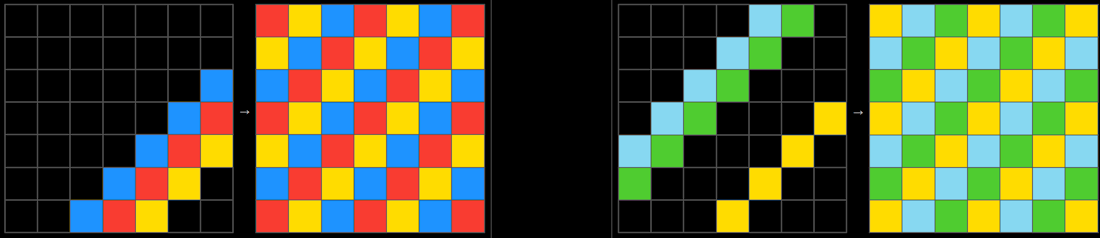\n\n```python\np=lambda g:eval(f'[{\"max(sum(g:=g[1:3]+g,[])[2::3]),\"*7}],'*7)\n```\nIn this task, there is a pattern that repeats with length 3, and we must fill in the missing cells. To do so, we take the maximum element of the flattened grid after slicing by steps of 3, and we mutate the grid so that we can always use the same slice, avoiding any need for loop variables. Because the grid is always 7x7, we can use string multiplication with `eval` to do each cell operation 7 times and each row operation 7 times.\n\n## List comprehensions\n\nThe most common structure of our solutions was to use a list comprehension to transform the grid. The most basic form of the code will look like this:\n```python\np=lambda g:[[F(x)for x in r]for r in g]\n```\nThis operates on single cells only, which is quite limiting. To do more complex operations that require looking beyond a single cell, state variables can be introduced with the walrus `:=` operator. For example, to include the cumulative sum of the row, one can write\n```python\np=lambda g:[(s:=0)or[F(x,s:=s+x)for x in r]for r in g]\n```\nInitializing the state variable could sometimes be done more efficiently using `map` and `lambda`:\n```python\n[(a:=0)or[F(x,a:=...)for x in r)for*r,in zip(*g)]\n#shortens to\n[*map(lambda*r,a=0:[F(x,a:=...)for x in r],*g)]\n```\n\nAnother technique is mutating the list while operating on it. In particular, `list.pop()` was a source of multiple tricks. For example, it could facilitate \"lookahead\" in a list comprehension, such as testing whether a certain color appears later in the row:\n```python\n#Original version, check if there is a gray cell in the row to the right of the current cell\np=lambda g:[[F(x,5in r[i:])for i,x in enumerate(r)]for r in g]\n#Optimized with pop()\np=lambda g:[[F(r.pop(0),5in r)for _ in r*1]for r in g] \n```\n\n`list.pop()` can also implicitly reverse a list when popping from the back instead of front:\n```python\np=lambda g:[[F(r.pop(0))for _ in r*1][::-1]for r in g] \n#shortens to\np=lambda g:[[F(r.pop())for _ in r*1]for r in g] \n```\n\n## Regular expressions\n\nRegular expressions, in particular `re.sub`, are extremely powerful for concisely editing strings. Therefore, it is often shorter to convert the given input matrix into a string, perform the substitution, and convert back to a matrix using `eval`. Our final submission used regex in a total of 46 solutions.\n\nA simple example of regex can be seen for [Task 294](https://arcprize.org/play?task=bb43febb):\n\n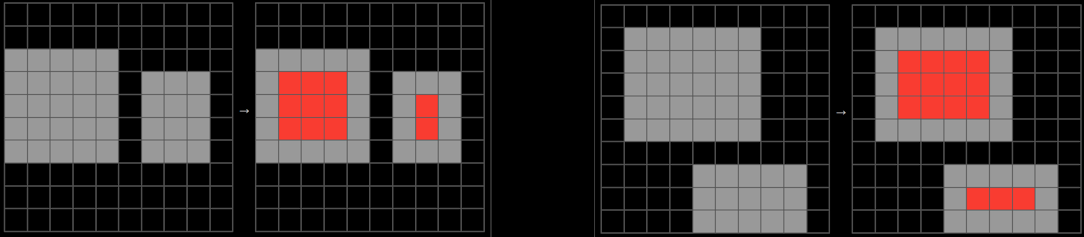\n\n```python\nimport re\np=lambda g:eval(re.sub(\"(?<=5.{34})5(?=.{34}5)\",\"2\",str(g)))\n```\n\nThe above substitution replaces all gray pixels with red if they are in the middle of a diagonal of three gray pixels. Since the grid size is fixed (10x10), we know that diagonally connected pixels are 34 characters apart.\n\nFor more complex drawing tasks, a *rotate-and-replace* strategy was often used:\n\n```python\np=lambda g:[g:=eval(re.sub(\"...\",\"...\",f\"{*zip(*g[::-1]),}\"))for _ in g][3]\n```\nWe employed different variations of this approach (list comprehension, recursion, or loops) depending on the task. \nAn interesting trick we found to save one byte is that f-strings allow unpacking, i.e., `f\"{*zip(*g[::-1]),}\"` vs `str([*zip(*g[::-1])])`.\n\nIn some of the most complex tasks, we utilized multiple substitutions with different expressions. One way of doing so is:\n\n```python\np=lambda g:[g:=eval(re.sub(*s,f\"{*zip(*g[::-1]),}\"))for s in[(\"...\",\"...\")]*16+[(\"...\",\"...\")]*4][-1]\n```\n\nBecause the result after `re.sub` is `eval`ed, the replacement could be any Python expression. This was a source for some interesting tricks. For example, in [task 154](https://arcprize.org/play?task=6855a6e4), we use the replacement `*[\\g<0>][::-1]` to reverse the matched substring.\n\n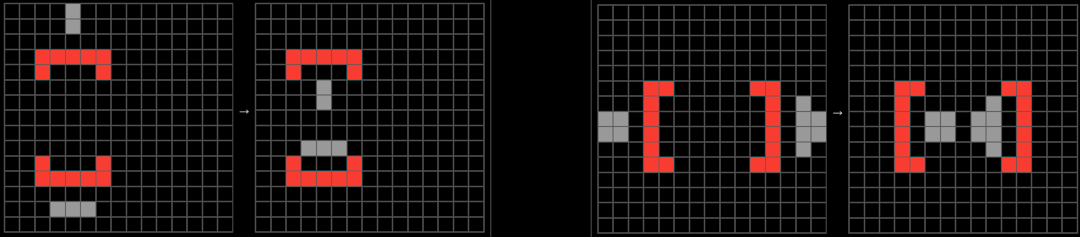\n\n```python\nimport re\np=lambda g,k=0:eval(re.sub(\"[^(2]{9}2\"*2+\"?\",\"*[\\g<0>][::-1]\",f\"{*zip(*k or p(g,g)),}\"))\n```\n\n## \"Dimension\" recursion\n\nA conceptually difficult but very powerful technique is to re-use the function `p` for different shapes of input: a 2d grid (`list[list[int]]`), 1d row (`list[int]`), or 0d cell (`int`). This can lead to significant savings in cases where the 2d operation and 1d operation can use overlapping code. There are several variations, but one template is \n```python\np=lambda g:g*0!=0and[p(r)for r in g]or F(g)\n```\nwhere `F` is the `int -> int` operation. The condition `g*0!=0` checks if the input is a list, and separates the 2d/1d cases from the `int` case. For example, [task 021](https://arcprize.org/play?task=1190e5a7):\n\n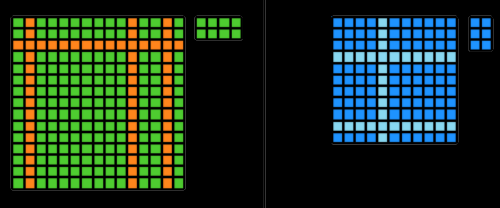\n\n```python\np=lambda g:g*-1*-1or[p(g:=r)for r in g if g!=r][::2]\n```\nIn this task, the row and column operations can use the exact same code: skip identical consecutive elements and downsample by 2. Note that the formula `g*-1*-1` can be used here instead of `g*0!=0` because cells never have value 0 (black) in this task.\n\nThis technique becomes extremely potent when utilizing additional arguments to `p`. For example, [task 040](https://arcprize.org/play?task=2204b7a8):\n\n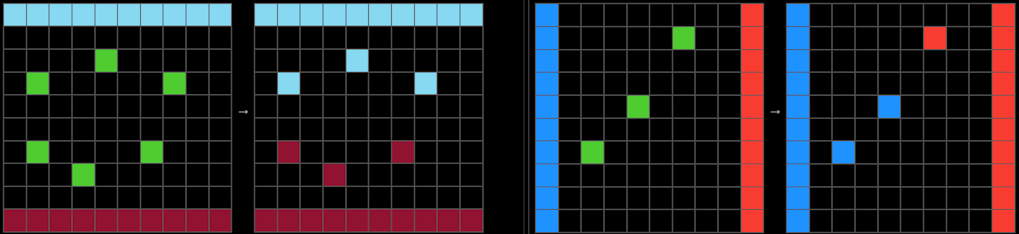\n\n```python\np=lambda g,h=[]:g*0!=0and[*map(p,g[:1]*5+g[9:]*5,h+g)]or h%~h&g\n```\nThe high-level idea behind this solution is to color each cell according to the nearest corner of the grid. The trick is that recursively applying `g[:1]*5+g[9:]*5` will yield the colors of the nearest corners (taking advantage that the grid is always 10x10). At the end of the recursion, `h` will contain the current cell and `g` will contain the nearest corner. Note that `h%~h&g` is a math trick to efficiently express `h and g`. \n\n## Guess-and-check\n\nIn some problems, it is difficult to search for an object, but easy to verify whether an object is correct. As such, it is more efficient to simply keep guessing the object until the correct one is found. One example is [task 124](https://arcprize.org/play?task=53b68214):\n\n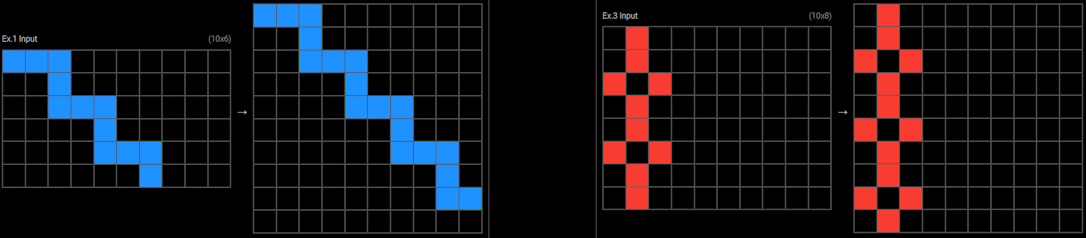\n\n```python\np=lambda g,x=0,y=2:(G:=[(i//y*x*[0]+g[i%y])[:10]for i in range(10)])*(G[:4]I really enjoy reading about your all's way of doing the whole approach in different ways, and yeah, that's fun.
", "rawMarkdown": "I really enjoy reading about your all's way of doing the whole approach in different ways, and yeah, that's fun.", "votes": -2 } ], "complete": true, "source": "live", "fetched_at": "2026-10-19T12:52:08Z", "competition_id": 95282, "competition_slug": "google-code-golf-2025", "team_id": 14196298, "solution_url": "/competitions/google-code-golf-2025/writeups/cgi" }